스트림 시작 1
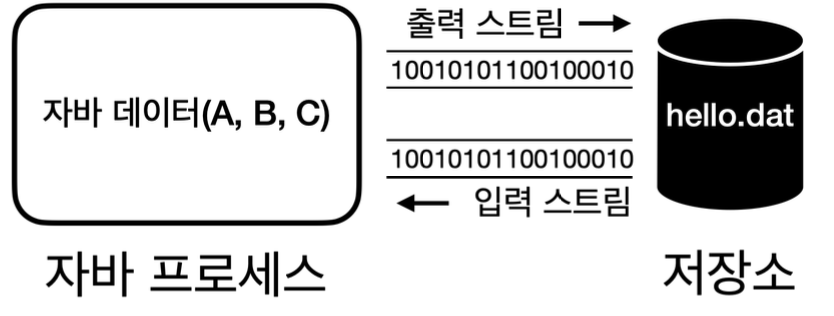
데이터를 밖으로 보내려면 출력 스트림 사용, 외부 데이터를 자바 프로세스 안으로 가져오려면 입력 스트림
각 스트림의 경우 단방향
예제 1
package chap52.io.start;

import java.io.FileInputStream;
import java.io.FileOutputStream;
import java.io.IOException;

public class StreamStartMain1 {
    public static void main(String[] args) throws IOException {
        //파일에 데이터를 출력하는 스트림, 파일이 없으면 자동으로 생성, 데이터를 만들어 해당 파일에 저장
        //append true -> 이어서 적는다
        FileOutputStream fileOutputStream = new FileOutputStream("temp/hello.dat");
        //ASCII code -> decoding
        fileOutputStream.write(65);
        fileOutputStream.write(66);
        fileOutputStream.write(67);
        fileOutputStream.close();

        //파일에서 데이터를 읽어오는 스트림
        FileInputStream fileInputStream = new FileInputStream("temp/hello.dat");
        //ASCII code -> incoding
        System.out.println(fileInputStream.read());
        System.out.println(fileInputStream.read());
        System.out.println(fileInputStream.read());
        System.out.println(fileInputStream.read()); // 더이상 반환 할 값이 없다면 -1
        fileInputStream.close();
    }
}
new FileOutputStream("temp/hello.dat");
- 파일에 데이터를 출력
- 파일이 없으면 파일을 자동으로 형성, 데이터를 해당 파일 저장
- 폴더 형성 X, 미리 폴더 형성
new FileInputStream("temp/hello.dat")
- 파일 데이터를 읽어오는 스트림
append opiton
true : 기존 파일의 끝에 이어 사용
false : 기존 파일의 데이터를 지우고 처음부터 다시 사용
예제 2
package chap52.io.start;

import java.io.FileInputStream;
import java.io.FileOutputStream;
import java.io.IOException;

public class StreamStartMain2 {
    public static void main(String[] args) throws IOException {
        //파일에 데이터를 출력하는 스트림, 파일이 없으면 자동으로 생성, 데이터를 만들어 해당 파일에 저장
        FileOutputStream fileOutputStream = new FileOutputStream("temp/hello.dat");
        //ASCII code -> decoding
        fileOutputStream.write(65);
        fileOutputStream.write(66);
        fileOutputStream.write(67);
        fileOutputStream.close();

        //파일에서 데이터를 읽어오는 스트림
        FileInputStream fileInputStream = new FileInputStream("temp/hello.dat");
        int data;
        while ((data = fileInputStream.read()) != -1) {
            System.out.println(data);
        }
        fileInputStream.close();
    }
}
read 메서드는 파일의 끝에 도달 => -1 반환
read가 int를 반환
-
부호 없는 바이트 표현
byte는 부호 있는 8비트 값 (-128 ~ 127)
int로 반환, 0 ~ 255 모든 가능한 바이트 값을 부호 없이 표현 가능 -
EOF
byte를 표현하려면 256 종류의 값을 모두 사용
int는 0 ~ 255까지 모든 가능한 바이트 값을 표현 추가로 -1을 반환, EOF를 나타낼 수 있음
스트림 시작 2
예제 3
package chap52.io.start;

import java.io.FileInputStream;
import java.io.FileOutputStream;
import java.io.IOException;
import java.util.Arrays;

public class StreamStartMain3 {
    public static void main(String[] args) throws IOException {
        //파일에 데이터를 출력하는 스트림, 파일이 없으면 자동으로 생성, 데이터를 만들어 해당 파일에 저장
        FileOutputStream fileOutputStream = new FileOutputStream("temp/hello.dat");
        byte[] input = {65, 66, 67};
        fileOutputStream.write(input);
        fileOutputStream.close();

        //파일에서 데이터를 읽어오는 스트림
        FileInputStream fileInputStream = new FileInputStream("temp/hello.dat");
        byte[] buffer = new byte[10];
        int readCount = fileInputStream.read(buffer, 0, 10); //offset : index 시작 위치
        System.out.println("readCount = " + readCount); //3
        System.out.println(Arrays.toString(buffer));
        fileInputStream.close();
    }
}
출력 스트림
write(byte[]) : byte에 원하는 데이터를 담고, write에 전달, 해당 데이터를 한번에 출력 가능
입력 스트림
read(byte[], offset, length) : byte을 미리 형성, 한번에 데이터를 읽어올 수 있음
byte[] : data가 읽혀지는 버퍼
offset : 데이터 기록되는 byte[]의 인덱스 시작 위치
length : 읽어올 byte 최대 길이
예제 4
package chap52.io.start;

import java.io.FileInputStream;
import java.io.FileOutputStream;
import java.io.IOException;
import java.util.Arrays;

public class StreamStartMain4 {
    public static void main(String[] args) throws IOException {
        //파일에 데이터를 출력하는 스트림, 파일이 없으면 자동으로 생성, 데이터를 만들어 해당 파일에 저장
        FileOutputStream fileOutputStream = new FileOutputStream("temp/hello.dat");
        byte[] input = {65, 66, 67};
        fileOutputStream.write(input);
        fileOutputStream.close();

        //파일에서 데이터를 읽어오는 스트림
        FileInputStream fileInputStream = new FileInputStream("temp/hello.dat");
        byte[] readBytes = fileInputStream.readAllBytes();
        System.out.println(Arrays.toString(readBytes));
        fileInputStream.close();

    }
}
부분으로 나눠 읽기 vs 전체 읽기
-
read(byte[], offset, lentgh)
스트림 내용을 부분적으로 읽거나, 읽은 내용을 처리, 스트림을 계속 읽어 드려야 할 경우 적합
메모리 사용량 제어
대용량의 경우 한번에 처리하려고 하다보면, 메모리 초과 error 발생 가능 따라서 나눠서 처리 -
readAllBytes()
한번의 호출로 모든 데이터 읽을 수 있어 편리
작은 파일이나 메모리에 모든 내용을 올려서 처리, 적합
메모리 사용량 제어 X
InputStream, OutputStream
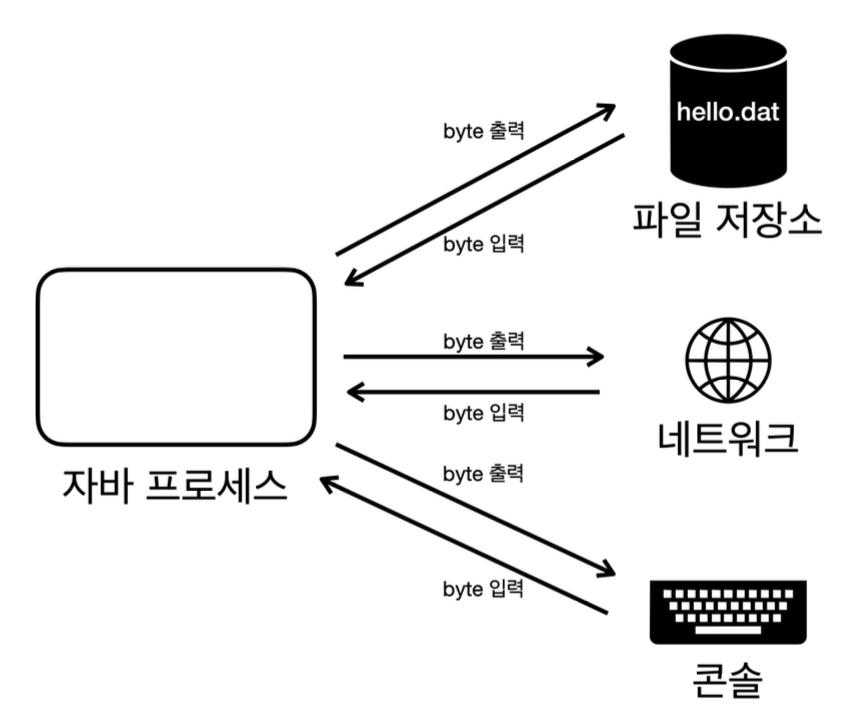
데이터를 주고 받는 것은 Input/Output. 위의 기능을 활용하기 위해 InputStream, OutputStream 기본 추상 클래스 제공
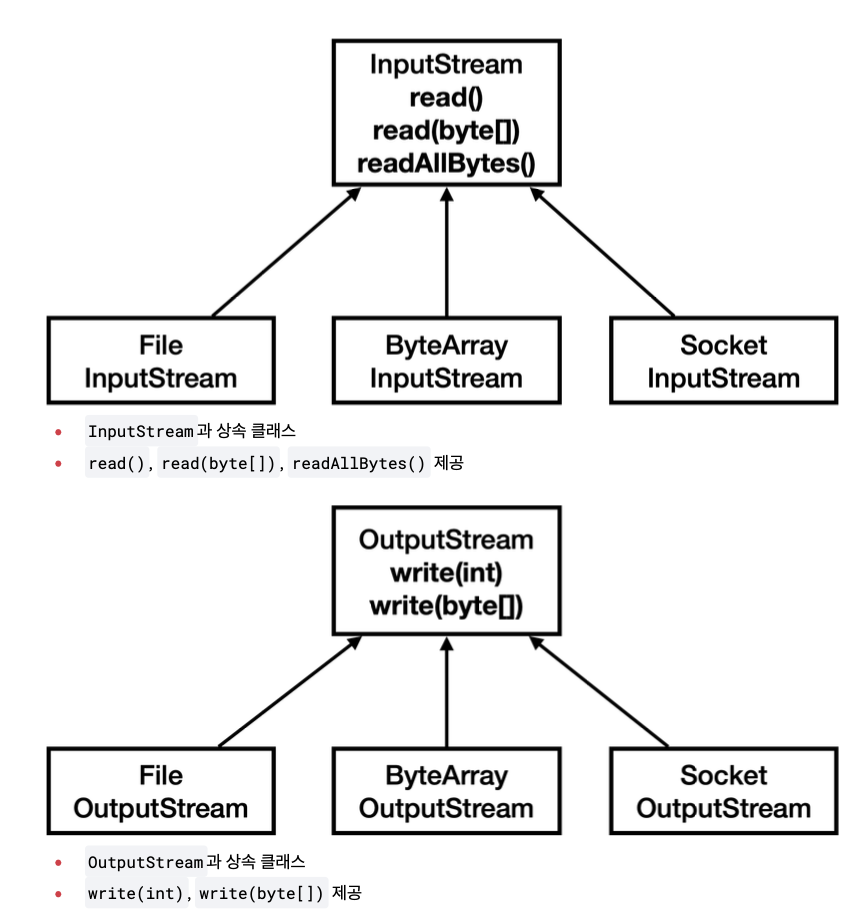
메모리 스트림
package chap52.io.start;

import java.io.ByteArrayInputStream;
import java.io.ByteArrayOutputStream;
import java.io.IOException;
import java.util.Arrays;

public class ByteArrayStreamMain {
    public static void main(String[] args) throws IOException {
        byte[] input = {1, 2, 3};
        ByteArrayOutputStream outputStream = new ByteArrayOutputStream();
        outputStream.write(input);

        ByteArrayInputStream inputStream = new ByteArrayInputStream(outputStream.toByteArray());
        byte[] bytes = inputStream.readAllBytes();
        System.out.println("bytes = " + Arrays.toString(bytes));
    }
}
콘솔 스트림
package chap52.io.start;

import java.io.IOException;
import java.io.PrintStream;
import java.nio.charset.StandardCharsets;

public class PrintStreamMain {
    public static void main(String[] args) throws IOException {
        PrintStream printStream = System.out;

        byte[] bytes = "Hello!\n".getBytes(StandardCharsets.UTF_8);
        printStream.write(bytes);
        printStream.println("Print!"); //println(String) -> 자체적 제공 code
    }
}- write(byte[]) : OutputStream 부모 클래스가 제공하는 기능
- println(String) : PrintStream이 자체적 제공하는 추가 기능
추상화의 장점을 극대화
- 일관성 : 모든 종류의 입출력 작업에 대해 동일한 인터페이스 활용.
- 유연성 : 실제 데이터 소스나 목적지가 무엇인지에 관계 없이 동일한 방식으로 코드 작성
- 확장성 : 새로운 유형의 입출력 스트림을 쉽게 추가
- 재사용성 : 다양한 스트림 클래스들의 조합
- 예외처리 : 표준화된 예외 처리 메커니즘을 통해 일정한 방식으로 오류 처리 가능
파일 입출력과 성능 최적화 (하나씩 쓰기)
package chap52.io.buffered;

public class BufferedConst {
    public static final String FILE_NAME = "temp/buffered.dat";
    public static final int FILE_SIZE = 10 * 1024 * 1024; // 10MB
    public static final int BUFFER_SIZE = 8192; // 8KB
}
예제 - 쓰기
package chap52.io.buffered;

import java.io.FileOutputStream;
import java.io.IOException;

import static chap52.io.buffered.BufferedConst.FILE_NAME;
import static chap52.io.buffered.BufferedConst.FILE_SIZE;

public class CreateFileV1 {
    public static void main(String[] args) throws IOException {
        FileOutputStream fos = new FileOutputStream(FILE_NAME);
        long startTime = System.currentTimeMillis();

        for (int i = 0; i < FILE_SIZE; i++) {
            fos.write(1); // 한번 호출애 1byte 형성, 1000만번 호출 -> 10MB 파일 형성
        }
        fos.close();

        long endTime = System.currentTimeMillis();
        System.out.println("FILE_NAME = " + FILE_NAME);
        System.out.println("FILE_SIZE = " + FILE_SIZE / 1024 / 1024 + "MB");
        System.out.println("TOTAL TIME = " + (endTime - startTime) + "ms");
    }
}
예제 - 읽기
package chap52.io.buffered;

import java.io.FileInputStream;
import java.io.IOException;

import static chap52.io.buffered.BufferedConst.FILE_NAME;

public class ReadFileV1 {
    public static void main(String[] args) throws IOException {
        FileInputStream fis = new FileInputStream(FILE_NAME);
        long startTime = System.currentTimeMillis();
        int fileSize = 0;
        int data;
        while ((data = fis.read()) != -1) {
            fileSize++;
        }
        fis.close();

        long endTime = System.currentTimeMillis();
        System.out.println("FILE_NAME = " + FILE_NAME);
        System.out.println("FILE_SIZE = " + (fileSize / 1024 / 1024) + "MB");
        System.out.println("TOTAL TIME = " + (endTime - startTime) + "ms");
    }
}
시간이 매우 오래 걸림
write, read를 호출할때 OS의 system Call을 통해 파일을 읽거나 쓰는 명령어.
HDD를 직접 사용하면 더욱 느린데, 물리적 디스크 회전을 사용
파일 입출력과 성능 최적화2 - 버퍼 활용
예제 - 쓰기
package chap52.io.buffered;

import java.io.FileOutputStream;
import java.io.IOException;

import static chap52.io.buffered.BufferedConst.*;

public class CreateFileV2 {
    public static void main(String[] args) throws IOException {
        FileOutputStream fos = new FileOutputStream(FILE_NAME);
        long startTime = System.currentTimeMillis();

        byte[] buffer = new byte[BUFFER_SIZE];
        int bufferIdx = 0;

        for (int i = 0; i < FILE_SIZE; i++) {
            //buffer에다가 값을 1씩 채운다.
            buffer[bufferIdx++] = 1;

            //버퍼가 가득 차면 쓰고, 버퍼를 비움
            //size 만큼 모았다가 -> 한번에 스트림 처리
            if (bufferIdx == BUFFER_SIZE) {
                fos.write(buffer);
                bufferIdx = 0;
            }
        }

        //끝에 오다보면 버퍼가 가득 차지 않고, 남아 있을 수 있음. 남은 부분 끝까지 사용
        if (bufferIdx > 0) {
            fos.write(buffer, 0, bufferIdx);
        }

        fos.close();

        long endTime = System.currentTimeMillis();
        System.out.println("FILE_NAME = " + FILE_NAME);
        System.out.println("FILE_SIZE = " + FILE_SIZE / 1024 / 1024 + "MB");
        System.out.println("TOTAL TIME = " + (endTime - startTime) + "ms");
    }
}
데이터를 buffer라는 byte에 담아준다.
데이터를 보아서 전달하거나 모아서 전달받는 용도로 사용하는 것을 버퍼
BUFFER_SIZE 만큼 데이터를 모아서 write를 호출
버퍼 크기에 따른 쓰기 성능
버퍼의 크기가 무작정 크다고 해서 성능이 개선 된는 것은 아님
왜냐면 디스크나 파일 시스템에서 데이터를 읽고 쓰는 기본 단위가 보통 4KB or 8KB
예제 - 읽기
package chap52.io.buffered;

import java.io.FileInputStream;
import java.io.IOException;

import static chap52.io.buffered.BufferedConst.BUFFER_SIZE;
import static chap52.io.buffered.BufferedConst.FILE_NAME;

public class ReadFileV2 {
    public static void main(String[] args) throws IOException {
        FileInputStream fis = new FileInputStream(FILE_NAME);
        long startTime = System.currentTimeMillis();

        byte[] buffer = new byte[BUFFER_SIZE];
        int fileSize = 0;
        int size;
        while ((size = fis.read()) != -1) {
            fileSize += size;
        }
        fis.close();

        long endTime = System.currentTimeMillis();
        System.out.println("FILE_NAME = " + FILE_NAME);
        System.out.println("FILE_SIZE = " + (fileSize / 1024 / 1024) + "MB");
        System.out.println("TOTAL TIME = " + (endTime - startTime) + "ms");
    }
}
파일 입출력과 성능 최적화 3 - Buffered stream 쓰기
package chap52.io.buffered;

import java.io.BufferedOutputStream;
import java.io.FileOutputStream;
import java.io.IOException;

import static chap52.io.buffered.BufferedConst.*;

public class CreateFileV3 {
    public static void main(String[] args) throws IOException {
        FileOutputStream fos = new FileOutputStream(FILE_NAME);
        BufferedOutputStream bos = new BufferedOutputStream(fos, BUFFER_SIZE); //내부에 buffer 기능이 있음
        long start = System.currentTimeMillis();

        for (int i = 0; i < FILE_SIZE; i++) {
            bos.write(1);
        }
        bos.close();

        long end = System.currentTimeMillis();
        System.out.println("FILE_NAME = " + FILE_NAME);
        System.out.println("FILE_SIZE = " + (FILE_SIZE / 1024 / 1024) + "MB");
        System.out.println("TOTAL TIME = " + (end - start) + "ms");
    }
}
내부에서 단순 버퍼 기능만 제공, OutputStream이 있어야 함
FileOutputStream 객체를 생성자에 전달
버퍼가 가득 찰 때까지 대기 했다가 -> 가득 차면, 그때 내보낸다.
그리고 stream에 연관된 close를 할 경우 flush가 된 후 close를 한다.
하지만 직접 파일을 close 할경우, flush 안됨
파일 입출력과 성능 최적화4 - Buffered 스트림 읽기
package chap52.io.buffered;

import java.io.BufferedInputStream;
import java.io.FileInputStream;
import java.io.IOException;

import static chap52.io.buffered.BufferedConst.BUFFER_SIZE;
import static chap52.io.buffered.BufferedConst.FILE_NAME;

public class ReadFileV3 {
    public static void main(String[] args) throws IOException {
        FileInputStream fis = new FileInputStream(FILE_NAME);
        BufferedInputStream bis = new BufferedInputStream(fis, BUFFER_SIZE);

        long startTime = System.currentTimeMillis();
        int fileSize = 0;
        int data;
        while ((data = bis.read()) != -1) {
            fileSize++;
        }
        bis.close();

        long endTime = System.currentTimeMillis();
        System.out.println("FILE_NAME = " + FILE_NAME);
        System.out.println("FILE_SIZE = " + (fileSize / 1024 / 1024) + "MB");
        System.out.println("TOTAL TIME = " + (endTime - startTime) + "ms");
    }
}
read의 경우 1byte만 조회
데이터가 buffer에 없으므로, 데이터를 불러옴
이런 방식을 반복
버퍼를 직접 다루는 것 보다 BufferedXxx의 성능이 떨어지는 이유
BufferedXxx라는 클래스가 대신 버퍼를 처리, 버퍼를 사용하는 것은 같기 때문에 성능차이가 없어야 하지만, 차이가 있다. 왜 그럴까??
안에 API 문서를 들어가보면
   @Override
    public synchronized void write(int b) throws IOException {
        if (count >= buf.length) {
            flushBuffer();
        }
        buf[count++] = (byte)b;
    }
동기화가 걸려있음. lock을 반납하고 다시 회수하고 하는 부분에 대해 성능의 차이가 있을 수 있다.
만약에 싱글스레드를 사용한다면, 버퍼를 직접 다루는게 성능에는 좋고, 멀티 스레드 환경에서 사용한다면, BufferedXxx를 사용하는 것을 추천
파일 입출력과 성능 최적화5 - 한번에 쓰기
package chap52.io.buffered;

import java.io.FileOutputStream;
import java.io.IOException;

import static chap52.io.buffered.BufferedConst.*;

public class CreateFileV4 {
    public static void main(String[] args) throws IOException {
        FileOutputStream fos = new FileOutputStream(FILE_NAME);
        long start = System.currentTimeMillis();

        byte[] buffer = new byte[FILE_SIZE];
        for (int i = 0; i < FILE_SIZE; i++) {
            buffer[i] = 1;
        }
        fos.write(buffer);
        fos.close();

        long end = System.currentTimeMillis();
        System.out.println("FILE_NAME = " + FILE_NAME);
        System.out.println("FILE_SIZE = " + (FILE_SIZE / 1024 / 1024) + "MB");
        System.out.println("TOTAL TIME = " + (end - start) + "ms");
    }
}
파일 입출력과 성능 최적화5 - 한번에 읽기
package chap52.io.buffered;

import java.io.FileInputStream;
import java.io.IOException;

import static chap52.io.buffered.BufferedConst.BUFFER_SIZE;
import static chap52.io.buffered.BufferedConst.FILE_NAME;

public class ReadFileV4 {
    public static void main(String[] args) throws IOException {
        FileInputStream fis = new FileInputStream(FILE_NAME);
        long startTime = System.currentTimeMillis();

        byte[] buffer = fis.readAllBytes();
        fis.close();

        long endTime = System.currentTimeMillis();
        System.out.println("FILE_NAME = " + FILE_NAME);
        System.out.println("FILE_SIZE = " + (buffer.length / 1024 / 1024) + "MB");
        System.out.println("TOTAL TIME = " + (endTime - startTime) + "ms");
    }
}