예외처리가 필요한 이유
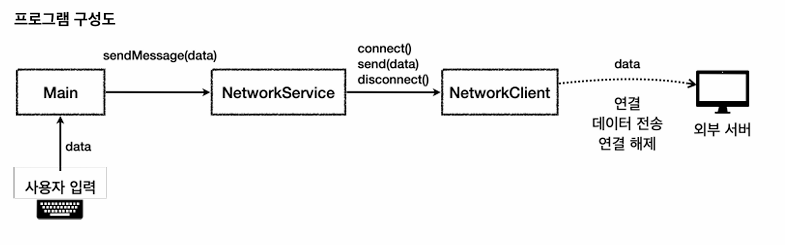
NetworkClient : 외부 서버와 연결하고, 데이터를 전송하고, 연결을 종료하는 기능
NetworkService : NetworkClient를 사용해서 데이터를 전송
NetworkClient를 사용하려면 연결, 전송, 연결 종료와 같은 복잡한 흐름 제어
전체 흐름 : Main을 통해 사용자의 입력을 받으면 사용자의 입력을 NetworkService에 전달. NetworkServices는 NetworkClient를 사용해서 외부 서업에 연결, 종료
NetworkClient 사용법
- connect() 를 먼저 호출해서 서버와 연결한다.
- send(data) 로 연결된 서버에 메시지를 전송한다.
- disconnect() 로 연결을 해제한다.
-> connect 실패 -> send 호출 X
-> 사용 후 disconnect 호출해서 연결 해제
NetworkServiceV0
public class NetworkClientV0 {
    private final String address;

    public NetworkClientV0(String address) {
        this.address = address;
    }

    public String connect(){
        System.out.println(address + " 연결 성공");
        return "success";
    }

    public String send(String data){
        System.out.println(address + " 서버에 데이터 성공 "  + data);
        return "success";
    }

    public void disconnect(){
        System.out.println(address + " 서버 연결 해제 ");
    }
}
public class NetworkServiceV0 {

    public void sendMessage(String data){
        String address = "http://ex.com";
        NetworkClientV0 client = new NetworkClientV0(address);

        client.connect();
        client.send(data);
        client.disconnect();
    }
}
public class MainV0 {
    public static void main(String[] args) {
        NetworkServiceV0 serviceV0 = new NetworkServiceV0();

        Scanner sc = new Scanner(System.in);
        while (true){
            System.out.println("전송할 문자 : ");
            String input = sc.nextLine();

            if (input.equals("exit")) {
                break;
            }
            serviceV0.sendMessage(input);
            System.out.println();
        }
        System.out.println("프로그램을 정상 종료 합니다");
    }
}
예외 처리가 필요한 이유 2 - 오류 만들기
public class NetworkClientV1 {
    private final String address;
    public boolean connectError;
    private boolean sendError;

    public NetworkClientV1(String address) {
        this.address = address;
    }

    public String connect(){
        if (connectError){
            System.out.println(address + " 연결 실패");
            return "connectError";
        }
        System.out.println(address + " 서버 연결 성공");
        return "success";
    }

    public String send(String str){
        if (sendError){
            System.out.println(address + " 서버에 데이터 전송 실패 "  + str);
            return "sendError";
        }

        System.out.println(address + " 서버에 데이터 전송 " + str);
        return "success";
    }

    public void disconnect(){
        System.out.println(address + " 서버 연결 해제");
    }

    public void initError(String data){
        if (data.contains("error1")){
            connectError = true;
        }

        if (data.contains("error2")){
            sendError = true;
        }
    }
}
connectError : 이 필드의 값이 true 가 되면 연결에 실패하고, connectError 오류 코드를 반환한다.
sendError : 이 필드의 값이 true 가 되면 데이터 전송에 실패한다. sendError 오류 코드를 반환한다.
문제가 없으면 success 코드를 반환한다.
public class NetworkServiceV1 {

    public void sendMessage(String data){
        String address = "http://ex.com";
        NetworkClientV1 client = new NetworkClientV1(address);
        client.initError(data);

        client.connect();
        client.send(data);
        client.disconnect();
    }
}
public class MainV1 {
    public static void main(String[] args) {
        NetworkServiceV1 serviceV0 = new NetworkServiceV1();

        Scanner sc = new Scanner(System.in);
        while (true){
            System.out.println("전송할 문자 : ");
            String input = sc.nextLine();

            if (input.equals("exit")) {
                break;
            }
            serviceV0.sendMessage(input);
            System.out.println();
        }
        System.out.println("프로그램을 정상 종료 합니다");
    }
}
예외 처리가 필요한 이유 - 반환 값으로 예외처리
public class NetworkServiceV1_2 {

    public void sendMessage(String data){
        String address = "http://ex.com";
        NetworkClientV1 client = new NetworkClientV1(address);
        client.initError(data);

        String connectRst = client.connect();
        if (isError(connectRst)) {
            System.out.println("[네트워크 오류 발생] 오류 코드 " + connectRst);
            return;
        }

        String sendRst = client.send(data);
        if (isError(sendRst)){
            System.out.println("[네트워크 오류 발생] 오류 코드 " + sendRst);
            return;
        }

        client.disconnect();
    }

    public static boolean isError(String rstCode){
        return !rstCode.equals("success");
    }
}
public class MainV1_2 {
    public static void main(String[] args) {
        NetworkServiceV1_2 serviceV1_2 = new NetworkServiceV1_2();

        Scanner sc = new Scanner(System.in);
        while (true){
            System.out.println("전송할 문자 : ");
            String input = sc.nextLine();

            if (input.equals("exit")) {
                break;
            }
            serviceV1_2.sendMessage(input);
            System.out.println();
        }
        System.out.println("프로그램을 정상 종료 합니다");
    }
}
connect() 가 실패한 경우 send() 를 호출하면 안되는 부분은 해결되었다. 하지만 사용 후에는 disconnect()를 반드시 호출해야 하는 문제는 해결되지 않았다. error2 를 보면 데이터 전송에 실패하는 경우, 연결이 해제 되지 않는다. 계속 이렇게 두면 네트워크 연결 자원이 고갈될 수 있다.
public class NetworkServiceV1_3 {

    public void sendMessage(String data) {
        String address = "http://ex.com";
        NetworkClientV1 client = new NetworkClientV1(address);
        client.initError(data);

        String connectRst = client.connect();
        if (isError(connectRst)) {
            System.out.println("[네트워크 오류 발생] 오류 코드 " + connectRst);
        } else {
            String sendRst = client.send(data);
            if (isError(sendRst)) {
                System.out.println("[네트워크 오류 발생] 오류 코드 " + sendRst);
            }
        }
        client.disconnect();
    }

    private static boolean isError(String rstCode) {
        return !rstCode.equals("success");
    }
}
프로그램에서 return문을 제거, if문으로 적절한 분기를 사용
connect() 에 성공해서 오류가 없는 경우에만 send() 를 호출한다.
중간에 return 하지 않으므로 마지막에 있는 disconnect() 를 호출할 수 있다.
- 연결에 실패해도 disconnect() 를 호출한다.
- 데이터 전송에 실패해도 disconnect() 를 호출한다.
public class MainV1_3 {
    public static void main(String[] args) {
        NetworkServiceV1_3 serviceV1_2 = new NetworkServiceV1_3();

        Scanner sc = new Scanner(System.in);
        while (true){
            System.out.println("전송할 문자 : ");
            String input = sc.nextLine();

            if (input.equals("exit")) {
                break;
            }
            serviceV1_2.sendMessage(input);
            System.out.println();
        }
        System.out.println("프로그램을 정상 종료 합니다");
    }
}
자바 예외 처리1 - 예외계층
예외(Exception)을 처리하기 위한 메커니즘을 자바에서 제공
자바의 예외 처리는 다음 키워드를 사용한다.
try , catch , finally , throw , throws
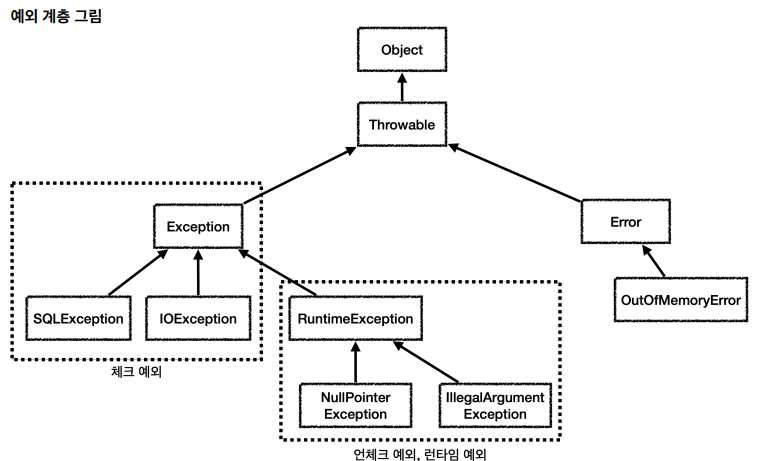
Object: 자바에서 기본형을 제외한 모든 것은 객체, 객체의 최상위 부모
Throwable : 최상위 예외, 하위에 Exception, Error
Error : 메모리 부족이나 심각한 시스템 오류와 같이 애플이케이션에서 복구가 불가능한 시스탬 예외
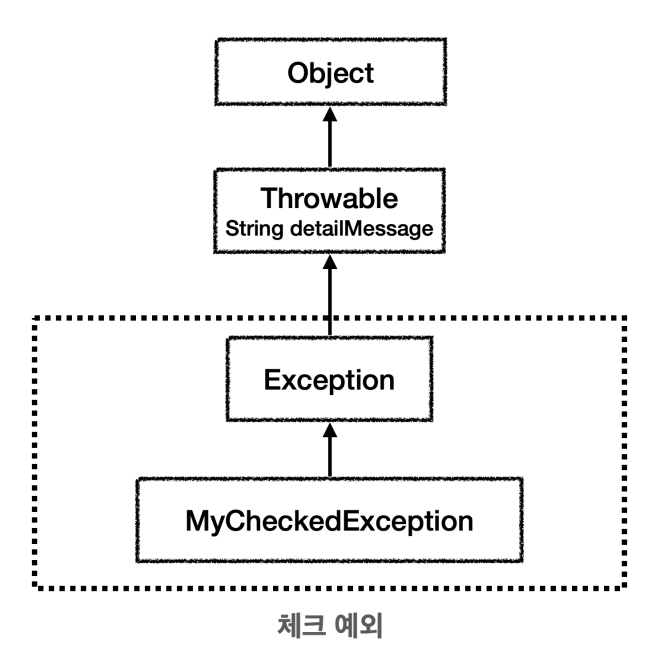
Exception : 체크 예외
- 애플리케이션 로직에서 사용할 수 있는 실질적인 최상위 예외
- Exception과 그 하위 예외는 모든 컴파일러가 체크하는 체크 예외, 단 RuntimeException은 예외
RuntimeException : 언체크 예외
컴파일러가 체크하지 않는 언체크 예외
체크 예외 vs 언체크 예외
체크예외는 발생한 예외를 개발자가 명시적 처리 -> 처리 안하면, 컴파일오류
언체크 예외 -> 명시적 처리 X
주의
상속 관계에서 부모 타입은 자식을 담을 수 있다. 이 개념이 예외 처리에도 적용되는데, 상위 예외를 catch 로 잡으면그 하위 예외까지 함께 잡는다. 따라서 애플리케이션 로직에서는 Throwable 예외를 잡으면 안되는데, 앞서 이야기한 잡으면 안되는 Error 예외도 함께 잡을 수 있기 때문이다. 애플리케이션 로직은 이런 이유로 Exception 부터 필요한 예외로 생각하고 잡으면 된다.
자바 예외 처리2 - 예외 기본 규칙
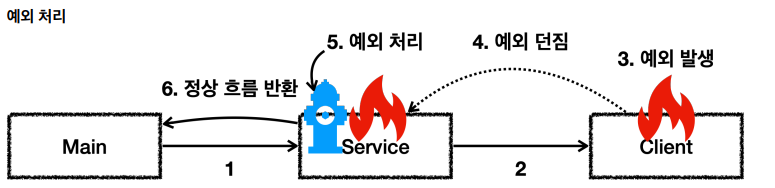
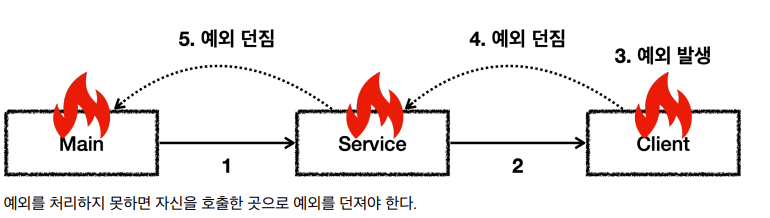
예외에 대해서는 2가지 기본 규칙
예외를 잡아서 처리, 밖으로 던지면 됨
예외를 잡거나 던질 때 지정한 예외 뿐만 아니라, 자식들도 함께 처리
- Exception을 Catch로 잡으면 하위 예외들도 모두 잡을 수 있다.
- Exception throws로 던지면 하위 예외들도 모두 던질 수 있다.
자바 예외 처리 - 체크 예외
/**
- exception을 상속 받은 예외는 check 예외가 된다
*/
public class MyCheckedException extends Exception{
public MyCheckedException (String message){
super(message);
}
}
Exception 을 상속받은 예외는 체크 예외가 된다
public class Client {
public void call() throws MyCheckedException {
throw new MyCheckedException("ex");
}
}
throw 예외라고 하면 새로운 예외를 발생, 예외도 객체이기, 객체를 먼저 new 생성하고 예외를 발생
throws 예외는 발생시킨 예외를 메서드 밖으로 던질 때는 사용하는 키워드
throw, throws 차이에 주의
public class Service {
Client client = new Client();
/**
 * 예외를 잡아서 처리 -> 정상 흐름으로 돌아감
 */

public void callCatch(){
    try {
        client.call();
    } catch (MyCheckedException e) {
        System.out.println("예외 처리, message : " + e.getMessage());
    }
    System.out.println("정상 흐름");
}

/**
 * @throws MyCheckedException
 * 체크 예외를 밖으로 던지는 코드
 * 체크 예외는 예외를 잡지 않고 밖으로 던지면, throws 예외를 메서드에 필수로 선언
 * 예외 처리를 못하겠다.
 */
public void callThrow() throws MyCheckedException {
    client.call();
}
}
MyCheckedException은 Exception을 상속, Exception을 상속받으면 체크 예외
RuntimeException 을 상속받으면 언체크 예외가 된다. 이런 규칙은 자바 언어에서 문법으로 정한 것이다.
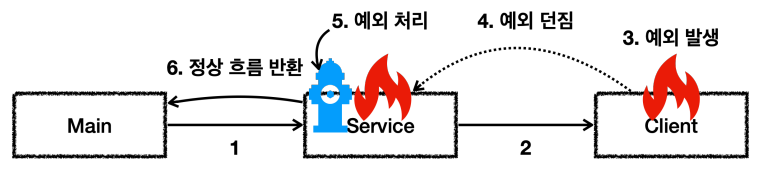
예외를 잡아서 처리
public class CheckedCatchMain {
public static void main(String[] args) {
Service service = new Service();
service.callCatch();
System.out.println("정상 종료");
}
}
service.callCatch() 에서 예외를 처리했기 때문에 main() 메서드까지 예외가 올라오지 않는다
main() service.callCatch() client.call() [예외 발생, 던짐]
2. main() service.callCatch() [예외 처리] client.call()
3. main() [정상 흐름] service.callCatch() client.call()
Service.callCatch에서 잡는 것 확인 가능 try {
client.call();
} catch (MyCheckedException e) {
//예외 처리 로직
System.out.println("예외 처리, message=" + e.getMessage());
}
System.out.println("정상 흐름");
}
catch는 해당 타입과 그 하위 타입을 모두 잡을 수 있다catch 에 MyCheckedException 의 상위 타입인 Exception 을 적어주어도 MyCheckedException 을 잡을 수 있다.
cathc에 예외를 지정하면 해당 예외와 그 하위 타입 예외를 모두 잡아준다.
물론 정확하게 MyCheckedException 만 잡고 싶다면 catch에 MyCheckedException 을 적어주어야 한다. 예외도 객체이기 때문에 다형성이 적용된다
public class CheckedThrowMain {
public static void main(String[] args) throws MyCheckedException {
Service service = new Service();
service.callThrow();
System.out.println("장상 종료");
}
}
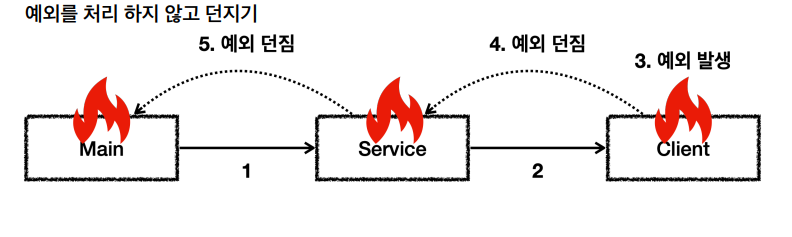
Service.callThrow() 안에서 예외를 처리하지 않고, 밖으로 던졌기 때문에 예외가 main() 메서드까지 올라온다. main() 에 있는 service.callThrow() 메서드 다음에 있는 "정상종료"가 출력되지 않는다
main() service.callThrow() client.call() [예외 발생, 던짐]
2. main() service.callThrow() [예외 던짐] client.call()
3. main() [예외 던짐] service.callThrow() client.call()
체크 예외를 처리 할 수 없을때는 throws 키워드를 사용해서 method thorws 예외와 같이 밖으로 던질 예외를 필수로 지정.

throws 를 지정하지 않으면 컴파일 오류가 발생한다.
java: unreported exception exception.basic.checked.MyCheckedException;must be caught or declared to be thrown

client.call() 을 보면 throws MyCheckedException 가 선언되어 있다. 따라서
client.call() 을 호출하는 쪽에서 예외를 잡아서 처리하든, 던지든 선택해야 한다. 참고로 MyCheckedException 는 체크 예외이다.

체크 예외를 밖으로 던지는 경우에도 해당 타입과 하위 타입 던질 수 있다.

## 자바 예외 처리 4 - 언체크 예외
RuntimeException 과 그 하위 예외는 언체크 예외로 분류된다.
언체크 예외는 말 그대로 컴파일러가 예외를 체크하지 않는다는 뜻이다.
언체크 예외는 체크 예외와 기본적으로 동일하다. 차이가 있다면 예외를 던지는 throws 를 선언하지 않고, 생략 할 수 있다. 생략한 경우 자동으로 예외를 던진다.

체크 예외: 예외를 잡아서 처리하지 않으면 항상 throws 키워드를 사용해서 던지는 예외를 선언해야 한다.

언체크 예외: 예외를 잡아서 처리하지 않아도 throws 키워드를 생략할 수 있다.
/**
- RuntimeException을 상속받은 예외는 언체크 예외가 필요
*/
public class MyUncheckedException extends RuntimeException{
public MyUncheckedException(String message){
super(message);
}
}
public class Client {
public void call(){
throw new MyUncheckedException("ex");
}
}
/**
-
Unchecked 예외는
-
예외를 잡거나, 던지지 않아도 된다.
-
예외를 집지 않으면 자동으로 밖으로 던진다.
*/
public class Service {
Client client = new Client();/** * 필요한 경우 예외를 잡아서 처리 */ public void callCatch(){ try { client.call(); } catch (MyUncheckedException e){ System.out.println("예외 처리 message " + e.getMessage()); } System.out.println("정상 로직"); } /** * 예외를 잡지 않아도 된다. 자연습럽게 상위로 넘어간다. * 체크 예외와 다르게 throws 예외 선언을 하지 않아도 된다. */ public void callThrow(){ client.call(); }}
public class CheckedCatchMain {
public static void main(String[] args) {
Service service = new Service();
service.callCatch();
System.out.println("정상 종료");
}
}
언체크 예외도 필요한 경우 예외를 잡아서 처리 / 예외를 밖으로 던질 수도 있음