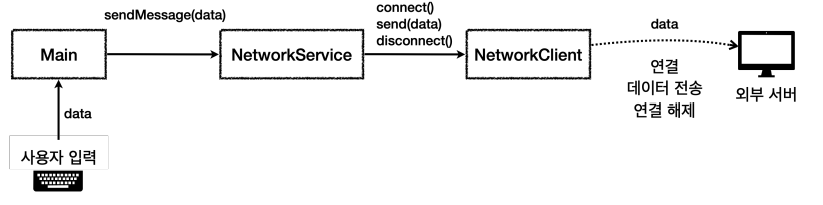
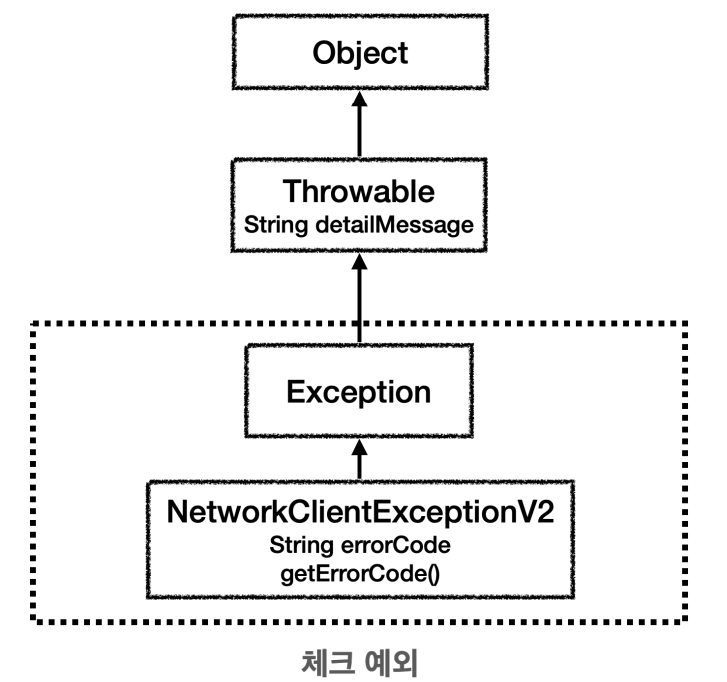
public class NetworkClientExceptionV2 extends Exception{
    private String errorCode;

    public NetworkClientExceptionV2(String errorCode, String message) {
        super(message);
        this.errorCode = errorCode;
    }

    public String getErrorCode() {
        return errorCode;
    }
}
예외도 객체이다. 따라서 필요한 필드와 메서드를 소유 가능
public class NetworkClientV2 {
    private final String address;
    public boolean connectError;
    private boolean sendError;

    public NetworkClientV2(String address) {
        this.address = address;
    }

    public void connect() throws NetworkClientExceptionV2 {
        if (connectError) {
            throw new NetworkClientExceptionV2("connectError", address + " 서버 연결 실패");
        }
        System.out.println(address + " 서버 연결 성공");
    }

    public void send(String str) throws NetworkClientExceptionV2 {
        if (sendError) {
            throw new NetworkClientExceptionV2("sendError", address + " 서버 데이터 전송 실패");
            //중간에 다른 예외가 발생
            //throw new RuntimeException("ex");
        }

        System.out.println(address + " 서버에 데이터 전송 " + str);
    }

    public void disconnect() {
        System.out.println(address + " 서버 연결 해제");
    }

    public void initError(String data) {
        if (data.contains("error1")) {
            connectError = true;
        }

        if (data.contains("error2")) {
            sendError = true;
        }
    }
}
오류가 발생했을때 오류 코드를 반환하는 것이 아니라 예외를 던진다.
반환값을 사용하지 않아도 됨.
예외처리 덕분에 메서드가 정상 종료되면 성공, 예외가 던져지면 예외를 통해 실패를 확인
오류가 발생하면, 예외 객체를 만들고, 거기에 오류 코드와 오류 메시지를 담아둔다.
public class NetworkServiceV2_1 {
    public void sendMessage(String data) throws NetworkClientExceptionV2 {
        String address = "http://ex.com";

        NetworkClientV2 clientV2 = new NetworkClientV2(data);
        clientV2.initError(data);

        clientV2.connect();
        clientV2.send(data);
        clientV2.disconnect();
    }
}
예외 별도 처리 안하고, 던짐.
public class MainV2 {
    public static void main(String[] args) throws NetworkClientExceptionV2 {
        NetworkServiceV2_1 service = new NetworkServiceV2_1();

        Scanner sc = new Scanner(System.in);
        while (true){
            System.out.println("전송할 문자 : ");
            String input = sc.nextLine();

            if (input.equals("exit")) {
                break;
            }
            service.sendMessage(input);
            System.out.println();
        }
        System.out.println("프로그램을 정상 종료 합니다");
    }
}
예외 복구
public class NetworkServiceV2_2 {
    public void sendMessage(String data) {
        String address = "http://ex.com";

        NetworkClientV2 clientV2 = new NetworkClientV2(data);
        clientV2.initError(data);

        try {
            clientV2.connect();
        } catch (NetworkClientExceptionV2 e) {
            System.out.println("[오류] 코드 " + e.getErrorCode() + " , 메시지 " + e.getMessage());
            return;
        }
        try {
            clientV2.send(data);
        } catch (NetworkClientExceptionV2 e) {
            System.out.println("[오류] 코드 " + e.getErrorCode() + " , 메시지 " + e.getMessage());
            return;
        }
        clientV2.disconnect();
    }
}
connect, send와 같이 예외가 발생할 수 있는 곳을 try ~ catch를 사용해서 예외를 잡음
오류 코드와 예외 메시지를 출력
예외를 잡아서 처리 했기 때문에 이후에는 정상흐름으로 복귀, 리턴을 사용해서 seneMessage 메서드를 정상적으로 빠져나간다.
public class MainV2_1 {
    public static void main(String[] args) throws NetworkClientExceptionV2 {
        NetworkServiceV2_2 service = new NetworkServiceV2_2();

        Scanner sc = new Scanner(System.in);
        while (true){
            System.out.println("전송할 문자 : ");
            String input = sc.nextLine();

            if (input.equals("exit")) {
                break;
            }
            service.sendMessage(input);
            System.out.println();
        }
        System.out.println("프로그램을 정상 종료 합니다");
    }
}
예외 처리 도입 - 정상, 예외 흐름 분리
public class NetworkServiceV2_3 {
    public void sendMessage(String data) {
        String address = "http://ex.com";

        NetworkClientV2 clientV2 = new NetworkClientV2(data);
        clientV2.initError(data);

        try {
            clientV2.connect();
            clientV2.send(data);
            clientV2.disconnect();

        } catch (NetworkClientExceptionV2 e) {
            System.out.println("[오류] 코드 " + e.getErrorCode() + " , 메시지 " + e.getMessage());
        }
    }
}
하나의 try안에 정상 흐름을 모두 담는다.
예외 부분은 catch 블럭에서 해결
try 블럭에 들어가고, 예외 흐름은 catch 블럭으로 명확히 구분
예외 처리 도입 - 리소스 반환 문제
public class NetworkServiceV2_4 {
    public void sendMessage(String data) {
        String address = "http://ex.com";

        NetworkClientV2 clientV2 = new NetworkClientV2(data);
        clientV2.initError(data);

        try {
            clientV2.connect();
            clientV2.send(data);

        } catch (NetworkClientExceptionV2 e) {
            System.out.println("[오류] 코드 " + e.getErrorCode() + " , 메시지 " + e.getMessage());
        }

        //NetworkClientException이 아닌 다른 예외가 발생해서 예외가 밖으로 던져져 무시
        clientV2.disconnect();
    }
}
정상 흐름 마직막에 client.disconnect를 호출
예외가 모두 처리 되었기 때문에 client.disconnect 항상 호출
예외 처리 도입 - finally
자바는 어떤 경우라도 반드시 호출되는 finally 기능을 제공
```java
try {
 //정상 흐름
} catch {
 //예외 흐름
} finally {
 //반드시 호출해야 하는 마무리 흐름
}
try를 시작하면 finally 코드 블럭은 어떤 경우라도 반드시 호출
public class NetworkServiceV2_5 {
    public void sendMessage(String data) {
        String address = "http://ex.com";

        NetworkClientV2 clientV2 = new NetworkClientV2(data);
        clientV2.initError(data);

        try {
            clientV2.connect();
            clientV2.send(data);

        } catch (NetworkClientExceptionV2 e) {
            System.out.println("[오류] 코드 " + e.getErrorCode() + " , 메시지 " + e.getMessage());
        } finally {
            clientV2.disconnect();
        }
    }
}
public class MainV2_3 {
public static void main(String[] args) throws NetworkClientExceptionV2 {
NetworkServiceV2_5 service = new NetworkServiceV2_5();
Scanner sc = new Scanner(System.in);
while (true){
System.out.println("전송할 문자 : ");
String input = sc.nextLine();
if (input.equals("exit")) {
break;
}
service.sendMessage(input);
System.out.println();
}
System.out.println("프로그램을 정상 종료 합니다");
}
}
catch 없이 try ~ finally만 사용 가능
try {
 client.connect();
 client.send(data);
} finally {
 client.disconnect();
}
예외계층 1 - 시작
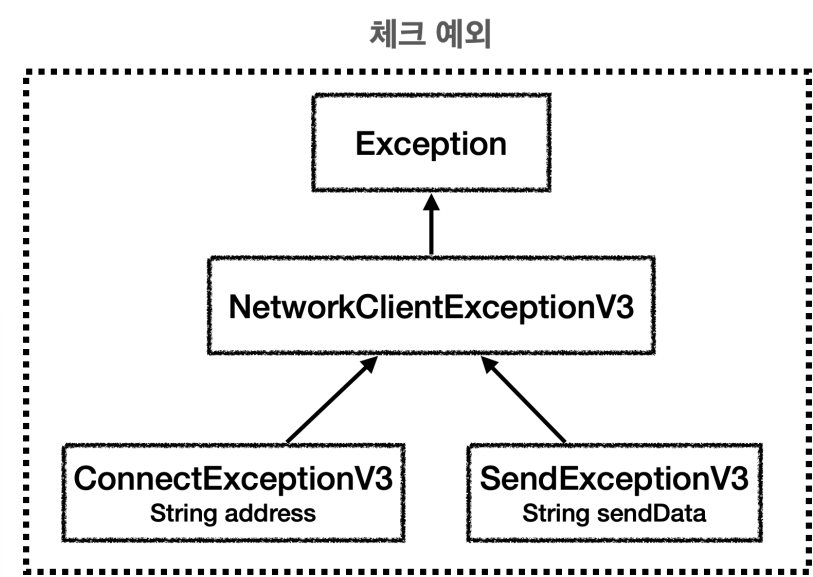
예외를 단순히 오류 코드로 분류하는 것이 아니라, 예외를 계층화 해서 다양하게 만들면, 더 세밀하게 예외를 처리 가능
자바에서 예외는 객체이다. 부모 예외를 잡거나 던지면, 자식 예외도 함께 던지거나 잡을 수 있다.
특정 예외를 잡아서 처리하고 싶다면, 하위 예외를 잡아서 처리
public class NetworkClientExceptionV3 extends Exception{
    public NetworkClientExceptionV3(String message){
        super(message);
    }
}
public class ConnectExceptionV3 extends NetworkClientExceptionV3{
private final String address;
public ConnectExceptionV3(String address, String message) {
super(message);
this.address = address;
}
public String getAddress() {
return address;
}
}public class SendExceptionV3 extends NetworkClientExceptionV3{
public final String sendData;
public SendExceptionV3(String sendData, String message) {
super(message);
this.sendData = sendData;
}
public String getSendData() {
return sendData;
}
}
public class NetworkClientV3 {
    private final String address;
    public boolean connectError;
    private boolean sendError;

    public NetworkClientV3(String address) {
        this.address = address;
    }

    public void connect() throws ConnectExceptionV3{
        if (connectError) {
            throw new ConnectExceptionV3("connectError", address + " 서버 연결 실패");
        }
        System.out.println(address + " 서버 연결 성공");
    }

    public void send(String str) throws SendExceptionV3{
        if (sendError) {
            throw new SendExceptionV3("sendError", address + " 서버 데이터 전송 실패");
            //throw new RuntimeException("ex");
        }

        System.out.println(address + " 서버에 데이터 전송 " + str);
    }

    public void disconnect() {
        System.out.println(address + " 서버 연결 해제");
    }

    public void initError(String data) {
        if (data.contains("error1")) {
            connectError = true;
        }

        if (data.contains("error2")) {
            sendError = true;
        }
    }
}
public class NetworkServiceV3_1 {
    public void sendMessage(String data) {
        String address = "http://ex.com";

        NetworkClientV3 client = new NetworkClientV3(data);
        client.initError(data);

        try {
            client.connect();
            client.send(data);

        } catch (ConnectExceptionV3 e) {
            System.out.println("[연결 오류] 코드 " + e.getAddress() + " , 메시지 " + e.getMessage());
        }catch (SendExceptionV3 e){
            System.out.println("[전송 오류] 코드 " + e.getSendData() + " , 메시지 " + e.getMessage());
        } finally {
            client.disconnect();
        }
    }
}
public class MainV3 {
    public static void main(String[] args) throws NetworkClientExceptionV2 {
        NetworkServiceV3_1 service = new NetworkServiceV3_1();

        Scanner sc = new Scanner(System.in);
        while (true){
            System.out.println("전송할 문자 : ");
            String input = sc.nextLine();

            if (input.equals("exit")) {
                break;
            }
            service.sendMessage(input);
            System.out.println();
        }
        System.out.println("프로그램을 정상 종료 합니다");
    }
}
예외 계층2 - 활용
예외를 잡아서 처리할 때 예외 계층을 활용
모든 예외를 하나하나 다 잡아서 처리하는 것은 번거로움
public class NetworkServiceV3_2 {
    public void sendMessage(String data) {
        String address = "http://ex.com";

        NetworkClientV3 client = new NetworkClientV3(data);
        client.initError(data);

        try {
            client.connect();
            client.send(data);

        } catch (ConnectExceptionV3 e) {
            System.out.println("[연결 오류] 코드 " + e.getAddress() + " , 메시지 " + e.getMessage());
        }catch (NetworkClientExceptionV3 e) {
            System.out.println("[네트워크 오류] 메시지 " + e.getMessage());
        } catch (Exception e){
            System.out.println("[알수 없는 오류], 메시지 " + e.getMessage());
        } finally {
            client.disconnect();
        }
    }
}
public class MainV4 {
    public static void main(String[] args) throws NetworkClientExceptionV2 {
        NetworkServiceV3_2 service = new NetworkServiceV3_2();

        Scanner sc = new Scanner(System.in);
        while (true){
            System.out.println("전송할 문자 : ");
            String input = sc.nextLine();

            if (input.equals("exit")) {
                break;
            }
            service.sendMessage(input);
            System.out.println();
        }
        System.out.println("프로그램을 정상 종료 합니다");
    }
}
실무 예외 처리 방안
처리 할 수 없는 예외
네트워크 서버 문제가 발생해서 통신 불가능, DB 서버에 문제가 발생해서 접속 X -> application 오류, DB 접속 실패 같은 예외 발생
예외를 잡아서 처리해도 다시 발생
체크 예외 부담
체크 예외는 개발자가 실수로 놓칠 수 있는 예외들을 컴파일러가 체크해주기 때문에 오래전부터 많이 사용. 처리 할 수 없는 예외 많아지고, 프로그램이 복잡 -> 체크 사용 부담
체크 예외 사용 시나리오
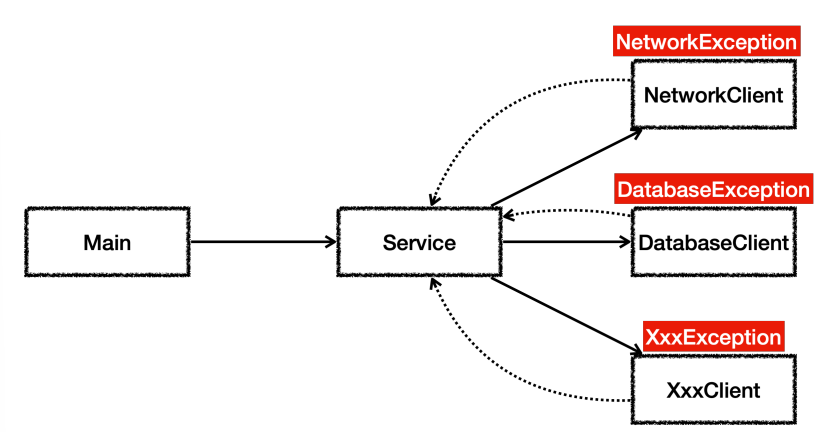
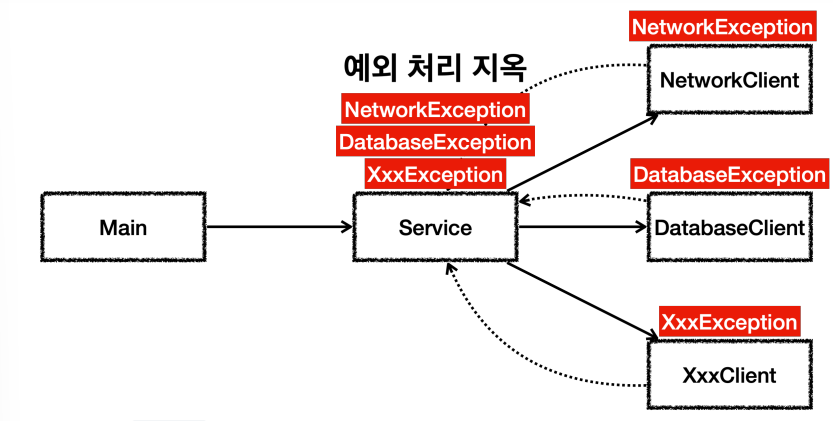
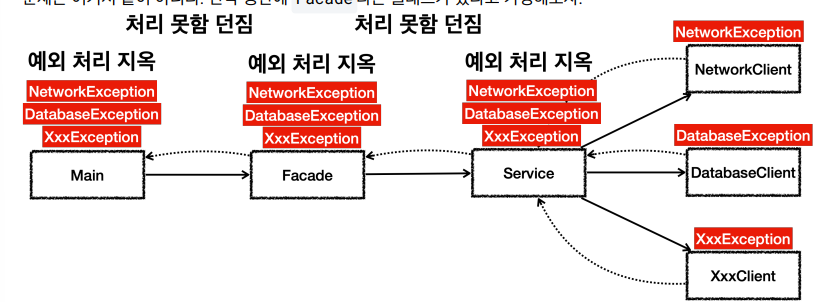
예외를 하나씩 모두 처리해야 하는 불상사 발생
결국 throws Exception 최악의 수를 두게 된다.
모든 예외를 던지기 떄문에 체크 예외를 의도한 대로 사용하는 것은 아니다. 따라서 꼭 필요한 경우가 아니면 Exception 자체를 밖으로 던지는 것은 좋지 않은 방법
언체크 예외 사용 시나리오
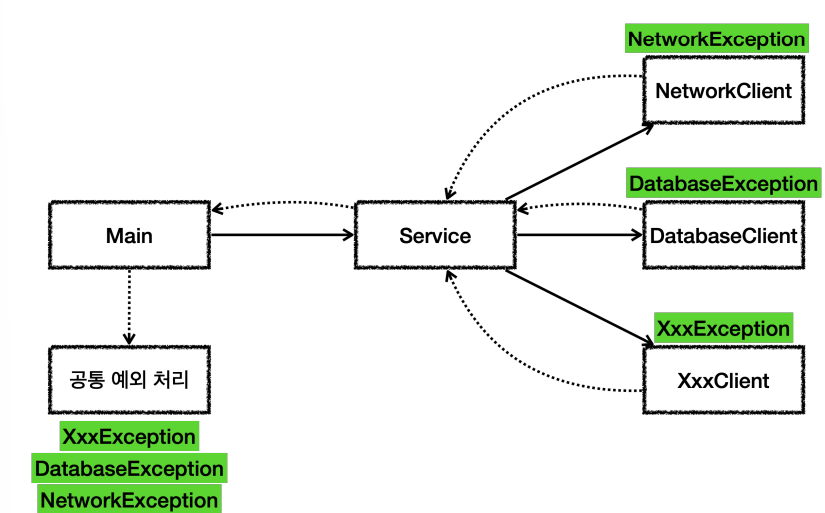
언체크 예외는 throws로 선언하지 않아도 됨 .
언체크 예외는 잡지 않으면 밖으로 던짐
예외 공통처리
예외들은 중간에 여러곳에서 나누어 처리하기 보다는 예외를 공통으로 처리할 수 있는 곳을 만들어서 한곳에서 해결, 고객에게는 현제 시스탬에 문제가 있습니다. 라고 오류를 보여주고 만약, 웹 이라면 오류 페이지를 날려주면 됨.
구현
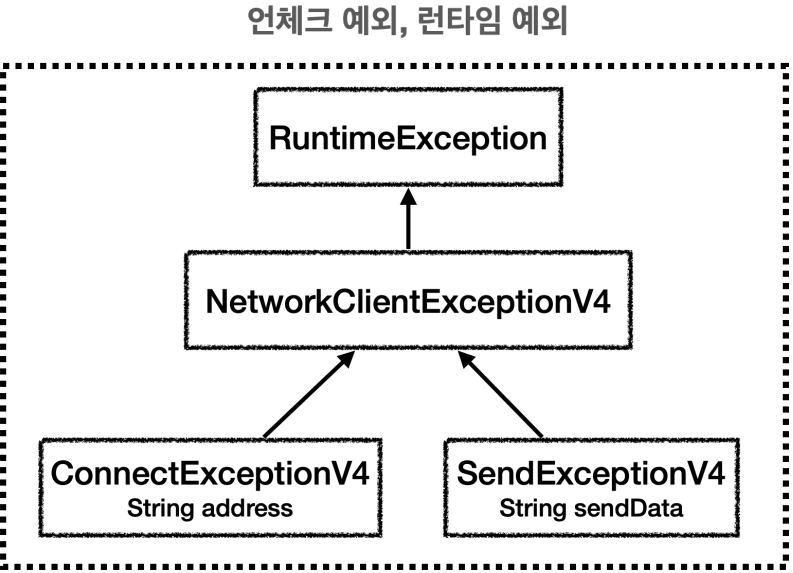
public class NetworkClientExceptionV4 extends RuntimeException{
    public NetworkClientExceptionV4(String message){
        super(message);
    }
}
public class ConnectExceptionV4 extends NetworkClientExceptionV4 {

    private final String address;

    public ConnectExceptionV4(String address, String message) {
        super(message);
        this.address = address;
    }

    public String getAddress() {
        return address;
    }
}
public class SendExceptionV4 extends NetworkClientExceptionV4{
    public final String sendData;

    public SendExceptionV4(String sendData, String message) {
        super(message);
        this.sendData = sendData;
    }

    public String getSendData() {
        return sendData;
    }
}
public class NetworkClientV4 {
    private final String address;
    public boolean connectError;
    private boolean sendError;

    public NetworkClientV4(String address) {
        this.address = address;
    }

    public void connect(){
        if (connectError) {
            throw new ConnectExceptionV4("connectError", address + " 서버 연결 실패");
        }
        System.out.println(address + " 서버 연결 성공");
    }

    public void send(String str) {
        if (sendError) {
            throw new SendExceptionV4("sendError", address + " 서버 데이터 전송 실패");
            //throw new RuntimeException("ex");
        }

        System.out.println(address + " 서버에 데이터 전송 " + str);
    }

    public void disconnect() {
        System.out.println(address + " 서버 연결 해제");
    }

    public void initError(String data) {
        if (data.contains("error1")) {
            connectError = true;
        }

        if (data.contains("error2")) {
            sendError = true;
        }
    }
}
public class NetworkServiceV4 {
    public void sendMessage(String data) {
        String address = "http://ex.com";

        NetworkClientV4 client = new NetworkClientV4(data);
        client.initError(data);

        try {
            client.connect();
            client.send(data);
        } finally {
            client.disconnect();
        }
    }
}
public class MainV4_1 {
    public static void main(String[] args) {
        NetworkServiceV4 service = new NetworkServiceV4();

        Scanner sc = new Scanner(System.in);
        while (true) {
            System.out.println("전송할 문자 : ");
            String input = sc.nextLine();

            if (input.equals("exit")) {
                break;
            }

            try {
                service.sendMessage(input);
            } catch (Exception e){
                exceptionHandler(e);
            }
            System.out.println();
        }
        System.out.println("프로그램을 정상 종료 합니다");
    }

    // 공통 예외 처리
    private static void exceptionHandler(Exception e){
        System.out.println("사용자 메시지 : 죄송합니다. 알 수 없는 문제가 발생했습니다.");
        System.out.println("== 개발자 디버깅 메시지 ==");
        e.printStackTrace(System.out); // 예외 발생시 trace 츨력하면 도움 많이 된다.
        // e.printStackTrace();

        // 필요하면 예외 별도 추가 처리 기능
        if (e instanceof SendExceptionV4 sendEx){
            System.out.println("[전송 오류] : " + sendEx.getSendData());
        }
    }
}
exceptionHandler()
해결할 수 없는 예외가 발생하면 사용자에게 시스탬 내 알수 없는 문제 발생
- 디테일한 오류나 오류 상황 까지 모두 이해 X
개발자는 빠르게 문제를 찾고 디버깅
e.printStackTrace()
예외 메시지와 스택 트레이스 출력
예외가 발생한 지점으로 역으로 추적 가능
try-with-resource
try (Resource resource = new Resource()) {
 // 리소스를 사용하는 코드
}
public class NetworkClientV5 implements AutoCloseable{
private final String address;
public boolean connectError;
private boolean sendError;
public NetworkClientV5(String address) {
this.address = address;
}
public void connect(){
if (connectError) {
throw new ConnectExceptionV4("connectError", address + " 서버 연결 실패");
}
System.out.println(address + " 서버 연결 성공");
}
public void send(String str) {
if (sendError) {
throw new SendExceptionV4("sendError", address + " 서버 데이터 전송 실패");
//throw new RuntimeException("ex");
}
System.out.println(address + " 서버에 데이터 전송 " + str);
}
public void disconnect() {
System.out.println(address + " 서버 연결 해제");
}
public void initError(String data) {
if (data.contains("error1")) {
connectError = true;
}
if (data.contains("error2")) {
sendError = true;
}
}
//try 구문 끝날때 자동 호출
@Override
public void close() {
System.out.println("NetworkClientV5.close");
disconnect();
}
}
public class NetworkServiceV5 {
    public void sendMessage(String data) {
        String address = "http://ex.com";

        try (NetworkClientV5 client = new NetworkClientV5(address)){
            client.initError(data);
            client.connect();
            client.send(data);
        } catch (Exception e) {
            System.out.println("[예외 확인] " + e.getMessage());
            throw e;
        }
    }
}
public class MainV4_2 {
    public static void main(String[] args) {
        NetworkServiceV5 service = new NetworkServiceV5();

        Scanner sc = new Scanner(System.in);
        while (true) {
            System.out.println("전송할 문자 : ");
            String input = sc.nextLine();

            if (input.equals("exit")) {
                break;
            }

            try {
                service.sendMessage(input);
            } catch (Exception e){
                exceptionHandler(e);
            }
            System.out.println();
        }
        System.out.println("프로그램을 정상 종료 합니다");
    }

    // 공통 예외 처리
    private static void exceptionHandler(Exception e){
        System.out.println("사용자 메시지 : 죄송합니다. 알 수 없는 문제가 발생했습니다.");
        System.out.println("== 개발자 디버깅 메시지 ==");
        e.printStackTrace(System.out); // 예외 발생시 trace 츨력하면 도움 많이 된다.
        // e.printStackTrace();

        // 필요하면 예외 별도 추가 처리 기능
        if (e instanceof SendExceptionV4 sendEx){
            System.out.println("[전송 오류] : " + sendEx.getSendData());
        }
    }
}
trywithresource 장점
리소스 누수 방지 : 모든 리소스가 제대로 닫히도록 보장, finally 블록을 적지 않거나 finally 블럭 안에서 자원 해제 코드를 누락하는 문제 예방
코드 간결성 및 가독성 향상 : 명시적 close 호출이 필요 없으므로 코드 더 간결
스코프 범위 한정 : 예를 들어 리소스를 사용, client 변수의 스코프가 try 블럭 안으로 한정