
✅ 셀프 힐링(Liveness Probe)
🔹 Liveness Probe
- 애플리케이션이 "죽었는지" 확인하기 위한 프로브
- 실패 시 컨테이너를 자동 재시작함 → Self-Healing
🔹 Command 타입 Liveness Probe
kubectl apply -f - <<EOF
apiVersion: v1
kind: Pod
metadata:
  labels:
    test: liveness
  name: liveness-exec
spec:
  containers:
  - name: liveness
    image: k8s.gcr.io/busybox
    args:
    - /bin/sh
    - -c
    - touch /tmp/healthy; sleep 30; rm -rf /tmp/healthy; sleep 600
    livenessProbe:
      exec:
        command:
        - cat
        - /tmp/healthy
      initialDelaySeconds: 5
      periodSeconds: 5
EOF30초후/tmp/healthy삭제 → probe 실패 → 컨테이너 재시작
🔸 상태 확인
kubectl describe pod liveness-exec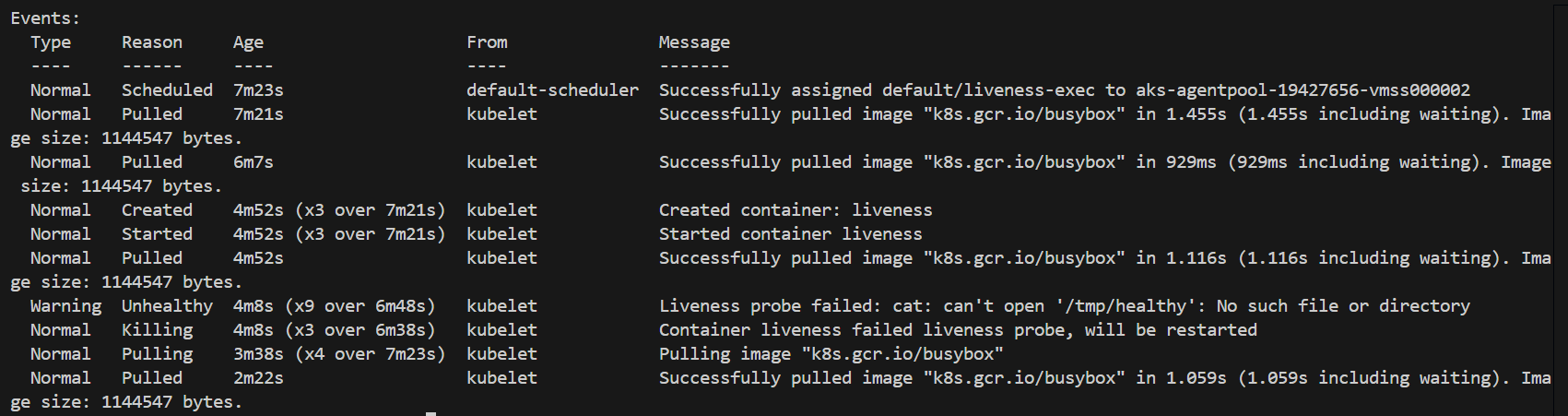
🔹 HttpGet 타입 Liveness Probe
🔸 배포
kubectl apply -f https://raw.githubusercontent.com/acmexii/demo/master/edu/order-liveness.yaml
kubectl expose deploy order --type=LoadBalancer --port=8080
kubectl get svc
🔸 상태 확인
http <EXTERNAL-IP>:8080/actuator/health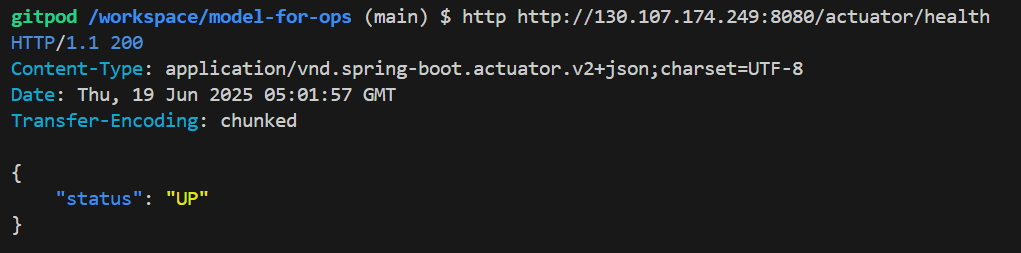
http PUT <EXTERNAL-IP>:8080/actuator/down  # 강제 fail
http <EXTERNAL-IP>:8080/actuator/health
kubectl describe pod <order-pod-name>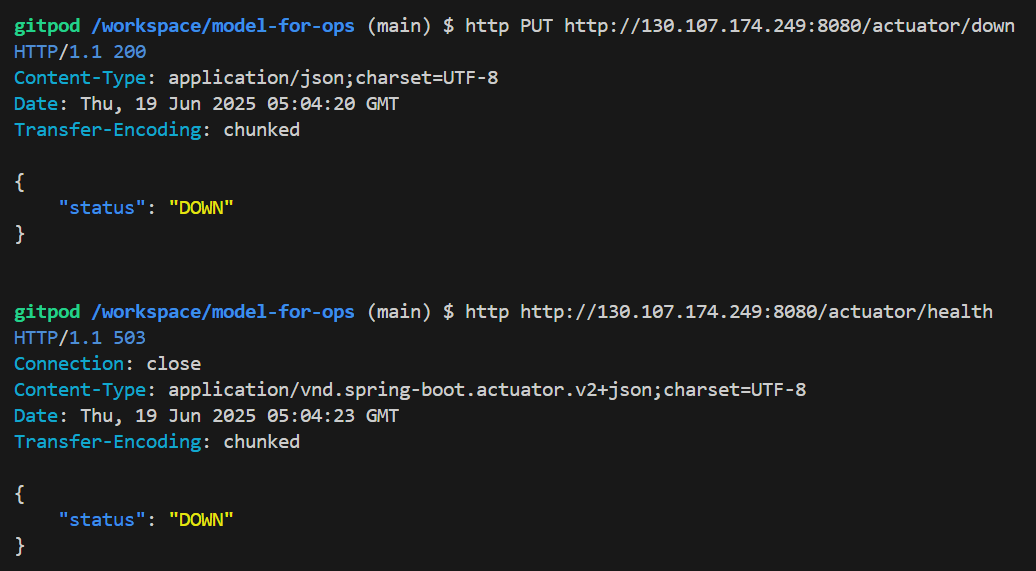
- 실패 시
Liveness Probe failed, 컨테이너 자동 재시작됨
✅ 무정지 배포 (Readiness Probe)
🔹 Readiness Probe
- 컨테이너가 트래픽을 받을 준비가 되었는지 확인
- 실패 시 해당 pod로 트래픽 미전달 (서비스 연결에서 제거)
🔸 Helm 설치 및 Kafka 배포
curl https://raw.githubusercontent.com/helm/helm/master/scripts/get-helm-3 > get_helm.sh
chmod 700 get_helm.sh
./get_helm.sh

helm repo add bitnami https://charts.bitnami.com/bitnami
helm repo update
kubectl create ns kafka
helm install my-kafka bitnami/kafka --version 23.0.5 --namespace kafka
🔹 주문 서비스 deployment.yaml
apiVersion: apps/v1
kind: Deployment
metadata:
  name: order
  labels:
    app: order
spec:
  replicas: 1
  selector:
    matchLabels:
      app: order
  template:
    metadata:
      labels:
        app: order
    spec:
      containers:
      - name: order
        image: jinyoung/order:stable
        ports:
        - containerPort: 8080
🔹 서비스 service.yaml
apiVersion: v1
kind: Service
metadata:
  name: order
  labels:
    app: order
spec:
  ports:
  - port: 8080
    targetPort: 8080
  selector:
    app: order
  type: ClusterIP
🔸 적용
kubectl apply -f deployment.yaml
kubectl apply -f service.yaml
🔹 부하 테스트용 Siege Pod 설치
kubectl apply -f - <<EOF
apiVersion: v1
kind: Pod
metadata:
  name: siege
spec:
  containers:
  - name: siege
    image: apexacme/siege-nginx
EOF
🔸 실행
kubectl exec -it siege -- /bin/bash
siege -c1 -t2S -v http://order:8080/orders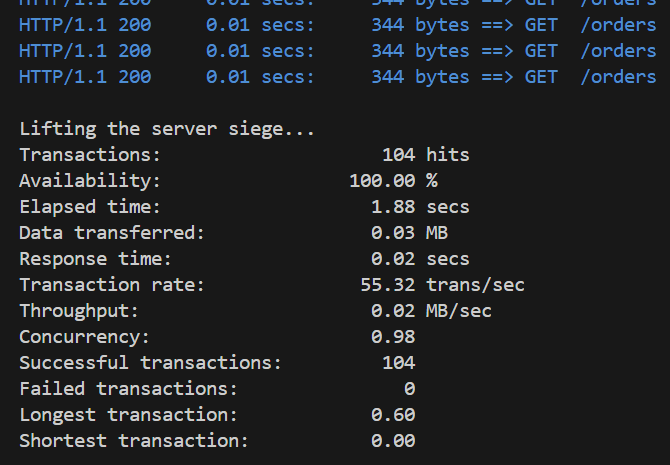
🔹 readinessProbe 없는 상태에서 배포
🔸 이미지 변경
image: jinyoung/order:canary🔸 부하 테스트 / 배포
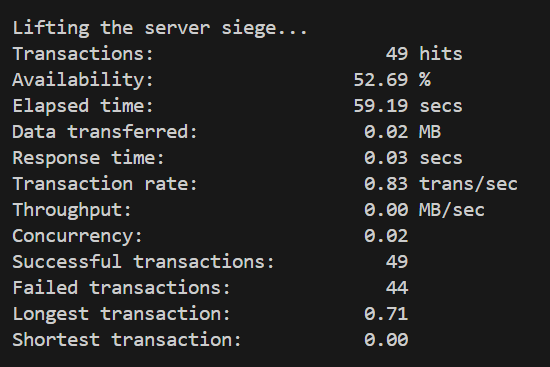
siege -c1 -t60S -v http://order:8080/orders --delay=1Skubectl apply -f deployment.yaml- Availability 낮음 → 배포 중 장애 발생
🔹 readinessProbe 추가 후 배포
🔸 readinessProbe 추가
readinessProbe:
  httpGet:
    path: '/orders'
    port: 8080
  initialDelaySeconds: 10
  timeoutSeconds: 2
  periodSeconds: 5
  failureThreshold: 10
🔸 이미지 안정 버전 복귀
image: jinyoung/order:stable🔸 부하 테스트 / 배포
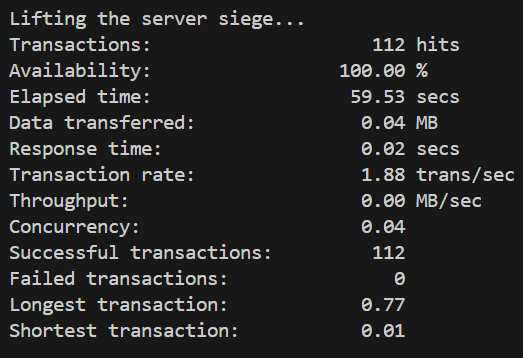
siege -c1 -t60S -v http://order:8080/orders --delay=1Skubectl apply -f deployment.yaml🔸 결과
- Availability 100% → 무정지 배포 성공

코코딩딩