✅ EmptyDir Volume
한 Pod 내에서 컨테이너 간 임시 디스크 공유를 위한 방식
🔸 배포
kubectl apply -f -<<EOF
apiVersion: v1
kind: Pod
metadata:
  name: shared-volumes
spec:
  containers:
  - image: redis
    name: redis
    volumeMounts:
    - name: shared-storage
      mountPath: /data/shared
  - image: nginx
    name: nginx
    volumeMounts:
    - name: shared-storage
      mountPath: /data/shared
  volumes:
  - name: shared-storage
    emptyDir: {}
EOF
🔸 공유 여부 확인
kubectl exec -it shared-volumes --container redis -- /bin/bash
cd /data/shared
echo test… > test.txt
exit

kubectl exec -it shared-volumes --container nginx -- /bin/bash
cd /data/shared
ls
✅ HostPath Volume
노드 로컬 디스크(/tmp 등)을 컨테이너 내부로 마운트하여 공유
🔸 배포
kubectl apply -f -<<EOF
apiVersion: v1
kind: Pod
metadata:
  name: hostpath
spec:
  containers:
  - name: redis
    image: redis
    volumeMounts:
    - name: somepath
      mountPath: /data/shared
  volumes:
  - name: somepath
    hostPath:
      path: /tmp
      type: Directory
EOF
🔸 확인
kubectl exec -it pod/hostpath -- /bin/sh
ls -al /data/shared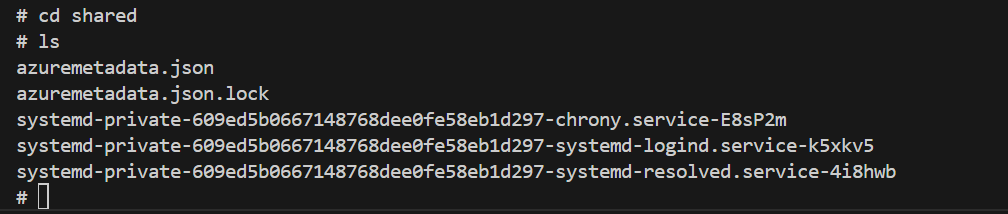
✅ AzureFile 기반 NFS 연동
🔹 StorageClass 확인
kubectl get storageclass🔹 PVC 생성
kubectl apply -f - <<EOF
apiVersion: v1
kind: PersistentVolumeClaim
metadata:
  name: azurefile
spec:
  accessModes:
  - ReadWriteMany
  storageClassName: azurefile
  resources:
    requests:
      storage: 1Gi
EOF
🔸 상태 확인
kubectl get pvc
✅ 주문 서비스 배포 (NFS 마운트)
kubectl apply -f - <<EOF
apiVersion: "apps/v1"
kind: "Deployment"
metadata:
  name: order
  labels:
    app: "order"
spec:
  selector:
    matchLabels:
      app: "order"
  replicas: 1
  template:
    metadata:
      labels:
        app: "order"
    spec:
      containers:
      - name: "order"
        image: "ghcr.io/acmexii/order-liveness:latest"
        ports:
          - containerPort: 80
        volumeMounts:
          - mountPath: "/mnt/data"
            name: volume
      volumes:
      - name: volume
        persistentVolumeClaim:
          claimName: azurefile
EOF
🔸 마운트 확인
kubectl get all
kubectl exec -it <order-pod-name> -- /bin/sh
cd /mnt/data
echo "NFS Strorage Test.. " > test.txt
ls
🔹 Scale Out 후 공유 검증
kubectl scale deploy order --replicas=2
kubectl get pod -l app=order
kubectl exec -it <새로운 order-pod-name> -- /bin/sh
cd /mnt/data
ls
cat test.txt

# 2번째 컨테이너에서 새 파일 생성
echo "NFS Strorage Test2.. " > test2.txt

코코딩딩