1. 표준 모듈
- 모듈은 여러 변수와 함수를 갖고 있는 집합체로, 크게 표준 모듈과 외부 모듈로 나뉨
- 표준 모듈: 파이썬에 기본적으로 내장되어있는 모듈
- 외부 모듈: 다른 사람들이 만들어서 공개한 모듈
- 모듈을 가져올 때는 일반적으로
import구문을 사용하며, 코드의 가장 위에 작성함
import (모듈 이름)1.1 from 구문
- 모듈 내에 일부 기능만을 사용하고 싶을 때, 해당 기능만 가져올 수 있는 구문
from (모듈 이름) import (가져오고 싶은 변수 혹은 함수)- 모두 가져오고 싶으면
*기호를 사용하면 되나, 모든 것을 가져오면 식별자 이름에서 충돌이 일어날 수 있으므로 최대한 필요한 것만 가져와서 사용하는 것이 좋음
1.2 as 구문
- 모듈을 가져올 때 이름 충돌이 발생하는 경우나 모듈 이름이 너무 길어서 짧게 줄여 사용하고 싶을 때 사용
import (모듈) as (사용하고 싶은 식별자)1.3 유용한 몇 가지 모듈
1.3.1 math 모듈
- 수학과 관련된 기능을 갖고 있음
- sin(), cos(), tan(), log()와 같은 연산뿐만 아니라 ceil() (올림), floor() (내림)과 같은 기능도 있음
1.3.2 random 모듈
- 랜덤한 값을 생성할 때 사용하는 모듈
import random as rd
print("# random 모듈")

# random(): 0.0 <= x < 1.0 사이의 float값을 리턴
print("- random():", random.rd())

# uniform(min, max): 지정한 범위 사이의 float를 리턴
print("- uniform(10, 20)", rd.uniform(10,20))

# randrange(): 지정한 범위의 int를 리던
# - randrange(max): 0부터 max 사이의 값을 리턴
# - randrange(min, max): min부터 max 사이의 값을 리턴
print("- randrange(10)", rd.randrange(10))

# choice(list): 리스트 내부에 있는 요소를 랜덤하게 선택
print("- choice([1, 2, 3, 4, 5])", rd.choice([1, 2, 3, 4, 5]))

# shuffle(list): 리스트의 요소를 랜덤하게 선택
print("- suffle([1, 2, 3, 4, 5]):", rd.suffle([1, 2, 3, 4, 5]))

# sample(list, k=(숫자)): 리스트의 요소 중에 k개를 뽑음
print("- sample([1, 2, 3, 4, 5], k=2):", rd.sample([1, 2, 3, 4, 5], k=2))
실행 결과
# random 모듈
- random(): 0.5671614057098718
- uniform(10, 20): 18.064138971352616
- randrange(10): 6
- choice([1, 2, 3, 4, 5]): 2
- suffle([1, 2, 3, 4, 5]): None
- sample([1, 2, 3, 4, 5], k=2): [5, 4]
1.3.3 sys 모듈
- 시스템과 관련된 정보를 가지고 있는 모듈
- 명령 매개변수를 받을 때 많이 사용됨
import sys

# 명령 매개변수를 출력
print(sys.argv)
print("---")

# 컴퓨터 환경과 관련된 정보 출력
print("getwindowsversion():", sys.getwindowsversion())
print("---")
print("copyright:", sys.copyright)
print("---")
print("version:", sys.version)

sys.exit()- sys.getwindowsversion()은 윈도우의 버전을 확인할 수 있음
- sys.copyright과 sys.version은 파이썬의 저작권과 버전을 확인하는 것
- sys.argv라고 되어있는 부분이 바로 명령 매개변수로, 프로그램을 실행할 때 추가로 입력하는 값들을 의미
- 명령 프롬포트에서 프롬프트 창의 경로와 실행할 .py파일 위치한 경로가 동일하게 하여 cmd창에서,
python module_sys.py 10 20 30을 입력한 후 코드를 실행하면, sys.argv에 ['module_sys.py', '10', '20', '30']이라는 리스트가 들어옴 - 이런 방식을 활용하여
python module_sys.py filename.txt등으로 입력하면 파일 경로 등을 외부에서 지정할 수 있음
- 명령 프롬포트에서 프롬프트 창의 경로와 실행할 .py파일 위치한 경로가 동일하게 하여 cmd창에서,
1.3.4 os 모듈
- 운영체제와 관련된 기능을 가진 모듈로, 새로운 폴더를 만들거나 폴더 내부의 파일 목록을 보는 등의 일을 할 때 활용
import os

# 기본 정보 출력
print("현재 운영체제:", os.name)
print("현재 폴더:", os.getcwd())
print("현재 폴더 내부의 요소:", os.listdir())

# 폴더를 만들고 제거(폴더가 비어있을 떄만 제거 가능)
os.mkdir("hello")
os.rmdir("hello")

# 파일을 생성하고 파일 이름을 변경
with open("original.txt", "w") as file:
	file.write("hello")
os.rename("original.txt", "new.txt")

# 파일 제거
os.remove("new.txt")
#os.unlink("new.txt")

# 시스템 명령어 실행
os.system("dir)- 파일 제거 시 remove()함수와 unlink()함수 두 가지가 있는데, 단지 이름만 다를 뿐 동일한 함수이므로 아무거나 사용해도 무관
- os.system()함수의 경우 명령어를 그냥 실행하는 함수로,
rm -rf \와 같은 루트 권한이 있을 경우 무슨 명령어든 실행할 수 있으므로 주의해서 사용해야함
1.3.5 time 모듈
time.sleep()- 위의 sleep()함수를 가장 많이 사용하며, 해당 함수는 특정 시간 동안 코드 진행을 정지할 때 사용하는 함수
추가로,
- urllib 모듈 : URL을 다루는 라이브러리로, 인터넷 주소를 활용할 때 사용하는 라이브러리
- urlopen(): URL 주소의 페이지를 열어줌
- read(): 해당 웹 페이지에 있는 내용을 읽어서 가져오며, 바이너리 데이터로 읽어옴
- datetime 모듈: date(날짜), time(시간)과 관련된 모듈로, 날짜 형식을 만들 때 자주 사용되는 코드들로 구성
- timedelta를 사용하면 시간을 더할 수 있음
2. 외부 모듈
- 사이킷-런(scikit-learn), 텐서플로우(Tensorflow), 장고(Django), 플라스크(Flask), 넘파이(NumPy)와 같은 것들이 외부 모듈
cmd (명령 프롬프트)창을 띄우고, 모듈 이름에 필요한 외부 모듈명을 작성하여 설치하면 됨pip install (모듈 이름)
2.1 Matplot
- MatLab의 그래프 기능 대체 가능
- pip을 통해 matplotlib 설치
- matplotlib의 하위 모듈 pyplot 사용
- import matplotlib.pyplot as plt
- plt로 사용하는 것이 표준 관행
import matplotlib.pyplot as plt

X = ['Mon', 'Tue', 'Wed', 'Thur', 'Fri', 'Sat', 'Sun']
Y1 = [15.6, 14.2, 16.3, 18.2, 17.1, 20.2, 22.4]
Y2 = [20.1, 23.1, 23.8, 25.9, 23.4, 25.1, 26.3]

plt.plot(X, Y1, X, Y2)
plt.xlabel("day")
plt.ylabel("temperature")
plt.show()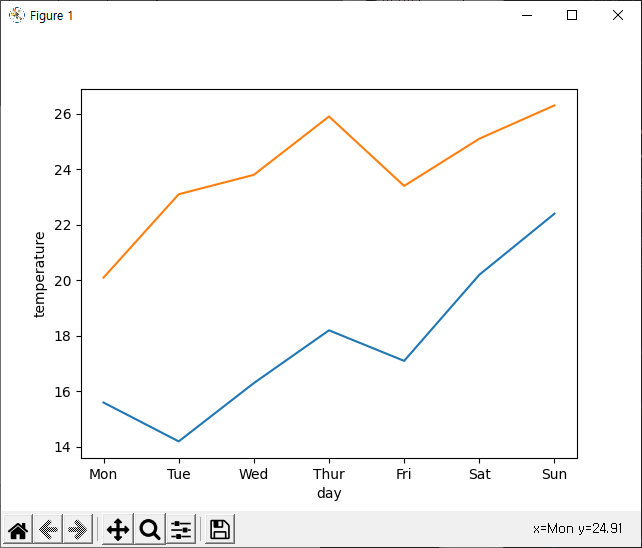
import matplotlib.pyplot as plt

X = ['Mon', 'Tue', 'Wed', 'Thur', 'Fri', 'Sat', 'Sun']
Y = [15.6, 14.2, 16.3, 18.2, 17.1, 20.2, 22.4]

plt.bar(X, Y)
plt.xlabel("day")
plt.ylabel("temperature")
plt.show()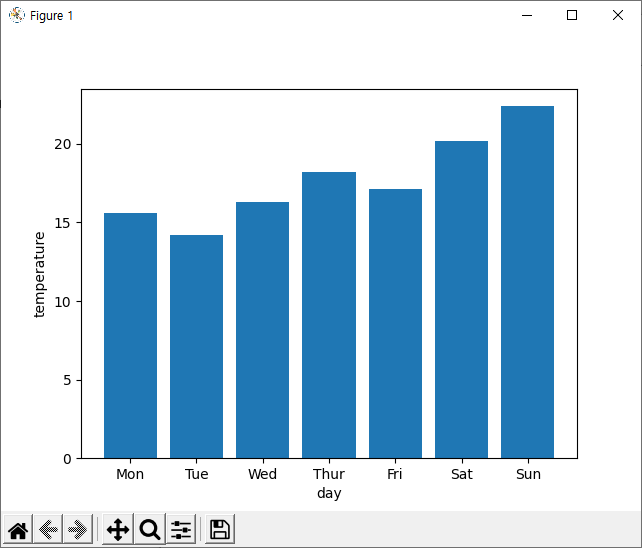
- Matlab에서 사용하는 그래프 그리기 기능은 모두 지원
2.2 NumPy
- NUMerical PYthon의 줄임말
- 배열(텐서, tensor) 계산을 위한 라이브러리
- 배열간의 연산을 제공하며, 연산 속도도 리스트보다 빠름
- 처리속도가 중요한 인공지능이나 데이터 과학에서는 리스트 대신 넘파이를 선호
pip numpy
- import numpy as np로 사용하는 것이 관행
- 넘파이는 리스트와는 달리 서로 다른 자료형의 값을 원소로 가질 수 없으며, 자료형을 명시하지 않을 경우, 자동 형 변환이 일어나므로 덧셈이나 뺄셈 등의 연산을 사용할 수 없음
>>> a = np.array([1, 2, 3, 4]) # 넘파이의 배열을 생성할 때, 반드시 대괄호를 사용하여 리스트 형식의 데이터를 인자로 사용해야함
>>> b = np.array([1, 'two', 3, 4])
>>> b # 자동 형 변환이 일어난 모습
array(['1', 'two', '3', '4']) 
코린이의 취준 자취 기록장