Today?
챌린지반 수업
가상 메모리
OS에서 정말 많은 프로그램이 동시에 실행되어도 안전성을 보장해줌
각 프로세스마다 각각의 가상 메모리를 할당받음 -> 다른 프로세스의 가상 메모리를 침범할 일 X
유지 비결
페이지 : 가상 메모리에서 사용되는 메모리 영역을 일정한 크기로 나눈 블록
프레임 : 물리 메모리에서 사용되는 메모리 영역을 일정한 크기로 나눈 블록
forwardRef() 순환?
TS 5주차 : 객체 지향 프로그래밍
클래스
객체 지향 프로그래밍(OOP)의 핵심!
붕어빵 틀 = 클래스 / 각각의 붕어빵 = 객체
- 객체를 만들기 위한 틀(template)이 클래스구나~!
- 클래스를 기반으로 만들어지는 객체<- 클래스의 인스턴스라고도 함
속성(attribute)
- 객체의 성질을 결정
- 예 :
팥이라는 속성이 있는팥 붕어빵과슈크림이라는 속성이 있는슈크림 붕어빵
메서드(method)
- 객체의 성질을 변화시키거나, 객체에서 제공하는 기능들을 사용
- 붕어빵 주인은 붕어빵을 팥 붕어빵에서 슈크림 붕어빵으로 전환할 수 있다.
- 붕어빵 고객은 팥 붕어빵과 슈크림 붕어빵의 가격을 알 수 있다.
클래스와 객체 정의법
TypeScript
class키워드 사용으로 클래스 정의new키워드 사용으로 객체 생성
class Person {
	name : string;
    age : number;

    constructor(name : string, age:number){
    	this.name = name;
        this.age = age;
    }

    sayHello(){
    	console.log(`제 이름은 ${this.name}이고, 나이는 ${this.age}살입니다.`);
    }
}- constructor : 생성자
- 클래스의 인스턴스를 생성/초기화하는데 사용되는 메서드
constructor라는 이름으로 정의됨- 생성자는 인스턴스 생성 시 자동 호출
- 한 클래스에 오직 하나만 존재
클래스 접근 제한자
TypeScript
public- 클래스 외부에서도 접근 가능한 제한자
- 선언 안 할 시 기본으로 퍼블릭임
private- 클래스 내부에서만 접근 가능
- getter/setter?
protected- 클래스 내부 / 해당 클래스 상속받은 자식 클래스에서만 접근 가능
상속
기존 클래스의 속성과 메서드를 물려받아 새로운 클래스를 정의함...
똑같은 코드를 여러 개 작성할 필요 없음.
extends키워드를 사용하자
class Animal {
	name : string;

    constructor(name:string){
    	this.name = name;
    }

    makeSound(){
    	console.log('동물 소리~');
    }
}

class Dog extends Animal {
	age : number;

    constructor(name : string) {
    	super(name);
        this.age = 5;
    }

    makeSound() { // 새로운 makeSound 함수 정의 (오버라이딩)
    	console.log('멍멍!');
    }

    eat(){
    	console.log('강아지가 사료를 먹습니다.');
    }
}

const dog = new Dog('누렁이');
dog.makeSound(); // 출력 : 멍멍!super? 자식 클래스가 부모 클래스를 참조할 때 사용하는 키워드.- 부모 클래스의 생성자나 메서드를 그대로 사용하고 싶다면 작성 안 해도 됨!
--
nest.js
데코레이터
@module({...})이렇게 @가 붙는 키워드를 데코레이터라고 함
해당 클래스나 함수가 어떤 역할을 수행하는지 Nest.js에 알려주는 역할
import { Module } from '@nestjs/common';
import { AppController } from './app.controller';
import { AppService } from './app.service';

@Module({
	imports : [],
    controllers : [AppController],
    providers : [AppService],
})

export class AppModule {}
여기서 AppModule은 이 Nest.js 웹 어플리케이션에서 '모듈'이라는 역할을 할 거다! 하고 선언한 것.
- 모듈 속성의 종류
importscontrollersprovidersexports
컨트롤러와 서비스
IoC와 DI
IoC(제어 역전 : Inversion of Control)
개발자가 사용할 객체를 직접 생성하지 않고, 외부(Nest.js IoC 컨테이너)에 위임하는 것
- 객체의 관리를 컨테이너에게 맡겨 제어권이 넘어갔기 때문에 제어 역전이라고 함
만약에 직접 객체를 생성하면? AppController는 서비스의 구체적인 구현에 강하게 결합된다. 즉, 의존하는 서비스가 변경되면 개발자가 코드를 수정해주어야 함. 서비스가 자주 변경될 경우 번거롭다...
그러나 IoC원칙은 모듈 간 결합도를 낮춰준다. 모듈이 바뀌어도 다른 모듈에는 영향을 최소화시켜서 확장성 있는 웹 어플리케이션을 만들 수 있다.
DI(의존성 주입 : Dependency Injection)
Nest.js의 의존성 주입 메커니즘으로 AppService를 AppController에 주입하는 예시
constructor(private readonly appService: AppService) {}- 이렇게 하면 이
constructor에서 AppService의 인스턴스는 DI 컨테이너한테 관리된당...
게시판 만들기 실습
게시판 뼈대 만들어주기

- OmitType : 기존 DTO에서 특정 속성만을 배제하여 새로운 DTO를 생성하게 함
개인과제
Nest.js 개발 환경 세팅을 위해 새 프로젝트를 생성했는데, 다음과 같은 에러가 뜨면서 프로젝트 생성이 제대로 되지 않았다.
▹▹▸▹▹ Installation in progress... ☕
Failed to execute command: npm install --silent
✖ Installation in progress... ☕
🙀  Packages installation failed!
In case you don't see any errors above, consider manually running the failed command npm install to see more details on why it errored out.
무슨 문제지 싶어서 생성된 프로젝트 폴더로 이동해서 npm install --verbose를 실행시킴...
npm ERR! code ERESOLVE
npm ERR! ERESOLVE unable to resolve dependency tree
npm ERR!
npm ERR! While resolving: ticket-nest@0.0.1
npm ERR! Found: reflect-metadata@undefined
npm ERR! node_modules/reflect-metadata
npm ERR!   reflect-metadata@"^0.2.0" from the root project
npm ERR!
npm ERR! Could not resolve dependency:
npm ERR! peer reflect-metadata@"^0.1.12 || ^0.2.0" from @nestjs/common@10.3.3
npm ERR! node_modules/@nestjs/common
npm ERR!   @nestjs/common@"^10.0.0" from the root project
npm ERR!
npm ERR! Fix the upstream dependency conflict, or retry
npm ERR! this command with --force or --legacy-peer-deps
npm ERR! to accept an incorrect (and potentially broken) dependency resolution.
npm ERR!
npm ERR!
npm ERR! For a full report see:
npm ERR! /Users/jy/.npm/_logs/2024-03-07T14_32_14_291Z-eresolve-report.txt
@nestjs/common 패키지를 설치하려고 할 때 reflect-metadata와 관련된 의존성 충돌이 발생했다고 한다. reflect-metadata 버전 ^0.2.0이 프로젝트에 요구되고 있으나, @nestjs/common@10.3.3은 reflect-metadata@"^0.1.12 || ^0.2.0"를 요구하고 있다는데....
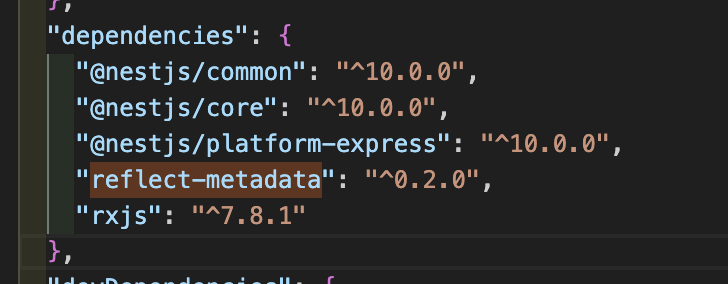
이미 ^0.2.0 버전을 사용하고 있는데 대체 뭐가 문젠지 알 수가 없음...
검색한 끝에 --legacy-peer-deps 옵션을 사용해보기로 했다.
npm install @nestjs/common --legacy-peer-deps
sudo npm install @nestjs/common --legacy-peer-deps
ㅠㅠㅠ
관리자 권한으로 실행시키니까 설치되길래 혹시나하고 프로젝트 폴더 아예 지운 다음에 sudo nest new projectName으로 재생성해보니까 생성된다.
권한 문제였군...
TS 프로젝트(공연예매)
npm init -y
tsc --init --rootDir ./src --outDir ./di
st --esModuleInterop --module commonjs --strict true --allowJS true --checkJS true