Tokenization
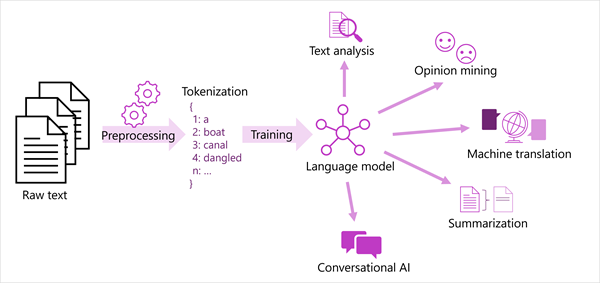
- Break text into tokens.
- Tokens can be generated for partial words, or combinations of words and punctuation.
1. we
2. choose
3. to
4. go
5. the
6. moon
Frequency Analysis
- count the number of occuerences of each token
- can often provide a clude as to the main subject of the text corpus
Machine learning for text classification
- Train a machine learning model classifies text based ono known set of categorization
- Ex. Positive or Negative sentence
Semantic language model
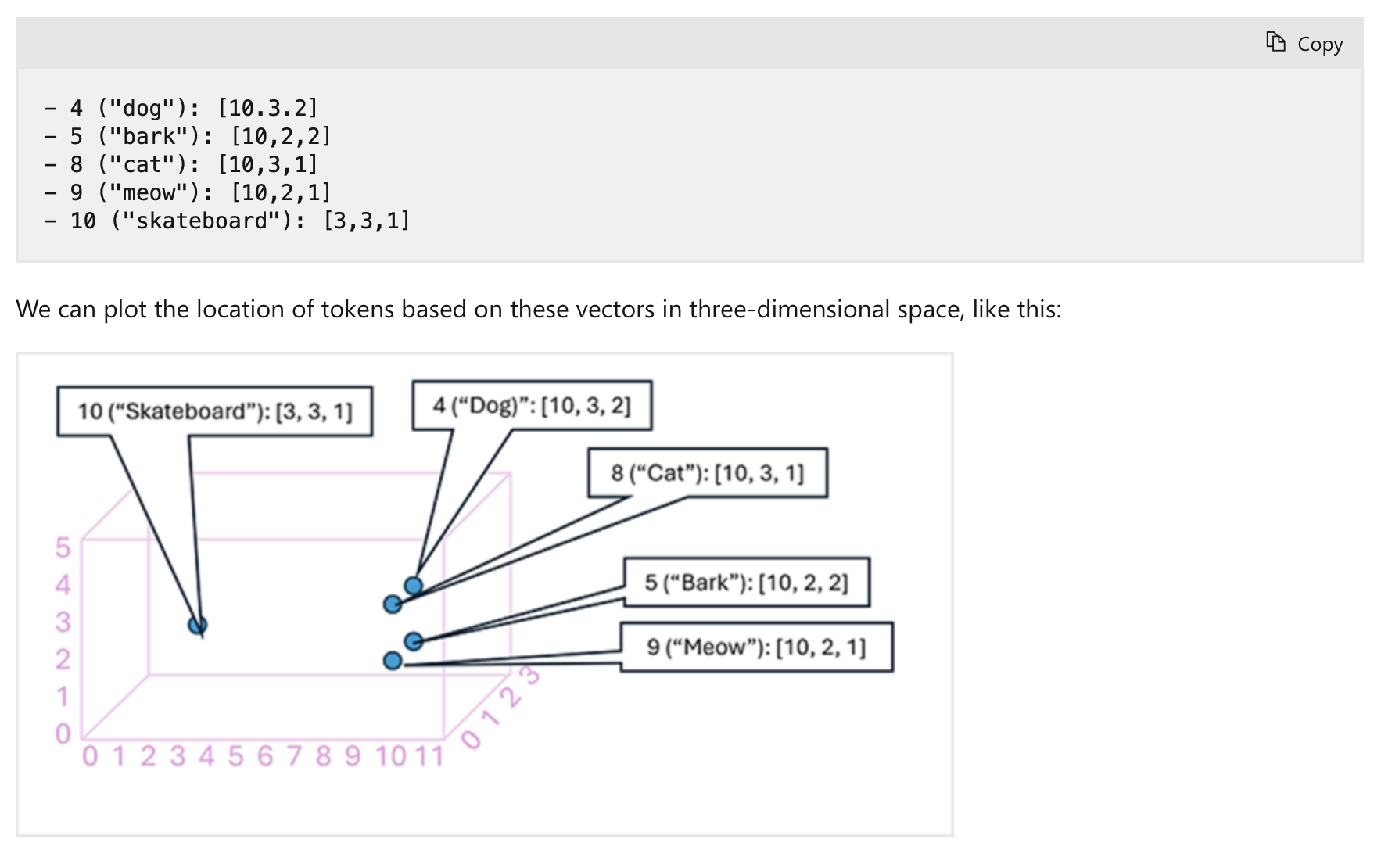
- Embeddings ( endocing of language token as vectors )
- Embedding vectors as a coordinate in multi-dimensional space, that they occupy their own space
- more related one groups together
Language detection
- Can return NaN if language is ambiguous
Question answering
Create a custon question answering knowledge base
1. Define questions and answers
Using Language Studio's custom question answering, create a project with question-and-answer pairs.
These can be sourced from existing FAQs/web pages, entered manually, or a mix of both.
You can add alternative phrasing to questions
(e.g., for "What is your head office location?", add "Where is your head office?") so the system recognizes different ways users might ask the same thing.
2. Test the Project
After creating your question pairs, save the project.
This trains a natural language model to match questions to answers, even if phrased differently.
Then, use the built-in test tool in Language Studio to submit questions and review the generated answers.
Conversational Language Understanding
- Build language model that interpret the meaning of phrases in a conversational setting.
- Ex. "turn the light off" -> interpret -> turn the light of home off
HOW?
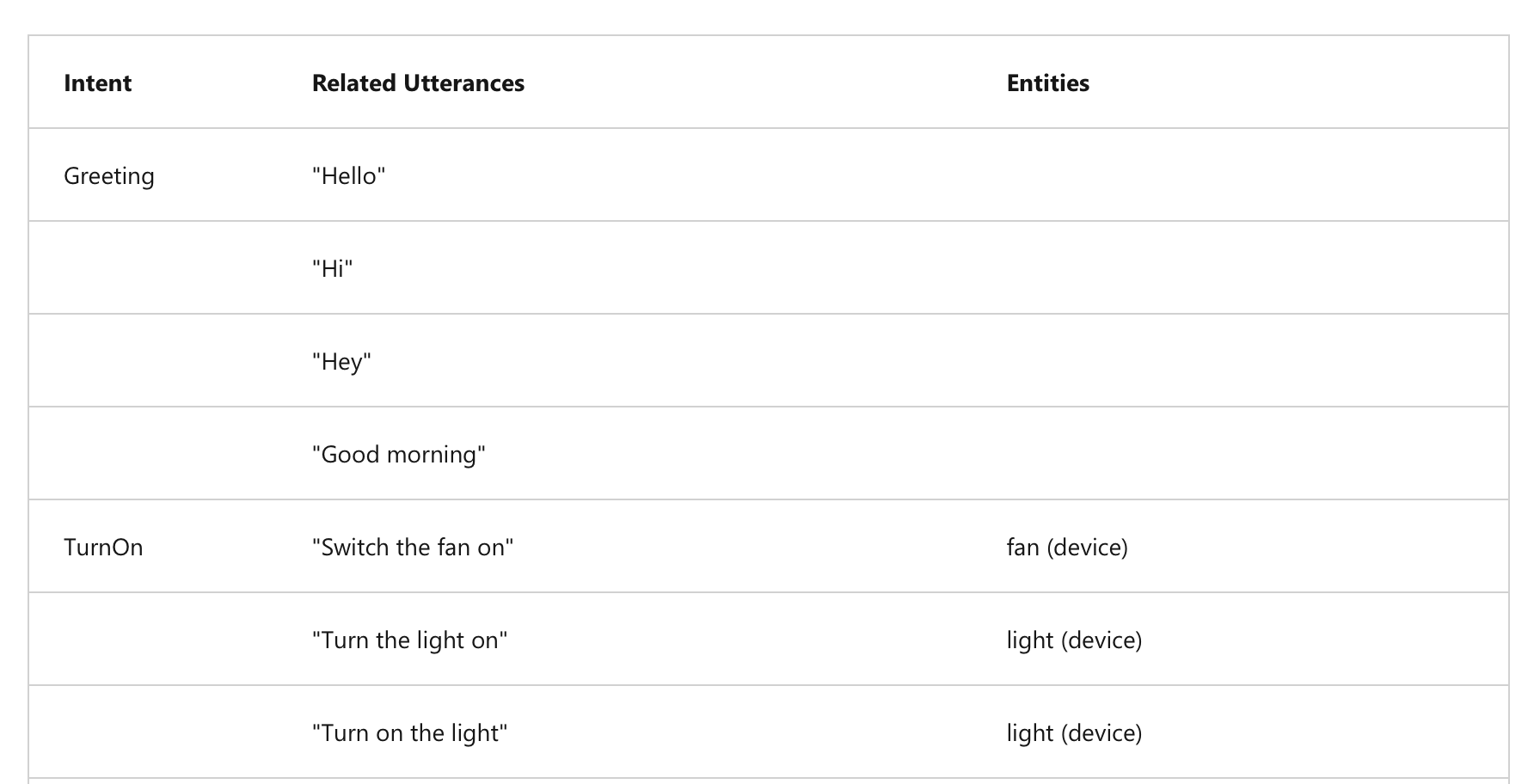
1. Utterance ( Spoken word )
- Something user might say that application must interpret
- Switch the fan off
- Turn on the light
2. Entities
- Refers an item utterance refers.
Ex
- Switch the fan on.
- Turn on the light
3. Intents
- Purpose or goal expressed on utterance
CLU Authoring, Training, and Predicting
Authoring
- Create an authoring resource to start building a CLU model.
- Define intents, entities, and sample utterances.
- Use prebuilt domains (with predefined intents and entities) or create your own.
- You can create intents and entities in any order.
- Authoring is easiest via the Language Studio (web-based interface).
Training
- After defining intents, entities, and utterances, train the model.
- Training teaches the model to match user input to the correct intent and entities.
- Training and testing are iterative:
Test → Update → Retrain → Test again until performance is satisfactory.
Predicting
- Once satisfied, publish your CLU application to a prediction resource.
- Client apps connect to the prediction endpoint with an authentication key.
- Predictions (intents and entities) are returned, allowing the app to act accordingly.
Azure AI Speech
Speech Recognition and Synthesis
Speech Recognition
- Converts spoken words (live or recorded) into data, often as text.
- Uses models:
- Acoustic model: Maps audio to phonemes.
- Language model: Maps phonemes to words using statistical prediction.
- Applications:
- Closed captions
- Transcripts of calls/meetings
- Automated dictation
- Interpreting user input
Speech Synthesis
- Converts text into spoken audio.
- Requires:
- Text to speak
- Chosen voice characteristics
- Process:
- Tokenizes text → assigns phonetic sounds → organizes into prosodic units → generates audio.
- Applications:
- Spoken responses to users
- Voice menus
- Reading messages aloud
- Public announcements
Speech to Text
- Use Azure AI Speech to transcribe audio (real-time or batch) into text.
- Based on Microsoft's Universal Language Model, optimized for conversation and dictation.
- Supports custom models (acoustics, language, pronunciation) if needed.
Real-time transcription:
- Streams audio from microphone or file.
- Returns transcribed text instantly for live scenarios.
Batch transcription:
- Works with stored audio files (e.g., Azure storage with SAS URI).
- Asynchronous job processing without guaranteed start time.
Text to Speech
- Converts text into audible speech via API.
- Output can be played directly or saved as an audio file.
Speech synthesis voices:
- Choose from multiple pre-defined or neural voices (natural intonation).
- Supports multiple languages and regional accents.
- Option to create and use custom voices.
Translation
Literal and Semantic Translation
- Early machine translation used literal word-for-word translation, often causing meaning loss.
- AI translation focuses on semantic understanding, considering grammar, context, formality, and colloquialisms for accurate results.
Text and Speech Translation
Text translation:
- Translate documents, emails, websites, and social media content.
Speech translation:
- Translate spoken language directly (speech-to-speech) or via text (speech-to-text).
Azure AI Translator
- Integrates easily into apps, websites, and tools.
- Uses Neural Machine Translation (NMT) for context-aware, accurate translations.
Language support:
- Supports translation between 130+ languages.
- Use ISO 639-1 codes (e.g.,
en,fr,zh) or extended culture codes (e.g.,en-US,fr-CA). - Allows translating from one source language into multiple target languages at once.
Azure AI Speech
- Translates spoken audio from streams (e.g., microphone, audio file) into text or audio.
- Enables real-time closed captioning and two-way spoken conversation translation.
Language support:
- Translates speech into 90+ languages.
- Source language must use extended culture codes (e.g.,
es-US), target languages use two-letter codes (e.g.,en,de).