
1. Data-Driven Architecture
이번에는 Unreal Engine에서 Data-Driven Architecture를 가장 잘 보여주는 사례인 Epic Games에서 제공하는 샘플 프로젝트인 Lyra Starter Game을 살펴보겠다.
1-1. Experience 시스템
Lyra에서 “Experience”는 일반적인 GameMode에 해당하는 개념이다.
예를 들어 1인칭 모드, 탑다운 모드, 메인 메뉴 같은 게임 흐름 자체를 하나의 데이터 단위로 정의한다.
이 관점에서 Experience는 Data-Driven Architecture의 Definition 계층에 해당한다.
ULyraExperienceDefinition
ULyraExperienceDefinition은 Experience의 핵심 정의 데이터이다.
UPrimaryDataAsset을 상속받아 Asset Manager 시스템과 직접 연결된다.
UCLASS(BlueprintType, Const)
class ULyraExperienceDefinition : public UPrimaryDataAsset
{
	GENERATED_BODY()

    ...

public:
	// 이 Experience에서 활성화할 Game Feature들
	UPROPERTY(EditDefaultsOnly, Category = Gameplay)
	TArray<FString> GameFeaturesToEnable;

	// 기본 플레이어 Pawn 설정
	UPROPERTY(EditDefaultsOnly, Category=Gameplay)
	TObjectPtr<const ULyraPawnData> DefaultPawnData;

	// Experience 로드 과정에서 실행할 액션들
	UPROPERTY(EditDefaultsOnly, Instanced, Category="Actions")
	TArray<TObjectPtr<UGameFeatureAction>> Actions;

	// 추가로 조합할 Action Set
	UPROPERTY(EditDefaultsOnly, Category=Gameplay)
	TArray<TObjectPtr<ULyraExperienceActionSet>> ActionSets;
};
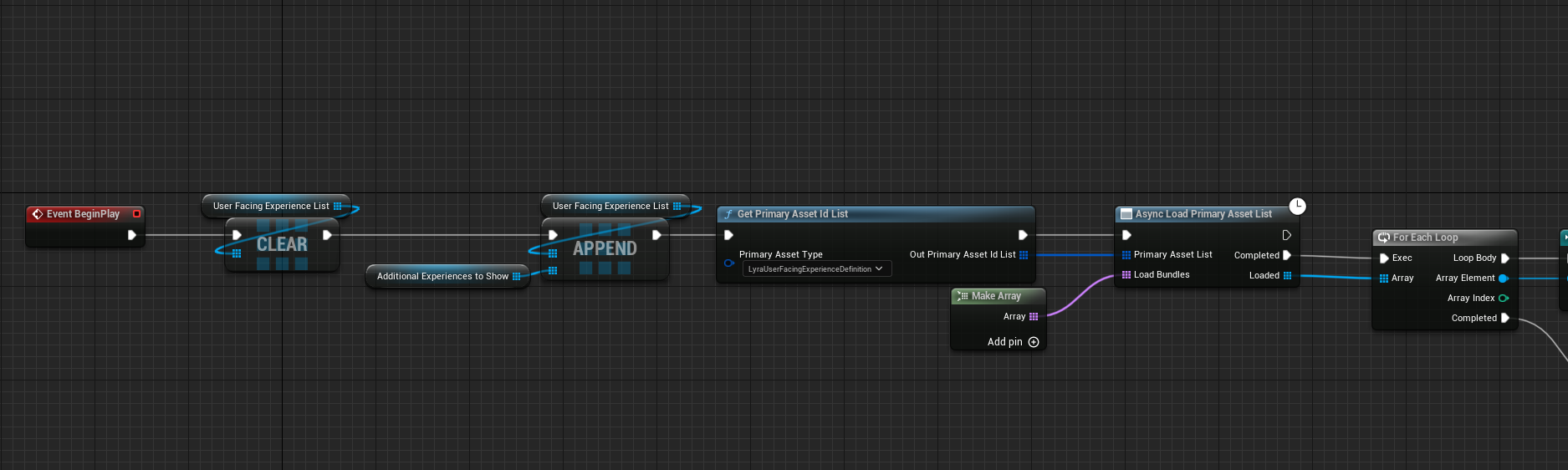
ULyraUserFacingExperienceDefinition
ULyraUserFacingExperienceDefinition은 UI를 위한 경량 데이터이다.
이를 통해 실제 Experience를 로드하지 않고도 UI를 구성할 수 있다,
UCLASS(BlueprintType)
class ULyraUserFacingExperienceDefinition : public UPrimaryDataAsset
{
	GENERATED_BODY()

    ...

public:
	UPROPERTY(BlueprintReadWrite, EditAnywhere, Category=Experience, meta=(AllowedTypes="Map"))
	FPrimaryAssetId MapID;

	UPROPERTY(BlueprintReadWrite, EditAnywhere, Category=Experience, meta=(AllowedTypes="LyraExperienceDefinition"))
	FPrimaryAssetId ExperienceID;

	UPROPERTY(BlueprintReadWrite, EditAnywhere, Category=Experience)
	FText TileTitle;

	UPROPERTY(BlueprintReadWrite, EditAnywhere, Category=Experience)
	FText TileDescription;

	UPROPERTY(BlueprintReadWrite, EditAnywhere, Category=Experience)
	TObjectPtr<UTexture2D> TileIcon;

	UPROPERTY(BlueprintReadWrite, EditAnywhere, Category=Experience)
	bool bIsDefaultExperience = false;
};
두 Definition의 역할은 다음과 같다.
-
ULyraExperienceDefinition
→ 실제 게임 플레이 규칙과 실행 구성을 관리하는 데이터 -
ULyraUserFacingExperienceDefinition
→ 메뉴 화면에서 추가 정보와 표시할 데이터를 관리하는 데이터
결과적으로 실행용 데이터와 표시용 데이터를 분리하여 UI 구성도 유연하게 동작하도록 한다.
1-2. Asset Manager & Async Loading
Lyra는 Experience를 UPrimaryDataAsset 기반 데이터로 정의한 뒤, 이를 Asset Manager에 등록해 둔다.
이렇게 하면 런타임에서 PrimaryAssetId를 통해 원하는 Experience를 식별하고, 적절한 타이밍에 불러올 수 있다.
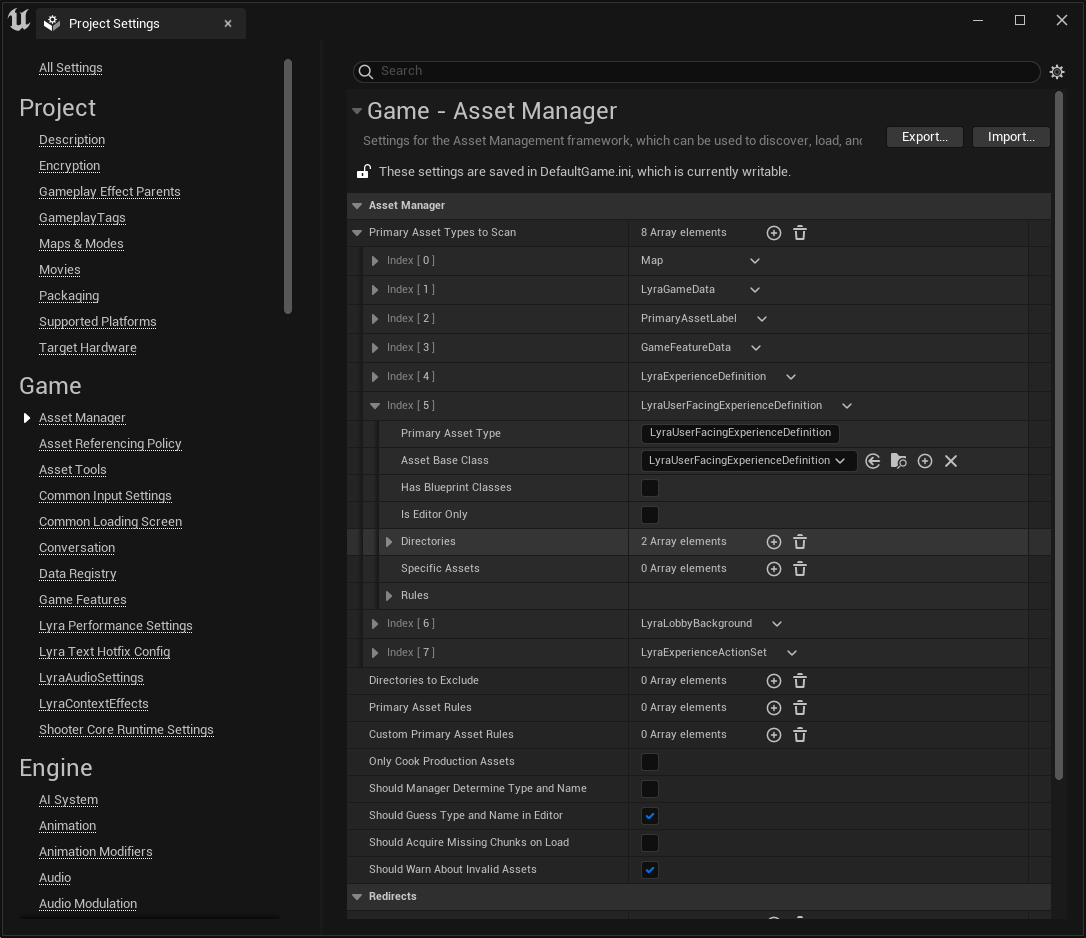

Lyra의 로딩 구조는 다음과 같은 흐름으로 이해할 수 있다.
- Experience 데이터를 식별한다.
- Experience와 관련된 에셋들을 번들 형태로 비동기로 로드한다.
- 필요한 Game Feature Plugin을 활성화한다.
- Experience에 연결된 Action을 실행한다.
이러한 흐름 덕분에 Lyra는 게임 모드 전환을 단순한 클래스 교체가 아니라, 데이터 기반의 초기화 파이프라인으로 처리할 수 있다.
ULyraAssetManager
ULyraAssetManager는 게임 전반에서 사용하는 주요 데이터 에셋을 관리하고, 필요할 경우 이를 동기 또는 비동기 방식으로 로드하는 역할을 담당한다.
UCLASS(Config = Game)
class ULyraAssetManager : public UAssetManager
{
	GENERATED_BODY()

public:
	static ULyraAssetManager& Get();

	template<typename AssetType>
	static AssetType* GetAsset(const TSoftObjectPtr<AssetType>& AssetPointer, bool bKeepInMemory = true);

	template<typename AssetType>
	static TSubclassOf<AssetType> GetSubclass(const TSoftClassPtr<AssetType>& AssetPointer, bool bKeepInMemory = true);

protected:
	UPROPERTY(Config)
	TSoftObjectPtr<ULyraGameData> LyraGameDataPath;

	UPROPERTY(Transient)
	TMap<TObjectPtr<UClass>, TObjectPtr<UPrimaryDataAsset>> GameDataMap;

	UPROPERTY(Config)
	TSoftObjectPtr<ULyraPawnData> DefaultPawnData;

private:
	UPROPERTY()
	TSet<TObjectPtr<const UObject>> LoadedAssets;
};
주요 게임 데이터는 TSoftObjectPtr 형태로 참조된다.
이를 통해 에셋을 즉시 메모리에 올리지 않고도 참조를 유지할 수 있게 하며 필요한 순간까지 로딩을 지연할 수 있다.
그리고 로드된 에셋은 LoadedAssets에 보관해둔다.
이는 단순히 에셋을 한 번 불러오는 것에서 끝나는 것이 아니라, 이후 재사용할 수 있도록 생명주기를 관리하는 것이다.
template<typename AssetType>
AssetType* ULyraAssetManager::GetAsset(const TSoftObjectPtr<AssetType>& AssetPointer, bool bKeepInMemory)
{
	AssetType* LoadedAsset = nullptr;

	const FSoftObjectPath& AssetPath = AssetPointer.ToSoftObjectPath();

	if (AssetPath.IsValid())
	{
		LoadedAsset = AssetPointer.Get();
		if (!LoadedAsset)
		{
			LoadedAsset = Cast<AssetType>(SynchronousLoadAsset(AssetPath));
			ensureAlwaysMsgf(LoadedAsset, TEXT("Failed to load asset [%s]"), *AssetPointer.ToString());
		}

		if (LoadedAsset && bKeepInMemory)
		{
			// Added to loaded asset list.
			Get().AddLoadedAsset(Cast<UObject>(LoadedAsset));
		}
	}

	return LoadedAsset;
}
해당 코드를 보면
- 평소에는 Soft Reference만 유지한다.
- 실제로 필요해지는 순간 로드한다.
- 필요하다면 메모리에 유지한다.
는 Data-Driven 설계를 바탕으로 하고 있는 것을 볼 수 있다.
ULyraExperienceManagerComponent
실제로 Experience를 로드하고 적용하는 주체는 ULyraExperienceManagerComponent이다.
이 컴포넌트는 현재 Experience를 설정하고, 관련 에셋 로딩과 Game Feature 활성화, Action 실행까지 전체 과정을 관리한다.
- SetCurrentExperience()
Experience 설정은 SetCurrentExperience()에서 시작된다.
void ULyraExperienceManagerComponent::SetCurrentExperience(FPrimaryAssetId ExperienceId)
{
	ULyraAssetManager& AssetManager = ULyraAssetManager::Get();
	FSoftObjectPath AssetPath = AssetManager.GetPrimaryAssetPath(ExperienceId);
	TSubclassOf<ULyraExperienceDefinition> AssetClass = Cast<UClass>(AssetPath.TryLoad());
	check(AssetClass);
	const ULyraExperienceDefinition* Experience = GetDefault<ULyraExperienceDefinition>(AssetClass);

	check(Experience != nullptr);
	check(CurrentExperience == nullptr);
	CurrentExperience = Experience;
	StartExperienceLoad();
}
이 함수는 PrimaryAssetId를 사용해 Experience 에셋의 경로를 찾고, 실제 ULyraExperienceDefinition을 가져온 뒤 로딩을 시작한다.
- StartExperienceLoad()
void ULyraExperienceManagerComponent::StartExperienceLoad()
{
	LoadState = ELyraExperienceLoadState::Loading;

	ULyraAssetManager& AssetManager = ULyraAssetManager::Get();

	TSet<FPrimaryAssetId> BundleAssetList;
	TSet<FSoftObjectPath> RawAssetList;

	BundleAssetList.Add(CurrentExperience->GetPrimaryAssetId());
	for (const TObjectPtr<ULyraExperienceActionSet>& ActionSet : CurrentExperience->ActionSets)
	{
		if (ActionSet != nullptr)
		{
			BundleAssetList.Add(ActionSet->GetPrimaryAssetId());
		}
	}

	// Load assets associated with the experience

	TArray<FName> BundlesToLoad;
	BundlesToLoad.Add(FLyraBundles::Equipped);

	...

    FStreamableDelegate OnAssetsLoadedDelegate = FStreamableDelegate::CreateUObject(this, &ThisClass::OnExperienceLoadComplete);
	if (!Handle.IsValid() || Handle->HasLoadCompleted())
	{
		// Assets were already loaded, call the delegate now
		FStreamableHandle::ExecuteDelegate(OnAssetsLoadedDelegate);
	}
	else
	{
		Handle->BindCompleteDelegate(OnAssetsLoadedDelegate);

		Handle->BindCancelDelegate(FStreamableDelegate::CreateLambda([OnAssetsLoadedDelegate]()
			{
				OnAssetsLoadedDelegate.ExecuteIfBound();
			}));
	}

	// This set of assets gets preloaded, but we don't block the start of the experience based on it
	TSet<FPrimaryAssetId> PreloadAssetList;
	//@TODO: Determine assets to preload (but not blocking-ly)
	if (PreloadAssetList.Num() > 0)
	{
		AssetManager.ChangeBundleStateForPrimaryAssets(PreloadAssetList.Array(), BundlesToLoad, {});
	}
}
여기서 살펴볼만 한 부분이 두 가지가 있다.
-
Lyra는 현재 Experience 하나만 로드하지 않는다.
Experience에 연결된 ActionSet까지 함께 수집하여 로딩 대상에 포함한다.
이를 통해 Experience는 독립적인 데이터 조각이 아니라, 여러 데이터 집합을 묶는 상위 진입점 역할을 한다. -
로딩은 FStreamableHandle을 통해 비동기적으로 진행된다.
이는 Experience 전환 과정에서 멀티스레딩을 이용하여 메인 흐름을 불필요하게 막지 않으면서 필요한 리소스 비동기적으로 준비할 수 있게 한다.
이후 핸들에 완료 델리게이트를 연결해, 로딩이 끝났을 때 다음 단계로 넘어간다.
- OnExperienceLoadComplete()
void ULyraExperienceManagerComponent::OnExperienceLoadComplete()
{
	// find the URLs for our GameFeaturePlugins - filtering out dupes and ones that don't have a valid mapping
	GameFeaturePluginURLs.Reset();

	auto CollectGameFeaturePluginURLs = [This=this](const UPrimaryDataAsset* Context, const TArray<FString>& FeaturePluginList)
	{
		for (const FString& PluginName : FeaturePluginList)
		{
			FString PluginURL;
			if (UGameFeaturesSubsystem::Get().GetPluginURLByName(PluginName, /*out*/ PluginURL))
			{
				This->GameFeaturePluginURLs.AddUnique(PluginURL);
			}
			else
			{
				ensureMsgf(false, TEXT("OnExperienceLoadComplete failed to find plugin URL from PluginName %s for experience %s - fix data, ignoring for this run"), *PluginName, *Context->GetPrimaryAssetId().ToString());
			}
		}
	};

	CollectGameFeaturePluginURLs(CurrentExperience, CurrentExperience->GameFeaturesToEnable);
	for (const TObjectPtr<ULyraExperienceActionSet>& ActionSet : CurrentExperience->ActionSets)
	{
		if (ActionSet != nullptr)
		{
			CollectGameFeaturePluginURLs(ActionSet, ActionSet->GameFeaturesToEnable);
		}
	}

	// Load and activate the features
	NumGameFeaturePluginsLoading = GameFeaturePluginURLs.Num();
	if (NumGameFeaturePluginsLoading > 0)
	{
		LoadState = ELyraExperienceLoadState::LoadingGameFeatures;
		for (const FString& PluginURL : GameFeaturePluginURLs)
		{
			ULyraExperienceManager::NotifyOfPluginActivation(PluginURL);
			UGameFeaturesSubsystem::Get().LoadAndActivateGameFeaturePlugin(PluginURL, FGameFeaturePluginLoadComplete::CreateUObject(this, &ThisClass::OnGameFeaturePluginLoadComplete));
		}
	}
	else
	{
		OnExperienceFullLoadCompleted();
	}
}
Lyra는 게임에 필요한 기능들을 Module과 Plugin단위로 기술하고 있다.
이때 Experience는 단순히 “어떤 모드인지”를 설명하는 데이터가 아니라 필요한 경우 어떤 기능 플러그인을 활성화해야 하는지까지 선언적으로 기술하고 있다.
수집된 Plugin URL을 통해 실제 게임에 필요한 기능들이 활성화가 이루어진다.
- OnExperienceFullLoadCompleted()
void ULyraExperienceManagerComponent::OnExperienceFullLoadCompleted()
{
	// Insert a random delay for testing (if configured)
	if (LoadState != ELyraExperienceLoadState::LoadingChaosTestingDelay)
	{
		const float DelaySecs = LyraConsoleVariables::GetExperienceLoadDelayDuration();
		if (DelaySecs > 0.0f)
		{
			FTimerHandle DummyHandle;

			LoadState = ELyraExperienceLoadState::LoadingChaosTestingDelay;
			GetWorld()->GetTimerManager().SetTimer(DummyHandle, this, &ThisClass::OnExperienceFullLoadCompleted, DelaySecs, /*bLooping=*/ false);

			return;
		}
	}

	LoadState = ELyraExperienceLoadState::ExecutingActions;

	// Execute the actions
	FGameFeatureActivatingContext Context;

	// Only apply to our specific world context if set
	const FWorldContext* ExistingWorldContext = GEngine->GetWorldContextFromWorld(GetWorld());
	if (ExistingWorldContext)
	{
		Context.SetRequiredWorldContextHandle(ExistingWorldContext->ContextHandle);
	}

	auto ActivateListOfActions = [&Context](const TArray<UGameFeatureAction*>& ActionList)
	{
		for (UGameFeatureAction* Action : ActionList)
		{
			if (Action != nullptr)
			{
				//@TODO: The fact that these don't take a world are potentially problematic in client-server PIE
				// The current behavior matches systems like gameplay tags where loading and registering apply to the entire process,
				// but actually applying the results to actors is restricted to a specific world
				Action->OnGameFeatureRegistering();
				Action->OnGameFeatureLoading();
				Action->OnGameFeatureActivating(Context);
			}
		}
	};

	ActivateListOfActions(CurrentExperience->Actions);
	for (const TObjectPtr<ULyraExperienceActionSet>& ActionSet : CurrentExperience->ActionSets)
	{
		if (ActionSet != nullptr)
		{
			ActivateListOfActions(ActionSet->Actions);
		}
	}

	LoadState = ELyraExperienceLoadState::Loaded;

	OnExperienceLoaded_HighPriority.Broadcast(CurrentExperience);
	OnExperienceLoaded_HighPriority.Clear();

	OnExperienceLoaded.Broadcast(CurrentExperience);
	OnExperienceLoaded.Clear();

	OnExperienceLoaded_LowPriority.Broadcast(CurrentExperience);
	OnExperienceLoaded_LowPriority.Clear();
}
여기까지 완료되면 Experience는 완전히 로드된 상태가 된다.
단순히 데이터가 메모리에 올라온 것이 아니라, 해당 Experience가 요구하는 기능과 액션까지 모두 적용된 상태가 되는 것이다.
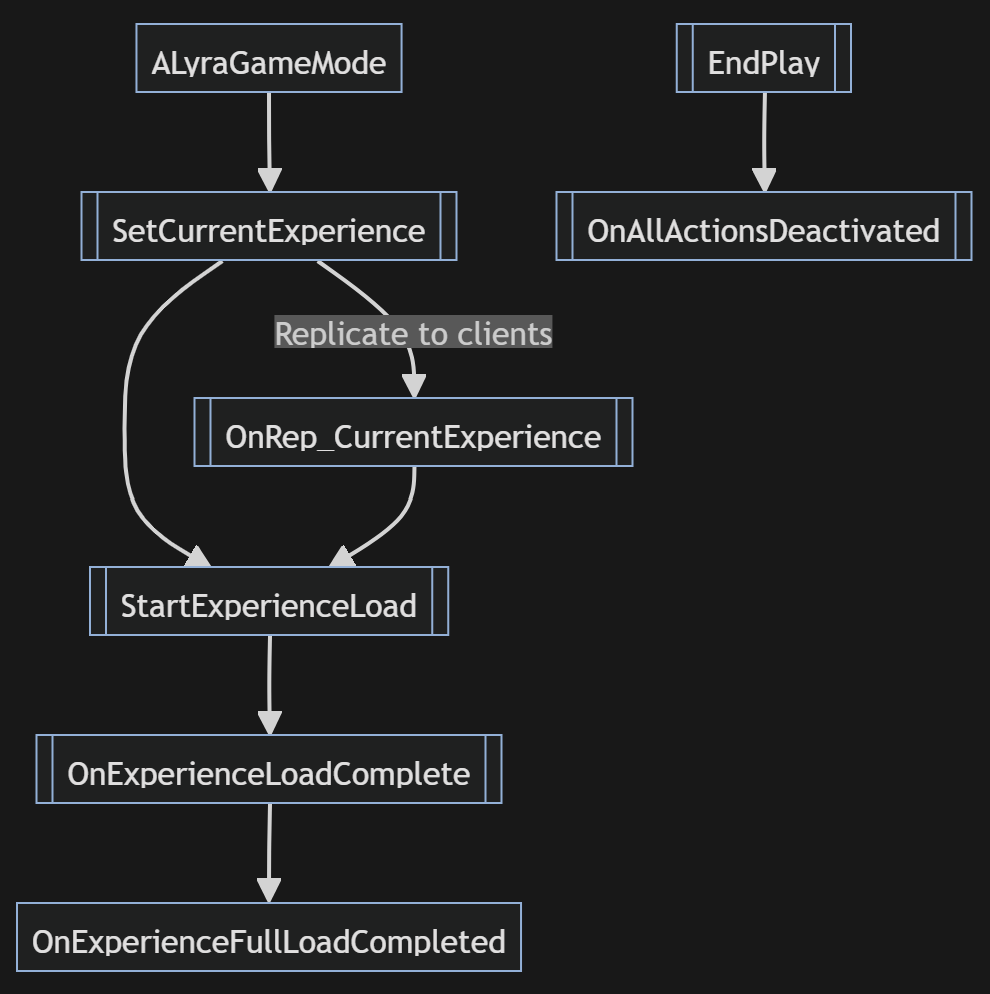
- Lyra의 게임 모드 흐름 정리
전체 흐름을 다시 정리하면 다음과 같다.
- PrimaryAssetId로 Experience를 식별한다.
- Experience와 관련된 Asset Bundle을 비동기로 로드한다.
- 필요한 Game Feature Plugin을 활성화한다.
- Experience와 Action Set의 Action을 실행한다.
- 최종적으로 Loaded 상태가 된다.
1-3. Data Save & Load
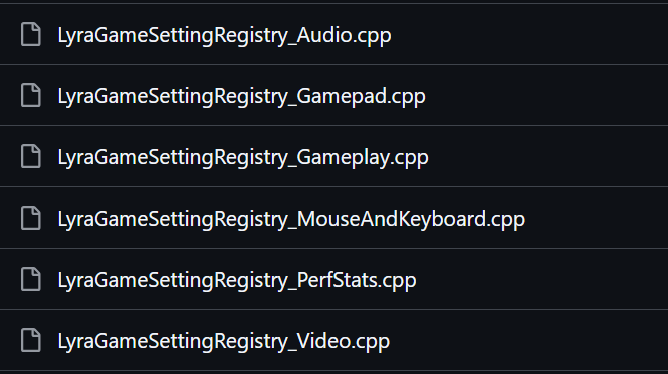
Lyra는 플레이어 설정 역시 데이터로 분리해 저장하고 다시 불러오는 구조를 가지고 있다.
이때 설정 데이터를 여러가지 기준으로 분리하고, 이를 필요할 때 로드하고 저장하는 방식으로 구성되어 있다.
- ULyraSettingsShared
- ULyraSettingsLocal
ULyraSettingsShared
ULyraSettingsShared는 플레이어 기준으로 공유될 수 있는 설정을 담당한다.
class ULyraSettingsShared : public ULocalPlayerSaveGame

ULyraSettingsShared* ULyraSettingsShared::CreateTemporarySettings(const ULyraLocalPlayer* LocalPlayer)
{
	// This is not loaded from disk but should be set up to save
	ULyraSettingsShared* SharedSettings = Cast<ULyraSettingsShared>(CreateNewSaveGameForLocalPlayer(ULyraSettingsShared::StaticClass(), LocalPlayer, SHARED_SETTINGS_SLOT_NAME));

	SharedSettings->ApplySettings();

	return SharedSettings;
}

ULyraSettingsShared* ULyraSettingsShared::LoadOrCreateSettings(const ULyraLocalPlayer* LocalPlayer)
{
	// This will stall the main thread while it loads
	ULyraSettingsShared* SharedSettings = Cast<ULyraSettingsShared>(LoadOrCreateSaveGameForLocalPlayer(ULyraSettingsShared::StaticClass(), LocalPlayer, SHARED_SETTINGS_SLOT_NAME));

	SharedSettings->ApplySettings();

	return SharedSettings;
}
ULyraSettingsLocal
ULyraSettingsLocal은 현재 디바이스 환경에 종속되는 로컬 설정을 담당한다.
해상도, 프레임 제한, 오디오 볼륨, 세이프존, 디바이스 프로파일과 같이 실행 중인 환경에 따라 달라지는 설정이 이 클래스에서 관리된다.
void ULyraSettingsLocal::LoadSettings(bool bForceReload)
{
	Super::LoadSettings(bForceReload);

	// Console platforms use rhi.SyncInterval to limit framerate
	const ULyraPlatformSpecificRenderingSettings* PlatformSettings = ULyraPlatformSpecificRenderingSettings::Get();
	if (PlatformSettings->FramePacingMode == ELyraFramePacingMode::ConsoleStyle)
	{
		FrameRateLimit = 0.0f;
	}

	// Enable HRTF if needed
	bDesiredHeadphoneMode = bUseHeadphoneMode;
	SetHeadphoneModeEnabled(bUseHeadphoneMode);

	ApplyLatencyTrackingStatSetting();

	DesiredUserChosenDeviceProfileSuffix = UserChosenDeviceProfileSuffix;

	LyraSettingsHelpers::FillScalabilitySettingsFromDeviceProfile(DeviceDefaultScalabilitySettings);

	DesiredMobileFrameRateLimit = MobileFrameRateLimit;
	ClampMobileQuality();


	PerfStatSettingsChangedEvent.Broadcast();
}
1-4. Data Validation
Lyra는 Experience, Action Set, Input, Ability, Team 설정처럼 많은 시스템을 데이터 중심으로 구성하고 있다.
이 방식은 유연하고 확장성이 높지만, 반대로 잘못된 데이터가 들어갔을 때 런타임 오류로 이어질 가능성도 크다.
Lyra는 이를 위해 LyraEditor/Validation 폴더 아래에 에디터 전용 Data Validation 계층을 두고 있다.
이 계층은 단순히 객체 내부의 IsDataValid()를 호출하는 수준을 넘어, 패키지를 다시 로드해 경고를 수집하거나, Blueprint를 검사하거나, 소스 컨트롤 상태까지 확인하는 역할을 담당한다.
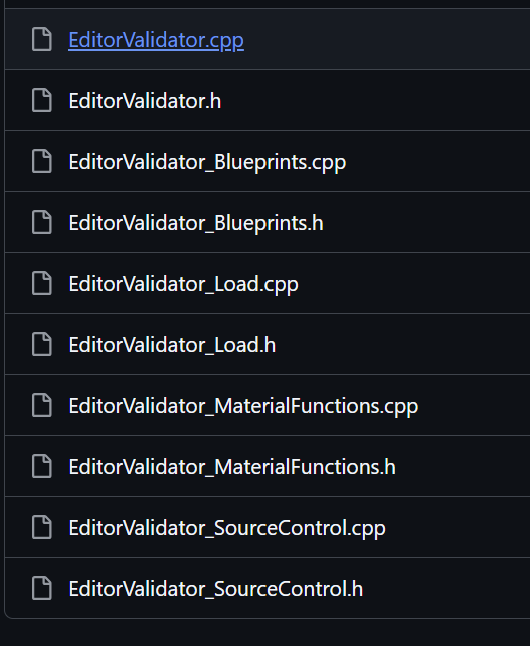
Editor Validator
UEditorValidator는 프로젝트 전반의 자산 검증 진입점을 구성하고 있다.
UCLASS(Abstract)
class UEditorValidator : public UEditorValidatorBase
{
	GENERATED_BODY()

public:
	UEditorValidator();

	static void ValidateCheckedOutContent(bool bInteractive, const EDataValidationUsecase InValidationUsecase);
	static bool ValidatePackages(const TArray<FString>& ExistingPackageNames, const TArray<FString>& DeletedPackageNames, int32 MaxPackagesToLoad, TArray<FString>& OutAllWarningsAndErrors, const EDataValidationUsecase InValidationUsecase);
	static bool ValidateProjectSettings();

	static bool IsInUncookedFolder(const FString& PackageName, FString* OutUncookedFolderName = nullptr);
	static bool ShouldAllowFullValidation();

	static void GetChangedAssetsForCode(class IAssetRegistry& AssetRegistry, const FString& ChangedHeaderLocalFilename, TArray<FString>& OutChangedPackageNames);

protected:
	virtual bool CanValidateAsset_Implementation(UObject* InAsset) const override;

	static TArray<FString> TestMapsFolders;

private:
	/**
	 * Used by some validators to determine if it is okay to load referencing assets or other slow tasks.
	 * This is not okay for fast operations like saving, but is fine for slower "check everything thoroughly" tests
	 */
	static bool bAllowFullValidationInEditor;
};
해당 Validator에서는 다음과 같은 검증을 거치고 있다.
- 체크아웃된 콘텐츠 검증
- 패키지 단위 검증
- 프로젝트 설정 검증
또한 실제로 에셋을 로드하면서 발생하는 경고와 오류를 수집하고 있다.
class FLyraValidationMessageGatherer : public FOutputDevice
{
public:
	FLyraValidationMessageGatherer()
		: FOutputDevice()
	{
		GLog->AddOutputDevice(this);
	}

	virtual ~FLyraValidationMessageGatherer()
	{
		GLog->RemoveOutputDevice(this);
	}

	...
};
이 외에도 다양한 용도의 Validator가 존재한다.
- EditorValidator_Load
UEditorValidator_Load는 패키지를 직접 로드하고, 그 과정에서 발생한 경고와 오류를 수집하여 validation 결과로 사용한다.
-
UEditorValidator_Blueprints
UEditorValidator_Blueprints는 Blueprint 자산만 골라서 검증하도록 구성되어 있다. -
EditorValidator_SourceControl
UEditorValidator_SourceControl은 소스 컨트롤에 제대로 포함되어 있는지 확인한다. -
UEditorValidator_MaterialFunctions
UEditorValidator_MaterialFunctions는 머티리얼 함수 자산을 전용으로 검증하도록 구성되어 있다.
참고자료
johnlogostini/Lyra - DeepWiki
Looking into Lyra - Experiences
Lyra Deep Dive - Chapter 3: Experience Lifecycle