
📝 Next.js 란?
Vercel에서 만든 SSR, SEO 등을 하기 위한 React Framework
장점
- SSR (server-side-rendering) 에 최적
- 각종 Optimization
- 소스가 바뀌었을 때 바로 re-loading
📍 Next.js의 작동방식
- 사용자가 초기에 Server에 페이지 접속을 요청한 경우 SSR방식으로 렌더링 될 HTML을 보낸다.
- 브라우저에서 JS를 다운로드 받고 React를 실행한다.
- 사용자가 페이지와 상호작용을 하며 다른 페이지로 이동할 경우 CSR방식으로 Server가 아닌 브라우저에서 처리한다.
여기서 잠깐 ssr 에 대하여 알아보자!
📍 SSR (server side rendering) 이란?
클라이언트로 전달될 HTML 파일 내용 (일부를) 미리 그려서 내려주는 것
-
CSR (client side rendering) 속도를 빠르게 하여, 사용자 체감 속도 증진
-
검색 엔진이 JS 를 실행하지 않고 크롤링 가능 SEO (검색 엔진 최적화)
SEO (검색 엔진 최적화) 란?
검색엔진 봇들은 JavaScript를 해석하기 힘들기 때문에 HTML에서 크롤링하게 됩니다. CSR 방식은 Client 측에서 페이지를 구성하기 전에 HTML에 아무것도 없으므로 데이터를 수집하지 못해 검색엔진에 노출이 어려운 것 입니다.
📍 CSR vs SSR
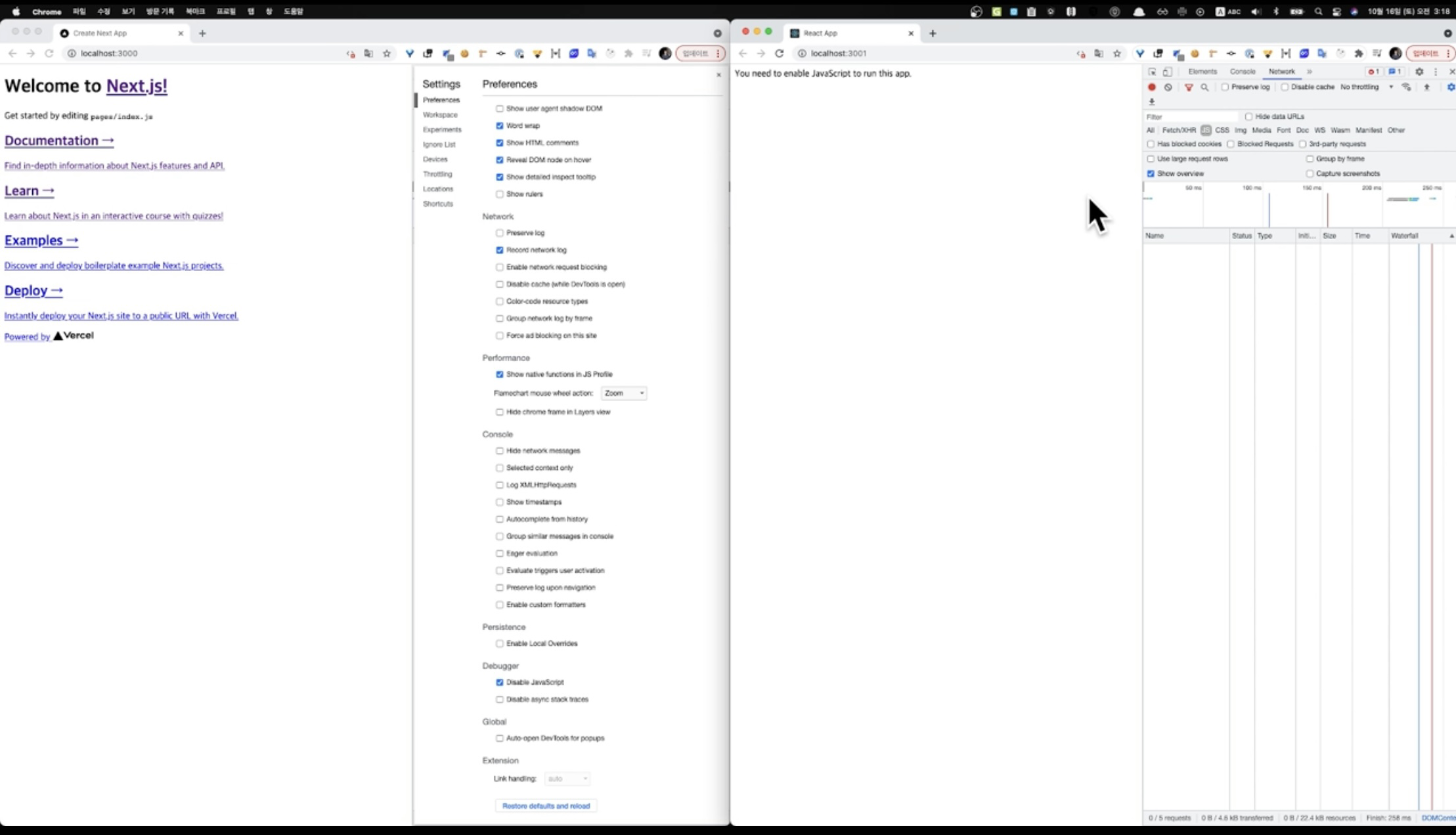
왼쪽 SSR | 오른쪽 CSR
next.js 프로젝트를 npm run dev 를 통해 dev 서버를 실행하고, preferences 에서 JS를 제거하면,
react 프로젝트 (CSR) 의 경우는 render 하지 않지만,
next.js 프로젝트 (SSR)는 render 되는 모습을 볼 수 있다.
CSR 과 SSR 작성 법은 아래와 같다.
-
CSR (일반적인 React 프로젝트 코드)
export default function Launches() {

    const [data, setData] = useState(null);

    useEffect(() => {
      // api 에서 data 를 받아서 json 으로 바꿔서 data에 set
      const fetchLaunches = async () => {
        const res = await fetch("https://api.spacexdata.com/v3/launches");
        const data = await res.json();
        setData(data);
      };
      fetchLaunches();
    }, []);
  if (data === null) {
    return null;
  }

  return (
    <div>
      <ol>
        {data.map((launch, index) => (
          <li key={index}>{launch.mission_name}</li>
        ))}
      </ol>
    </div>
  );
}
서버로 페이지 요청을 하면, 빈 HTML 을 받아서 JS 코드로 데이터를 받아와 처리한다.
-
SSR (getServerSideProps 이용)
export default function Launches({ data }) {

  if (data === null) {
    return null;
  }

  return (
    <div>
      <ol>
        {data.map((launch, index) => (
          <li key={index}>{launch.mission_name}</li>
        ))}
      </ol>
    </div>
  );
}

export async function getServerSideProps(context) {
  const res = await fetch("https://api.spacexdata.com/v3/launches");
  const data = await res.json();

 // console.log("getServerSideProps"); => 브라우저가 아닌 **서버**에서 찍힌다

  return {
    props: { data },
  };
}
SSR 은
getServerSideProps혹은Static Generation를 이용해
서버에서 미리 데이터를 받고 그려서 data 를 props 로 전달하여
해당 component 에서 브라우저에서 JS 코드의 도움없이 data 를 그릴 수 있는 것이다.
📍 Pre-rendering | SSR vs SSG
-
SSR
- Next.js는 에서 반환된 데이터를 사용하여 각 요청에서 이 페이지를 미리 렌더링
- 새로고침할 때 마다 (클라이언트가 서버에 요청할 때 마다) 요청 데이터를 가져온다.
- data가 계속 변경될 때 사용하면 좋다.
export async function getServerSideProps(context) { const res = await fetch("https://api.spacexdata.com/v3/launches"); const data = await res.json(); return { props: { data }, }; } -
SSG (Static Generation) 👍🏻
- Next.js는 빌드 시 에서 반환된 props를 사용하여 이 페이지를 미리 렌더링
- 즉 build 할 때 data 까지 받아와서 미리 렌더링 하기 때문에 효율적이고 빠르다.
- data가 바뀌지 않는다면 사용하면 좋다.
export async function getStaticProps(context) {

  const res = await fetch("https://api.spacexdata.com/v3/launches");
  const data = await res.json();

  return {
    props: { data },
  };
}