Vue로 PWA 개발 - 그랜파 개발자
49. 알림 요청 개선
알림 요청 화면에 ‘알림 요청’ 버튼 하나만 있는 것은 상당히 불친절합니다. 왜 알림 요청을 해야 하는지 설명이 있어야 하고, 알림 요청 버튼을 눌렀을 때 처리 결과에 대해 알려 주어야 하고, 그리고 알림은 어떤 형태를 가지는지 보여주는 것이 아무래도 좀 더 사용자에 친절할 것입니다.
1. 알림 요청
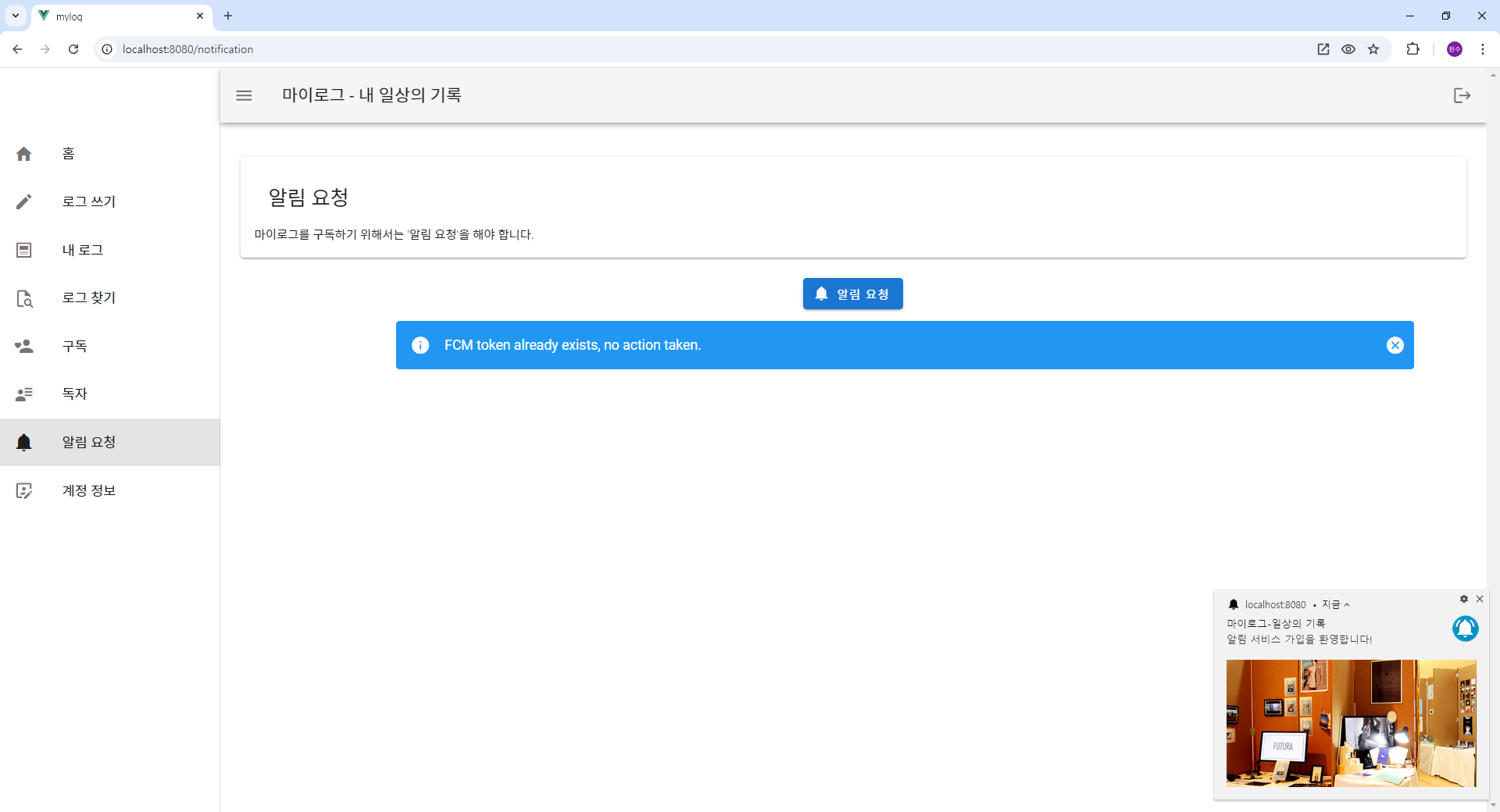
2. src/views/NotificationView.vue
<!-- src/views/NotificationView.vue -->
<template>
  <v-container class="mt-4" fluid>
    <v-row align="center" justify="center">
      <v-col cols="12">
        <v-card class="pa-4">
          <v-card-title>
            <span class="text-h5">알림 요청</span>
          </v-card-title>

          <v-list-item-subtitle>
            마이로그를 구독하기 위해서는 '알림 요청'을 해야 합니다.
          </v-list-item-subtitle>

        </v-card>
      </v-col>
    </v-row>

    <v-row>
      <v-col class="text-center" cols="10" offset="1" sm="8" offset-sm="2">
        <v-btn color="primary" @click="requestFCMToken">
          <v-icon left>mdi-bell</v-icon>
          알림 요청
        </v-btn>
      </v-col>
    </v-row>

    <v-row align="center" justify="center">
      <v-col cols="10" offset="1">
        <!-- v-alert : type="success" "info" "warning"  "error" -->
        <v-alert v-if="error" type="info" dismissible @input="resetErrorMsg" class="my-alert">{{ error }}</v-alert>
      </v-col>
    </v-row>
  </v-container>

</template>

<script>
import { mapActions, mapGetters } from "vuex";

export default {
  name: "NotificationView",
  data() {
    return {
    };
  },
  computed: {
    ...mapGetters('fcm',['error']),
  },
  methods: {
    ...mapActions('fcm', ['getAndSaveFCMToken', 'resetError']),
    async requestFCMToken() {
      try {
        const userId = this.$store.state.auth.user.id;
        this.getAndSaveFCMToken(userId);

        this.ShowNotification();
      } catch (error) {
        console.error("Error requesting FCM token:", error);
      }
    },
    resetErrorMsg() {
      this.resetError();
    },
    ShowNotification() {
      const title = "마이로그-일상의 기록";
      const options = {
        body: "알림 서비스 가입을 환영합니다!",
        icon: "/img/push-noti.png",
        badge: "/img/push-badge-icon.png",
        image: "/img/push-image.jpg",
        data: [
           { action: "like", title: "링크를 클릭하세요.", icon: "/img/push-coffee.png", url: 'https://velog.io/@inetsos/posts'}
        ],
        vibrate: [500, 100, 500]
      };
      navigator.serviceWorker.ready
      .then(function(swreg) {
        swreg.showNotification(title, options);
      });
    },
  }
};
</script>

<style scoped>
.my-alert {
  text-align: justify;
  bottom: 30px;
  margin: 20px 0;
}

#blog-link:hover {
  color: blue;
  cursor: pointer;
}
</style>
3. src/store/modules/fcm.js
// src/store/modules/fcm.js
import { messaging } from '@/firebase';
import { getToken } from "firebase/messaging";
import { db, collection, doc, setDoc, getDoc, arrayUnion } from "@/firebase";

const state = {
  isLoading: false,
  error: null
};

const mutations = {
  setError(state, error) {
    state.error = error;
    state.isLoading = false;
  },
  setLoading(state, isLoading) {
    state.isLoading = isLoading;
  }
};

const actions = {
  async getAndSaveFCMToken({ commit, dispatch }, userId) {
    try {
      // Request permission from the user to send notifications
      const permission = await Notification.requestPermission();
      if (permission === "granted") {
        console.log("Notification permission granted.");

        // Get the FCM token
        const token = await getToken(messaging, { vapidKey: process.env.VUE_APP_VAPID_KEY });
        if (token) {
          //console.log("FCM Token: ", token);
          // Save the FCM token to Firestore
          dispatch('saveFCMToken', { userId, token });
        } else {
          commit('setError', "No registration token available.");
          console.log("No registration token available.");
        }
      } else {
        commit('setError', "Notification permission denied.");
        console.log("Notification permission denied.");
      }
    } catch (error) {
      console.error("An error occurred while getting the FCM token:", error);
      commit('setError', "An error occurred while getting the FCM token: ${error}");
    }
  },

  // Save the FCM token to Firestore
  async saveFCMToken({ commit}, {userId, token}) {
    const tokenRef = doc(db, 'fcmTokens', userId);
    try {
      const tokenDoc = await getDoc(tokenRef);
      if (tokenDoc.exists()) {
        // 이미 등록된 토큰이 있는 경우
        const tokens = tokenDoc.data().tokens || [];

        // Check if the token already exists
        const tokenExists = tokens.some(t => t.token === token);
        if (!tokenExists) {
          // Add the token with creation date using arrayUnion
          await updateDoc(tokenRef, {
            tokens: arrayUnion({
              token: token,
              createdAt: new Date()
              //createdAt: serverTimestamp()  // Store server timestamp as creation date
            })
          });
          console.log('New FCM token added with creation date.');
          commit('setError', 'New FCM token added with creation date.');
        } else {
          console.log('FCM token already exists, no action taken.');
          commit('setError', 'FCM token already exists, no action taken.');
        }
      } else {
        // Create a new document if the user does not exist, with the token and creation date
        await setDoc(tokenRef, {
          tokens: [{
            token: token,
            createdAt: new Date()
            //createdAt: serverTimestamp()  // Store server timestamp as creation date
          }]
        });
        console.log('User document created and token saved.');
        commit('setError', 'User document created and token saved.');
      }
    } catch (error) {
      commit('setError','Error saving FCM token: ${error}');
      console.error('Error saving FCM token:', error);
    }
  },
  resetError({ commit }) {
    commit('setError', null);
  },
};

const getters = {
  isLoading: state => state.isLoading,
  error: state => state.error
};

export default {
  namespaced: true,
  state,
  mutations,
  actions,
  getters
};
ChatGPT와 함께 Vue PWA을 공부합니다.