Vue로 PWA 개발 - 그랜파 개발자
Vue 프로젝트 Beta Test : mylog, 일상의 기록
개발이 진행됨에 따라 소스 코드를 계속 추가해 갑니다.
App
vue create 명령어로 만들어진 프로젝트를 수정하면서 웹앱 개발을 시작합니다.
애플리케이션의 상태(state)를 관리하기 위해 store를 사용하고, Vue 애플리케이션의 여러 컴포넌트들이 서로 독립적으로 상태를 관리할 필요 없이, store를 통해 공통된 상태를 쉽게 공유하고 제어할 수 있습니다.
store는 일반적으로 Vuex라는 라이브러리를 이용해 구현되며 Vuex는 Vue.js의 공식 상태 관리 패턴이자 라이브러리로, 주로 대규모 애플리케이션에서 여러 컴포넌트 간의 상태를 일관성 있게 관리하는 데 유용합니다. Vuex의 상태 관리 원칙은 단방향 데이터 흐름을 따르며, 이는 애플리케이션의 상태를 관리하는데 체계적이고 예측 가능한 구조를 제공합니다.
mylog의 store는 사용자 인증을 처리하는 auth.js, 푸시 알림 메시지를 처리하는 fcm.js, 회원이 등록하는 짧은 글들을 처리하는 mylogs.js로 구성이 됩니다.
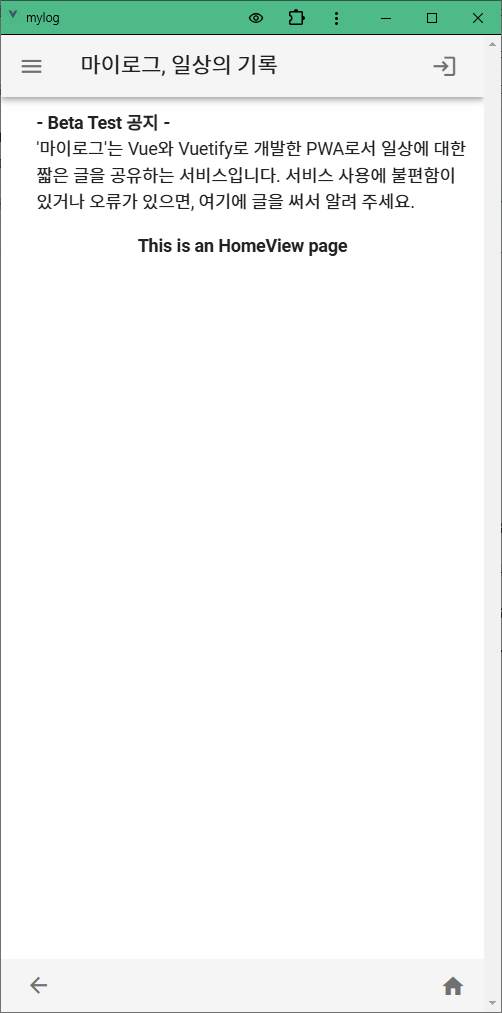
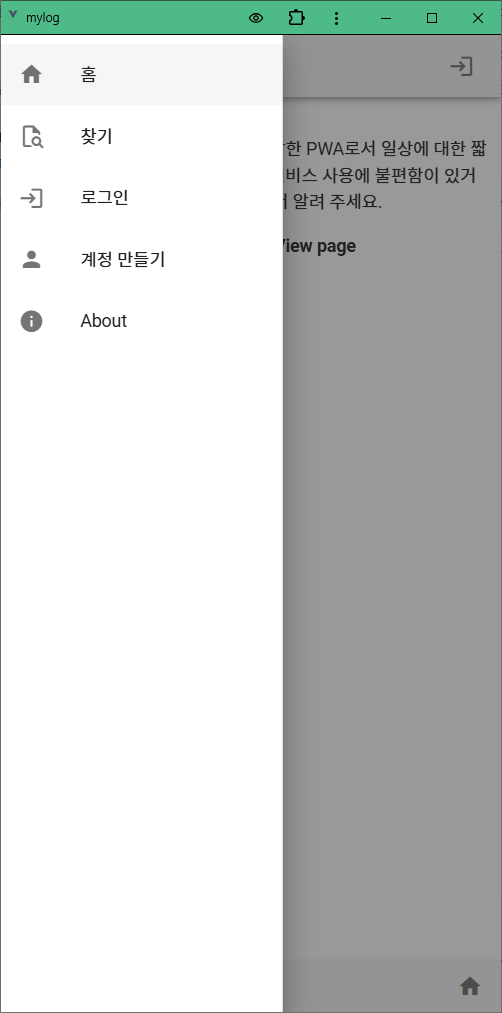
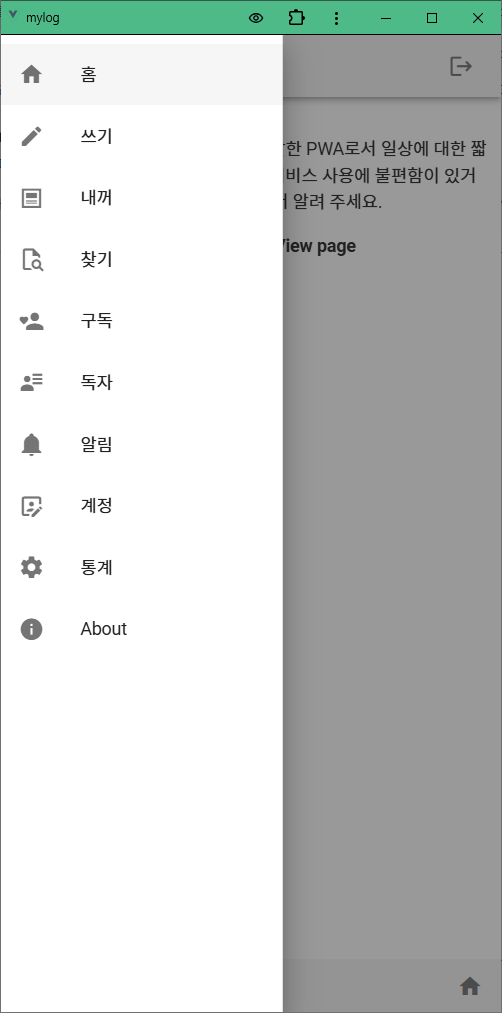
App.vue를 수정하여 앱의 레이아웃과 메뉴를 구성합니다. 메뉴와 router를 연결하여 메뉴 항목을 누르면 앱의 해당 페이지가 열리도록 합니다.
1. mylog
2. 폴더 구조
src
 ┣ assets
 ┃ ┣ logo.png
 ┃ ┗ logo.svg
 ┣ components
 ┃ ┗ HelloWorld.vue
 ┣ plugins
 ┃ ┗ vuetify.js
 ┣ router
 ┃ ┗ index.js
 ┣ store
 ┃ ┣ modules
 ┃ ┃ ┣ auth.js
 ┃ ┃ ┣ fcm.js
 ┃ ┃ ┗ mylogs.js
 ┃ ┗ index.js
 ┣ views
 ┃ ┣ AboutView.vue
 ┃ ┣ EditMyLogView.vue
 ┃ ┣ HomeView.vue
 ┃ ┣ LoginView.vue
 ┃ ┣ ManageView.vue
 ┃ ┣ MyLogView.vue
 ┃ ┣ MyMyLogsView.vue
 ┃ ┣ NotificationView.vue
 ┃ ┣ ProfileView.vue
 ┃ ┣ ReadersView.vue
 ┃ ┣ RegisterView.vue
 ┃ ┣ SearchMyLogsView.vue
 ┃ ┣ SubscriptionsView.vue
 ┃ ┣ UserMyLogsView.vue
 ┃ ┗ WriteMyLogView.vue
 ┣ App.vue
 ┣ main.js
 ┗ registerServiceWorker.js
3. app
v-app-bar에 로그인, 로그아웃 아이콘이 있습니다. 로그인 상태이면 로그아웃 아이콘이 보이고, 로그아웃 상태이면 로그인 아이콘이 보입니다.
로그인 상태는 store의 auth 모듈의 user 상태로 판단을 합니다. 아직 계정 만들기 전이므로 테스트를 위하여 임시로 로그인을 하면 user에 'user'를 설정하여 user가 null이 아닌 것으로 만들면 로그인 상태가 되고, user가 null이면 로그아웃 상태 입니다. login, logout action이 아주 단순한 코드이지만 애플리케이션의 상태관리에 대한 내용이 모두 포함되어 있습니다. actions에서 mutations를 호출하여 상태를 변경하고, 변경된 상태는 getters로 애플리케이션에서 사용할 수 있습니다.
GetMenuItems()은 user의 상태로 로그인 여부를 알 수 있으며, 로그인 상태에 따라 각각의 메뉴 아이템을 보여줍니다.
<!-- src/App.vue -->
<template>
  <v-app>
    <!-- App Bar -->
    <v-app-bar app>
      <v-app-bar-nav-icon @click="drawer = !drawer"></v-app-bar-nav-icon>
      <v-toolbar-title>마이로그, 일상의 기록</v-toolbar-title>
      <v-spacer></v-spacer>
      <div @click="doLogout" v-if="user" style="cursor: pointer">
        <v-icon left class="ml-5">mdi-logout</v-icon>
      </div>

      <!-- 계정만들기 전에 로그인 테스트 용 -->
      <div @click="doLogin" v-if="!user" style="cursor: pointer">
        <v-icon left class="ml-5">mdi-login</v-icon>
      </div>

    </v-app-bar>

    <!-- Navigation Drawer -->
    <v-navigation-drawer app v-model="drawer" :clipped="$vuetify.breakpoint.lgAndUp">
      <v-list>
        <v-list-item-group>
          <!-- Loop through routes array to create navigation items -->
          <v-list-item v-for="(route, index) in GetMenuItems" :key="index" @click="$router.push(route.path).catch(() => {});">
            <v-list-item-icon>
              <v-icon>{{ route.icon }}</v-icon>
            </v-list-item-icon>
            <v-list-item-content>
              <v-list-item-title>{{ route.title }}</v-list-item-title>
            </v-list-item-content>
          </v-list-item>
        </v-list-item-group>
      </v-list>
    </v-navigation-drawer>

    <!-- Main Content with Router View -->
    <v-main>
      <v-container>
        <div class="ml-5 mb-1">
          <b>- Beta Test 공지 -</b><br>
          '마이로그'는 Vue와 Vuetify로 개발한 PWA로서 일상에 대한 짧은 글을 공유하는 서비스입니다.
          서비스 사용에 불편함이 있거나 오류가 있으면, 여기에 글을 써서 알려 주세요.<br>
        </div>

        <!-- Router View to display route components -->
        <router-view></router-view>
      </v-container>
    </v-main>

    <v-footer app>
      <!--홈 화면이 아닌 경우 돌아가기 버튼 표시-->
      <v-btn icon v-if="$route.name !== 'HomeView'" @click="$router.go(-1)">
        <v-icon>mdi-arrow-left</v-icon>
      </v-btn>

<!--
      <v-btn class="ml-2" icon v-if="$route.name == 'home'" @click="orderByAsc">
        <v-icon>mdi-arrow-up</v-icon>
      </v-btn>

      <v-btn class="ml-2" icon v-if="$route.name == 'home'" @click="orderByDesc">
        <v-icon>mdi-arrow-down</v-icon>
      </v-btn>
-->
      <router-link v-if="user" to="/write" style="cursor: pointer" class="ml-2">
        <v-icon>mdi-pencil</v-icon>
      </router-link>

      <v-spacer></v-spacer>
      <router-link to="/" style="cursor: pointer">
        <v-icon>mdi-home</v-icon>
      </router-link>
    </v-footer>
  </v-app>
</template>

<script>
import { mapActions, mapGetters } from 'vuex';
import router from '@/router';  // Vue Router import

export default {
  name: 'App',

  data: () => ({
    drawer: false, // State to toggle the navigation drawer
  }),
  computed: {
    ...mapGetters('auth', ['user']),

    // 로그인 여부에 따라 다르게 탐색서랍과 툴바 메뉴명 항목 배열 반환
    GetMenuItems() {
      if(this.user) {
        return [
          { title: '홈', path: '/', icon: 'mdi-home'},
          { title: '쓰기', path: '/write', icon: 'mdi-pencil'},
          { title: '내꺼', path: '/mylogs', icon: 'mdi-post-outline'},
          { title: '찾기', path: '/search', icon: 'mdi-file-search-outline'},
          { title: '구독', path: '/subscribing', icon: 'mdi-account-heart'},
          { title: '독자', path: '/subscriber', icon: 'mdi-account-details'},
          { title: '알림', path: '/notification', icon: 'mdi-bell'},
          { title: '계정', path: '/profile', icon: 'mdi-account-box-edit-outline'},
          { title: '통계', path: '/manage', icon: 'mdi-cog'},
          { title: 'About', path: '/about', icon: 'mdi-information'}
        ]
      } else {
        return [
          { title: '홈', path: '/', icon: 'mdi-home'},
          { title: '찾기', path: '/search', icon: 'mdi-file-search-outline'},
          { title: '로그인', path: '/login', icon: 'mdi-login'},
          { title: '계정 만들기', path: '/register', icon: 'mdi-account'},
          { title: 'About', path: '/about', icon: 'mdi-information'}
        ]
      }
    }
  },
  methods: {
    ...mapActions('auth', ['login', 'logout']),
    doLogout() {
      this.logout();
      if(this.$route.name !== 'home')
        router.push("/");   // home으로
    },
    doLogin() {
      this.login();
      if(this.$route.name !== 'home')
        router.push("/");   // home으로
    },
  }
};
</script>
4. router
// src/router/index.js
import Vue from 'vue'
import VueRouter from 'vue-router'
import store from '../store';

import HomeView from '../views/HomeView.vue'
import LoginView from '../views/LoginView.vue'
import RegisterView from '../views/RegisterView.vue'
import ProfileView from '../views/ProfileView.vue'
import WriteMyLogView from '../views/WriteMyLogView.vue'
import EditMyLogView from '../views/EditMyLogView.vue'

import MyMyLogsView from '../views/MyMyLogsView.vue'
import MyLogView from '../views/MyLogView.vue'
import UserMyLogsView from '../views/UserMyLogsView.vue'
import SearchMyLogsView from '../views/SearchMyLogsView.vue'
import SubscriptionsView from '../views/SubscriptionsView.vue'
import ReadersView from '../views/ReadersView.vue'
import NotificationView from '../views/NotificationView.vue'
import ManageView from '../views/ManageView.vue'

Vue.use(VueRouter)

const routes = [
  {
    path: '/',
    name: 'home',
    component: HomeView
  },
  {
    path: '/login',
    name: 'login',
    component: LoginView
  },
  {
    path: '/register',
    name: 'register',
    component: RegisterView
  },
  {
    path: '/profile',
    name: 'profile',
    component: ProfileView,
    meta: { requiresAuth: true }
  },
  {
    path: '/write',
    name: 'write',
    component: WriteMyLogView,
    meta: { requiresAuth: true }
  },
  {
    path: '/mylog/:id',
    name: 'mylog',
    component: MyLogView
  },
  {
    path: '/mylog/edit/:mylog',
    name: 'edit',
    component: EditMyLogView,
    props: true,
  },
  {
    path: '/mylogs',
    name: 'mylogs',
    component: MyMyLogsView,
    meta: { requiresAuth: true }
  },
  {
    path: '/userlogs/:userId',
    name: 'userlogs',
    component: UserMyLogsView
  },
  {
    path: '/search',
    name: 'search',
    component: SearchMyLogsView
  },
  {
    path: '/subscribing',
    name: 'subscribing',
    component: SubscriptionsView,
    meta: { requiresAuth: true }
  },
  {
    path: '/subscriber',
    name: 'subscriber',
    component: ReadersView,
    meta: { requiresAuth: true }
  },
  {
    path: '/notification',
    name: 'notification',
    component: NotificationView,
    meta: { requiresAuth: true }
  },
  {
    path: '/manage',
    name: 'manage',
    component: ManageView,
    meta: { requiresAuth: true  }
  },
  {
    path: '/about',
    name: 'about',
    // route level code-splitting
    // this generates a separate chunk (about.[hash].js) for this route
    // which is lazy-loaded when the route is visited.
    component: () => import(/* webpackChunkName: "about" */ '../views/AboutView.vue')
  }
]

const router = new VueRouter({
  mode: 'history',
  base: process.env.BASE_URL,
  routes
})

router.beforeEach((to, from, next) => {

  const requiresAuth = to.matched.some(record => record.meta.requiresAuth);
  const user = store.state.auth.user;

  if (requiresAuth && !user) {
    next('/login');
  } else {
    next();
  }
});

export default router
5. store
src/store/index.js
// src/store/index.js
import Vue from 'vue';
import Vuex from 'vuex';
import auth from './modules/auth';
import mylogs from './modules/mylogs';
import fcm from './modules/fcm';

Vue.use(Vuex);

export default new Vuex.Store({
  modules: {
    auth,
    mylogs,
    fcm
  }
});
src/store/modules/auth.js
// src/store/modules/auth.js
const state = {
  user: null,
};

const mutations = {
  setUser(state, user) {
    state.user = user;
  },
};

const actions = {
  async login({ commit }) {
    commit('setUser', 'user');  // 테스트를 위한 임시 로그인
  },
  async logout({ commit }) {
    commit('setUser', null);
  },
};

const getters = {
  user: state => state.user,
};

export default {
  namespaced: true,
  state,
  mutations,
  actions,
  getters
};
src/store/modules/fcm.js
// src/store/modules/fcm.js
const state = {
};

const mutations = {
};

const actions = {
};

const getters = {
};

export default {
  namespaced: true,
  state,
  mutations,
  actions,
  getters
};
src/store/modules/mylogs.js
// src/store/modules/mylogs.js
const state = {
};

const mutations = {
};

const actions = {
};

const getters = {
};

export default {
  namespaced: true,
  state,
  mutations,
  actions,
  getters
};
6. views
rc/views/AboutView.vue
<!-- src/views/AboutView.vue -->
<template>
  <div class="mt-8">
    <h4>마이로그는?</h4>
    <br>
    '마이로그'는 일상에 대한 짧은 글을 공유하는 서비스입니다. <br>
    Client Side는 Vue.js (with Vuetify)로 개발하고,<br>
    Backend 서비스는 Firebase (Authentication, Firestore, Hosting)를 사용하여 개발을 진행합니다.<br>
    <br>
    개발이 진행되는 순서대로 소스코드를 공개하고, 베타 버전은 웹에 서비스되고 있습니다.<br>
    <br>
    <div>
      <v-icon>mdi-arrow-right</v-icon>
      Beta Test : <a href="https://my-project-bd617.web.app/">mylog, 일상의 기록</a>
    </div>
  </div>
</template>
src/views/EditMyLogView.vue
<!-- src/views/EditMyLogView.vue -->
<template>
  <div class="mt-4 text-center">
    <h4>This is an EditMyLogView page</h4>
  </div>
</template>
src/views/HomeView.vue
<!-- src/views/HomeView.vue -->
<template>
  <div class="mt-4 text-center">
    <h4>This is an HomeView page</h4>
  </div>
</template>
src/views/LoginView.vue
<!-- src/views/LoginView.vue -->
<template>
  <div class="mt-4 text-center">
    <h4>This is an LoginView page</h4>
  </div>
</template>
src/views/ManageView.vue
<!-- src/views/ManageView.vue -->
<template>
  <div class="mt-4 text-center">
    <h4>This is an ManageView page</h4>
  </div>
</template>
src/views/MyLogView.vue
<!-- src/views/MyLogView.vue -->
<template>
  <div class="mt-4 text-center">
    <h4>This is an MyLogView page</h4>
  </div>
</template>
src/views/MyMyLogsView.vue
<!-- src/views/MyMyLogsView.vue -->
<template>
  <div class="mt-4 text-center">
    <h4>This is an MyMyLogsView page</h4>
  </div>
</template>
src/views/NotificationView.vue
<!-- src/views/NotificationView.vue -->
<template>
  <div class="mt-4 text-center">
    <h4>This is an NotificationView page</h4>
  </div>
</template>
src/views/ProfileView.vue
<!-- src/views/ProfileView.vue -->
<template>
  <div class="mt-4 text-center">
    <h4>This is an ProfileView page</h4>
  </div>
</template>
src/views/ReadersView.vue
<!-- src/views/ReadersView.vue -->
<template>
  <div class="mt-4 text-center">
    <h4>This is an ReadersView page</h4>
  </div>
</template>
src/views/RegisterView.vue
<!-- src/views/RegisterView.vue -->
<template>
  <div class="mt-4 text-center">
    <h4>This is an RegisterView page</h4>
  </div>
</template>
src/viewss/SearchMyLogsView.vue
<!-- src/viewss/SearchMyLogsView.vue -->
<template>
  <div class="mt-4 text-center">
    <h4>This is an SearchMyLogsView page</h4>
  </div>
</template>
src/viewss/SubscribedPosts.vue
<!-- src/viewss/SubscribedPosts.vue -->
<template>
  <div class="mt-4 text-center">
    <h4>This is an SubscribedPosts page</h4>
  </div>
</template>
src/views/UserMyLogsView.vue
<!-- src/views/UserMyLogsView.vue -->
<template>
  <div class="mt-4 text-center">
    <h4>This is an UserMyLogsView page</h4>
  </div>
</template>
src/views/WriteMyLogView.vue
<!-- src/views/WriteMyLogView.vue -->
<template>
  <div class="mt-4 text-center">
    <h4>This is an WriteMyLogView page</h4>
  </div>
</template>
7. main
// src/main.js
import Vue from 'vue'
import App from './App.vue'
import './registerServiceWorker'
import router from './router'
import store from './store'
import vuetify from './plugins/vuetify'

Vue.config.productionTip = false

new Vue({
  router,
  store,
  vuetify,
  render: h => h(App)
}).$mount('#app')
Vue PWA 프로젝트, mylog 코드
