Vue로 PWA 개발 - 그랜파 개발자
Vue 프로젝트 Beta Test : mylog, 일상의 기록
개발이 진행됨에 따라 소스 코드를 계속 추가해 갑니다.
mylog 카테고리
마이로그가 늘어나면 스크롤하면서 읽는 것만으로는 불편합니다. 마이로그의 개수가 많아지면 한없이 스크롤해야 하기 때문입니다. 그래서 마이로그 카테고리를 등록하여 카테고리 별로 분류할 수 있게 하고자 합니다. 마이로그를 볼 때 카메고리별로 볼 수 있으면 같이 주제에 대한 글들이 묶여 있으니 보는 것이 편리하겠지요.
카테고리는 각 사용별로 등록할 수 있습니다. 각 사용자는 자신의 마이로그를 쓸 때 자신이 등록한 카테고리로 마이로그의 카테고리를 정할 수 있습니다. 사용자가 등록한 카테고리는 DB에 저장되어 앱이 종료 후 새로 실행되어도 카테고리는 로드하여 사용할 수 있어야 합니다.
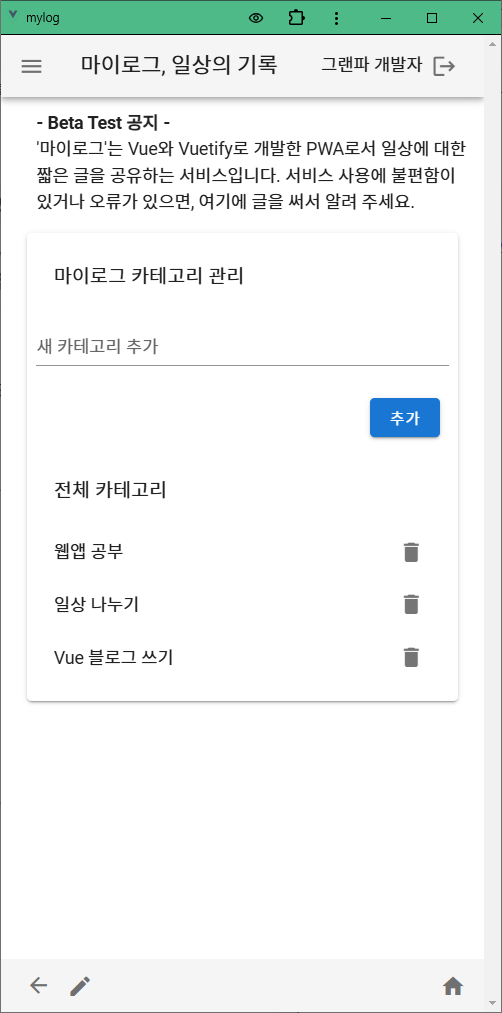
1. 마이로그의 카테고리 관리 기능을 구현
아래와 같은 기능을 구현해야 합니다.
- 카테고리 등록 페이지가 로드되면 DB에 등록된 카테고리를 로드하여 리스트로 보여 줍니다.
- 카테고리를 입력하고 등록을 누르면 카테고리를 DB에 저장합니다.
- 등록된 전체 카테고리는 리스트로 나타내고 삭제 아이콘을 누르면 삭제할 수 있습니다.
2. ManageView.vue
<!-- src/views/ManageView.vue -->
<template>
  <v-container>
    <v-row>
      <v-col cols="12">
        <v-card class="pa-2">
          <v-card-title style="font-size:1.1em">마이로그 카테고리 관리</v-card-title>

          <!-- 새로운 카테고리 추가 -->
          <v-text-field label="새 카테고리 추가" v-model="newCategory" @keyup.enter="doAddCategory"></v-text-field>
          <v-card-actions>
            <v-spacer></v-spacer><v-btn color="primary" @click="doAddCategory">추가</v-btn>
          </v-card-actions>

          <v-list>
            <v-card-title style="font-size:1.1em">전체 카테고리</v-card-title>
            <!-- Firestore에서 불러온 카테고리 -->
            <v-list-item v-for="category in categories" :key="category.id">
              <v-list-item-title style="font-size:1em">{{ category.name }}</v-list-item-title>
              <v-btn icon @click="doRemoveCategory(category.id)">
                <v-icon text>mdi-delete</v-icon>
              </v-btn>
            </v-list-item>
          </v-list>

        </v-card>
      </v-col>
    </v-row>

  </v-container>
</template>

<script>
import { mapState, mapGetters, mapMutations, mapActions } from 'vuex';

export default {
  data() {
    return {
      newCategory: "", // 새로운 카테고리 입력 값
    };
  },

  computed: {
    ...mapState('mylogs', ['categories']),
  },

  methods: {
    ...mapActions('mylogs', ['fetchCategories', 'addCategory', 'removeCategory']),

    async doAddCategory() {
      if (!this.newCategory.trim()) return;

      const userId = this.$store.state.auth.user.id;
      this.addCategory({ newCategory: this.newCategory.trim(), userId: userId });
      this.newCategory = ""; // 입력 필드 초기화
    },

    async doRemoveCategory(id) {
      this.removeCategory(id);
    },
  },

  async mounted() {
    const userId = this.$store.state.auth.user.id;
    await this.fetchCategories(userId); // Firestore에서 카테고리 데이터 가져오기
  },
};
</script>
3. 카테고리 컬렉션의 구조
카테고리 컬렉션은 다음과 같은 구조를 가집니다.
categories (컬렉션)
  └ category1 (문서)
      └ name: "예제 카테고리"
      └ userId: "사용자 ID"
4. store/modules/mylogs.js
1. 카테고리 로드
async fetchCategories({ commit }, userId) {
  if (!userId) return;

  try {
    // 사용자 ID로 필터링된 카테고리 가져오기
    const q = query( collection(db, "categories"),  where("userId", "==", userId)  );
    const querySnapshot = await getDocs(q);

    // DB에서 로드한 카테고리를 배열에 넣는다.
    let categories = [];
    categories = querySnapshot.docs.map((doc) => ({ id: doc.id,  ...doc.data()  }));

    // 로드한 카테고리를 상태에 저장한다.
    commit("setCatogories", categories);

  } catch (error) {
    console.error("Error fetching categories:", error);
  }
},
2. 카테고리 등록
async addCategory({ commit }, { newCategory, userId } ) {
  if (!newCategory || !userId) return;

  try {
    // 새 카테고리를 저장한다.
    const docRef = await addDoc(collection(db, "categories"), {
      name: newCategory, userId: userId,
    });
    // 이미 로드되어 있는 store의 카테고리에 새 카테고리를 추가한다.
    commit("addCatogory", { id: docRef.id, name: newCategory });
  } catch (error) {
    console.error("Error adding category:", error);
  }
},
3. 카테고리 삭제
async removeCategory({ commit }, id) {
  try {
    await deleteDoc(doc(db, "categories", id)); // db에 저장된 카테고리 에서 제거
    commit("removeCatogory", id); // state에 있는 카테고리에서 제거
  } catch (error) {
    console.error("Error deleting category:", error);
  }
},
ChatGPT와 함께 Vue PWA을 공부합니다.