Xtrabackup 증분 백업이란?
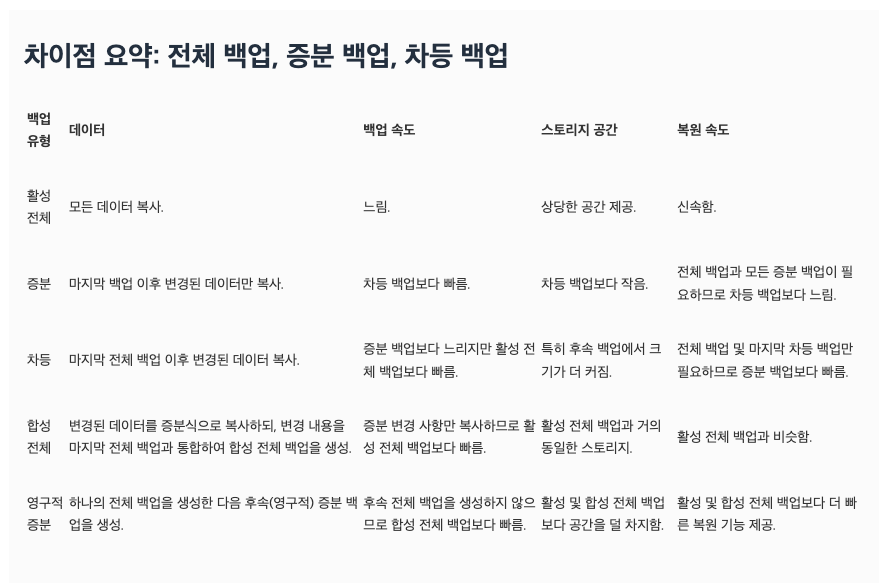
출처 : https://aws.amazon.com/ko/compare/the-difference-between-incremental-differential-and-other-backups/
-
증분 백업이란?
- 마지막 풀백업 혹은 증분백업 이후의 변경사항만 백업하는 방법
- 차등 백업은 항상 풀백업을 기반으로 변경사항을 백업하는 것으로, 증분 백업은 증분의 증분을 만들 수 있다는 것이 차등 백업과의 차이점
-
xtrabackup 증분 백업의 동작 방식
-
이전 백업의 LSN checkpoint보다 LSN이 최신인 모든 페이지를 백업
-
xtrabackup 백업 수행 시 출력되는 로그와 결과파일에서 LSN 정보 확인 가능
(로그내용) ... 2024-07-24T09:53:12.979942+09:00 0 [Note] [MY-011825] [Xtrabackup] Transaction log of lsn (43659097294) to (43659097304) was copied. 2024-07-24T09:53:13.202138+09:00 0 [Note] [MY-011825] [Xtrabackup] completed OK! $ cat xtrabackup_checkpoints backup_type = full-backuped from_lsn = 0 to_lsn = 43659097294 last_lsn = 43659097294 flushed_lsn = 43659097294 redo_memory = 0 -
직전 백업 결과물 중 xtrabackup_checkpoints 파일 내에서 마지막 LSN 번호(to_lsn) 정보를 찾아 이후 모든 변경사항을 백업
- 마지막 백업 LSN 번호만을 활용하므로, 직전 백업 파일이 꼭 존재해야하는 것은 아님
- xtrabackup_checkpoints 파일 내의 to_lsn 정보만을 사용하여 증분 백업 가능
- 백업 파일은 원격지에 저장해두고, xtrabackup_checkpoints 파일의 to_lsn 정보만 따로 가져와서 증분 백업을 생성하는 방식으로도 가능하다
- 이 외의 다른 정보는 복구 시에 사용됨
-
Xtrabackup 증분 백업 사용법
-
증분 백업하기
-
백업 파일 없이 lsn 값으로 증분 백업하는 방법 ->
--incremental --incremental-lsn옵션 사용xtrabackup --defaults-file={my.cnf 경로} --user={user} --password='{password}' --socket={mysql.sock 경로} --ftwrl-wait-threshold=0 --ftwrl-wait-timeout=180 --compress-threads=1 --backup --target-dir={inc_backup_dir} --incremental-lsn={lsn} -
백업 파일을 사용하여 증분 백업하는 방법 ->
--incremental --incremental-basedir옵션 사용xtrabackup --defaults-file={my.cnf 경로} --user={user} --password='{password}' --socket={mysql.sock 경로} --ftwrl-wait-threshold=0 --ftwrl-wait-timeout=180 --compress-threads=1 --backup --target-dir={inc_backup_dir} --incremental-basedir={prev_backup_dir}
-
-
복원하기
-
풀백업 준비 ->
--prepare --apply-log-only옵션 사용xtrabackup --prepare --apply-log-only --target-dir={full_backup_dir} -
증분백업 준비
xtrabackup --prepare --apply-log-only --target-dir={full_backup_dir} --incremental-dir={inc_backup_dir} -
마지막 증분백업 준비 ->
--apply-log-only옵션 사용 Xxtrabackup --prepare --target-dir={full_backup_dir} --incremental-dir={inc_backup_dir} -
복원 (일반 풀백업 복원과 동일)
xtrabackup --defaults-file={my.cnf 경로} --copy-back --target-dir={full_backup_dir}
-
복제관계인 서로 다른 인스턴스 간에 증분 백업 생성이 가능할까?
-
full 백업이 수행된 인스턴스에서만 증분 백업이 수행되도록 강제 필요!
-
lsn 은 각 DB 마다 관리 되어, 논리 복제 관계에서는 lsn 값이 서로 다를 수 있음
-
테스트 해보자!
--> 우연히 lsn 값이 일치한다고 하더라도, 다른 인스턴스에서 생성한 증분 백업을 풀 백업에 적용하려고 할 때 아래와 같은 This target seems not to have correct metadata 오류가 발생하여 복구를 진행 할 수 없음$ xtrabackup --apply-log test2/incre_1_master/2024-07-26_18-49-49 --incremental-dir=test2/full_slave/2024-07-26_18-27-17 IMPORTANT: Please check that the apply-log run completes successfully. At the end of a successful apply-log run xtrabackup prints "completed OK!". xtrabackup version 2.4.14 based on MySQL server 5.7.19 Linux (x86_64) (revision id: ef675d4) incremental backup from 0 is enabled. xtrabackup: cd to test2/incre_1_master/2024-07-26_18-49-49/ xtrabackup: This target seems not to have correct metadata...-
해당 에러는 uuid와 같은 metadata가 달라 복원에 실패하는 것으로 추정됨
$ head -1 test2/full_slave/2024-07-26_18-27-17/xtrabackup_info
uuid = 4219ca55-4b31-11ef-ae0f-005056b094eb

$ head -1 test2/incre_1_master/2024-07-26_18-49-49/xtrabackup_info
uuid = 67913d2f-4b34-11ef-aef4-005056b0fdf3
-
-
풀백업과 증분백업을 병합하여 새로운 풀백업 파일을 생성할 수 있을까?
- MySQL Xtrabackup 에서도 Oracle 처럼 증분 병합 할 수 있을까?
- 제공하는 기능은 없음
- 풀백업 + 증분백업 병합하려면 prepare 으로 복원 준비 단계까지 마친 후 tar로 압축하는 방법・・?
도큐먼트 참고
- 2.4
- https://docs.percona.com/percona-xtrabackup/2.4/backup_scenarios/incremental_backup.html#creating-an-incremental-backup
- https://docs.percona.com/percona-xtrabackup/2.4/innobackupex/innobackupex_option_reference.html#incremental-lsnlsn
- https://docs.percona.com/percona-xtrabackup/2.4/xtrabackup_bin/xbk_option_reference.html
- 8.0