
- 수강일자 : 2024.06.11
- URL
강의 요약
- 고객이 한 명이면 모르겠지만, N명이라고 할 경우에는?
- 저번 강의처럼 한 개씩 String 으로 보내주는 것은 좋지 않은 방법일 것!
- 이럴 경우를 대비해 고객 Component를 분리하는 작업을 수행
소스 코드
src/components/Customer.js
import React, { Component } from "react";

function Customer(props) {
  return (
    <div>
      <CustomerProfile id={props.id} image={props.image} name={props.name} />

      <CustomerInfo
        birthday={props.birthday}
        gender={props.gender}
        job={props.job}
      />
    </div>
  );
}

// Customer 정보 구조화기 1 - profile
function CustomerProfile(props) {
  return (
    <div>
      {/* alt는 시각장애인을 위한 속성 */}
      <img src={props.image} alt="profile" />
      <h2>
        {props.name}({props.id})
      </h2>
    </div>
  );
}

// Customer 정보 구조화기 2 - Info
function CustomerInfo(props) {
  return (
    <div>
      <p>{props.birthday}</p>
      <p>{props.gender}</p>
      <p>{props.job}</p>
    </div>
  );
}

export default Customer;
- CustomerProfile 와 CustomerInfo 사용자 정의 함수를 생성해서 하나의 고객에 대한 정보를 2개로 구조화
- Customer 함수에 CustomerProfile 와 CustomerInfo 를 할당
src/App.js
import React, { Component } from "react";
import "./App.css";
import Customer from "./components/Customer";

const customers = [
  {
    id: 1,
    image: "https://i.pravatar.cc/150?img=3",
    name: "박창영",
    birthday: "980630",
    gender: "male",
    job: "student",
  },
  {
    id: 2,
    image: "https://i.pravatar.cc/150?img=1",
    name: "홍길동",
    birthday: "901023",
    gender: "male",
    job: "cooker",
  },
  {
    id: 3,
    image: "https://i.pravatar.cc/150?img=10",
    name: "김수현",
    birthday: "950101",
    gender: "male",
    job: "actor",
  },
];

function App() {
  return (
    <div>
      {customers.map((customer) => (
        <Customer
          key={customer.id} // map 을 사용하려면 key 라는 속성이 있어야 함(안하면 Console창에 에러가 발생)
          id={customer.id}
          image={customer.image}
          name={customer.name}
          birthday={customer.birthday}
          gender={customer.gender}
          job={customer.job}
        />
      ))}
    </div>
  );
}

export default App;
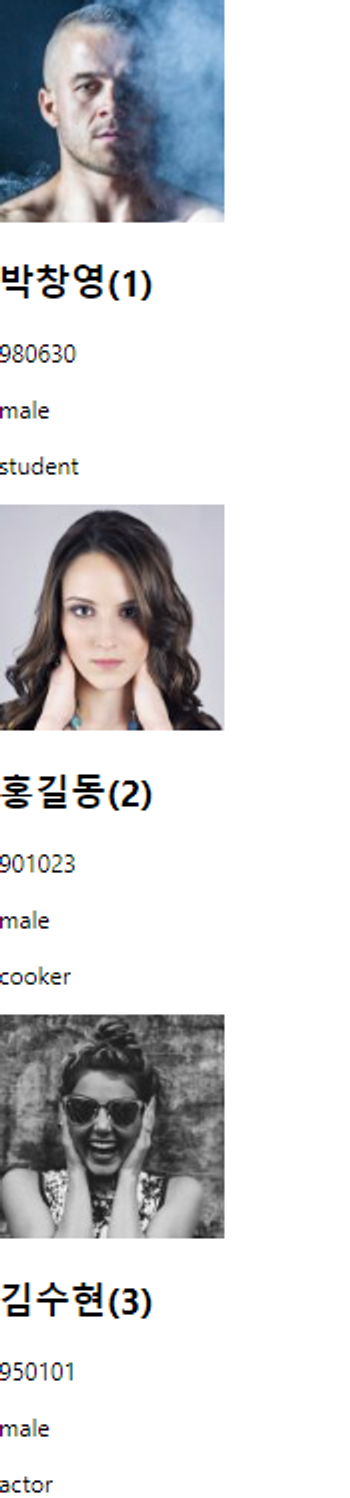
- customers 라는 변수에 N명의 정보 생성
- image 는 랜덤 생성 URL 도움을 받음
- App() 함수
- customers 배열에서 선언한 N명의 정보를 map() 메서드를 이용해 토스
- map()을 사용하려면 key라는 속성을 넣어줘야 함
- 안하면, F12 개발자 도구에서 에러가 발생
- map()을 사용하려면 key라는 속성을 넣어줘야 함
- customers 배열에서 선언한 N명의 정보를 map() 메서드를 이용해 토스
결과 화면

#Software Engineer #IRISH