39장 DOM
1. 노드
1.1 HTML요소와 노드 객체
- HTML 요소 : HTML 문서를 구성하는 개별적인 요소를 의미. 렌더링 엔진에 의해 파싱되어 DOM을 구성하는 요소 노드 객체로 변환된다.
- HTML 문서 : HTML 요소들의 집합이며, HTML 요소는 트리 구조와 같은 중첩 관계를 갖는다.
1.2 노드 객체의 타입
- 노드 객체는 총 12개 타입이 있으며, 그 중 중요한 4개 타입은 다음과 같다.
- 문서 노드(document node) : DOM 최상위의 루트 노드로써 document 객체를 가리킨다. HTML 문서에 document 객체는 유일하며, 모든 노드는 문서 노드 하위에 있다.
- 요소 노드(element node) : HTML 요소. 태그 이름을 가지고 문서의 구조를 이루고 있다.
- 어트리뷰트 노드 : 요소 노드에 포함되어 속성을 표현한다. 무조건 요소 노드 하위에 연결되어 있으나, 요소 노드의 부모 또는 형제 관계라고 볼 수는 없다.
- 텍스트 노드 : HTML요소의 텍스트를 가리킨다. 요소 노드의 자식 노드이다. 텍스트 노드는 자식 노드를 가질 수 없다.
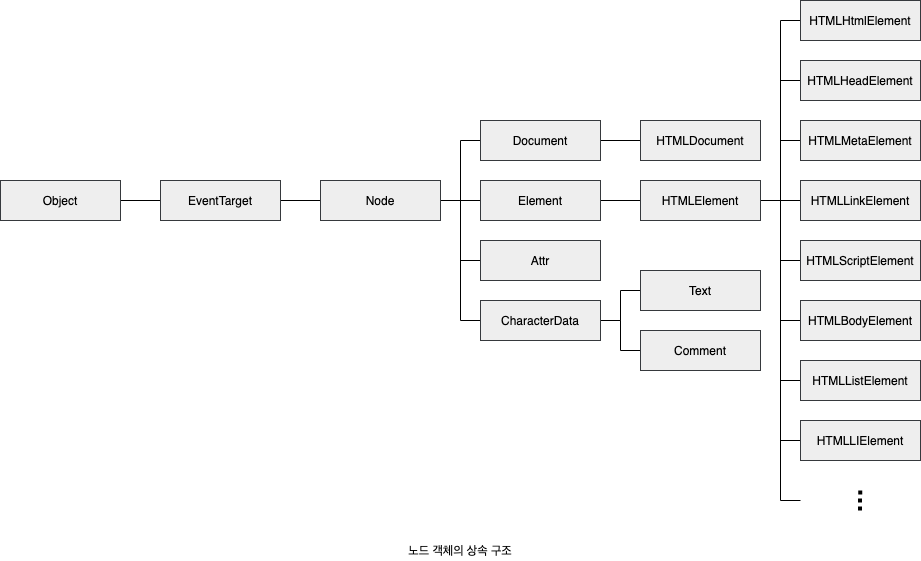
1.3 노드 객체의 상속 구조
- 노드 객체는 표준 빌트인 객체는 아니고 호스트 객체이다🤮
- 모든 노드 객체는 Object, EventTarget, Node 인터페이스를 상속 받는다.
- 문서 노드는 Document, HTMLDocument 인터페이스를 상속받는다.
- 어트리뷰트 노드는 Attr 인터페이스를 상속받는다.
- 텍스트 노드는 CharacterData 인터페이스를 상속받는다.
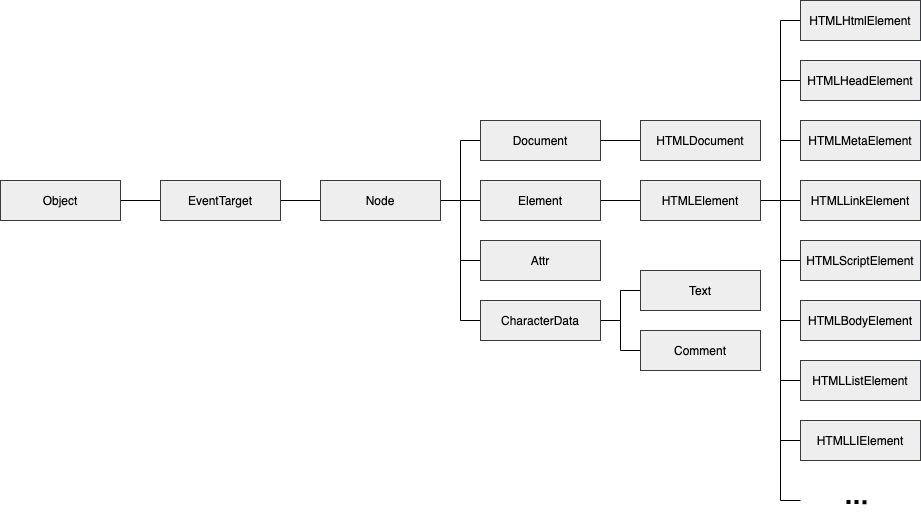
- 노드는 자신의 프로토타입 체인에 있는 모든 프로토타입의 프로퍼티나 메서드를 상속받아 사용할 수 있다.
- input 노드를 예로 들면,
<!DOCTYPE html>
<html>
<body>
  <input type="text">
  <script>
    // input 요소 노드 객체를 선택
    const $input = document.querySelector('input');

    // input 요소 노드 객체의 프로토타입 체인
    console.log(
      Object.getPrototypeOf($input) === HTMLInputElement.prototype,
      Object.getPrototypeOf(HTMLInputElement.prototype) === HTMLElement.prototype,
      Object.getPrototypeOf(HTMLElement.prototype) === Element.prototype,
      Object.getPrototypeOf(Element.prototype) === Node.prototype,
      Object.getPrototypeOf(Node.prototype) === EventTarget.prototype,
      Object.getPrototypeOf(EventTarget.prototype) === Object.prototype
    ); // 모두 true
  </script>
</body>
</html>| input 요소 노드 객체의 특성 | 프로토타입을 제공하는 객체 |
|---|---|
| 객체 | Object |
| 이벤트를 발생시키는 객체 | EventTarget |
| 트리 자료구조의 노드 객체 | Node |
| 브라우저가 렌더링할 수 있는 웹 문서의 요소(HTML, XML, SVG)를 표현하는 객체 | Element |
| 웹 문서의 요소 중에서 HTML 요소를 표현하는 객체 | HTMLElement |
| HTML 요소 중에서 input 요소를 표현하는 객체 | HTMLInputElement |
정리
- DOM은 HTML 문서의 계층적 구조와 정보를 표현하는 것은 물론 노드 객체의 종류, 즉 노드 타입에 따라 필요한 기능을 프로퍼티와 메서드의 집합인 DOM API로 제공
- 이 DOM API를 통해 HTML의 구조나 내용 또는 스타일 등을 동적으로 조작한다
2. 요소 노드 취득
2.1 id를 이용한 요소 노드 취득
- Document.prototype.getElementById 메서드 : 인수로 전달한 id 어트리뷰트 값을 갖는 하나의 요소 노드를 탐색하여 반환
- 인수로 전달된 id값을 갖는 첫 번째 요소 노드가 반환된다. (id 값이 중복되면 첫 번째 id값 반환)
- 요소가 존재하지 않는 경우 null을 반환
- id값은 HTML 문서 내에서 유일한 값...이어야 하지만, 여러 개 존재하더라도 에러가 발생하지는 않는다... 제발 1개만 만들자.
2.2 태그 이름을 이용한 요소 노드 취득
- Document.prototype/Element.prototype.getElementsByTagName 메서드 : 인수로 전달한 태그 이름을 갖는 모든 요소 노드들을 탐색하여 반환
- getElementsByTagName 메서드가 반환하는 DOM 컬렉션 객체인 HTMLCollection 객체는 유사 배열 객체이면서 이터러블
<!DOCTYPE html>
<html>
  <body>
    <ul>
      <li id="apple">Apple</li>
      <li id="banana">Banana</li>
      <li id="orange">Orange</li>
    </ul>
    <script>
      // 태그 이름이 li인 요소 노드를 모두 탐색하여 반환한다.
      // 탐색된 요소 노드들은 HTMLCollection 객체에 담겨 반환된다.
      // HTMLCollection 객체는 유사 배열 객체이면서 이터러블이다.
      const $elems = document.getElementsByTagName('li');

      // 취득한 모든 요소 노드의 style.color 프로퍼티 값을 변경한다.
      // HTMLCollection 객체를 배열로 변환하여 순회하며 color 프로퍼티 값을 변경한다.
      [...$elems].forEach(elem => { elem.style.color = 'red'; });
    </script>
  </body>
</html>
2.3 class를 이용한 요소 노드 취득
- Document.prototype/Element.prototype.getElementsByClassName 메서드 : 인수로 전달한 class 어트리뷰트 값을 갖는 모든 요소 노드들을 탐색하여 반환
- getElementsByClassName 메서드가 반환하는 DOM 컬렉션 객체인 HTMLCollection 객체는 유사 배열 객체이면서 이터러블
!DOCTYPE html>
<html>
  <body>
    <ul>
      <li class="fruit apple">Apple</li>
      <li class="fruit banana">Banana</li>
      <li class="fruit orange">Orange</li>
    </ul>
    <script>
      // class 값이 'fruit'인 요소 노드를 모두 탐색하여 HTMLCollection 객체에 담아 반환한다.
      const $elems = document.getElementsByClassName('fruit');

      // 취득한 모든 요소의 CSS color 프로퍼티 값을 변경한다.
      [...$elems].forEach(elem => { elem.style.color = 'red'; });

      // class 값이 'fruit apple'인 요소 노드를 모두 탐색하여 HTMLCollection 객체에 담아 반환한다.
      const $apples = document.getElementsByClassName('fruit apple');

      // 취득한 모든 요소 노드의 style.color 프로퍼티 값을 변경한다.
      [...$apples].forEach(elem => { elem.style.color = 'blue'; });
    </script>
  </body>
</html>
2.4 CSS 선택자를 이용한 요소 노드 취득
- 스타일을 적용하고자 하는 HTML 요소를 특정할 때 사용하는 문법
// 전체 선택자 : 모든 요소를 선택
* { ... }

// 태그 선택자 : 모든 p 태그 요소를 모두 선택
p { ... }

// id 선택자 : id 값이 'foo'인 요소를 모두 선택
#foo { ... }

// class 선택자 : class 값이 'foo'인 요소를 모두 선택
.foo { ... }

// 어트리뷰트 선택자 : input 요소 중에 type 어트리뷰트 값이 'text'인 요소를 모두 선택
input[type=text] { ... }

// 후손 선택자 : div 요소의 후손(자식 손자 며느리) 요소 중 p 요소를 모두 선택
div p { ... }

// 자식 선택자 : div 요소의 자식 요소 중 p 요소를 모두 선택
div > p { ... }

// 인접 형제 선택자 : p 요소의 형제 요소 중에 p 요소 바로 뒤에 위치하는 ul 요소 하나만 선택
p + ul { ... }

// 일반 형제 선택자 : p 요소의 형제 요소 중에 p 요소 뒤에 위치하는 ul 요소를 모두 선택
p ~ ul { ... }

// 가상 클래스 선택자 : hover 상태인 a 요소를 모두 선택
a:hover { ... }

// 가상 요소 선택자 : p 요소의 콘텐츠 앞에 위치하는 공간을 선택. 일반적으로 content 프로퍼티와 함께 사용
p::before { ... }- Document.prototype/Element.prototype.querySelector 메서드 : 인수로 전달한 CSS 선택자를 만족시키는 하나의 요소 노드를 탐색하여 반환
- 인수로 전달한 CSS 선택자를 만족시키는 요소 노드가 여러 개인 경우 첫 번째 요소 노드만 반환
- 인수로 전달한 CSS 선택자를 만족시키는 요소 노드가 없으면 null 반환
- 인수로 전달한 CSS 선택자의 문법이 틀리면 DOMException 에러 발생
- Document.prototype/Element.prototype.querySelectAll 메서드 : 인수로 전달한 CSS 선택자를 만족시키는 모든 요소 노드를 탐색하여 반환
- 인수로 전달한 CSS 선택자를 만족 시키는 요소가 없다면 빈 NodeList 객체를 반환
- 인수로 전달한 CSS 선택자의 문법이 틀리면 DOMException 에러 발생
2.5 특정 요소 노드를 취득할 수 있는지 확인
- Element.prototype.matches 메서드 : 인수로 전달한 CSS 선택자를 통해 특정 요소 노드를 취득할 수 있는지 확인
- 이벤트 위임에 유용한데.. 이에 대해선 40.7 참고
2.6 HTMLCollection과 NodeList
- HTMLCollection과 NodeList는 DOM API가 여러 개의 결과값을 반환하기 위한 DOM 컬렉션 객체
- HTMLCollection과 NodeList는 모두 유사 배열 객체이면서 이터러블. 따라서 for...of 문으로 순회할 수 있으며 스프레드 문법을 사용하여 간단히 배열로 변환 가능.
2.6.1 HTMLCollection
- HTMLCollection은 노드 객체의 상태 변화를 실시간으로 반영하는 살아 있는 객체
- getElementsByTagName, getElementByClass 사용
<!DOCTYPE html>
<head>
  <style>
    .red { color: red; }
    .blue { color: blue; }
  </style>
</head>
<html>
  <body>
    <ul id="fruits">
      <li class="red">Apple</li>
      <li class="red">Banana</li>
      <li class="red">Orange</li>
    </ul>
    <script>
      // class 값이 'red'인 요소 노드를 모두 탐색하여 HTMLCollection 객체에 담아 반환한다.
      const $elems = document.getElementsByClassName('red');
      // 이 시점에 HTMLCollection 객체에는 3개의 요소 노드가 담겨 있다.
      console.log($elems); // HTMLCollection(3) [li.red, li.red, li.red]

      // HTMLCollection 객체의 모든 요소의 class 값을 'blue'로 변경한다.
      for (let i = 0; i < $elems.length; i++) {
        $elems[i].className = 'blue';
      }

      // HTMLCollection 객체의 요소가 3개에서 1개로 변경되었다.
      console.log($elems); // HTMLCollection(1) [li.red]
    </script>
  </body>
</html>- 위 예제는 실제로는 제대로 동작하지 않는다.
- Apple이 blue가 됐을때 ul의 크기는 3->2가 된다. 그래서 두번째 순회시 index 1은 Banana가 아닌 Orange가 된다. 결국 Banana만 blue가 되지 못한다.
- 역방향으로 순회하거나 while문으로 모든 객체가 바뀔 때까지 반복하는 방법으로 회피 가능
- 아니면 배열로 변환해 순회하는 방법도 있다.
2.6.2 NodeList
- querySelectAll 메서드 사용 시 NodeList 반환
- 위와 같은 부작용을 해결하기 위해 NodeList는 살아있지 않는 것처럼 동작하는데....
- childNodes 프로퍼티가 반환하는 NodeList 객체는 HTMLCollection 객체와 동일하게 살아있는 객체로 동작하므로 주의가 필요🤮
<!DOCTYPE html>
<html>
  <body>
    <ul id="fruits">
      <li>Apple</li>
      <li>Banana</li>
    </ul>
  </body>
  <script>
    const $fruits = document.getElementById('fruits');

    // childNodes 프로퍼티는 NodeList 객체(live)를 반환한다.
    const { childNodes } = $fruits;
    console.log(childNodes instanceof NodeList); // true

    // $fruits 요소의 자식 노드는 공백 텍스트 노드(39.3.1절 "공백 텍스트 노드" 참고)를 포함해 모두 5개다.
    console.log(childNodes); // NodeList(5) [text, li, text, li, text]

    for (let i = 0; i < childNodes.length; i++) {
      // removeChild 메서드는 $fruits 요소의 자식 노드를 DOM에서 삭제한다.
      // (39.6.9절 "노드 삭제" 참고)
      // removeChild 메서드가 호출될 때마다 NodeList 객체인 childNodes가 실시간으로 변경된다.
      // 따라서 첫 번째, 세 번째 다섯 번째 요소만 삭제된다.
      $fruits.removeChild(childNodes[i]);
    }

    // 예상과 다르게 $fruits 요소의 모든 자식 노드가 삭제되지 않는다.
    console.log(childNodes); // NodeList(2) [li, li]
  </script>
</html>
결국 노드 객체의 상태 변경과 상관없이 안전하게 DOM 컬렉션을 사용하려면 HTMLCollection이던 NodeList 객체던 간에 배열로 변환하여 사용하는 것을 권장. 고차 함수를 사용하는 장점도 따라간다.
3. 노드 탐색
3.1 공백 텍스트 노드
- HTML요소 사이의 스페이스, 탭, 줄바꿈 등의 공백 문자는 공백 텍스트 노드를 생성
- 이 공백 때문에 개체 사이에 빈공간이 생기는 경우가 있어서.. 공백 텍스트 노드를 지워야 할 때가 있다.
3.2 자식 노드 탐색
자식 노드를 탐색하기 위해 사용하는 노드 탐색 프로퍼티
| 프로퍼티 | 설명 |
|---|---|
| Node.prototype.childNodes | childNodes 프로퍼티가 반환한 NodeList에는 요소 노드뿐만 아니라 텍스트 노드도 포함되어 있을 수 있다 |
| Element.prototype.children | children 프로퍼티가 반환한 HTMLCollection에는 텍스트 노드가 포함되지 않는다. |
| Node.prototype.firstChild | 텍스트 노드이거나 요소노드 |
| Node.prototype.lastChild | 텍스트 노드이거나 요소노드 |
| Element.prototype.firstElementChild | 요소노드만 반환 |
| Element.prototype.lastElementChild | 요소노드만 반환 |
<!DOCTYPE html>
<html>
  <body>
    <ul id="fruits">
      <li class="red">Apple</li>
      <li class="red">Banana</li>
      <li class="red">Orange</li>
    </ul>

<script>
      const fruites = document.getElementById('fruits');

console.log(fruits.childNodes);
// fruits요소의 모든 자식 노드 탐색 (텍스트 노드 포함)
// NodeList(7) [text, li.apple, text, li.banana, text, li.orange, text]]

console.log(fruits.children);
// fruits 요소의 모든 자식 노드를 탐색함 (요소 노드만 포함)
// HTMLCollection [li.apple, li.banana, li.orange]

console.log(fruits.firstChild); // #text
console.log(fruits.lastChild); // #text

console.log(fruits.firstElementChild); // li.apple
console.log(fruits.lastElementChild); // li.orange

</script>
3.3 자식 노드 존재 확인
- Node.prototype.hasChildNodes 메서드 : 자식 노드가 존재하면 true, 존재하지 않으면 false 반환
- 텍스트 노드를 포함하여 확인한다
- 텍스트 노드가 아닌 요소 노드가 존재하는지 확인하려면, children.length 또는 childElementCount 프로퍼티를 사용할 것
3.4 요소 노드의 텍스트 노드 탐색
- 텍스트 노드에 firstChild 프로퍼티로 접근 가능
- 첫번째 노드는 텍스트 노드이거나 요소 노드이다
- 접근 후 텍스트 노드인지 확인은 해봐야 한다
3.5 부모 노드 탐색
- Node.prototype.parentNode 프로퍼티 사용
3.6 형제 노드 탐색
- 부모노드가 같은 형제 노드를 탐색하려면 다음 노드 탐색 프로퍼티를 사용한다
| 프로퍼티 | 설명 |
|---|---|
| Node.prototype.previousSibling | 부모 노드가 같은 형제 노드 중에서 자신의 이전 형제 노드를 탐색하여 반환. previousSibling 프로퍼티가 반환하는 형제 노드는 요소 노드 뿐만 아니라 텍스트 노드일 수도 있다 |
| Node.prototype.nextSibling | 부모 노드가 같은 형제 노드 중에서 자신의 다음 형제 노드를 탐색하여 반환. nextSibling 프로퍼티가 반환하는 형제 노드는 요소 노드 뿐만 아니라 텍스트 노드일 수도 있다 |
| Element.prototype.previousElementSibling | 부모 노드가 같은 형제 노드 중에서 자신의 이전 형제 노드를 탐색하여 반환. previousSibling 프로퍼티는 요소 노드만 반환 |
| Element.prototype.nextElementSibling | 부모 노드가 같은 형제 노드 중에서 자신의 다음 형제 노드를 탐색하여 반환. nextSibling 프로퍼티는 요소 노드만 반환 |
4. 노드 정보 취득
- 노드 객체에 대한 정보를 취득하려면 다음과 같은 노드 정보 프로퍼티를 사용
| 프로퍼티 | 설명 |
|---|---|
| Node.prototype.nodeType | 노드 객체의 종류. 즉, 노드 타입을 나타내는 상수를 반환. 노드 타입 상수는 Node에 정의되어 있음 Node.ELEMENT_NODE: 요소 노드 타입을 나타내는 상수 1을 반환 Node.TEXT_NODE: 텍스트 노드 타입을 나타내는 상수 3을 반환 Node.DOCUMENT_NODE: 문서 노드 타입을 나타내는 상수 9를 반환 |
| Node.prototype.nodeName | 노드의 이름을 문자열로 반환 요소 노드: 대문자 문자열로 태그 이름("UL", "LI" 등)을 반환 텍스트 노트: 문자열 "#text"를 반환 문서 노드: 문자열 "#document"를 반환 |
5. 요소 노드의 텍스트 조작
5.1 nodeValue
- Node.prototype.nodeValue 프로퍼티
- 노드 객체의 값(텍스트 노드의 텍스트)을 반환
- 문서 노드나 요소 노드의 nodeValue 참조 시에는 null 반환
- nodeValue는 getter, setter가 모두 존재하므로, 다음 과정을 거쳐 값 할당이 가능
1. 텍스트를 변경할 요소 노드를 취득한 다음, 취득한 요소 노드의 텍스트 노드를 탐색. 텍스트 노드는 요소 노드의 자식 노드이므로 firstChild프로퍼티를 사용하여 탐색
2. 탐색한 테긋트 노드의 nodeValue 프로퍼티를 사용해 텍스트 노드의 값을 변경
5.2 textContent
- Node.prototype.textContent 프로퍼티
- 마찬가지로 setter와 getter 모두 존재하는 접근자 프로퍼티
- 요소 노드의 텍스트와 모든 자손 노드의 텍스트를 모두 취득하거나 변경 가능
<!DOCTYPE html>
<html>
  <body>
    <div id="foo">Hello <span>world!</span></div>
  </body>
  <script>
    // #foo 요소 노드의 모든 자식 노드가 제거되고 할당한 문자열이 텍스트로 추가된다.
    // 이때 HTML 마크업이 파싱되지 않는다.
    document.getElementById('foo').textContent = 'Hi <span>there!</span>'; // 이 태그는 파싱되지 않고 문자 그대로 보여진다.
  </script>
</html>
6. DOM 조작
6.1 innerHTML
- Element.prototype.innerHTML 프로퍼티
- setter와 getter 모두 존재하는 접근자 프로퍼티
- 요소 노드의 HTML 마크업을 취득하거나 변경 가능
- textContent 프로퍼티는 HTML 마크업을 무시하고 텍스트만 반환하지만, innerHTML 프로퍼티는 HTML 마크업이 포함된 문자열을 그대로 반환할 수 있고, 마크업 태그를 삽입할 수도 있다.
<!DOCTYPE html>
<html>
  <body>
    <div id="foo">Hello <span>world!</span></div>
  </body>
  <script>
    // #foo 요소의 콘텐츠 영역 내의 HTML 마크업을 문자열로 취득한다.
    console.log(document.getElementById('foo').innerHTML);
    // "Hello <span>world!</span>"
  </script>
</html>- innerHTML 프로퍼티는 마크업 문자열로 DOM 조작이 가능
<!DOCTYPE html>
<html>
  <body>
    <div id="foo">Hello <span>world!</span></div>
  </body>
  <script>
    // HTML 마크업이 파싱되어 요소 노드의 자식 노드로 DOM에 반영된다.
    document.getElementById('foo').innerHTML = 'Hi <span>there!</span>';
  </script>
</html>- 이러한 DOM 조작 기능은 크로스 사이트 스크립팅 공격(XSS)에 취약하다. 따라서 HTML5에서는 다음과 같은 예제는 막혀 있다.
<!DOCTYPE html>
<html>
  <body>
    <div id="foo">Hello</div>
  </body>
  <script>
    // innerHTML 프로퍼티로 스크립트 태그를 삽입하여 자바스크립트가 실행되도록 한다.
    // HTML5는 innerHTML 프로퍼티로 삽입된 script 요소 내의 자바스크립트 코드를 실행하지 않는다.
    document.getElementById('foo').innerHTML
      = '<script>alert(document.cookie)</script>';
  </script>
</html>- 하지만 다음과 같은 방식으로 공격할 수 있어, 보안이 완전하지는 않다
<!DOCTYPE html>
<html>
  <body>
    <div id="foo">Hello</div>
  </body>
  <script>
    // 에러 이벤트를 강제로 발생시켜서 자바스크립트 코드가 실행되도록 한다.
    document.getElementById('foo').innerHTML
      = `<img src="x">`;
  </script>
</html>
HTML 새니티제이션 : 사용자로부터 입력받은 데이터에 의해 발생할 수 있는 크로스 사이트 스크립팅 공격을 예방하기 위해 잠재적 위험을 제거하는 기능을 만한다. 새니티제이션 함수를 직접 구현할 수도 있겠지만, DOMPurify 라이브러리를 사용할 것을 권장한다.
6.2 insertAdjacentHTML 메서드
- Element.prototype.insertAdjacentHTML(position, DOMString) 메서드
- 존 요소를 제거하지 않으면서 위치를 지정해 새로운 요소를 삽입
- 기존 요소에는 영향을 주지 않고 새롭게 삽입될 요소만을 파싱하여 자식 요소로 추가하므로 innerHTML 프로퍼티보다 효율적이고 빠름
- 마찬가지로 HTML 마크업 문자열을 파싱하므로 크로스 사이트 스크립팅 공격에 취약하다는 점은 동일
<!DOCTYPE html>
<html>
  <body>
    <!-- beforebegin -->
    <div id="foo">
      <!-- afterbegin -->
      text
      <!-- beforeend -->
    </div>
    <!-- afterend -->
  </body>
  <script>
    const $foo = document.getElementById('foo');
    $foo.insertAdjacentHTML(beforebegin, '<p>beforebegin</p>');
    $foo.insertAdjacentHTML(afterbegin, '<p>afterbegin</p>');
    $foo.insertAdjacentHTML(beforeend, '<p>beforeend</p>');
    $foo.insertAdjacentHTML(afterend, '<p>afterend</p>');
  </script>
</html>
6.3 노드 생성과 추가
- Document.prototype.createElement(tagName) 메서드
- 요소 노드를 노드를 생성하여 반환
- createElement 메서드의 메개변수 tagName에는 태그 이름을 나타내는 문자열을 인수로 전달
<!DOCTYPE html>
<html>
  <body>
    <ul id="fruits">
      <li>Apple</li>
    </ul>
  </body>
  <script>
    // 1. 요소 노드 생성
    const $li = document.createElement('li');

    // 2. 텍스트 노드 생성
    const textNode = document.createTextNode('Banana');

    // 3. 텍스트 노드를 $li 요소 노드의 자식 노드로 추가
    $li.appendChild(textNode);

    // 4. $li 요소 노드를 #freuits 요소 노드의 마지막 자식 노드로 추가
    $fruits.appendChild(#li);
  </script>
</html>
6.4 복수의 노드 생성과 추가
- DocumentFragment 노드는 기존 DOM과는 별도로 존재하는 임시 노드
- DocumentFragment 노드에 자식 노드를 추가하여도 기존 DOM에는 어떠한 변경도 발생하지 않는다.
- DocumentFragment 노드를 DOM에 추가하면 자신은 제거되고 자식 노드만 DOM에 추가된다.
<!DOCTYPE html>
<html>
  <body>
    <ul id="fruits">
      <li>Apple</li>
    </ul>
  </body>
  <script>
    const $fruits = document.getElementById('fruits');

    // DocumentFragment 노드 생성
    const $fragment = document.createDocumentFragment();

    ['Apple', 'Banana', 'Orange'].forEach(text => {
      // 1. 요소 노드 생성
      const $li = document.createElement('li');

      // 2. 텍스트 노드 생성
      const $textNode = document.createTextNode('Banana');

      // 3. 텍스트 노드를 $li 요소 노드의 자식 노드로 추가
      $li.appendChild(textNode);

      // 4. $li 요소 노드를 DocumentFragment 노드의 마지막 자식 노드로 추가
      $fragment.appendChild($li);
    });

    // 5. DocumentFragment 노드를 #fruits 요소 노드의 마지막 자식 노드로 추가
    $fruits.appendChild($fragment);
  </script>
</html>
6.5 노드 삽입
마지막 노드로 추가
- Node.prototype.appendChild 메서드
- 인수로 전달받은 노드를 자신을 호출한 노드의 (항상)마지막 자식 노드로 DOM에 추가
<!DOCTYPE html>
<html>
  <body>
    <ul id="fruits">
      <li>Apple</li>
      <li>Banana</li>
    </ul>
  </body>
  <script>
    // 요소 노드 생성
    const $li = document.createElement('li');

    // 텍스트 노드를 $li 요소 노드의 마지막 자식 노드로 추가
    $li.appendChild(document.createTextNode('Orange'));

    // $li 요소 노드를 #fruits 요소 노드의 마지막 자식 노드로 추가
    document.getElementById('fruits').appendChild($li);
  </script>
</html>
지정한 위치에 노드 삽입
- Node.prototype.inserBefore(newNode, childNode) 메서드
- 첫 번째 인수로 전달받은 노드를 두 번째 인수로 전달받은 노드 앞에 삽입
<!DOCTYPE html>
<html>
  <body>
    <ul id="fruits">
      <li>Apple</li>
      <li>Banana</li>
    </ul>
  </body>
  <script>
    const $fruits = document.getElementById('fruits');

    // 요소 노드 생성
    const $li = document.createElement('li');

    // 텍스트 노드를 $li 요소 노드의 마지막 자식 노드로 추가
    $li.appendChild(document.createTextNode('Orange'));

    // $li 요소 노드를 #fruits 요소 노드의 마지막 자식 요소 앞에 삽입
    $fruits.insertBefore($li, $fruits.lastElementChild);
    // Apple - Orange - Banana
  </script>
</html>
6.6 노드 이동
- DOM에 이미 존재하는 노드를 appendChild 또는 insertBefore 메서드를 사용해 DOM에 다시 추가하면, 현재 위치에서 노드를 제거되고 새로운 위치에 노드가 추가된다.
=> 노드가 이동
...아 이건 좀..🤬
<!DOCTYPE html>
<html>
  <body>
    <ul id="fruits">
      <li>Apple</li>
      <li>Banana</li>
      <li>Orange</li>
    </ul>
  </body>
  <script>
    const $fruits = document.getElementById('fruits');

    // 이미 존재하는 요소 노드를 취득
    const [$apple, $banana, ] = $fruits.children;

    // 이미 존재하는 $apple 요소 노드를 #fruits 요소 노드의 마지막 노드로 이동
    $fruits.appendChild($apple); // Banana - Orange - Apple

    // 이미 존재하는 $banana 요소 노드를 #fruits 요소의 마지막 자식 노드 앞으로 이동
    $fruits.insertBefore($banana, $fruits.lastElementChild);
    // Orange - Banana - Apple
  </script>
</html>
6.7 노드 복사
- Node.prototype.clibeNode([deep : true | false]) 메서드
- 노드의 사본을 생성하여 반환
- 매개변수 deep에 true를 인수로 전달하면, 모든 자손 노드가 포함된 사본을 생성(깊은 복사)
- 매개변수 deep에 false를 인수로 전달하거나 생략하면, 노드 자신만의 사본을 생성(얕은 복사, 텍스트 노드도 복사X)
<!DOCTYPE html>
<html>
  <body>
    <ul id="fruits">
      <li>Apple</li>
    </ul>
  </body>
  <script>
    const $fruits = document.getElementById('fruits');
    const $apple = $fruits.firstElementChild;

    // $apple 요소를 얕은 복사하여 사본을 생성. 텍스트 노드가 없는 사본이 생성된다.
    const $shallowClone = $apple.cloneNode();
    // 사본 요소 노드에 텍스트 추가
    $shallowClone.textContent = 'Banana';
    // 사본 요소 노드를 #fruits 요소 노드의 마지막 노드로 추가
    $fruits.appendChild($shallowClone);

    // #fruits 요소를 깊은 복사하여 모든 자손 노드가 포함된 사본을 생성
    const $deepClone = $fruits.cloneNode(true);
    // 사본 요소 노드를 #fruits 요소 노드의 마지막 노드로 추가
    $fruits.appendChild($deepClone);
  </script>
</html>
6.8 노드 교체
- Node.prototype.replaceChild(newChild, oldChild) 메서드
- 자신을 호출한 노드의 자식 노드를 다른 노드로 교체
- 첫번째 매개변수 newChild에는 교체할 새로운 노드를 인수로 전달
- 두 번째 매개변수 oldChild에는 이미 존재하는 교체될 노드를 인수로 전달
<!DOCTYPE html>
<html>
  <body>
    <ul id="fruits">
      <li>Apple</li>
    </ul>
  </body>
  <script>
    const $fruits = document.getElementById('fruits');

    // 기존 노드와 교체할 요소 노드를 생성
    const $newChild = document.createElement('li');
    $newChild.textContent = 'Banana';

    // #fruits 요소 노드의 첫 번째 자식 요소 노드를 $newChild 요소 노드로 교체
    $fruits.replaceChild($newChild, $fruits.firstElementChild);
  </script>
</html>
6.9 노드 삭제
- Node.prototype.removeChild(child) 메서드
- child 매개변수에 인수로 전달한 노드를 DOM에서 삭제
<!DOCTYPE html>
<html>
  <body>
    <ul id="fruits">
      <li>Apple</li>
      <li>Banana</li>
    </ul>
  </body>
  <script>
    const $fruits = document.getElementById('fruits');

    // #fruits 요소 노드의 마지막 요소를 DOM에서 삭제
    $fruits.removeChild($fruits.lastElementChild);
  </script>
</html>
7. 어트리뷰트
7.1 어트리뷰트 노드와 attributes 프로퍼티
- HTML 문서의 구성 요소인 HTML 요소는 여러 개의 어트리뷰트(속성)을 가질 수 있다.
- HTML 어트리뷰트는 HTML 요소의 동작을 제어하기 위한 추가적인 정보를 제공하는 역할
- HTML 요소의 시작 태그에 어트리뷰트 이름 = 어티르뷰트 값 형식으로 정의
<input id="user" type="text" value="edLee2">7.2 HTML 어트리뷰트 조작
HTML 어트리뷰트 값을 참조
- Element.prototype.getAttribute(attributeName) 메서드
HTML 어트리뷰트 값을 변경
- Element.prototype.setAttribute(attributeName, attributeValue) 메서드
- setAttribute 메서드는 노드에서 관리하는 HTML 요소에 지정한 어트리뷰트 값, 즉 초기 상태 값을 변경
HTML 어트리뷰트 존재 확인
- Element.prototype.hasAttribute(attributeName) 메서드
HTML 어트리뷰트 삭제
- Element.prototype.removeAttribute(attributeName) 메서드
<!DOCTYPE html>
<html>
<body>
  <input id="user" type="text" value="ungmo2">
  <script>
    const $input = document.getElementById('user');

    // value 어트리뷰트 값을 취득
    const inputValue = $input.getAttribute('value');
    console.log(inputValue); // ungmo2

    // value 어트리뷰트 값을 변경
    $input.setAttribute('value', 'foo');
    console.log($input.getAttribute('value')); // foo

    // value 어트리뷰트의 존재 확인
    if ($input.hasAttribute('value')) {
      // value 어트리뷰트 삭제
      $input.removeAttribute('value');
    }

    // value 어트리뷰트가 삭제되었다.
    console.log($input.hasAttribute('value')); // false
  </script>
</body>
</html>
7.3 HTML 어트리뷰트 vs .DOM 프로퍼티
- 요소 노드 객체에는 HTML 어트리뷰트에 대응하는 프로퍼티가 존재
- 이 DOM 프로퍼티들은 HTML 어트리뷰트 값을 초기값으로 가지고 있다
- HTML 어트리뷰트의 역할은 HTML 요소의 초기 상태를 지정하는 것
- 즉, HTML 어트리뷰트 값은 HTML 요소의 초기 상태를 의미하며 이는 변하지 않는다
- DOM 프로퍼티는 사용자의 입력에 의한 상태 변화에 반응하여 언제나 최신 상태를 유지
<!DOCTYPE html>
<html>
<body>
  <input id="user" type="text" value="ungmo2">
  <script>
    const $input = document.getElementById('user');

    // attributes 프로퍼티에 저장된 value 어트리뷰트 값
    console.log($input.getAttribute('value')); // ungmo2

    // 요소 노드의 value 프로퍼티에 저장된 value 어트리뷰트 값
    console.log($input.value); // ungmo2
  </script>
</body>
</html>- 위의 예제를 보면 input value의 초기값은 "ungmo2" 인 것을 알 수 있다.
- 하지만 사용자의 입력으로 "foo" 등과 같이 다른 문자열을 입력하면 value의 값이 바뀐다.
- "foo"는 최신 상태이다. 그리고 새로 고침을 하면 다시 "ungmo2"가 된다.
7.4 data 어트리뷰트와 dataset 프로퍼티
- data 어트리뷰트와 dataset 프로퍼티를 사용하면 HTML 요소에 정의한 사용자 정의 어트리뷰트와 자바스크립트 간에 데이터를 교환가능
- data 어트리뷰트는 data-user-id, data-role과 같이 data- 접두사 다음에 임의의 이름을 붙여 사용
<!DOCTYPE html>
<html>
<body>
  <ul class="users">
    <li id="1" data-user-id="7621" data-role="admin">Lee</li>
    <li id="2" data-user-id="9524" data-role="subscriber">Kim</li>
  </ul>
</body>
</html>- data 어트리뷰트 값은 HTMLElement.dataset 프로퍼티로 취득할 수 있다.
- data 어트리뷰트의 data- 접두사 다음에 붙인 임의의 이름을 camel 케이스로 변환한 프로퍼티를 가지고 있다.
- 이 프로퍼티로 data 어트리뷰트의 값을 취득하거나 변경 가능
<!DOCTYPE html>
<html>
<body>
  <ul class="users">
    <li id="1" data-user-id="7621" data-role="admin">Lee</li>
    <li id="2" data-user-id="9524" data-role="subscriber">Kim</li>
  </ul>
  <script>
    const users = [...document.querySelector('.users').children];

    // user-id가 '7621'인 요소 노드를 취득한다.
    const user = users.find(user => user.dataset.userId === '7621');
    // user-id가 '7621'인 요소 노드에서 data-role의 값을 취득한다.
    console.log(user.dataset.role); // "admin"

    // user-id가 '7621'인 요소 노드의 data-role 값을 변경한다.
    user.dataset.role = 'subscriber';
    // dataset 프로퍼티는 DOMStringMap 객체를 반환한다.
    console.log(user.dataset); // DOMStringMap {userId: "7621", role: "subscriber"}
  </script>
</body>
</html>
8. 스타일
8.1 인라인 스타일 조작
- HTMLElement.prototype.style 프로퍼티
- getter, setter 가 모두 존재하는 접근자 프로퍼티로 요소 노드의 인라인 스타일을 취득하거나 추가 또는 변경
<!DOCTYPE html>
<html>
<body>
  <div style="color: red">Hello World</div>
  <script>
    const $div = document.querySelector('div');

    // 인라인 스타일 취득
    console.log($div.style); // CSSStyleDeclaration { 0: "color", ... }

    // 인라인 스타일 변경
    $div.style.color = 'blue';

    // 인라인 스타일 추가
    $div.style.width = '100px';
    $div.style.height = '100px';
    $div.style.backgroundColor = 'yellow';
  </script>
</body>
</html>
8.2 클래스 조작
className
- Element.prototype.className
- class 어트리뷰트의 값을 문자열로 반환
- getter와 setter 모두 존재하는 접근자 프로퍼티
- 클래스 값이 공백으로 구분되어 있을 경우 그대로 문자열로 반환
classList
- Element.prototype.classList
- class 어트리뷰트의 정보를 담은 DOMTokenList 객체를 반환
- DOMTokenList 객체는 class 어트리뷰트의 정보를나타내는 컬렉션 객체로 유사 배열이면서 이터러블
DOMTokenList 주요 메서드
- add(... className) : 인수로 전달된 1개의 이상의 문자열을 class 어트리뷰트 값으로 추가
- remove(... className) : 인수로 전달한 1개 이상의 문자열과 일치하는 class 어트리뷰트에서 삭제 (일치 하는 클래스가 없으면 무시됨)
- item(index) : 인수로 전달한 index에 해당하는 클래스를 class 어트리뷰트에서 반환
- contains(className) : 인수로 전달한 문자열과 일치하는 클래스가 class 어트리뷰트에 포함되어 있는지 확인
- replace(oldClassName, newClassName) : 첫 번째 인수 클래스를 두번째 클래스로 변경
- toggle(className[, force]) : 인수로 전달한 문자열과 일치하는 클래스가 존재하면 제거하고 존재하지 않으면 추가
이 밖에 forEach, entires, keys, values, supports 등의 메서드를 제공