
오늘 한 것
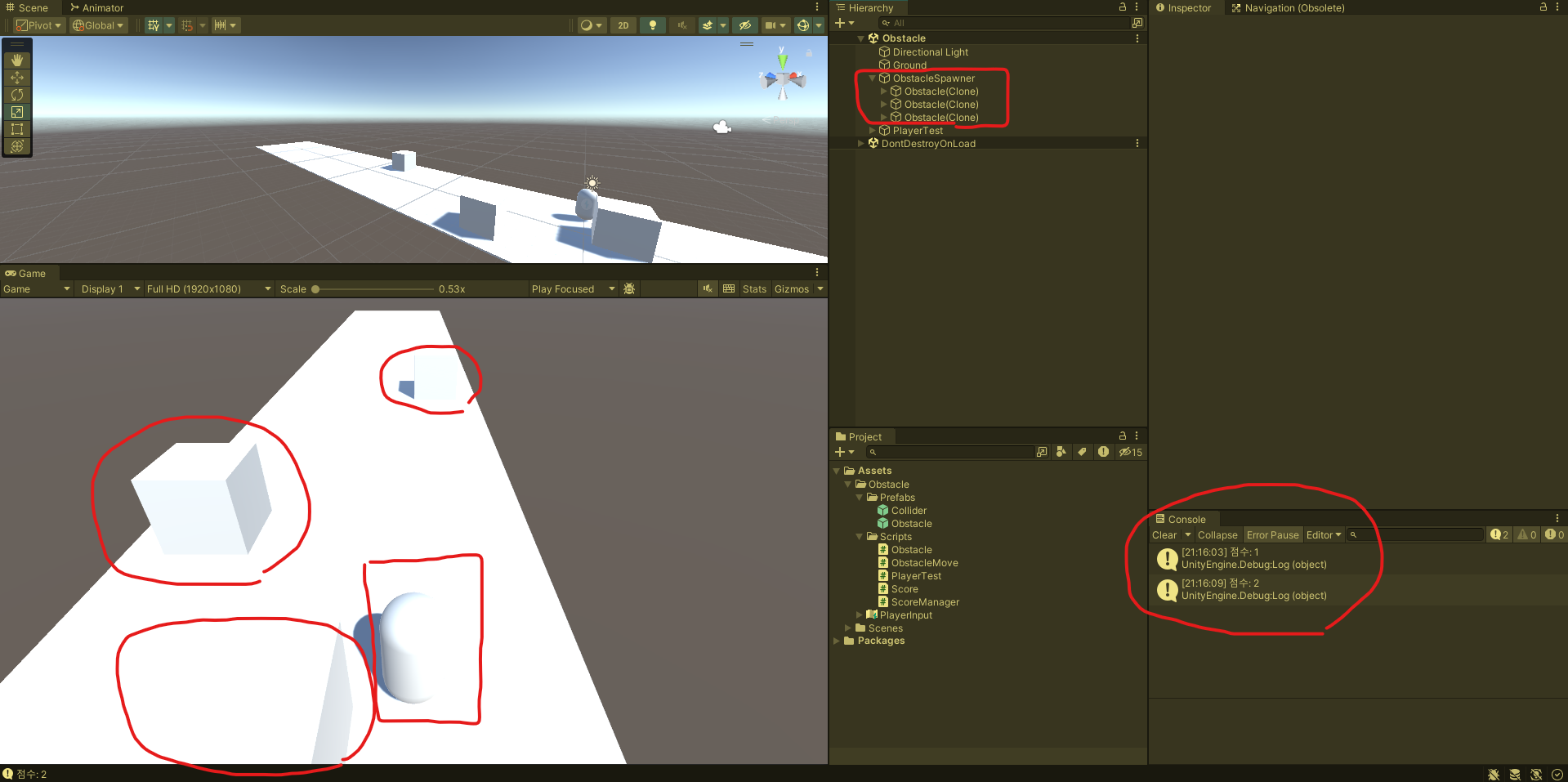 (동그라미 - 장애물, 네모 - 플레이어)
(Obstacle: 장애물, Collider: 점수 획득 범위, ObstacleSpawner: 장애물 소환 오브젝트)
콘솔 창에 장애물을 피하면 점수가 오르는 디버그와
ObstacleSpawner오브젝트에 장애물을 자식으로 소환하여
Hierarchy창을 깔끔하게 정리했다.
<3번에 문제 있었음>
1. 장애물 소환, 장애물 이동 스크립트 작성
3개의 라인이 독자적으로 장애물을 소환시켜 비슷한 타이밍에
2~3개 라인에서 여러 개가 등장하도록 구현했다.
using System.Collections;
using System.Collections.Generic;
using UnityEngine;
using Random = UnityEngine.Random;

public class Obstacle : MonoBehaviour
{
    [SerializeField] private GameObject obstaclePrefab; // 장애물 프리팹 넣기
    [Header("장애물 생성 설정")]
    public float[] spawnXPosition = { -3f, 0f, 3f }; // 장애물 가로 간격
    public float spawnYPosition; // 높이
    public float spawnZPosition; // 화면 뒷부분

    public float minSpawnDelay; // 장애물 소환되는데 걸리는 최소 시간
    public float maxSpawnDelay; // 장애물 소환되는데 걸리는 최대 시간

    void Start()
    {
        // 레인 별로 독립적으로 장애물 소환
        for (int i = 0; i < spawnXPosition.Length; i++)
        {
            StartCoroutine(RandomSpawnObstacle(i));
        }
    }

    IEnumerator RandomSpawnObstacle(int laneIdx) // 랜덤으로 장애물 소환
    {
        while (true)
        {
            // 다음 장애물 소환하는데 걸리는 시간
            yield return new WaitForSeconds(Random.Range(minSpawnDelay, maxSpawnDelay));

            // // 3개의 레인 중 하나를 랜덤으로 선택 (0 ~ 2)
            // int randomXLaneIndex = Random.Range(0, spawnXPosition.Length);
            // // 몇 번째 레인에서 소환될 것인지 정함
            // float selectedXLane = spawnXPosition[randomXLaneIndex];

            // 장애물 생성 x좌표 가져오기 - 레인 별로 독립적으로 장애물 소환
            float spawnX = spawnXPosition[laneIdx];

            // 장애물 소환 위치
            GameObject newObstacle = Instantiate(obstaclePrefab,
                new Vector3(spawnX, spawnYPosition, spawnZPosition), Quaternion.identity);

            // 장애물 오브젝트들이 ObstacleSpawner 오브젝트의 안에 생성됨
            // 생성된 장애물 오브젝트들이 ObstacleSpawner를 부모 오브젝트로 설정
            // hierarchy 창을 정리하는 용도
            newObstacle.transform.parent = this.transform;
        }
    }
}
장애물이 접근하는 속도와 플레이어 위치보다 뒤로 가면
오브젝트를 파괴하고 장애물과 부딪치면 게임 정지가 되도록 구현했다.
using System.Collections;
using System.Collections.Generic;
using UnityEngine;

public class ObstacleMove : MonoBehaviour
{
    Rigidbody _rigidbody;
    public float speed = 5f;

    void Awake()
    {
        _rigidbody = GetComponent<Rigidbody>();
    }

    void Update()
    {
        if (transform.position.z <= -15)
        {
            Destroy(this.gameObject);
        }
    }

    // Update is called once per frame
    void FixedUpdate()
    {
        _rigidbody.velocity = Vector3.back * speed; // 장애물 이동속도
    }

    // 플레이어와 장애물이 충돌하면 게임 정지
    private void OnCollisionEnter(Collision other)
    {
        if (other.gameObject.CompareTag("Player"))
        {
            Time.timeScale = 0;
            Debug.Log("장애물과 충돌로 인한 게임정지");
        }
    }
}
2. 테스트 하기 위해 테스트용 플레이어 생성
(좌우만 움직일 수 있도록 구현)
using System;
using System.Collections;
using System.Collections.Generic;
using System.Threading;
using UnityEngine;
using UnityEngine.InputSystem;

public class Player : MonoBehaviour
{
    [SerializeField] private Rigidbody _rigidbody;
    private Vector2 moveInput;
    public float speed = 25f;

    private void Update()
    {
        Move();
    }

    public void Move()
    {
        Vector3 move = new Vector3(moveInput.x, 0, 0);
        _rigidbody.MovePosition(this.transform.position + move * speed * Time.deltaTime);
    }

    public void OnMove(InputAction.CallbackContext context)
    {
        if (context.performed)
        {
            moveInput = context.ReadValue<Vector2>();
        }
        else
        {
            moveInput = Vector2.zero;
        }
    }
}
3. 장애물 회피 시 점수 증가 (점수 구현)
 Collider오브젝트를 만들어 Obstacle오브젝트의 자식으로 넣고
장애물이 소환될 때 같이 소환되도록 하였다.
저 범위와 Player가 충돌하면 점수가 1점 오르도록 구현했다.
using System;
using System.Collections;
using System.Collections.Generic;
using UnityEngine;

public class Score : MonoBehaviour
{
    private int score = 1; // 획득 점수

    private void OnTriggerEnter(Collider other)
    {
        if (other.gameObject.CompareTag("Player"))
        {
            ScoreManager.Instance.AddScore(score);
        }
    }
}
점수 부분 구현하다가 생긴 문제가 있었는데
장애물 프리팹을 만들어 복제하여 소환하는 방식으로 하다보니
점수가 중첩되지 않고 개별로 1점씩 오르는 현상이 있었다.
using System.Collections;
using System.Collections.Generic;
using UnityEngine;

public class ScoreManager : MonoBehaviour
{
    public static ScoreManager Instance {get; private set;} // 싱글톤
    private int currentScore = 0; // 현재 점수

    void Awake()
    {
        if (Instance == null)
        {
            Instance = this;
            DontDestroyOnLoad(gameObject);
        }
        else
        {
            Destroy(gameObject);
        }
    }

    public void AddScore(int score)
    {
        currentScore += score;
        Debug.Log($"점수: {currentScore}");
    }
}
위의 스코어매니저라는 싱글톤으로 만들었다.
프리팹의 자식에 있는 스코어 스크립트와 연결해
점수를 얻어와 매니저에 계속 저장하여 문제를 해결했다.

내배캠 Unity_9기 / 게임 서버 단기 심화_9기