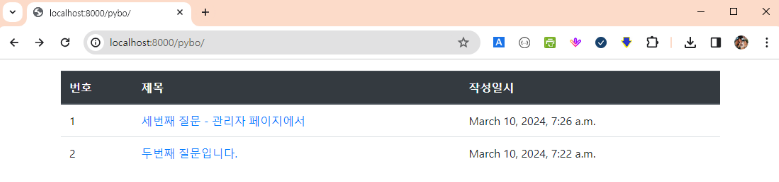
전 수업 이어서 작성되었습니다.
실습환경 시작
C:\Users\myanj> cd c:\python\projects\mysite ⇐ 프로젝트 홈 디렉터리로 이동
C:\python\projects\mysite> c:\python\mysite\Scripts\activate ⇐ 가상 환경 활성화
(mysite) C:\python\projects\mysite> code . ⇐ VSCode를 실행
(mysite) C:\python\projects\mysite> python manage.py runserver ⇐ 장고 개발 서버 실행
DTL(Django Template Language)
https://django-doc-test-kor.readthedocs.io/en/old_master/topics/templates.html#template-inheritance
변수, 필터, 태그, 주석
변수
{{ 변수 }}
필터
변수의 값을 특정 형식으로 변환할 때 사용
변수 다음에 | (파이프)를 넣어서 필터를 명시
필터는 : 문자를 통해 인자를 받을 수 있음
{{ text | escape | linebreaks }}
{{ text | truncatewords:30 }}
{{ text | default:"default value" }}
{{ text | length }}
{{ text | upper }}
태그
{% 태그 %}
if 문 또는 for 문과 처럼 흐름을 제어하기 위해 사용
{% extends %}와 같이 단독으로 사용하는 템플릿 태그도 있고, {% if %} {% endif %} 처럼 반듯이 닫아줘야 하는 템플릿 태그도 있음
주석
주석 처리할 때 사용
{# 한 줄 주석 #}
{% comment %}
여러 줄 주석
{% endcomment %}
def index(request):
    question_list = Question.objects.order_by('-create_date')
    context = { 'question_list' : question_list }

    return render(request, 'pybo/question_list.html', context)


{% if question_list %}
    <ul>
        {% for question in question_list %}		⇐ 뷰의 context 변수에 정의한 키 이름
            <li><a href="/pybo/{{ question.id }}/">{{ question.subject }}</a></li>
        {% endfor %}
    </ul>
{% else %}
    <p>질문이 없습니다.</p>
{% endif %}
질문 상세 기능을 구현
질문 목록 중 하나를 클릭했을 때 오류가 발생하는 것을 확인 ⇒ /pybo/숫자/ 형식의 URL 패턴이 정의되어 있지 않음
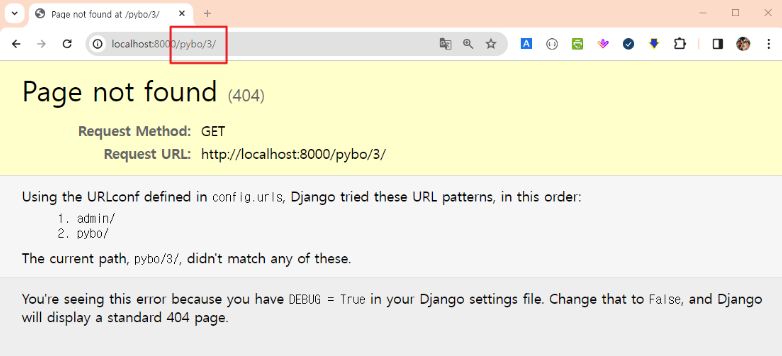
pybo\urls.py 파일에 패턴을 추가
from django.urls import path
from . import views         # 현재 패키지에서 views 모듈을 가져옴

urlpatterns = [
    path('', views.index),
    path('<int:question_id>/', views.detail),
]
pybo\views.py 파일에 detail 메서드를 추가
from django.shortcuts import render
from .models import Question

def index(request):
    question_list = Question.objects.order_by('-create_date')
    context = { 'question_list': question_list }

    return render(request, 'pybo/question_list.html', context)


def detail(request, question_id):
    question = Question.objects.get(id=question_id)
    context = { 'question': question }

    return render(request, 'pybo/question_detail.html', context)
templates\pybo\question_detail.html 템플릿을 정의
<h1>{{ question.subject }}</h1>

<div>
	{{ question.content }}
</div>
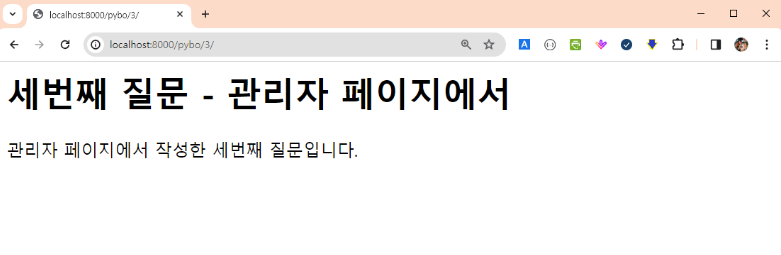
실행결과
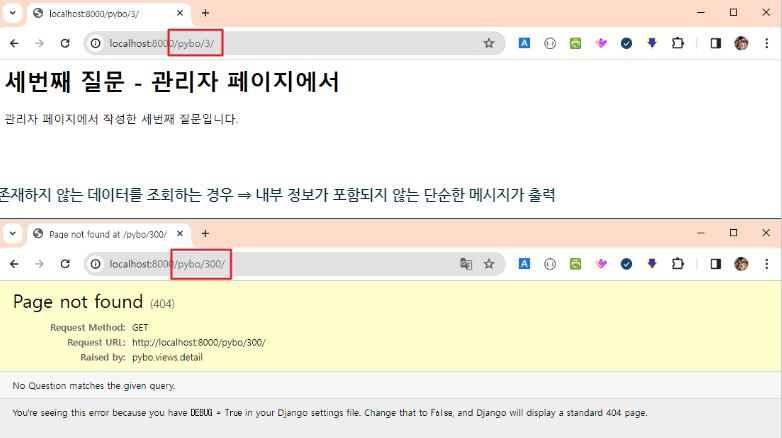
get_object_or_404 메서드를 활용
존재하지 않는 데이터를 조회하는 오류가 발생 ⇒ 오류 메시지에 시스템(프로그램) 내부 구조 및 로직이 포함되어 출력 ⇒ 오류 메시지를 통해 정보를 수집해서 추가 공격을 계획
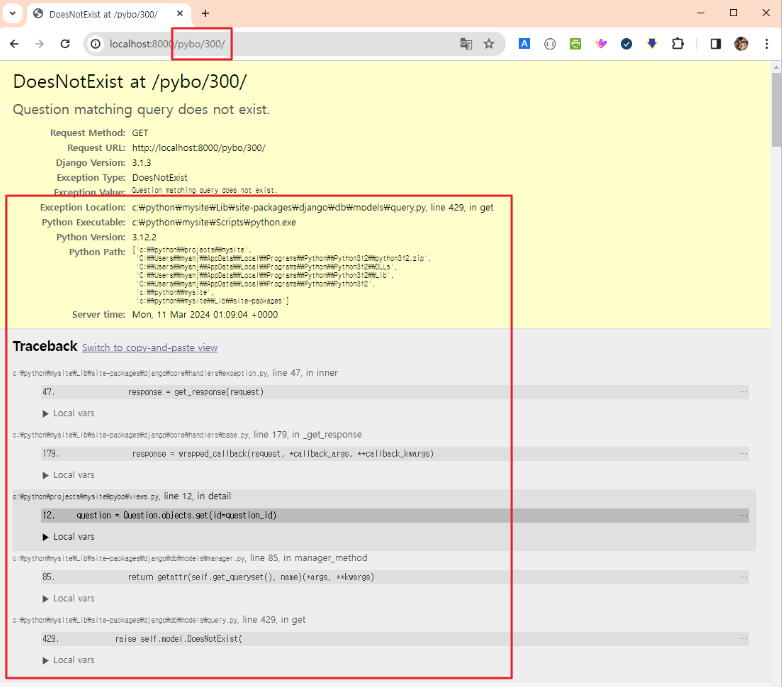
get 메서드를 get_objct_or_404 메서드로 대체 ⇒ 모델의 기본키를 이용해서 모델 객체 한 것을 반환
from django.shortcuts import render, get_object_or_404
from .models import Question

def index(request):
    question_list = Question.objects.order_by('-create_date')
    context = { 'question_list': question_list }

    return render(request, 'pybo/question_list.html', context)


def detail(request, question_id):
    # question = Question.objects.get(id=question_id)
    question = get_object_or_404(Question, pk=question_id)
    context = { 'question': question }

    return render(request, 'pybo/question_detail.html', context)
존재하는 데이터를 조회하는 경우
URL 매핑 정보에 별칭 사용
question_list.html 템플릿
<li><a href="/pybo/{{ question.id }}/">{{ question.subject }}</a></li>
             ~~~~~~~~~~~~~~~~~~~~~~~~
             질문 목록에서 제목(링크)을 클릭했을 때 이동하는 주소
             ⇒ 주소가 하드 코딩되어 있음 ⇒ 변경을 일관되고 쉽게 반영하기가 어려움
pybo\urls.py 파일에 URL 별칭을 추가
from django.urls import path
from . import views

urlpatterns = [
    path('', views.index, name='index'),				# /pybo/ 형식의 주소에 index라는 이름을 부여
    path('<int:question_id>/', views.detail, name="detail"),	# /pybo/숫자/ 형식의 주소에 detail라는 이름을 부여
]
templates\pybo\question_list.html 템플릿 파일을 URL 별칭을 사용하도록 수정
{% if question_list %}
    <ul>
        {% for question in question_list %}
            {# <li><a href="/pybo/{{ question.id }}/">{{ question.subject }}</a></li> #}
            <li><a href="{% url 'detail' question.id %}">{{ question.subject }}</a></li>
        {% endfor %}
    </ul>
{% else %}
    <p>질문이 없습니다.</p>
{% endif %}
URL 네임스페이스 적용
서로 다른 앱에서 같은 URL 별칭를 사용하면 중복 문제가 발생 ⇒ 네임스페이스(namespace: 각각의 앱이 관리하는 독립된 이름 공간)를 적용해서 해결이 가능
pybo\urls.py 파일에 네임스페이스 이름을 값으로 가지는 app_name 변수를 추가
from django.urls import path
from . import views

app_name = 'pybo'

urlpatterns = [
    path('', views.index, name='index'),
    path('<int:question_id>/', views.detail, name="detail"),
]
템플릿에 사용된 별칭의 네임스페이스를 정의하지 않아서 오류가 발생
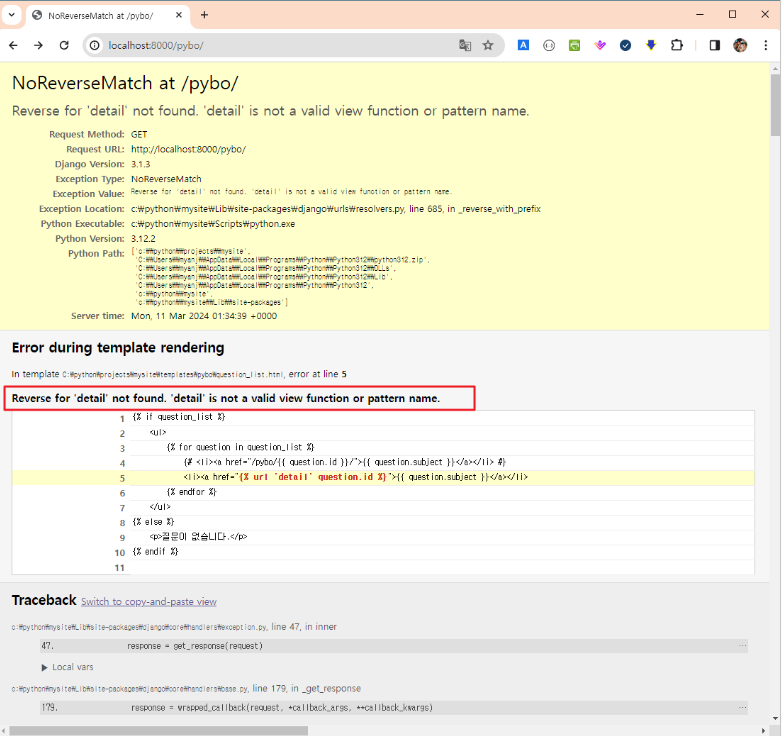
templats\pybo\question_list.html 파일에서 사용하고 있는 별칭의 네임스페이스를 지정
{% if question_list %}
    <ul>
        {% for question in question_list %}
            {# <li><a href="/pybo/{{ question.id }}/">{{ question.subject }}</a></li> #}
            <li><a href="{% url 'pybo:detail' question.id %}">{{ question.subject }}</a></li>
        {% endfor %}
    </ul>
{% else %}
    <p>질문이 없습니다.</p>
{% endif %}
정상적으로 동작하는 것을 확인

답변 저장 및 출력 기능을 추가
질문 상세 페이지(templates\pybo\question_detail.html)에 답변 등록 버튼을 추가
<h1>{{ question.subject }}</h1>

<div>
	{{ question.content }}
</div>

<form action="{% url 'pybo:answer_create' question.id %}" method="post">
	{% csrf_token %}
	<textarea name="content" id="content" rows="15"></textarea>
	<input type="submit" value="답변 등록"/>
</form>
상세 페이지 확인 ⇒ URL 맵핑이 정의되지 않아 오류가 발생
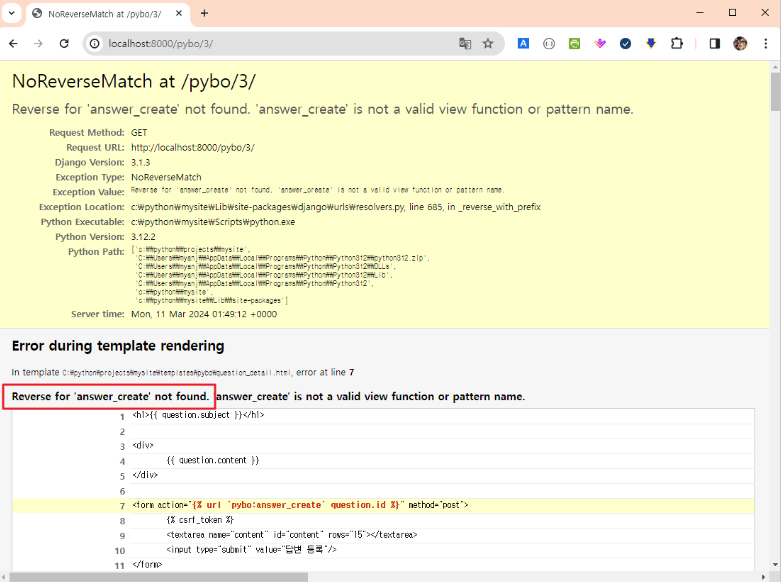
pybo\urls.py 파일에 URL 맵핑을 등록
from django.urls import path
from . import views

app_name = 'pybo'

urlpatterns = [
    path('', views.index, name='index'),
    path('<int:question_id>/', views.detail, name="detail"),
    path('answer/create/<int:question_id>', views.answer_create, name='answer_create'),
]
pybo\views.py 파일에 answer_create 메서드를 추가
from django.shortcuts import render, get_object_or_404, redirect
from .models import Question
from django.utils import timezone

def index(request):
    question_list = Question.objects.order_by('-create_date')
    context = { 'question_list': question_list }

    return render(request, 'pybo/question_list.html', context)


def detail(request, question_id):
    # question = Question.objects.get(id=question_id)
    question = get_object_or_404(Question, pk=question_id)
    context = { 'question': question }

    return render(request, 'pybo/question_detail.html', context)


def answer_create(request, question_id):
    question = get_object_or_404(Question, pk=question_id)		# 답변을 추가할 질문을 조회
    question.answer_set.create(content=request.POST.get('content'), create_date=timezone.now())

    return redirect('pybo:detail', question_id=question.id)		# 답변 추가 후 상세 페이지로 리다이렉트
templates\pybo\question_detail.html 파일에 답변을 출력하도록 수정
<h1>{{ question.subject }}</h1>

<div>
	{{ question.content }}
</div>

{# 답변 내용을 출력 #}
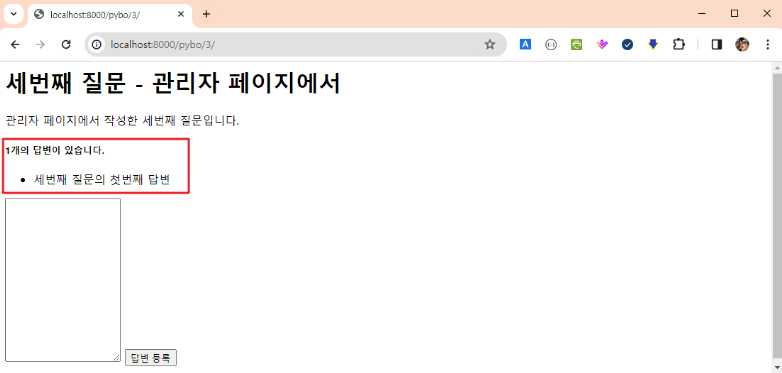
<h5>{{ question.answer_set.count }}개의 답변이 있습니다.</h5>
<div>
	<ul>
		{% for answer in question.answer_set.all %}
			<li>{{ answer.content }}</li>
		{% endfor %}
	</ul>
</div>

<form action="{% url 'pybo:answer_create' question.id %}" method="post">
	{% csrf_token %}
	<textarea name="content" id="content" rows="15"></textarea>
	<input type="submit" value="답변 등록"/>
</form>
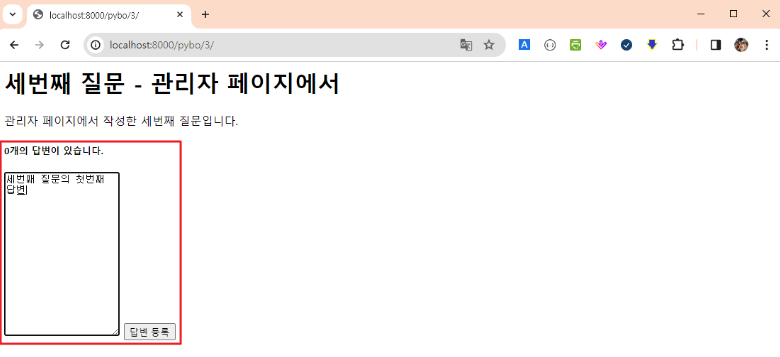
브라우저를 통해서 확인
스타일 적용
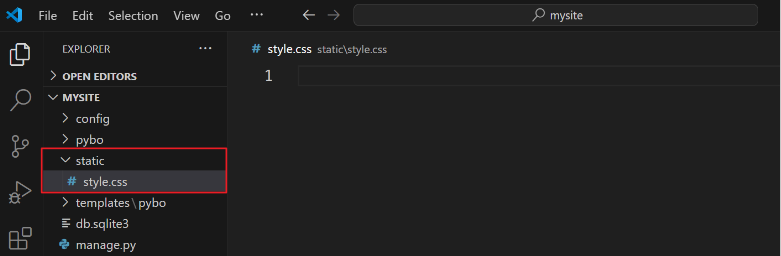
스태틱 디렉터리를 생성하고 해당 위치를 설정 파일에 추가
C:\python\project\mysite\static\style.css 파일을 생성
							선택자 { 적용할 스타일; 적용할 스타일; ... }
							⇒ https://poiemaweb.com/css3-selector 참고

textarea {						⇐ 요소(태그) 선택자 → textarea 태그에 적용할 스타일을 지정
	width: 100%;
}

input[type=submit] {					⇐ 속성 선택자 → input 태그 중 type 속성의 값이 submit인 태그에
	margin-top: 10px;				                  적용할 스타일을 지정
}
config\settings.py 파일에 스태틱 디렉터리 위치를 등록
STATIC_URL = '/static/'

STATICFILES_DIRS = [
	BASE_DIR / 'static',
]
질문 상세 페이지(templates\pybo\question_detail.html)에 스타일을 적용
{% load static %}
<link rel="stylesheet" type="text/css" href="{% static 'style.css' %}">

<h1>{{ question.subject }}</h1>

<div>
	{{ question.content }}
</div>

{# 답변 내용을 출력 #}
<h5>{{ question.answer_set.count }}개의 답변이 있습니다.</h5>
<div>
	<ul>
		{% for answer in question.answer_set.all %}
			<li>{{ answer.content }}</li>
		{% endfor %}
	</ul>
</div>

<form action="{% url 'pybo:answer_create' question.id %}" method="post">
	{% csrf_token %}
	<textarea name="content" id="content" rows="15"></textarea>
	<input type="submit" value="답변 등록"/>
</form>
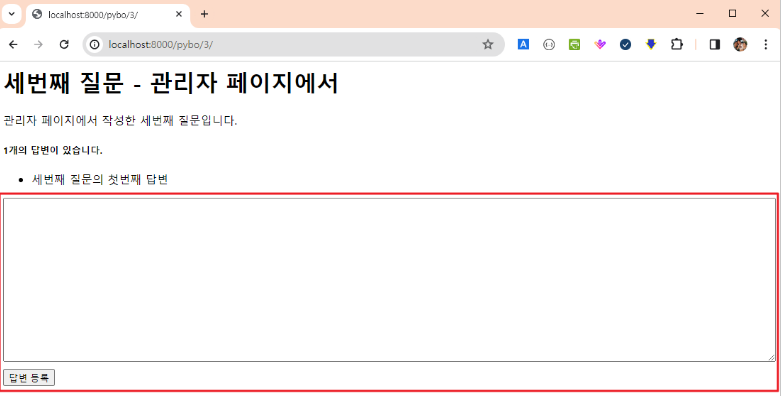
브라우저를 통해서 스타일이 적용된 것을 확인
질문 내용을 입력하는 창(textarea 태그)의 넓이가 화면의 가로 100%를 차지하고, 답변 등록 버튼(submit 버튼)의 윗쪽 바깥 여백이 10px 추가된 것을 확인
부트스트랩 적용
부트스트랩 4.5.3 다운로드
https://getbootstrap.com/docs/4.5/getting-started/download/
다운로드한 압축파일을 압축 해제한 후 bootstrap.min.css 파일만 static 디렉터리로 복사
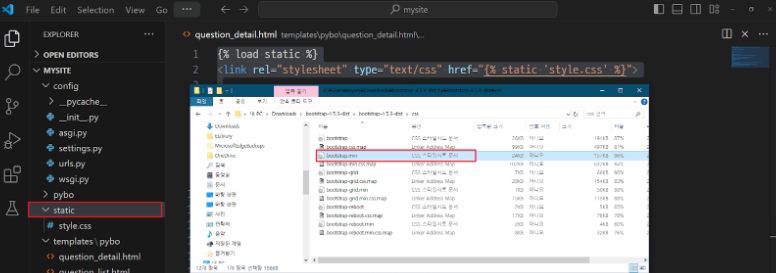
질문 목록 템플릿(templates\pybo\question_list.html)에 부트스트랩을 적용
{% load static %}
<link rel="stylesheet" type="text/css" href="{% static 'bootstrap.min.css' %}" >

{% if question_list %}
    <ul>
        {% for question in question_list %}
            {# <li><a href="/pybo/{{ question.id }}/">{{ question.subject }}</a></li> #}
            <li><a href="{% url 'pybo:detail' question.id %}">{{ question.subject }}</a></li>
        {% endfor %}
    </ul>
{% else %}
    <p>질문이 없습니다.</p>
{% endif %}
질문 목록 템플릿(templates\pybo\question_list.html)에 부트스트랩 스타일을 적용
{% load static %}
<link rel="stylesheet" type="text/css" href="{% static 'bootstrap.min.css' %}" >

<div class="container my-3">
    <table class="table">
        <thead>
            <tr class="thead-dark">
                <th>번호</th>
                <th>제목</th>
                <th>작성일시</th>
            </tr>
        </thead>
        <tbody>
            {% if question_list %}
                {% for question in question_list %}
                    <tr>
                        <td>{{ forloop.counter }}</td>
                        <td>
                            <a href="{% url 'pybo:detail' question.id %}">
                            {{ question.subject }}
                            </a>
                        </td>
                        <td>{{ question.create_date }}</td>
                    </tr>
                {% endfor %}
            {% else %}
                <tr>
                    <td colspan="3">질문이 없습니다.</td>
                </tr>
            {% endif %}
        </tbody>
    </table>
</div>
브라우저를 통해서 확인