[SK shieldus Rookies 19기][Python] 6일차 장고(django) 기본 사용법
사용 교재
점프 투 장고
⇒ https://wikidocs.net/book/4223
MVT(Model Template View) 패턴
Model : 데이터를 정의 ⇒ model.py
Template : 화면을 정의 ⇒ templates 디렉터리 하위에 *.html 파일
View : 어플리케이션의 흐름을 제어 ⇒ views.py
⇒ 느슨한 결합(losse couping) 설계 원칙에 부합
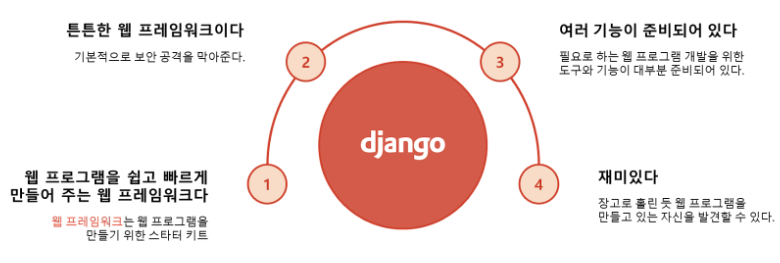
필자는 주피터노트북 가상환경을 사용하기에 아래 루트를 사용하지 않음.
파이썬 가상환경 사용하기
cmd
cd\
mkdir venvs
cd venvs
python -m venv mysite
cd C:\venvs\mysite\Scripts
activate
(mysite) C:\venvs\mysite\Scripts>
가 출력됐으면 진입 성공
faker 설치
pip install faker==22.7.0가상환경 탈출
deactivate아나콘다 파이썬 가상환경 생성 (내 방법)
Anaconda Prompt 실행
conda create -n <환경명> python=<파이썬 버전>
ex)
conda create -n jmt223 python=3.12가상환경 실행
conda activate jmt223가상환경 탈출
conda deactivate주피터 노트북 설치 및 접속
conda activate jmt223
pip install jupyter notebook
jupyter notebook
주피터노트북에서 오른쪽 위 new - terminal로 접속
장고 설치 및 프로젝트 생성
pip install django==3.1.3
pip install setuptools
python 3.12 버전에서 삭제된 도구를 설치
python 3.11 버전에서 기본적으로 포함되어 있음
django-admin startproject config . 현재 디렉터리를 프로젝트 디렉터리로 만들라는 의미
개발 서버 구동
python manage.py runserverWatching for file changes with StatReloader
Performing system checks...
System check identified no issues (0 silenced).
You have 18 unapplied migration(s). Your project may not work properly until you apply the migrations for app(s): admin, auth, contenttypes, sessions.
Run 'python manage.py migrate' to apply them.
March 08, 2024 - 11:14:34
Django version 3.1.3, using settings 'config.settings'⇐ 설정 파일
Starting development server at http://127.0.0.1:8000/⇐ 접속 주소
Quit the server with CTRL-BREAK. ⇐ 서버 중지 방법 (Ctrl + C)
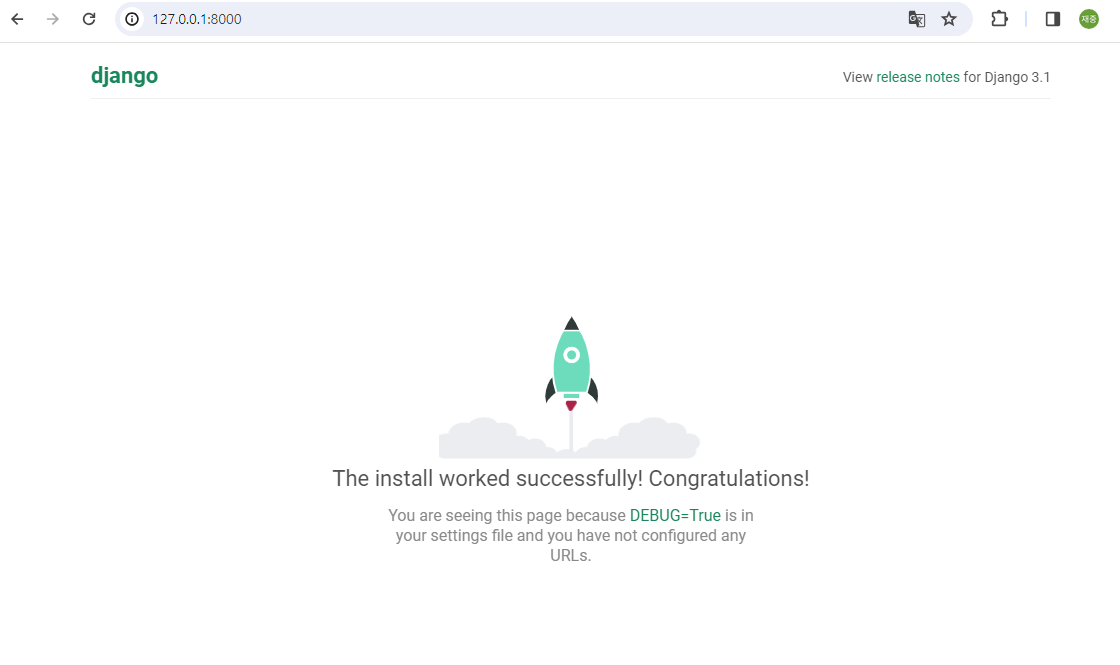
접속 주소에 접속하면 django 화면으로 넘어옴
앱 생성
앱 - 특정 기능을 수행하는 웹 애플리케이션
pybo 앱 생성
cmd
django-admin startapp pybopybo는 앱 이름
개발 서버 실행 후 http://127.0.0.1:8000/pybo 로 접속
python manage.py runserver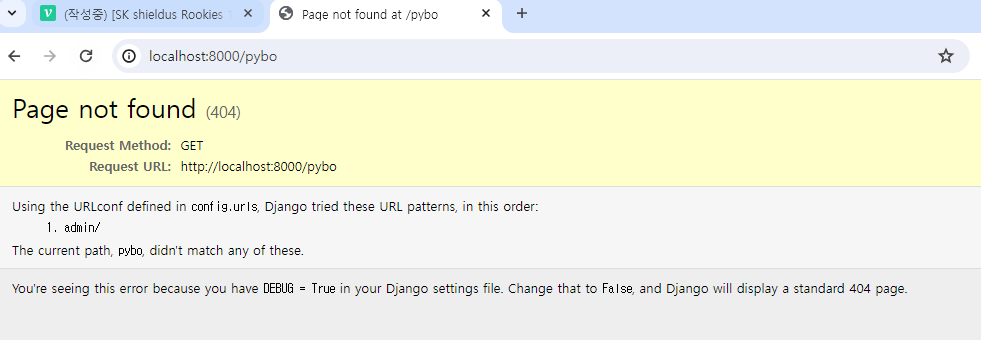
다음과 같이 오류가 뜰텐데 당황하지 말자.
URL 맵핑을 추가 ⇒ config/urls.py 파일에 path() 함수를 사용해서 URL과 요청을 처리할 함수를 연결
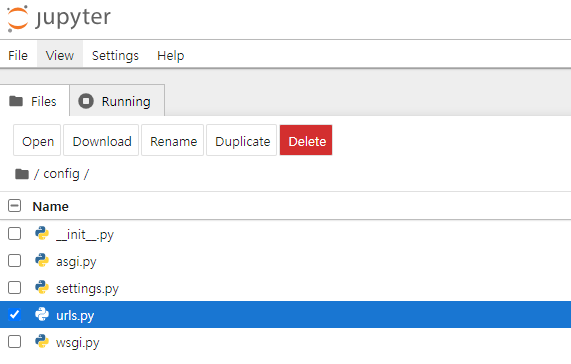
다음과 같이 수정한다.
from django.contrib import admin
from django.urls import path
from pybo import views

urlpatterns = [
    path('admin/', admin.site.urls),
    path('pybo/', views.index)	# views.py 파일에 index 함수는 구현되지 않은 상태임
]
추가한 뷰 함수 또한 정의가 되어있지 않다.
뷰 함수를 정의(작성) ⇒ pybo\views.py 파일에 index() 함수를 추가
from django.http import HttpResponse
def index(request):
    return HttpResponse("안녕하세요. PYBO에 온 것을 환영합니다.")
접속 결과
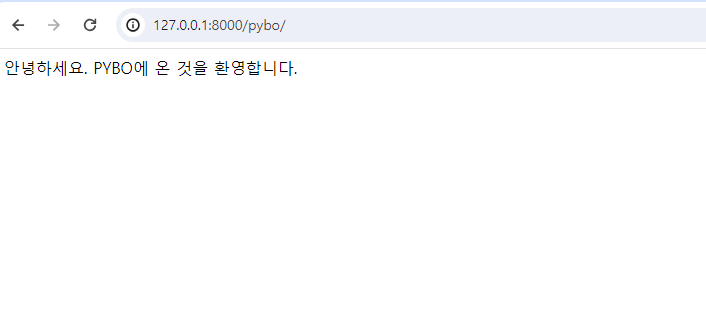
다른 명령 프롬프트에서 curl로 접속
cmd
C:\Users\crpark> curl http://localhost:8000/pybo/ -v
*   Trying [::1]:8000...					⇐ 개발 서버와 연결을 시도
*   Trying 127.0.0.1:8000...
* Connected to localhost (127.0.0.1) port 8000
> GET /pybo/ HTTP/1.1						⇐ 요청 시작
> Host: localhost:8000					⇐ 요청 헤더 시작
> User-Agent: curl/8.4.0
> Accept: */*
>								⇐ 요청 헤더 끝 (GET 방식인 경우 요청 본문은 생략)
< HTTP/1.1 200 OK						⇐ 응답 시작
< Date: Fri, 08 Mar 2024 04:32:44 GMT			⇐ 응답 헤더 시작
< Server: WSGIServer/0.2 CPython/3.12.2
< Content-Type: text/html; charset=utf-8
< X-Frame-Options: DENY
< Content-Length: 52
< X-Content-Type-Options: nosniff
< Referrer-Policy: same-origin
<								⇐ 응답 헤더 끝
안녕하세요. PYBO에 온 것을 환영합니다.			⇐ 응답 본문 ⇒ index 함수에서 HttpResponse 인스턴스 생성 시
Connection #0 to host localhost left intact		                입력한 문자열
장고 요청 처리 흐름
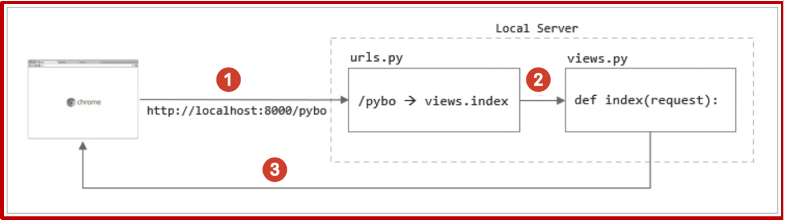
URL 분리 ⇒ 앱 별로 URL 맵핑을 관리
config\urls.py 파일을 수정
from django.contrib import admin
from django.urls import path, include
from pybo import views

urlpatterns = [
    path('admin/', admin.site.urls),
    # path('pybo/', views.index),
    path('pybo/', include('pybo.urls'))	#⇐ pybo 패키지에 있는 urls 모듈을 참조해서 URL 맵핑을 처리
]   						   #→ pybo\urls.py 파일에 pybo/ 패턴의 요청을 처리할 URL 맵핑을 정의
pybo\urls.py 파일을 추가
from django.urls import path
from django.urls import path, include
from . import views         # 현재 패키지에서 views 모듈을 가져옴

urlpatterns = [
    path('', views.index),
]
마이그레이션 - DB에 변경 사항을 적용
서버 기동 시 출력되는 경고를 확인 ⇒ 마이그레이션이 적용되지 않은 것이 존재
(mysite) c:\python\projects\mysite> python manage.py runserver
Watching for file changes with StatReloader
Performing system checks...

System check identified no issues (0 silenced).

You have 18 unapplied migration(s). Your project may not work properly until you apply the migrations for app(s): admin, auth, contenttypes, sessions.
Run 'python manage.py migrate' to apply them.
March 08, 2024 - 14:08:05
Django version 3.1.3, using settings 'config.settings'
Starting development server at http://127.0.0.1:8000/
Quit the server with CTRL-BREAK.
[08/Mar/2024 14:08:08] "GET /pybo/ HTTP/1.1" 200 52
config\settings.py 파일에서 설정 정보를 확인
INSTALLED_APPS을 확인 ⇒ 기본 설치된 앱
INSTALLED_APPS = [
'django.contrib.admin',
'django.contrib.auth',
'django.contrib.contenttypes',
'django.contrib.sessions',
'django.contrib.messages',
'django.contrib.staticfiles',
]
DATABASES를 확인 ⇒ 장고 애플리케이션에서 사용하는 데이터베이스의 연결 정보
DATABASES = {
'default': {
'ENGINE': 'django.db.backends.sqlite3',
'NAME': BASE_DIR / 'db.sqlite3',
}
}
migrate 명령으로 앱이 필요로 하는 테이블을 생성
(mysite) c:\python\projects\mysite> python manage.py migrate
Operations to perform:
  Apply all migrations: admin, auth, contenttypes, sessions
Running migrations:
  Applying contenttypes.0001_initial... OK
  Applying auth.0001_initial... OK
  Applying admin.0001_initial... OK
  Applying admin.0002_logentry_remove_auto_add... OK
  Applying admin.0003_logentry_add_action_flag_choices... OK
  Applying contenttypes.0002_remove_content_type_name... OK
  Applying auth.0002_alter_permission_name_max_length... OK
  Applying auth.0003_alter_user_email_max_length... OK
  Applying auth.0004_alter_user_username_opts... OK
  Applying auth.0005_alter_user_last_login_null... OK
  Applying auth.0006_require_contenttypes_0002... OK
  Applying auth.0007_alter_validators_add_error_messages... OK
  Applying auth.0008_alter_user_username_max_length... OK
  Applying auth.0009_alter_user_last_name_max_length... OK
  Applying auth.0010_alter_group_name_max_length... OK
  Applying auth.0011_update_proxy_permissions... OK
  Applying auth.0012_alter_user_first_name_max_length... OK
  Applying sessions.0001_initial... OK
DB Browser for SQLite를 설치
https://sqlitebrowser.org/dl/
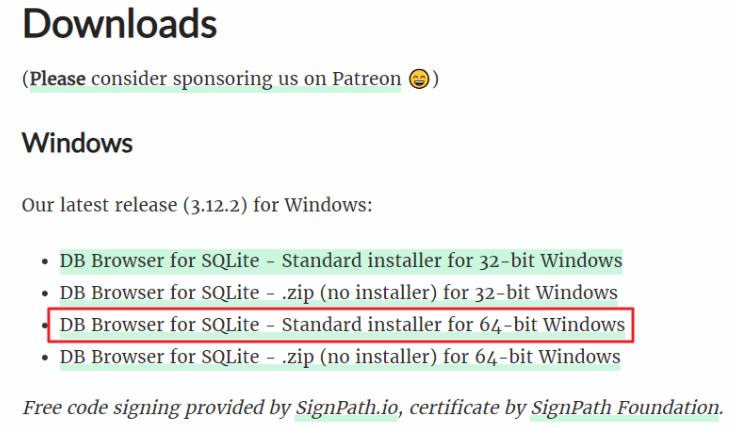
C:\Program Files\DB Browser for SQLite\DB Browser for SQLite.exe 실행
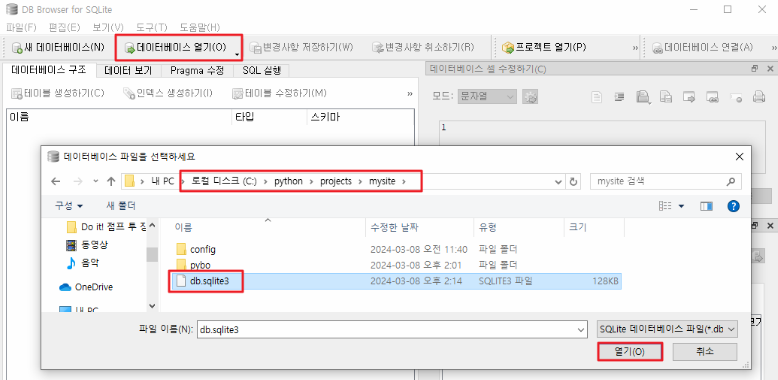
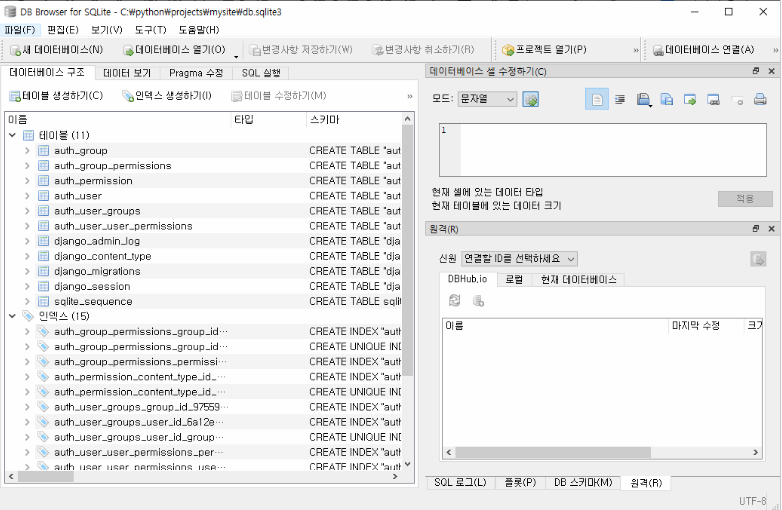
모델 생성
pybo\models.py
from django.db import models

# 질문 모델 클래스를 정의
class Question(models.Model):
    # 질문 모델이 가지는 속성을 정의
    subject = models.CharField(max_length=200)      # 글자 수 제한이 있는 데이터
    content = models.TextField()                    # 글자 수 제한이 없는 데이터
    create_date = models.DateTimeField()            # 날짜, 시간을 나타내는 데이터


# 답변 모델 클래스를 정의
class Answer(models.Model):
    # 답변 모델이 가지는 속성을 정의
    question = models.ForeignKey(Question, on_delete=models.CASCADE)
    content = models.TextField()
    create_date = models.DateTimeField()
config\settings.py 파일에 pybo 앱을 등록
INSTALLED_APPS = [
    'django.contrib.admin',
    'django.contrib.auth',
    'django.contrib.contenttypes',
    'django.contrib.sessions',
    'django.contrib.messages',
    'django.contrib.staticfiles',
    'pybo.apps.PyboConfig',			⇐ 장고가 pybo 앱을 인식하고 데이터베이스 관련 작업을 수행할 수 있음
]
migrate 명령으로 테이블을 생성
(mysite) c:\python\projects\mysite> python manage.py migrate
Operations to perform:
  Apply all migrations: admin, auth, contenttypes, sessions
Running migrations:
  No migrations to apply.
  Your models have changes that are not yet reflected in a migration, and so won't be applied.
  Run 'manage.py makemigrations' to make new migrations, and then re-run 'manage.py migrate' to apply them.
       ~~~~~~~~~~~~~~~~~~~~~~~~                                           ~~~~~~~~~~~~~~~~~
       장고가 테이블 작업을 수행하기 위한 파일을 생성                     실제 테이블을 생성
makemigrations 후 migrate를 수행
(mysite) c:\python\projects\mysite> python manage.py makemigrations
Migrations for 'pybo':
  pybo\migrations\0001_initial.py
    - Create model Question
    - Create model Answer
(mysite) c:\python\projects\mysite> dir pybo\migrations ⇐ 마이그레이션 파일이 있는 위치
C 드라이브의 볼륨에는 이름이 없습니다.
볼륨 일련 번호: 9027-83B9
c:\python\projects\mysite\pybo\migrations 디렉터리
2024-03-08 오후 03:02 <DIR> .
2024-03-08 오후 03:02 <DIR> ..
2024-03-08 오후 03:02 1,104 0001_initial.py
2024-03-08 오후 01:09 0 __init__.py
2024-03-08 오후 03:02 <DIR> __pycache__
2개 파일 1,104 바이트
3개 디렉터리 172,790,190,080 바이트 남음(mysite) c:\python\projects\mysite> type pybo\migrations\0001_initial.py
# Generated by Django 3.1.3 on 2024-03-08 06:02
from django.db import migrations, models
import django.db.models.deletion
class Migration(migrations.Migration):
initial = True
dependencies = [
]
operations = [
migrations.CreateModel(
name='Question',
fields=[
('id', models.AutoField(auto_created=True, primary_key=True, serialize=False, verbose_name='ID')),
('subject', models.CharField(max_length=200)),
('content', models.TextField()),
('create_date', models.DateTimeField()),
],
),
migrations.CreateModel(
name='Answer',
fields=[
('id', models.AutoField(auto_created=True, primary_key=True, serialize=False, verbose_name='ID')),
('content', models.TextField()),
('create_date', models.DateTimeField()),
('question', models.ForeignKey(on_delete=django.db.models.deletion.CASCADE, to='pybo.question')),
],
),
]
(mysite) c:\python\projects\mysite> python manage.py migrate
Operations to perform:
  Apply all migrations: admin, auth, contenttypes, pybo, sessions
Running migrations:
Applying pybo.0001_initial... OK 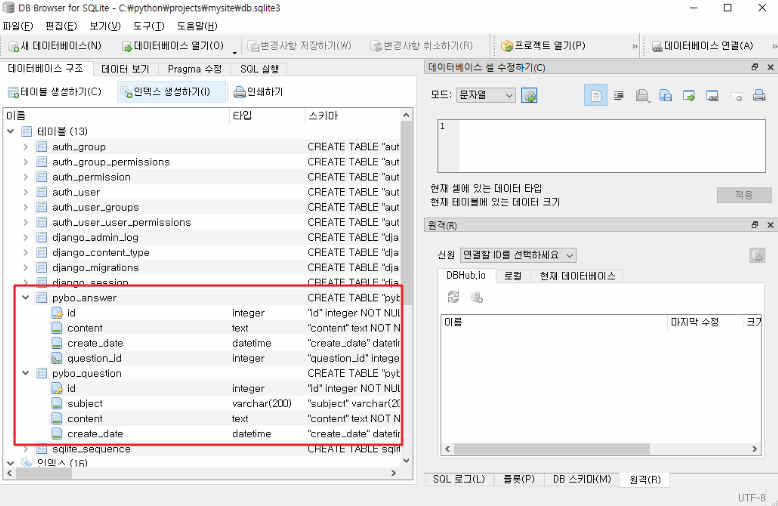
데이터 생성, 저장, 조회
장고 쉘을 실행 ⇒ 장고 실행에 필요한 환경들을 자동으로 설정해서 실행하는 쉘 (python shell과는 다름)
mysite) c:\python\projects\mysite> python manage.py shell
Python 3.12.2 (tags/v3.12.2:6abddd9, Feb  6 2024, 21:26:36) [MSC v.1937 64 bit (AMD64)] on win32
Type "help", "copyright", "credits" or "license" for more information.
(InteractiveConsole)
>>>

>>> from pybo.models import Question, Answer
>>> from django.utils import timezone
>>> q = Question(subject='pybo가 무엇인가요?', content='pybo에 대해서 알려 주세요', create_date=timezone.now())
>>> q.save()						⇐ 모델 데이터를 데이터베이스에 저장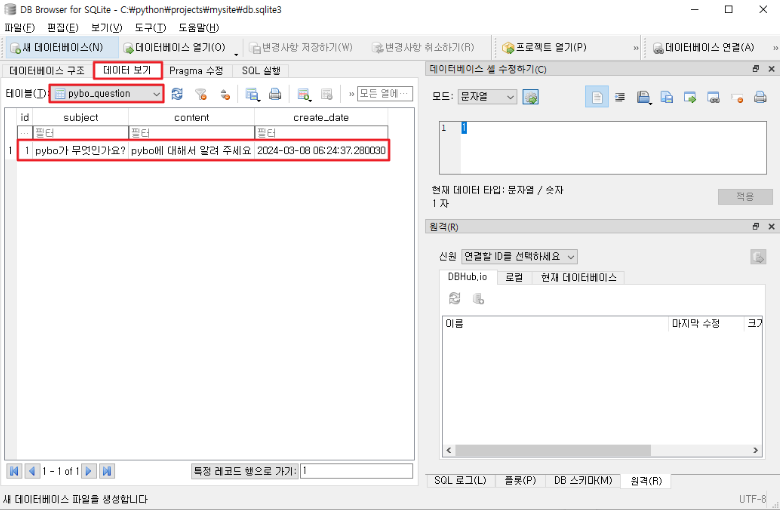
>>> q.subject
'pybo가 무엇인가요?'

>>> q.id				⇐ 장고가 자동으로 넣어 주는 필드
1

Question 인스턴스를 하나 더 생성해서 저장
>>> q = Question(subject='두번째 질문입니다.', content='ID는 자동으로 생성되나요?', create_date=timezone.now())
>>> q.save()
>>> q.id
2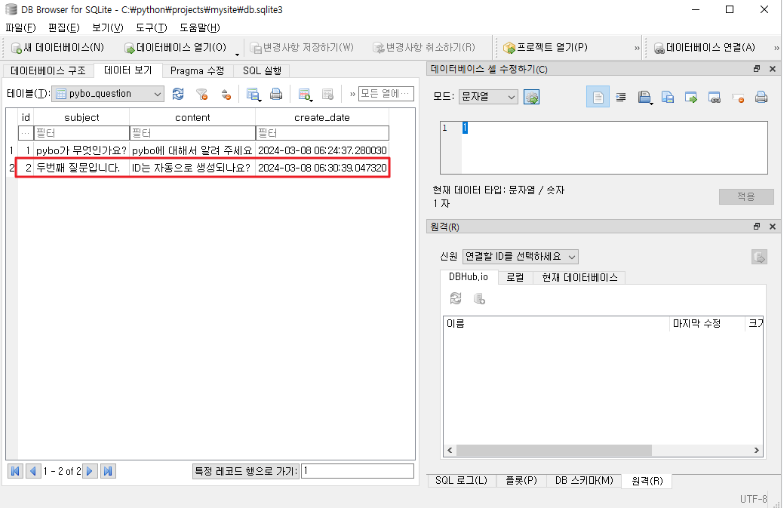
모든 데이터 조회
>>> Question.objects.all()
<QuerySet [<Question: Question object (1)>, <Question: Question object (2)>]>
                                       ~                                ~
                                       장고가 Question 모델 데이터에 자동으로 입력한 ID 값
모델 데이터 조회 결과에 출력한 정보를 변경 (기본적으로 ID가 출력)
pybo\models.py
from django.db import models

# 질문 모델 클래스를 정의
class Question(models.Model):
    # 질문 모델이 가지는 속성을 정의
    subject = models.CharField(max_length=200)      # 글자 수 제한이 있는 데이터
    content = models.TextField()                    # 글자 수 제한이 없는 데이터
    create_date = models.DateTimeField()            # 날짜, 시간을 나타내는 데이터

    def __str__(self):
        return self.subject				⇐ 제목을 반환


# 답변 모델 클래스를 정의
class Answer(models.Model):
    # 답변 모델이 가지는 속성을 정의
    question = models.ForeignKey(Question, on_delete=models.CASCADE)
    content = models.TextField()
    create_date = models.DateTimeField()
장고 쉘을 재 접속 후 Question 모델 데이터를 조회
exit()(mysite) c:\python\projects\mysite> python manage.py shell
Python 3.12.2 (tags/v3.12.2:6abddd9, Feb 6 2024, 21:26:36) [MSC v.1937 64 bit (AMD64)] on win32
Type "help", "copyright", "credits" or "license" for more information.
(InteractiveConsole)
>>> from pybo.models import Question, Answer
>>> Question.objects.all()
<QuerySet [<Question: pybo가 무엇인가요?>, <Question: 두번째 질문입니다.>]>
~~~~~~~~~~~~~~~~~~ ~~~~~~~~~~~~~~~~~~ 조건과 일치하는 모델 데이터 조회
>>> Question.objects.filter(id=1)			⇐ 조건에 해당하는 데이터를 모두 찾아서 QuerySet 형태로 반환
<QuerySet [<Question: pybo가 무엇인가요?>]>

>>> rs = Question.objects.filter(id=1)
>>> rs[0].subject
'pybo가 무엇인가요?'

>>> rs = Question.objects.filter(id=100)		⇐ 조건을 만족하는 결과가 없는 경우 빈 QuerySet을 반환
>>> rs
<QuerySet []>


>>> Question.objects.get(id=1)			⇐ 조건에 해당하는 데이터 중 하나만 해당 객체 타입으로 반환
<Question: pybo가 무엇인가요?>

>>> rs = Question.objects.get(id=1)
>>> rs.subject
'pybo가 무엇인가요?'


>>> rs = Question.objects.get(id=100)		⇐ 조건을 만족하는 결과가 없는 경우 오류가 발생
Traceback (most recent call last):
  File "<console>", line 1, in <module>
  File "C:\Users\crpark\AppData\Local\Programs\Python\Python312\Lib\site-packages\django\db\models\manager.py", line 85, in manager_method
    return getattr(self.get_queryset(), name)(*args, **kwargs)
           ^^^^^^^^^^^^^^^^^^^^^^^^^^^^^^^^^^^^^^^^^^^^^^^^^^^
  File "C:\Users\crpark\AppData\Local\Programs\Python\Python312\Lib\site-packages\django\db\models\query.py", line 429, in get
    raise self.model.DoesNotExist(
pybo.models.Question.DoesNotExist: Question matching query does not exist.
일부 내용을 포함하는 것을 조회
>>> Question.objects.filter(subject='인가요')			⇐ 일치하는 것을 조회
<QuerySet []>
>>> Question.objects.filter(subject__contains='인가요')		⇐ SQL의 LIKE 연산과 동일하게 동작
<QuerySet [<Question: pybo가 무엇인가요?>]>
모델 데이터 수정
>>> q = Question.objects.get(id=1)					⇐ 수정 대상 조회 (get, filter)
>>> q
<Question: pybo가 무엇인가요?>
>>> q.subject = 'What is pybo?'					⇐ 객체 필터의 데이터를 변경
>>> q.save()								⇐ save 함수를 이용해서 DB에 반영
>>> q = Question.objects.get(id=1)
>>> q
<Question: What is pybo?>
모델 데이터 삭제
>>> q = Question.objects.get(id=1)
>>> q.delete()								⇐ delete 메서드를 호출하면 DB에도 즉시 반영
(1, {'pybo.Question': 1})
>>> rs = Question.objects.all()
>>> rs
<QuerySet [<Question: 두번째 질문입니다.>]>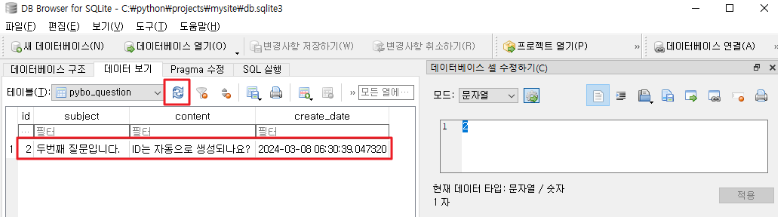
연결된 데이터 처리
Answer 모델 데이터 생성
>>> q = Question.objects.get(id=2)
>>> q
<Question: 두번째 질문입니다.>
>>> from django.utils import timezone
>>> a = Answer(question=q, content='네 자동으로 생성됩니다.', create_date=timezone.now())
>>> a.save()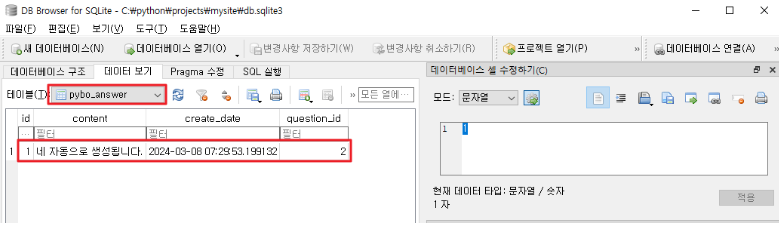
Answer에 연결된 Question을 조회
>>> a
<Answer: Answer object (1)>
>>> a.question
<Question: 두번째 질문입니다.>
#### Question에 연결된 Answer를 조회
>>> q = Question.objects.get(id=2)
>>> q.answer_set.all() ⇐ 연결되어있는모델명_set 형식으로 참조
<QuerySet [<Answer: Answer object (1)>]>
>>> exit()장고 admin 기능
슈퍼 유저 생성
(mysite) c:\python\projects\mysite> python manage.py createsuperuser
Username (leave blank to use 'crpark'): admin
Email address: myanjini@gmail.com
Password: p@ssw0rd
Password (again): p@ssw0rd
This password is too common.
Bypass password validation and create user anyway? [y/N]: y
Superuser created successfully.
개발 서버 실행
(mysite) c:\python\projects\mysite> python manage.py runserver
Watching for file changes with StatReloader
Performing system checks...

System check identified no issues (0 silenced).
March 08, 2024 - 16:48:25
Django version 3.1.3, using settings 'config.settings'
Starting development server at http://127.0.0.1:8000/
Quit the server with CTRL-BREAK.
장고 admin 페이지 접속 ⇒ http://localhost:8000/admin/
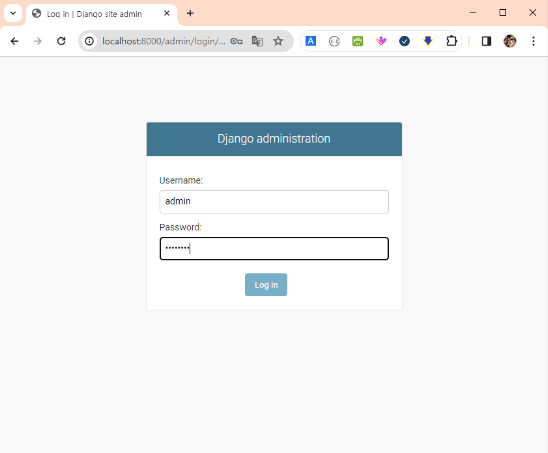
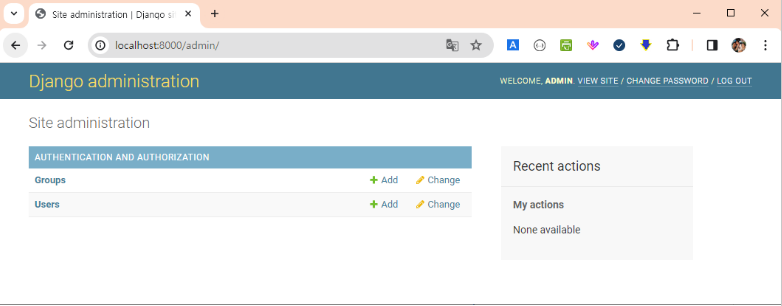
Question, Answer 모델을 admin 사이트에 등록 ⇒ 장고 admin을 통해서 모델 관리가 가능
pybo\admin.py
from django.contrib import admin
from .models import Question

admin.site.register(Question)
관리자 페이지를 리로드(F5)
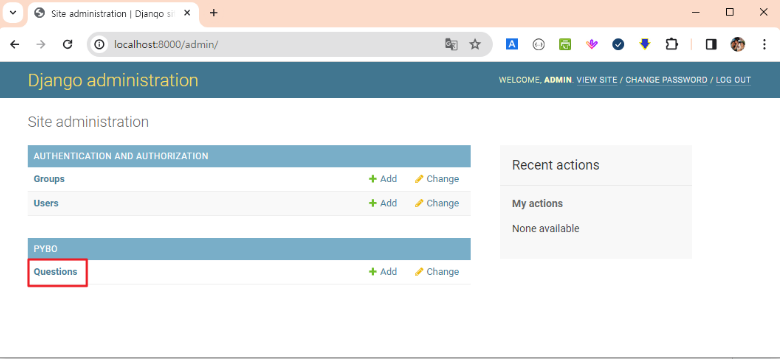
관리자 페이지에 검색 기능을 추가
pybo\admin.py
from django.contrib import admin
from .models import Question

class QuestionAdmin(admin.ModelAdmin):
    search_fields = ['subject']

admin.site.register(Question, QuestionAdmin)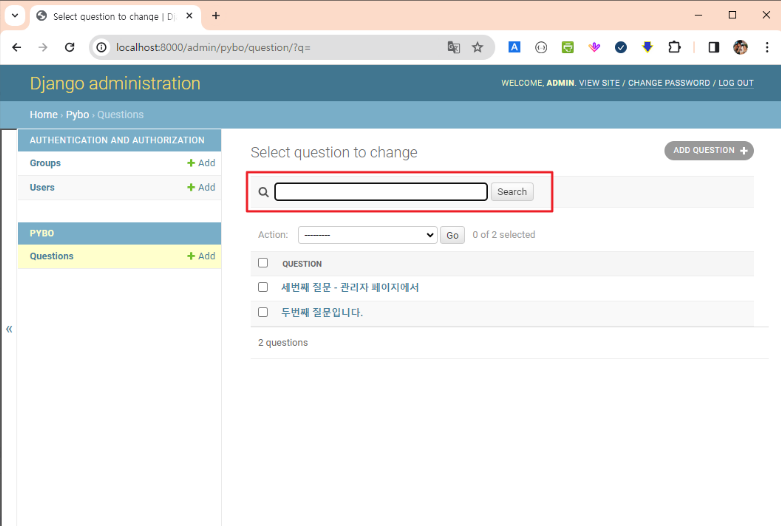
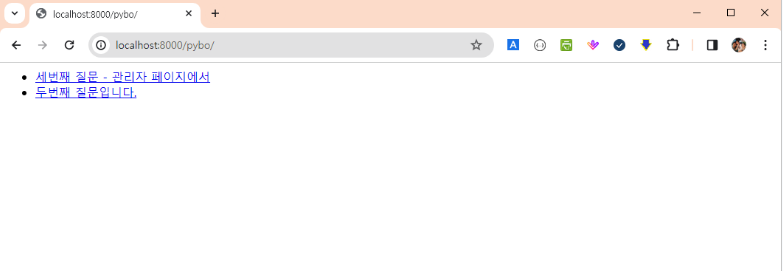
사용자 화면 중 질문 목록 조회 기능을 구현
Question 모델 데이터를 작성일자 역순으로 조회
pybo\views.py
from django.shortcuts import render
from .models import Question

def index(request):
    question_list = Question.objects.order_by('-create_date')
    context = { 'question_list' : question_list }

    return render(request, 'pybo/question_list.html', context)
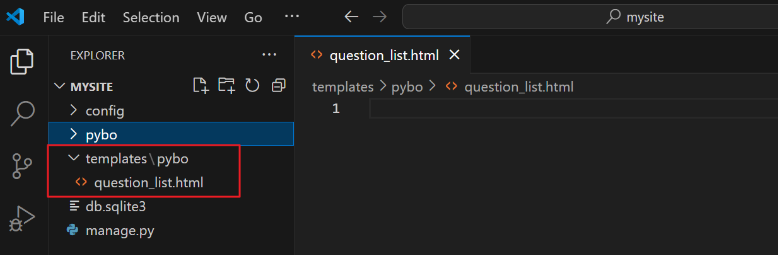
c:\python\projects\mysite\templates\pybo\question_list.html
템플릿 파일이 저장되는 위치
{% if question_list %}
    <ul>
        {% for question in question_list %}
            <li><a href="/pybo/{{ question.id }}/">{{ question.subject }}</a></li>
        {% endfor %}
    </ul>
{% else %}
    <p>질문이 없습니다.</p>
{% endif %}
config\settings.py 파일에 템플릿 디렉터를 추가
TEMPLATES = [
    {
        'BACKEND': 'django.template.backends.django.DjangoTemplates',
        'DIRS': [ BASE_DIR / 'templates' ],
        'APP_DIRS': True,
        'OPTIONS': {
            'context_processors': [
                'django.template.context_processors.debug',
                'django.template.context_processors.request',
                'django.contrib.auth.context_processors.auth',
                'django.contrib.messages.context_processors.messages',
            ],
        },
    },
]