DuckDB?
c++로 작성된 오픈소스 컬럼 기반 DB 관리 시스템으로, 인메모리(in-memory) OLAP에 최적화 되어있는 특징
비교
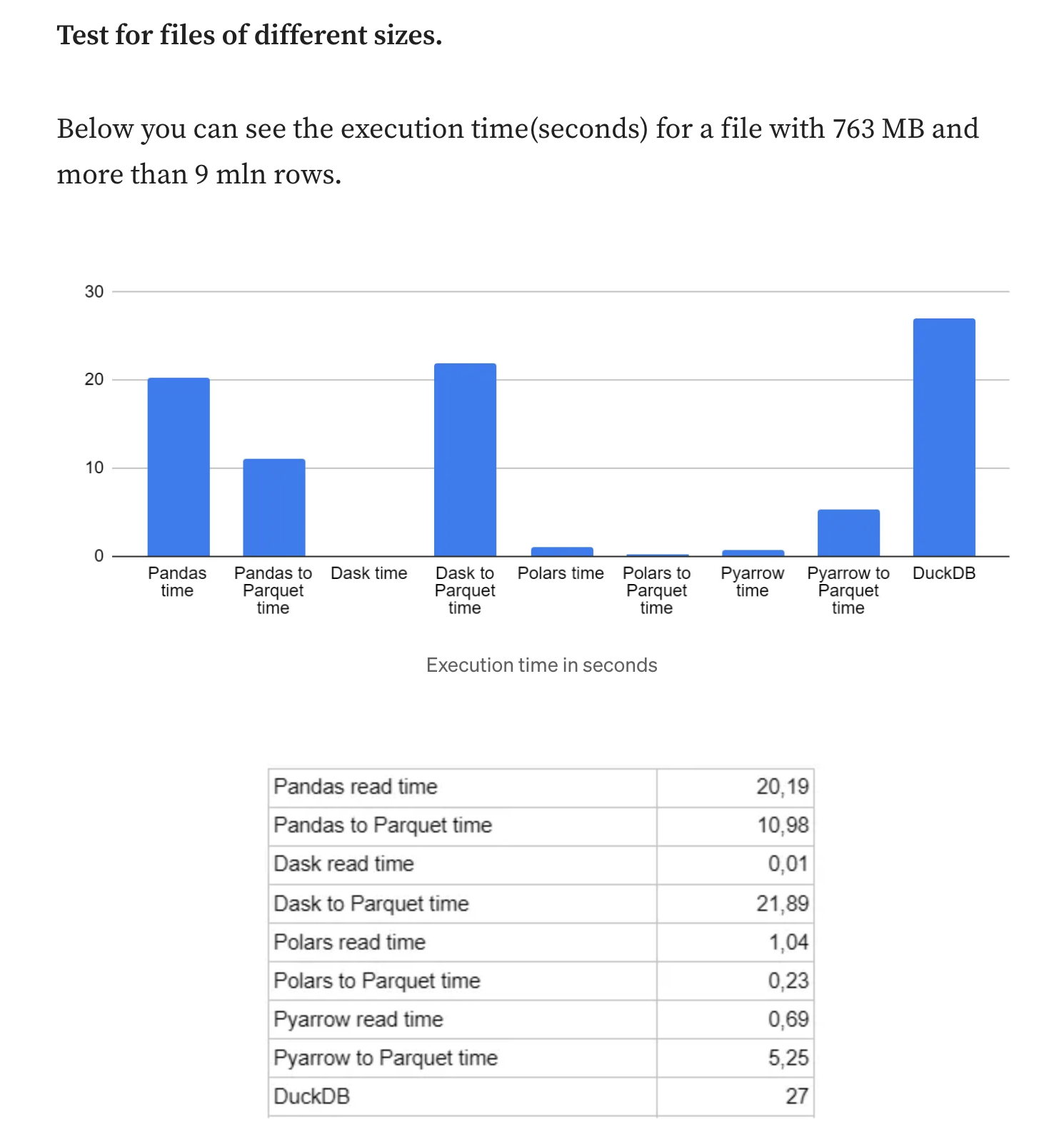
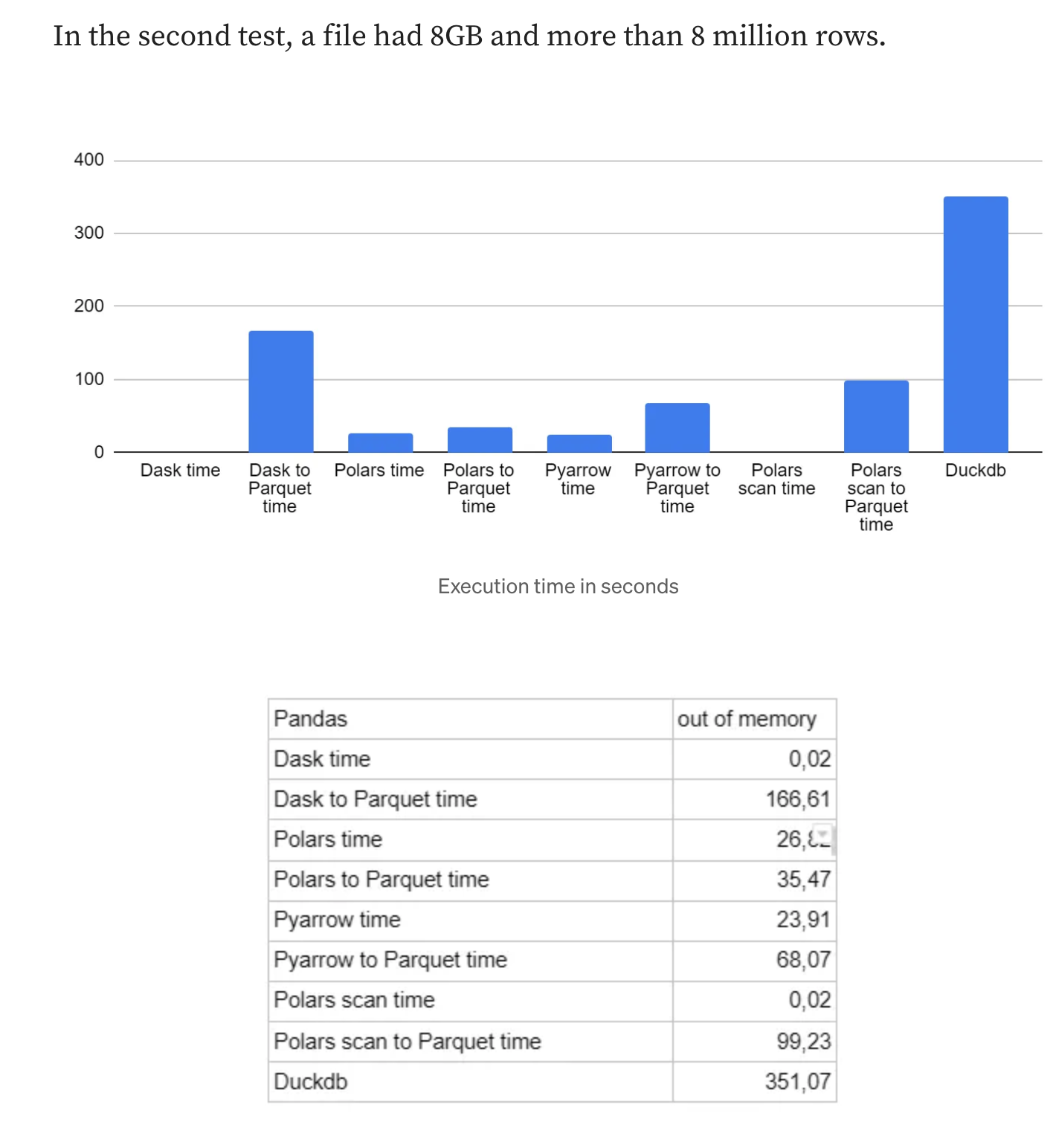
- DuckDB 는 속도와 효율성을 위해 설계된 인메모리 분석용 데이터베이스
- 일반적으로 대용량 데이터셋에 대한 SQL 쿼리 실행에 있어 Pandas 보다 빠름
- DuckDB = 멀티스레드 (쿼리를 실행하기 위해 여러 개의 스레드를 사용하며, 멀티코어 시스템에서 큰 성능 향상)
- EDA를 빨리하기 위함. PostgreSQL은 더 전문적인 일을 함
DataFrames
- DuckDB 는 Pandas DataFrame을 이용해서 쿼리를 작성할 수 있다.
import duckdb

# Pandas DataFrame
import pandas as pd
pandas_df = pd.DataFrame({"a": [42]})
duckdb.sql("SELECT * FROM pandas_df")

# Polars DataFrame
import polars as pl
polars_df = pl.DataFrame({"a": [42]})
duckdb.sql("SELECT * FROM polars_df")

# pyarrow table
import pyarrow as pa
arrow_table = pa.Table.from_pydict({"a": [42]})
duckdb.sql("SELECT * FROM arrow_table")
결과변환
- DuckDB는 쿼리 결과를 다양한 포맷으로 전환 가능
import duckdb
duckdb.sql("SELECT 42").fetchall()   # Python objects
duckdb.sql("SELECT 42").df()         # Pandas DataFrame
duckdb.sql("SELECT 42").pl()         # Polars DataFrame
duckdb.sql("SELECT 42").arrow()      # Arrow Table
duckdb.sql("SELECT 42").fetchnumpy() # NumPy Arrays
인메모리 DB 사용
- duckdb.connect() 명령어를 이용하면 새로운 DuckDB connect을 사용할 수 있다. duckdb.sql() 을 이용해서 DuckDB를 사용하면, 이는
Python에서 DuckDB API 사용
def import_data_directory_to_duckdb(data_path, db_path):
    # Connect to DuckDB database (will create a new one if it doesn't exist)
    con = duckdb.connect(db_path)
    # Iterate through all data files in the folder
    for file in os.listdir(data_path):

        # If the file is not a csv or parquet, skip
        if not file.endswith('.csv') and not file.endswith('.parquet'):
            continue

        # Split the file name and the file extension
        file_name, _ = os.path.splitext(file)

        # Create a table name by stripping the extension and replacing dots with underscores
        table_name = file_name.replace(".", "_")

        # Construct the full path to the data file
        file_path = os.path.join(data_path, file)

        try:
            # Create if not exists or replace a table and load the data into DuckDB
            con.execute(f"""
            CREATE OR REPLACE TABLE {table_name} AS
            SELECT * FROM '{file_path}';
            """)
        except duckdb.CatalogException:
            # If the table already exists, catch the exception and print a message
            print(f"The table: '{table_name}' already exists.")

        except Exception as e:
            # Catch any other exceptions that may occur
            print(f"An error occurred: {e}")
        else:
            # If there were no errors
            print(f"Inserted {file_name} into table {table_name}")

    # Close the connection when done
    con.close()