
저번 시간 BentoML 을 통해 Input Feature를 통한 Output 이 나오는 하나의 모델 서빙 과정을 확인 하였다. 이번 시간엔 그 Input Feature 와 Model Training Data를 같이 관리할 수 있는 Feature Store에 대해 알아보겠다.
pip install feast # feast 설치

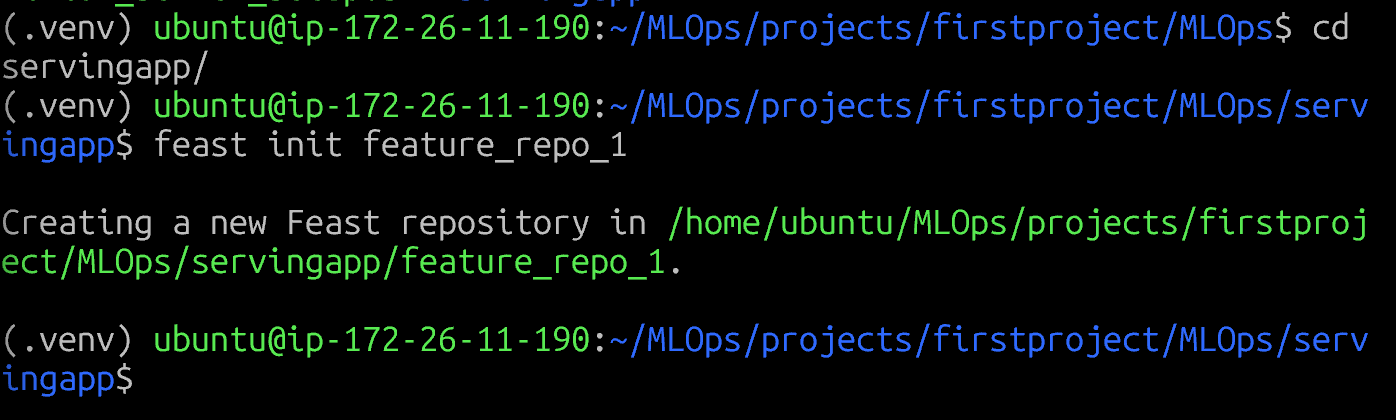
feast init feature_repo_1 # feature_repo_1 이라는 feature repository 생성
🧩 1️⃣ Feature Repo란?
Feature Repository는 Feature Store의 “프로젝트 단위”.
ML 프로젝트에서 데이터베이스로 치면 스키마(schema),
MLflow로 치면 experiment workspace 같은 개념.
| 구성 요소 | 설명 | 예시 |
|---|---|---|
feature_store.yaml | Feature Store 전체 설정파일 (offline/online backend, registry 등) | e.g. BigQuery, Redis 연결정보 |
entities.py | 엔티티(Entity) 정의 (e.g. user, item 등 피처의 주체 ID) | user_id, product_id |
feature_views/*.py | 실제 피처 계산 로직 정의 | 일별 구매합계, 최근 로그인시간 |
data/ | 샘플 데이터, 테스트용 parquet/csv | offline 학습용 feature |
feature_services.py | 어떤 피처를 어떤 모델이 사용할지 정의 | “fraud_detection_service” 등 |
🧱 2️⃣ Feature Repo가 저장하는 것
✅ 1. 엔티티(Entity)
각 피처가 속하는 “식별자 단위”
예: user_id, product_id, session_id
key 역할을 하며, Feature Store에서 Online KV 접근에 사용
from feast import Entity

user = Entity(name="user_id", join_keys=["user_id"])
✅ 2. 피처 뷰(FeatureView)
실제로 계산되는 피처의 묶음
SQL 쿼리, DataFrame 변환, 또는 ETL을 통해 정의됨
event_timestamp(시점), ttl(유효기간)도 정의 가능
from feast import FeatureView, Field
from feast.types import Float32, Int64

user_stats = FeatureView(
    name="user_stats",
    entities=["user_id"],
    ttl=timedelta(days=7),
    schema=[
        Field(name="total_purchases", dtype=Int64),
        Field(name="avg_purchase_value", dtype=Float32),
    ],
    source=FileSource(path="data/user_stats.parquet", timestamp_field="event_timestamp"),
)
✅ 3. 데이터 소스(Source)
피처가 계산될 원천 데이터 경로 (DB, DataLake, Stream 등)
Offline Store (e.g. BigQuery, S3, Snowflake)
Online Store (e.g. Redis, DynamoDB)
from feast import FileSource
transactions = FileSource(
    path="data/transactions.parquet",
    event_timestamp_column="event_timestamp"
)
✅ 4. 피처 서비스(Feature Service)
“모델별 피처 세트 정의”
여러 FeatureView를 하나의 서비스 단위로 묶음
→ 모델이 요청할 때 어떤 feature group을 쓸지 명시
from feast import FeatureService
fraud_service = FeatureService(
    name="fraud_detection_service",
    features=[user_stats, transaction_features]
)
| 기능 | 설명 | 예시 명령어 |
|---|---|---|
| 1️⃣ 초기화 (init) | Feature Repo 프로젝트 생성 | feast init my_feature_repo |
| 2️⃣ 정의 적용 (apply) | 정의된 Entity, FeatureView, Service를 메타스토어에 등록 | feast apply |
| 3️⃣ 학습용 데이터 생성 (get_historical_features) | Offline store에서 학습용 피처 데이터 추출 | feast get-historical-features |
| 4️⃣ 실시간 피처 제공 (serve / get-online-features) | Online Store에서 실시간 피처 조회 | feast serve / SDK 호출 |
| 5️⃣ 백필 (materialize / materialize-incremental) | Offline → Online 데이터 복사 / 동기화 | feast materialize 2025-01-01 2025-11-01 |
| 6️⃣ 피처 버전 관리 (registry) | 피처 정의 변경 이력 관리 (yaml 기반) | 자동 생성됨 (registry.db) |
| 7️⃣ 테스트 / 시뮬레이션 | 로컬 파일 기반으로 feature 계산 테스트 | feast apply && feast serve |
Feast 구성 요소
| 구성 요소 | 역할 |
|---|---|
| Project | Feature repo의 논리적 단위 (폴더, namespace 같은 개념) |
| Entity | feature를 조회할 때 기준이 되는 key (예: driver_id, user_id 등) |
| FileSource / DataSource | feature의 원천 데이터 (parquet, BigQuery, Redshift 등) |
| FeatureView (FV) | 특정 feature들의 schema 정의 (어떤 entity에서 어떤 feature를 가질지) |
| FeatureService (FS) | FeatureView들을 묶어서 모델 단위로 관리하는 그룹 |
| OnDemandFeatureView (ODFV) | Request 시점에 계산되는 feature (예: 실시간 계산값) |
| PushSource | feature를 직접 online store에 푸시할 때 사용 |
| LoggingConfig | feature 사용 로그 저장 설정 |
Feast Repo 구조
-
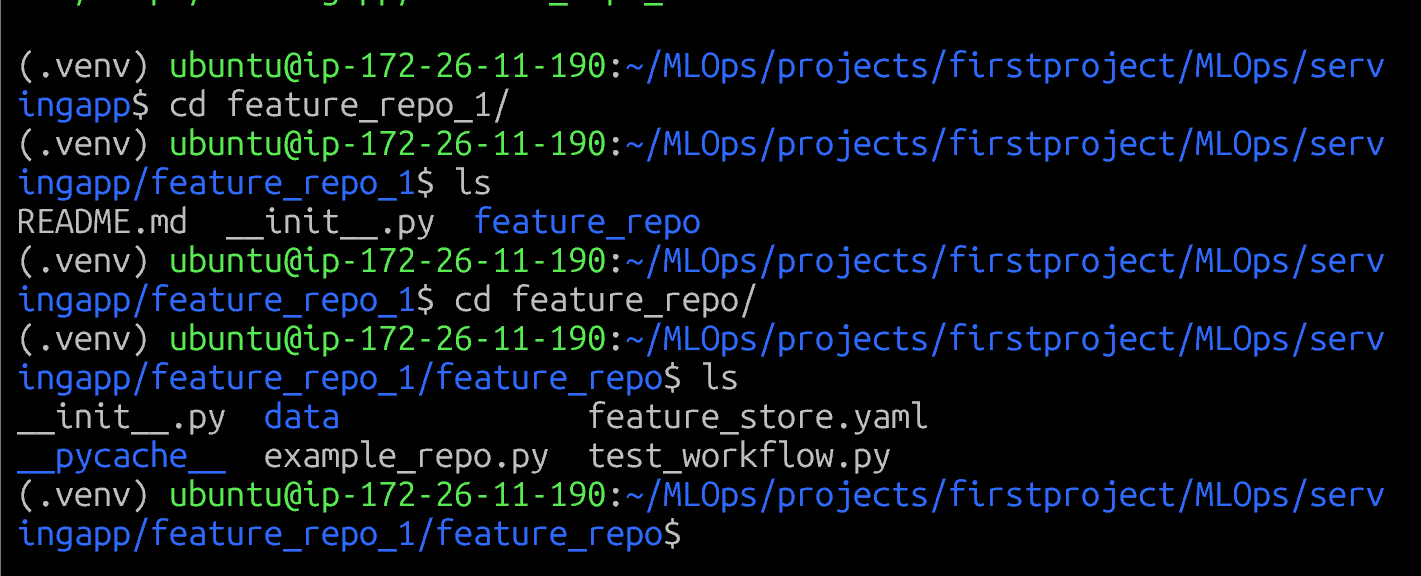
feature_store.yaml 에는 이 feature repo가 어떻게 실행될 지 등의 설정 값을 담는다.
-
example_repo.py 에는 저장할 feature 에 대한 정의를 담는다 (Entity 정의, FeatureView)
# This is an example feature definition file

from datetime import timedelta

import pandas as pd

from feast import (
    Entity,
    FeatureService,
    FeatureView,
    Field,
    FileSource,
    Project,
    PushSource,
    RequestSource,
)
from feast.feature_logging import LoggingConfig
from feast.infra.offline_stores.file_source import FileLoggingDestination
from feast.on_demand_feature_view import on_demand_feature_view
from feast.types import Float32, Float64, Int64

# Define a project for the feature repo
#============(1) 프로젝트 정의==================================

project = Project(name="feature_repo_1",
description="A project for driver statistics")

#==============================================================
# Define an entity for the driver. You can think of an entity as a primary key used to


#============(2) Entity 정의==================================

driver = Entity(name="driver", join_keys=["driver_id"])

#==============================================================


# Read data from parquet files. Parquet is convenient for local development mode. For
# production, you can use your favorite DWH, such as BigQuery. See Feast documentation


#============(3) Data Source 정의=================================

driver_stats_source = FileSource(
    name="driver_hourly_stats_source",
    path="data/driver_stats.parquet",
    timestamp_field="event_timestamp",
    created_timestamp_column="created",
)
#==============================================================
# Our parquet files contain sample data that includes a driver_id column, timestamps and
# three feature column. Here we define a Feature View that will allow us to serve this
# data to our model online.

#============(4) FeatureView 정의================================
driver_stats_fv = FeatureView(
    # The unique name of this feature view. Two feature views in a single
    # project cannot have the same name
    name="driver_hourly_stats",
    entities=[driver],
    ttl=timedelta(days=1),
    # The list of features defined below act as a schema to both define features
    # for both materialization of features into a store, and are used as references
    # during retrieval for building a training dataset or serving features
    schema=[
        Field(name="conv_rate", dtype=Float32),
        Field(name="acc_rate", dtype=Float32),
        Field(name="avg_daily_trips", dtype=Int64, description="Average daily trips"),
    ],
    online=True,
    source=driver_stats_source,
    # Tags are user defined key/value pairs that are attached to each
    # feature view
    tags={"team": "driver_performance"},
)
#==============================================================


# Define a request data source which encodes features / information only
# available at request time (e.g. part of the user initiated HTTP request)

#============(5) RequestSource 정의================================

input_request = RequestSource(
    name="vals_to_add",
    schema=[
        Field(name="val_to_add", dtype=Int64),
        Field(name="val_to_add_2", dtype=Int64),
    ],
)
#==============================================================

# Define an on demand feature view which can generate new features based on
# existing feature views and RequestSource features

#============(6) OndemandFeatureView 정의================================
@on_demand_feature_view(
    sources=[driver_stats_fv, input_request],
    schema=[
        Field(name="conv_rate_plus_val1", dtype=Float64),
        Field(name="conv_rate_plus_val2", dtype=Float64),
    ],
)
def transformed_conv_rate(inputs: pd.DataFrame) -> pd.DataFrame:
    df = pd.DataFrame()
    df["conv_rate_plus_val1"] = inputs["conv_rate"] + inputs["val_to_add"]
    df["conv_rate_plus_val2"] = inputs["conv_rate"] + inputs["val_to_add_2"]
    return df
#==============================================================

#============(7) FeatureService (모델 버전 단위 관리)================================
# This groups features into a model version
driver_activity_v1 = FeatureService(
    name="driver_activity_v1",
    features=[
        driver_stats_fv[["conv_rate"]],  # Sub-selects a feature from a feature view
        transformed_conv_rate,  # Selects all features from the feature view
    ],
    logging_config=LoggingConfig(
        destination=FileLoggingDestination(path="data")
    ),
)


driver_activity_v2 = FeatureService(
    name="driver_activity_v2",
    features=[driver_stats_fv,
    transformed_conv_rate]
)
#==============================================================

# Defines a way to push data (to be available offline, online or both) into Feast.

#============(8) PushSource & Fresh FeatureView================================
driver_stats_push_source = PushSource(
    name="driver_stats_push_source",
    batch_source=driver_stats_source,
)

# Defines a slightly modified version of the feature view from above, where the source
# has been changed to the push source. This allows fresh features to be directly pushed
# to the online store for this feature view.


driver_stats_fresh_fv = FeatureView(
    name="driver_hourly_stats_fresh",
    entities=[driver],
    ttl=timedelta(days=1),
    schema=[
        Field(name="conv_rate", dtype=Float32),
        Field(name="acc_rate", dtype=Float32),
        Field(name="avg_daily_trips", dtype=Int64),
    ],
    online=True,
    source=driver_stats_push_source,  # Changed from above
    tags={"team": "driver_performance"},
)
#==============================================================

# Define an on demand feature view which can generate new features based on
# existing feature views and RequestSource features
#============(9) Fresh 버전 OnDemand + FeatureService v3================================
@on_demand_feature_view(
    sources=[driver_stats_fresh_fv, input_request],  # relies on fresh version of FV
    schema=[
        Field(name="conv_rate_plus_val1", dtype=Float64),
        Field(name="conv_rate_plus_val2", dtype=Float64),
    ],
)
def transformed_conv_rate_fresh(inputs: pd.DataFrame) -> pd.DataFrame:
    df = pd.DataFrame()
    df["conv_rate_plus_val1"] = inputs["conv_rate"] + inputs["val_to_add"]
    df["conv_rate_plus_val2"] = inputs["conv_rate"] + inputs["val_to_add_2"]
    return df


driver_activity_v3 = FeatureService(
    name="driver_activity_v3",
    features=[driver_stats_fresh_fv, transformed_conv_rate_fresh],
)
위의 example_repo.py는 feast apply 명령어를 통해 feature store 에 등록할 수 있다.
| 단계 | Feast 컴포넌트 | 설명 |
|---|---|---|
| ① | Project | repo 단위 구분 |
| ② | Entity | feature join key |
| ③ | FileSource | 원천 데이터 (parquet 등) |
| ④ | FeatureView | feature 정의 |
| ⑤ | RequestSource | 요청 시점 값 정의 |
| ⑥ | OnDemandFeatureView | 실시간 계산 feature |
| ⑦ | FeatureService | 모델 버전별 feature 묶음 |
| ⑧ | PushSource | 실시간 feature 입력 |
| ⑨ | Feast CLI | apply, materialize, get-online-features 등 명령 수행 |
실제 데이터 저장 위치는 FeatureView의 source가 결정
project: feature_repo_1

# Registry (Feature metadata 저장)
registry: s3://feature-store/registry.db

provider: local

# ✅ Online Store → MySQL (Lightsail 3306)
online_store:
  type: mysql
  host: 127.0.0.1         # or Lightsail 내부 IP
  port: 3306
  database: feast_online_store
  user: root
  password: ######

# ✅ Offline Store → MinIO (S3 호환)
offline_store:
  type: s3
  s3_endpoint_url: "http://localhost:9000"   # MinIO 엔드포인트
  s3_access_key_id: "minioadmin"
  s3_secret_access_key: ######
  s3_bucket: "feature-store"
  s3_region: "ap-northeast-2"
  path: "offline_store"   # 버킷 내 폴더 경로

# Entity key encoding 버전
entity_key_serialization_version: 3

# 인증 비활성화
auth:
  type: no_auth
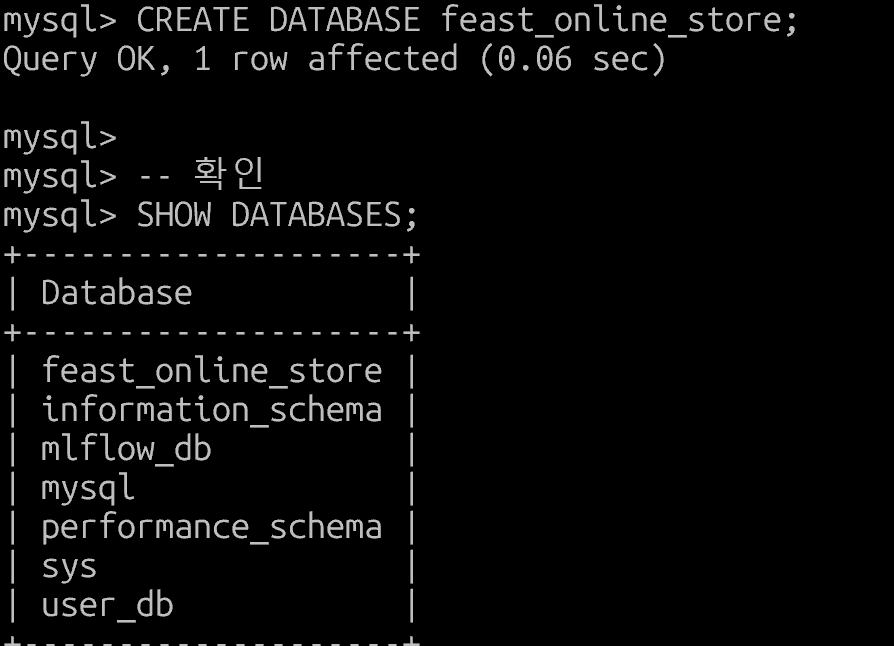
위의 s3 버킷을 만들어줘야한다.

mysql에도 feast_online_store 테이블을 만들어준다

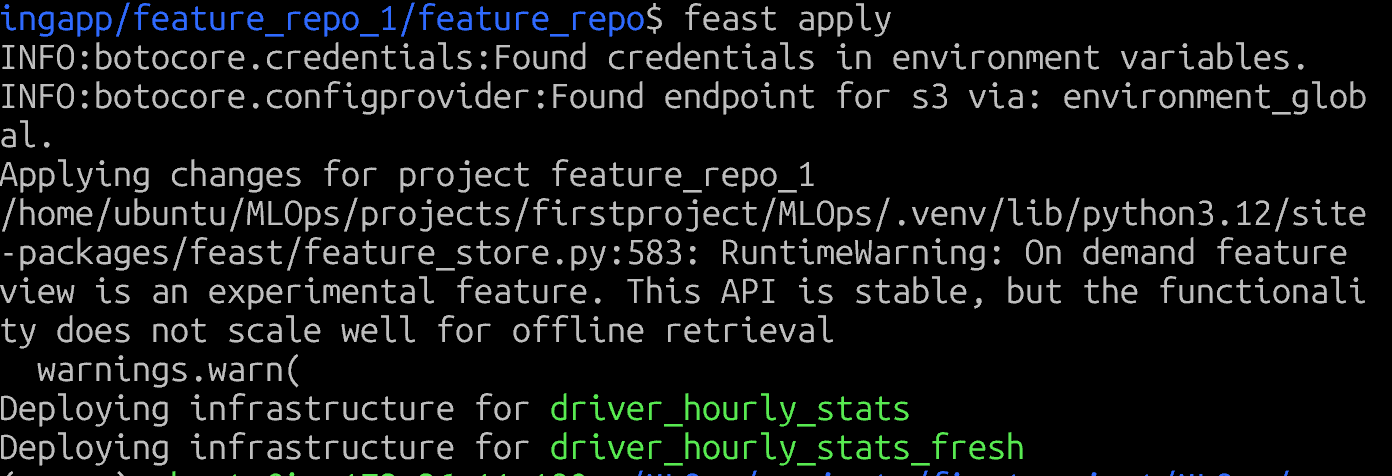
feast apply 가 끝나면 이렇게 나온다
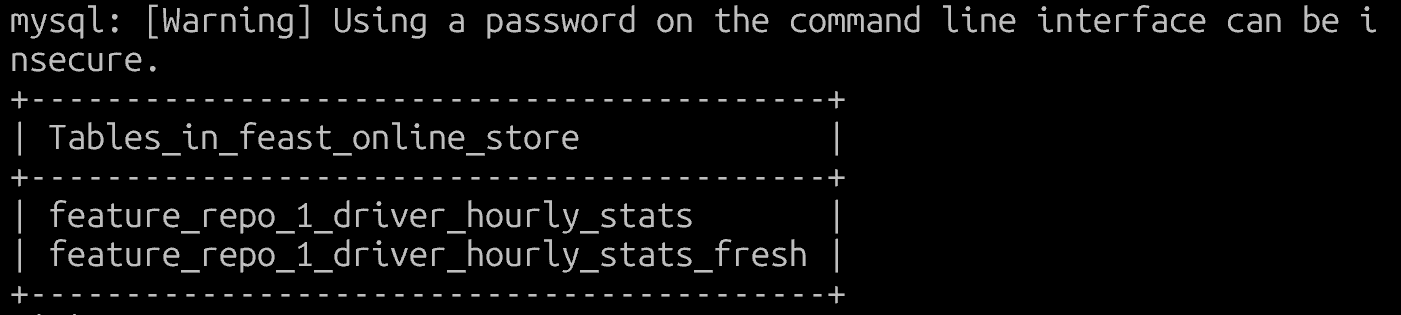
mysql 에 배포됨
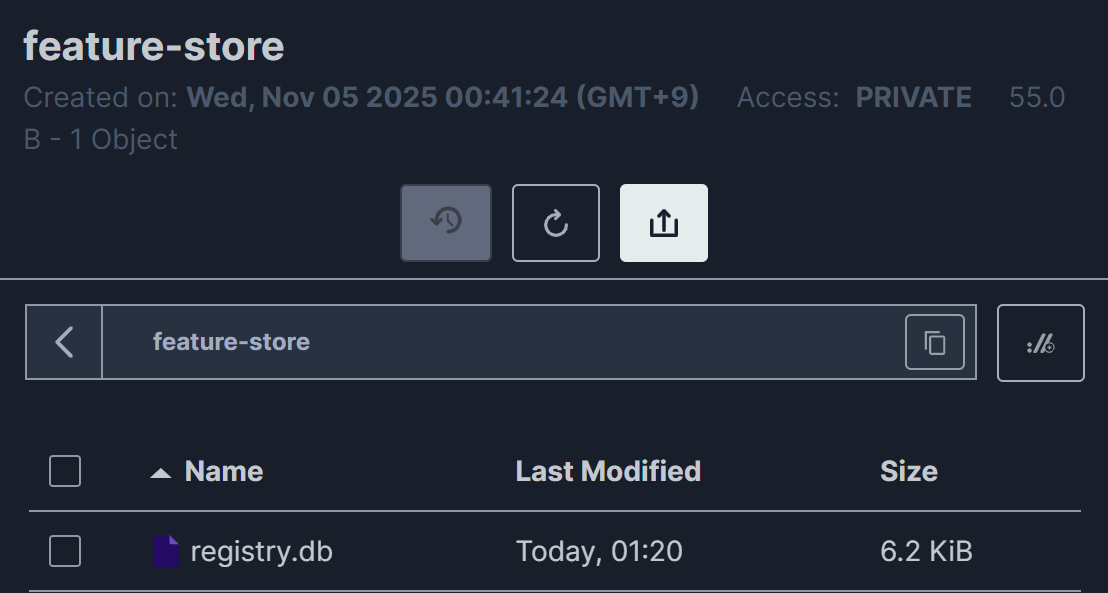
minIO에도 들어왔다
feast enities list
feast feature-views list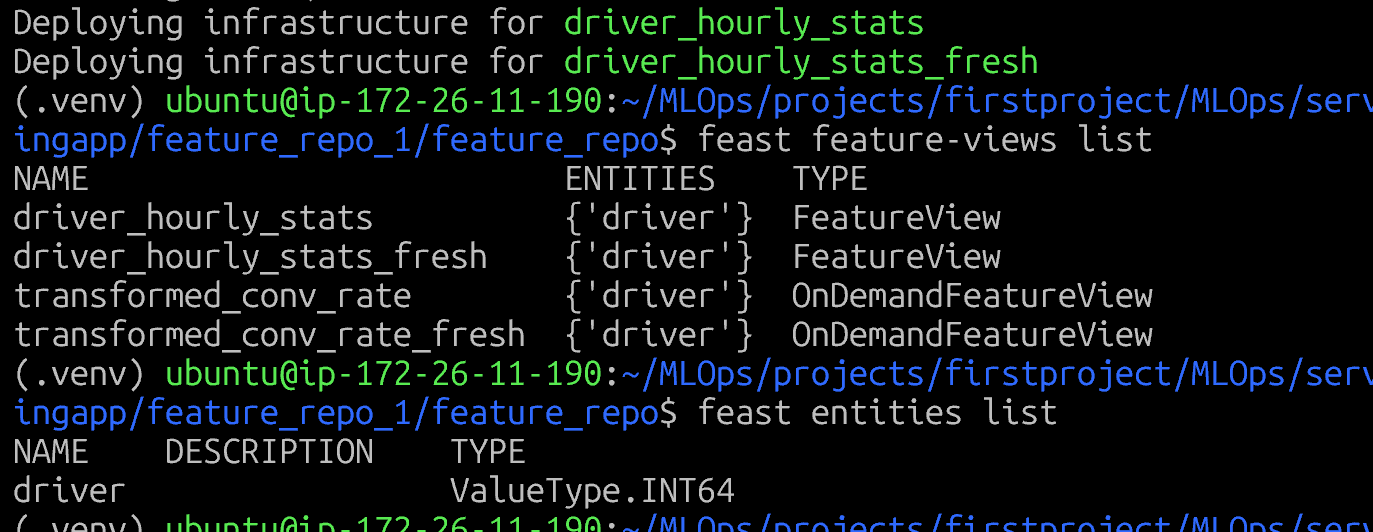
1️⃣ Feature 데이터 적재 (Materialize) Materialize란?
Offline Store(파일/S3)의 데이터를 → Online Store(MySQL)로 복사하는 작업
ML 모델이 실시간 추론할 때 빠르게 feature를 조회할 수 있도록 준비
작동 원리📁
Offline Store (MinIO/파일) → Materialize → 🗄️ Online Store (MySQL)
(역사적 데이터, 학습용) (최신 데이터, 실시간 추론용)
실행 방법
- 전체 기간 materialize (처음 한 번)
bash CURRENT_TIME=$(date -u +%Y-%m-%dT%H:%M:%S)
feast materialize-incremental $CURRENT_TIME- 특정 기간 materialize
bash feast materialize 2024-01-01T00:00:00 2024-11-05T23:59:59예시: 실제 데이터로 테스트bash# example_repo.py에 정의된 data/driver_stats.parquet 파일이 있다면
feast materialize-incremental $(date -u +%Y-%m-%dT%H:%M:%S)출력 예시:
Materializing 2 feature views from 2024-11-05 00:00:00+00:00 to 2024-11-05 23:59:59+00:00
  Materializing driver_hourly_stats...
  Materializing driver_hourly_stats_fresh...
Done!
2️⃣ Feature 조회 (Online/Offline)A. Online Feature 조회 (실시간 추론용)python
from feast import FeatureStore

store = FeatureStore(repo_path=".")

#실시간으로 특정 driver의 최신 feature 조회
entity_rows = [
    {"driver_id": 1001},
    {"driver_id": 1002},
    {"driver_id": 1003},
]

online_features = store.get_online_features(
    features=[
        "driver_hourly_stats:conv_rate",      # 전환율
        "driver_hourly_stats:acc_rate",       # 정확도
        "driver_hourly_stats:avg_daily_trips", # 일일 평균 여행 수
    ],
    entity_rows=entity_rows,
)

#DataFrame으로 변환
df = online_features.to_df()
print(df)
출력 예시:
   driver_id  conv_rate  acc_rate  avg_daily_trips
0       1001       0.85      0.92              150
1       1002       0.78      0.89              120
2       1003       0.91      0.95              180
사용 케이스:
🚀 실시간 예측: 고객이 앱을 열었을 때 즉시 추천
⚡ Low latency: MySQL에서 빠르게 조회 (ms 단위)
B. Offline Feature 조회 (학습용)
python

from feast import FeatureStore
import pandas as pd
from datetime import datetime, timedelta

store = FeatureStore(repo_path=".")

# 학습 데이터셋 생성: 과거 특정 시점의 feature 조회
entity_df = pd.DataFrame({
    "driver_id": [1001, 1002, 1003, 1001, 1002],
    "event_timestamp": [
        datetime(2024, 1, 1, 10, 0),
        datetime(2024, 1, 1, 11, 0),
        datetime(2024, 1, 2, 9, 0),
        datetime(2024, 1, 3, 14, 0),
        datetime(2024, 1, 4, 8, 0),
    ],
})

# Point-in-time correct join 수행
training_df = store.get_historical_features(
    entity_df=entity_df,
    features=[
        "driver_hourly_stats:conv_rate",
        "driver_hourly_stats:acc_rate",
        "driver_hourly_stats:avg_daily_trips",
    ],
).to_df()

print(training_df)

출력 예시:
   driver_id       event_timestamp  conv_rate  acc_rate  avg_daily_trips
0       1001  2024-01-01 10:00:00       0.82      0.90              145
1       1002  2024-01-01 11:00:00       0.75      0.88              115
2       1003  2024-01-02 09:00:00       0.89      0.93              175