
들어가며
ExFormSteps는 react-hook-form을 이용하여 여러 단계로 구성된 폼을 쉽게 구현할 수 있는 컴포넌트입니다. 각 단계는 유효성 검사를 거쳐야 하며, 다음 단계로 넘어가기 전에 현재 단계의 유효성 검사를 통과해야 합니다.
사용 예시
const navigate = useNavigate();

const exFormStepsHandleRef = useRef<TFormStepsHandle>(null);
const methods = useForm<{ test1: string; test2: string; test3: string; test4: string }>({
  mode: "onTouched",
  defaultValues: {
    test1: "",
    test2: "",
    test3: "",
    test4: "",
  },
});
const { control, triggerWithFocusError } = methods;

const handleClickCancelAddButton = () => navigate("/biz/common/g-seed/equipment-list");
const handleClickPrevStepButton = () => exFormStepsHandleRef.current?.stepPrev();
const handleClickNextStepButton = () => exFormStepsHandleRef.current?.stepNext();
const handleAddGseedEquipmentButton = async () => {
  if (!(await triggerWithFocusError())) return;
};

return (
  <ExFormSteps
    ref={exFormStepsHandleRef}
    methods={methods}
    options={[
      {
        stepLabel: "스텝1",
        triggerFields: ["test1"],
        render: () => (
          <StepLayout>
            <Controller
              control={control}
              rules={RULES_REQUIERD}
              name="test1"
              render={({ field, fieldState: { error } }) => (
                <ExInput
                  {...field}
                  error={!!error}
                  errorMessage={error?.message}
                  placeholder="스텝1"
                />
              )}
            />
            <StepFooter>
              <ExButton
                label="등록 취소"
                onClick={handleClickCancelAddButton}
                mode="outlined"
              />
              <ExButton label="다음" onClick={handleClickNextStepButton} />
            </StepFooter>
          </StepLayout>
        ),
      },
      {
        stepLabel: "스텝2",
        triggerFields: ["test2"],
        render: () => (
          <StepLayout>
            <Controller
              control={control}
              rules={RULES_REQUIERD}
              name="test2"
              render={({ field, fieldState: { error } }) => (
                <ExInput
                  {...field}
                  error={!!error}
                  errorMessage={error?.message}
                  placeholder="스텝2"
                />
              )}
            />
            <StepFooter>
              <ExButton label="이전" onClick={handleClickPrevStepButton} mode="outlined" />
              <ExButton label="다음" onClick={handleClickNextStepButton} />
            </StepFooter>
          </StepLayout>
        ),
      },
      {
        stepLabel: "스텝3",
        triggerFields: ["test3"],
        render: () => (
          <StepLayout>
            <Controller
              control={control}
              rules={RULES_REQUIERD}
              name="test3"
              render={({ field, fieldState: { error } }) => (
                <ExInput
                  {...field}
                  error={!!error}
                  errorMessage={error?.message}
                  placeholder="스텝3"
                />
              )}
            />
            <StepFooter>
              <ExButton label="이전" onClick={handleClickPrevStepButton} mode="outlined" />
              <ExButton label="다음" onClick={handleClickNextStepButton} />
            </StepFooter>
          </StepLayout>
        ),
      },
      {
        stepLabel: "스텝4",
        triggerFields: ["test4"],
        render: () => (
          <StepLayout>
            <Controller
              control={control}
              rules={RULES_REQUIERD}
              name="test4"
              render={({ field, fieldState: { error } }) => (
                <ExInput
                  {...field}
                  error={!!error}
                  errorMessage={error?.message}
                  placeholder="스텝4"
                />
              )}
            />
            <StepFooter>
              <ExButton label="이전" onClick={handleClickPrevStepButton} mode="outlined" />
              <ExButton label="자재 등록" onClick={handleAddGseedEquipmentButton} />
            </StepFooter>
          </StepLayout>
        ),
      },
    ]}
  />
);
사용 결과
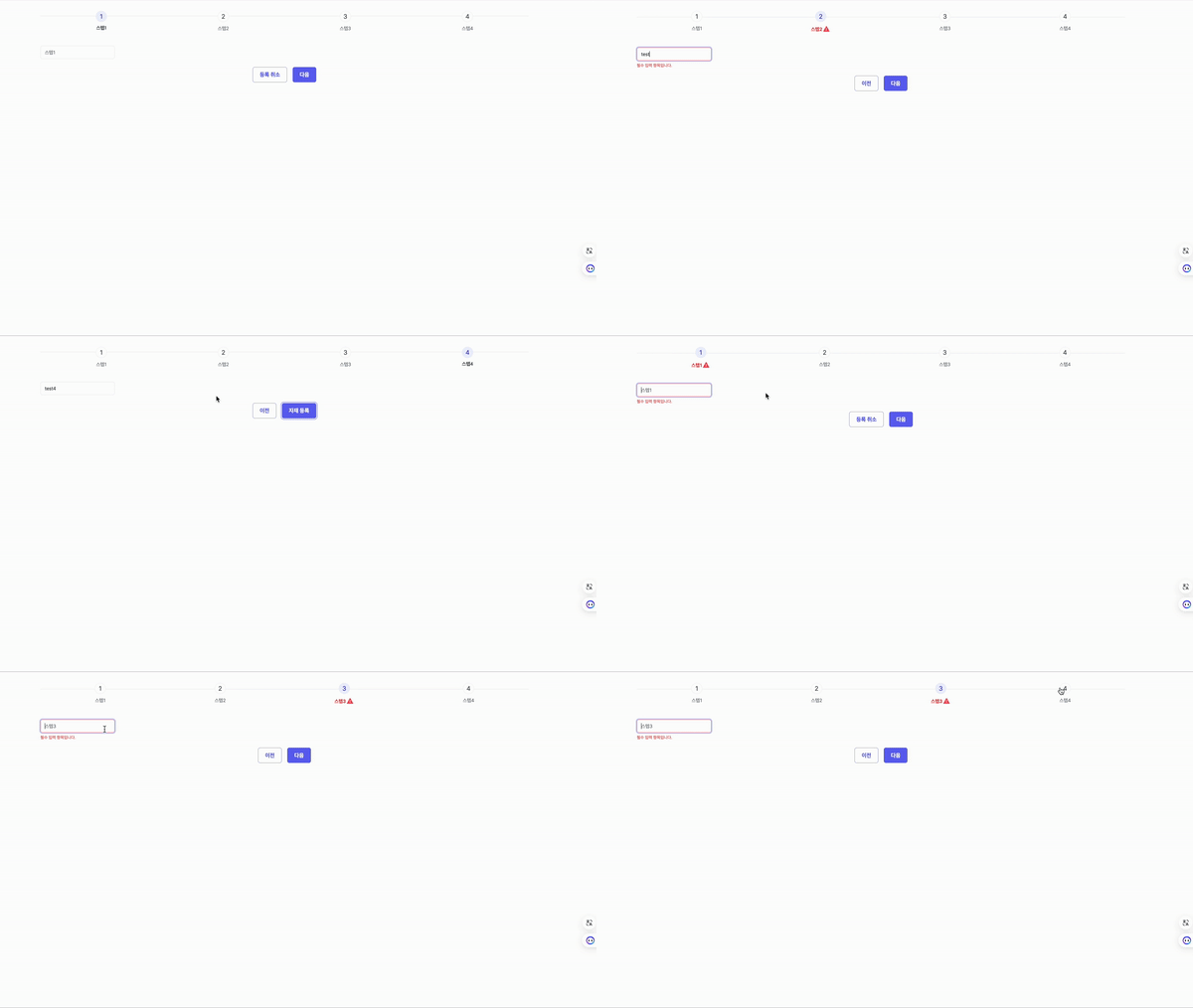
ExFormSteps 코드
import styled from "@emotion/styled";
import { Image } from "primereact/image";
import { MenuItem, MenuItemCommandParams } from "primereact/menuitem";
import { Steps } from "primereact/steps";
import { forwardRef, useImperativeHandle, useState } from "react";
import { Path, UseFormReturn, UseFormTrigger } from "react-hook-form";

type TProps<T extends Record<string, any>> = {
  methods: UseFormReturn<T> & { triggerWithFocusError?: UseFormTrigger<T> };
  options: {
    stepLabel: string;
    triggerFields?: Path<T>[];
    render: () => JSX.Element;
  }[];
};

export type TExFormStepsHandle = {
  stepPrev: () => void;
  stepNext: () => void;
  stepGoto: (nextActiveStep: number) => void;
};

const ExFormSteps = <T extends Record<string, any>>(
  { methods, options }: TProps<T>,
  ref: React.Ref<TExFormStepsHandle>
) => {
  const [activeStepIndex, setActiveStepIndex] = useState(0);

  const stepGoto = async (nextActiveStep: number) => {
    nextActiveStep = Math.max(0, Math.min(options.length - 1, nextActiveStep));

    if (nextActiveStep === activeStepIndex) return;

    if (nextActiveStep > activeStepIndex) {
      for (let i = activeStepIndex; i < nextActiveStep; i++) {
        if (!(await formTrigger(options[i].triggerFields ?? []))) {
          setActiveStepIndex(i);
          setValidationError(true);
          return;
        }
      }
    }

    setActiveStepIndex(nextActiveStep);
    setValidationError(false);
    clearErrors();
  };

  useImperativeHandle(ref, () => ({
    stepPrev: () => stepGoto(activeStepIndex - 1),
    stepNext: () => stepGoto(activeStepIndex + 1),
    stepGoto: (nextActiveStep: number) => stepGoto(nextActiveStep),
  }));

  const { trigger, triggerWithFocusError, clearErrors } = methods;
  const formTrigger = triggerWithFocusError ?? trigger;
  const [validationError, setValidationError] = useState(false);

  const model: MenuItem[] = options.map(({ stepLabel }, optionIndex) => {
    const isActive = optionIndex === activeStepIndex;
    const error = isActive && validationError;
    return {
      label: (
        <StepLabel isActive={isActive} error={error}>
          <span className="label">{stepLabel}</span>
          {error && <Image src={require("/asset/icon/redattention.png")} alt="error-icon" />}
        </StepLabel>
      ) as unknown as string,
      command: ({ index: nextActiveStep }: MenuItemCommandParams & { index: number }) =>
        stepGoto(nextActiveStep),
    };
  });

  return (
    <StepsWrap>
      <Steps model={model} activeIndex={activeStepIndex} readOnly={false} />
      <ul className="steps-render-item-list">
        {options.map(({ render }, optionIndex) => {
          const isActive = optionIndex === activeStepIndex;
          return (
            <StepsRenderItem key={optionIndex} isActive={isActive}>
              {render()}
            </StepsRenderItem>
          );
        })}
      </ul>
    </StepsWrap>
  );
};

export default forwardRef(ExFormSteps) as <T extends Record<string, any>>(
  props: TProps<T> & { ref?: React.Ref<TExFormStepsHandle> }
) => ReturnType<typeof ExFormSteps>;

const StepsWrap = styled.div`
  display: flex;
  flex-direction: column;
  row-gap: 40px;

  .p-steps-current a {
    pointer-events: none;
  }

  .steps-render-item-list {
    position: relative;
  }
`;

const StepsRenderItem = styled.li<{ isActive: boolean }>`
  position: ${({ isActive }) => (isActive ? "relative" : "absolute")};
  left: 0;
  top: 0;
  opacity: ${({ isActive }) => (isActive ? 1 : 0)};
  z-index: ${({ isActive }) => isActive && 1};
`;

const StepLabel = styled.div<{ isActive: boolean; error: boolean }>`
  display: flex;
  align-items: center;

  .label {
    color: var(--Lara-Steps-stepsItemTextColor, #6c757d);
    font-family: Pretendard;
    font-size: 14px;
    font-style: normal;
    font-weight: 400;
    line-height: 21px;

    ${({ isActive }) =>
      isActive &&
      `
        color: var(--Lara-Global-textColor, #495057);
        font-family: Inter;
        font-size: 14px;
        font-style: normal;
        font-weight: 700;
        line-height: 21px;
      `}

    ${({ error }) =>
      error &&
      `
        color: #EF4444;
        font-family: Pretendard;
        font-size: 14px;
        font-style: normal;
        font-weight: 700;
        line-height: 21px; /* 150% */
      `}
  }
`;
주요 기능 및 설명
부모 컴포넌트로부터 props 를 받지 않고 컴포넌트 내부적으로 상태를 관리합니다.
const [activeStepIndex, setActiveStepIndex] = useState(0);useImperativeHandle을 사용하여 필요한 메서드만 부모 컴포넌트로 전달합니다.
useImperativeHandle(ref, () => ({
  stepPrev: () => stepGoto(activeStepIndex - 1),
  stepNext: () => stepGoto(activeStepIndex + 1),
  stepGoto: (nextActiveStep: number) => stepGoto(nextActiveStep),
}));
stepGoto 함수
const stepGoto = async (nextActiveStep: number) => {
  nextActiveStep = Math.max(0, Math.min(options.length - 1, nextActiveStep));

  if (nextActiveStep === activeStepIndex) return;

  if (nextActiveStep > activeStepIndex) {
    for (let i = activeStepIndex; i < nextActiveStep; i++) {
      if (!(await formTrigger(options[i].triggerFields ?? []))) {
        setActiveStepIndex(i);
        setValidationError(true);
        return;
      }
    }
  }

  setActiveStepIndex(nextActiveStep);
  setValidationError(false);
  clearErrors();
};
- 범위 제한: Math.max와 Math.min을 사용하여 nextActiveStep이 0과 options.length - 1 사이의 유효한 범위 내에 있도록 합니다. 이를 통해 activeStepIndex가 범위를 벗어나지 않도록 합니다.
- 현재 스텝과의 비교: nextActiveStep이 현재 스텝(activeStepIndex)과 같다면 아무 작업도 하지 않고 함수를 종료합니다.
- 유효성 검사: nextActiveStep이 현재 스텝보다 클 경우, 현재 스텝에서 목표 스텝까지의 모든 중간 스텝에 대해 유효성 검사를 수행합니다. 유효성 검사를 통과하지 못하면 해당 스텝에서 멈추고, 그 스텝을 activeStepIndex로 설정합니다.
- 스텝 이동: 모든 유효성 검사를 통과하면 activeStepIndex를 nextActiveStep으로 설정하고, 유효성 검사 오류 상태를 초기화합니다.
- 유효성 검사 함수: formTrigger는 triggerWithFocusError 또는 trigger를 사용하여 유효성 검사를 수행합니다.
부모에서 이동 관련 함수 사용
const exFormStepsHandleRef = useRef<TExFormStepsHandle>(null);

const handleClickPrevStepButton = () => exFormStepsHandleRef.current?.stepPrev();
const handleClickNextStepButton = () => exFormStepsHandleRef.current?.stepNext();

<ExFormSteps
  ref={exFormStepsHandleRef}
  options={[
    {
      render: () => (
        <StepFooter>
          <ExButton label="이전" onClick={handleClickPrevStepButton} mode="outlined" />
          <ExButton label="다음" onClick={handleClickNextStepButton} />
        </StepFooter>
      ),
    },
  ]}
/>

4년차 프론트엔드 개발자 장세진