Prologue
데이터베이스에서 어떠한 컬럼에 대해 동일한 값을 가지 않도록 방지하기 위해 스프링부트에서 중복체크를 하는 방법에 대해 소개하고자 한다.
1. 코드
Repository
import com.example.exproject.Entity.UserEntity;
import org.springframework.data.repository.CrudRepository;


public interface UserRepository extends CrudRepository<UserEntity,String> {
    //아이디 중복확인
    boolean existsById(String id);
    //닉네임 중복확인
    boolean existsByNickname(String nickname);
}
UserEntity
import jakarta.persistence.Column;
import jakarta.persistence.Entity;
import jakarta.persistence.Id;
import lombok.Builder;
import lombok.NoArgsConstructor;

@Entity(name="user")
@NoArgsConstructor
public class UserEntity {
    @Id
    @Column
    private String id;

    @Column
    private String pw;

    @Column
    private String nickname;

    @Builder
    public UserEntity(String id,String pw,String nickname) {
        this.id = id;
        this.pw = pw;
        this. nickname=nickname;
    }
}
UserDto
package com.example.exproject.Dto;

import com.example.exproject.Entity.UserEntity;
import jakarta.validation.constraints.NotBlank;
import jakarta.validation.constraints.Pattern;
import lombok.*;

@Data
@ToString
@Getter
@NoArgsConstructor
@AllArgsConstructor
@Builder
public class UserDto {

    @NotBlank(message = "아이디를 입력해주세요.")
    private String id;

    @NotBlank(message = "비밀번호를 입력해주세요.")
    @Pattern(regexp = "(?=.*[0-9])(?=.*[a-zA-Z])(?=.*\\W)(?=\\S+$).{8,16}", message = "비밀번호는 8~16자 영문 대 소문자, 숫자, 특수문자를 사용하세요.")
    private String pw;

    @NotBlank(message = "닉네임을 입력해주세요.")
    private String nickname;

    //빌더 패턴
    @Builder
    public UserEntity toEntity() {
        return UserEntity.builder()
                .id(id)
                .pw(pw)
                .nickname(nickname)
                .build();
    }
}
UserService
public class UserService {
    private UserRepository userRepository;
    public UserService(UserRepository userRepository) {
        this.userRepository = userRepository;
    // 아이디 중복확인
    public boolean existsById(String id) {

       return userRepository.existsById(id);
    }

    // 닉네임 중복확인
    public boolean existsByNickName(String nickname){

        return userRepository.existsByNickname(nickname);
    }
}
UserApiController
@RestController
public class UserApiController {
    private UserService userService;
    public UserApiController(UserService userService){
        this.userService=userService;
    }

    //아이디 중복확인
@PostMapping("checkid")
public ResponseEntity<Boolean> checkid(@RequestParam("id") String id){
    boolean exists = userService.existsById(id);
    return new ResponseEntity<>(exists, HttpStatus.OK);
}

    //닉네임 중복확인
    @PostMapping("checknickname")
    public ResponseEntity<Boolean> checknickname(@RequestParam("nickname") String nickname){
        boolean exists = userService.existsByNickName(nickname);
        return new ResponseEntity<>(exists, HttpStatus.OK);
    }
}
1. html
★ textfiled의 id값은 반드시 entity와 dto와 동일하게 맞춰줘야 한다 !!
<body>
<section class="bg-light">
    <div class="container py-4">
        <div class="row align-items-center justify-content-between">
            <a class="navbar-brand hi text-center" href="/signup">
                <span class="text-dark h4"> Sign Up  </span>
            </a>
        </div>
<form id="signupForm" action="/signup" method="post">
        <div>
            <!-- 아이디 입력 -->
            <div class="form-group">
                <label for="exampleInputEmail1" class="form-label mt-4"> ID </label>
                <div>
                <input type="text" id="id" name="id" value="{{#userDto}}{{userDto.id}}{{/userDto}}" oninput="hideidMessage()" class="form-control" placeholder="ID"/>
                <button  type="button" id="checkidButton" style="  background :  lightsteelblue; float:right; left:-325px; position: relative; top:-72px;
                    width:64px; height:24px; font-size: 12px; font-weight: bolder">
                    중복확인
                </button>
            </div>
                {{#valid_id}} <span id="valid_id" style="font-size: 12px; color:red;">{{valid_id}}</span> {{/valid_id}}
            <div><span id="checkId"></span></div>


        </div>

        <div class="form-group has-success">
            <!-- 비밀번호 입력 -->
            <label class="form-label mt-4" for="inputValid"> Password </label>
            <input type="password" id="pw" name="pw" value="{{#userDto}}{{userDto.pw}}{{/userDto}}" oninput="hidepwMessage()" class="form-control" placeholder="Password"/>
            {{#valid_pw}} <span id="valid_pw" style="font-size: 12px; color:red; ">{{valid_pw}}</span> {{/valid_pw}}


            <div class="valid-feedback"></div>
        </div>
    </div>
    <div class="form-group has-danger">

        <!-- 비밀번호 재확인 입력 -->
        <label class="form-label mt-4" for="inputInvalid"> Re-enter Password </label>
        <input type="password" class="form-control invalid" id="newRe-enterPW" placeholder="CheckPassword">
        <div><span id="checkPw"></span></div>
    </div>
<div class="form-group-nickname">
    <div>
    <label class="form-label mt-4" for="newNickName">Nickname</label>

    <button  type="button" id="checknicknameButton" style="  background : lightsteelblue; float:right; left:-270px; position: relative; top:24px;
        width:64px; height:24px; font-size: 12px; font-weight: bolder ">
        중복확인
    </button>
    </div>
    <div class="input-group">
        <input type="nickname" name="nickname" id="nickname" value="{{#userDto}}{{userDto.nickname}}{{/userDto}}" oninput="hidenicknameMessage()" class="form-control" placeholder="nickname" />
    </div>
    {{#valid_nickname}} <span id="valid_nickname" style="font-size: 12px; color:red;">{{valid_nickname}}</span> {{/valid_nickname}}
    <div><span id="checknickname"></span></div>
    <!-- 닉네임 중복확인 버튼 -->
</div>

<div class="d-grid gap-2">
        <!-- 회원 가입 버튼 -->
        <button class="btn btn-primary btn-lg" type="submit" id="signUpButton" style="background: dodgerblue"> Sign UP</button>
    </div>
</div>
</form>ajax
<!-- 중복확인 -->
<script>
    // 아이디 중복확인
    $("#checkidButton").click(function () {
        var id = $("#id").val();

        // AJAX 요청
        $.ajax({
            url: "/checkid", // 중복확인을 처리할 서버 URL
            type: "post",
            data: { id: id },
            success: function (response) {
                // 서버에서 응답을 받았을 때의 처리
                if (response) {
                    alert("중복된 아이디입니다.");

                } else { // 그렇지 않다면
                    alert("사용 가능한 아이디입니다.");
                }
            }
        });
    });
    $("#checknicknameButton").click(function () {
        var nickname = $("#nickname").val();

        // AJAX 요청을 보냅니다.
        $.ajax({
            url: "/checknickname", // 중복확인을 처리할 서버의 URL
            type: "post",
            data: { nickname: nickname },
            success: function (response) {
                // 서버에서 응답을 받았을 때의 처리
                if (response) {
                    alert("중복된 닉네임");

                } else {
                    alert("사용 가능");
                }
            }
        });
    });

</script>
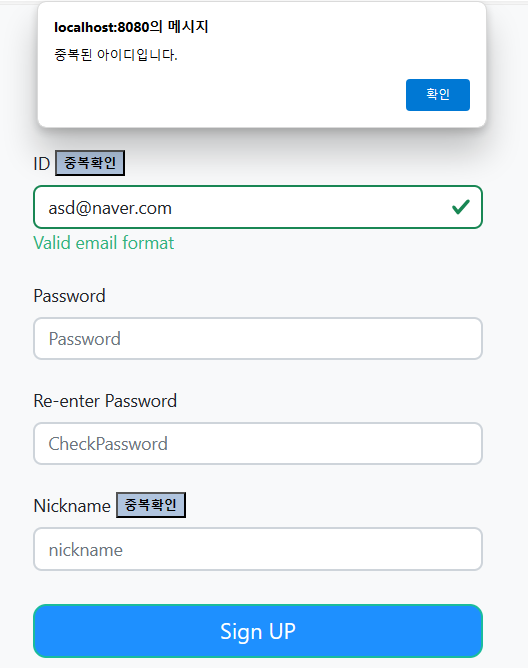
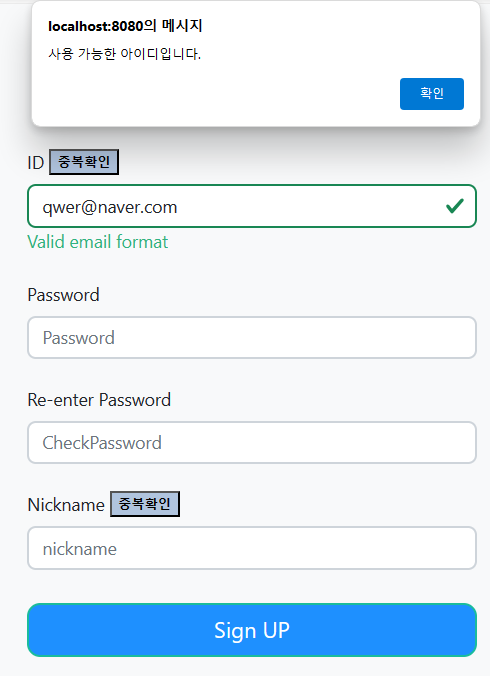
3. 결과
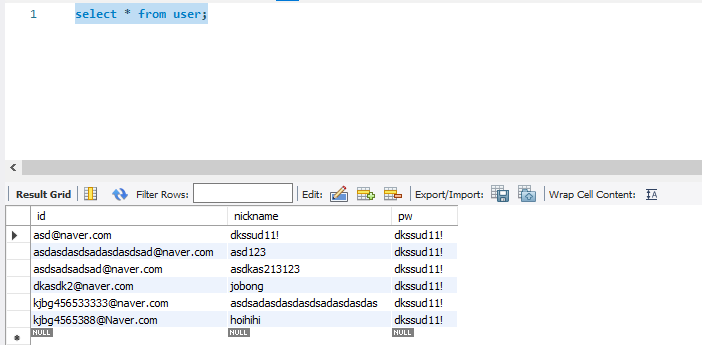
database

노력하는 개미