C#
C, C++과 달리...
- 메모리 관리는 프로그래머 가비지 콜렉터의 책임
- 플랫폼 이식은 프로그래머 CLR의 책임
- 일관성 없는 일관된 클래스 라이브러리
동작 구조
C# 프로그래밍 -> CLR(Command Language Runtime)이 어떤 운영체제 위에서 돈다 -> 그 위에서 C# 앱이 돈다.
- C# 컴파일러는 기계 코드에 준하는 IL코드로 만들어주고 실행파일을 만들어준다.
- 그 실행파일을 직접 실행하지 않고 CLR위에서 실행한다.
변수의 값 방식과 주소 방식
-
값 방식은 Stack
-
주소 방식은 Heap에 담아 참조한다.
-
C, C++에서는 직접 개발자가 메모리를 수거했지만, C#에서는 Java처럼 가비지 컬렉터가 존재한다.
Boxing, Unboxing
- 박싱: 값 형식을 object 형식에 담아 힙에 올림
- 언박싱: 힙에 올라가 있는 데이터를 object에서 꺼내 값 형식으로 옮김
Enum
- 하나의 일므 아래 묶인 상수들의 집합
var
- 형식 추론 데이터 타입
- 지역 변수에 대해서만 사용 가능 (메서드에서만 사용가능)
연산자
-
전위/후위 연산자
Console.WriteLine(a++) 증가 되기 전 값이 출력된다. 그 이후 증간된다. -
삼항 연산자
조건식 ? 참 값 : 거짓 값 -
비트 연산자
- <<, >>, &(논리곱), |(논리합), ^(XOR), ~(부정)
- 할당 연산자
- <<== (비트도 += 합 할당 연산자처럼 할당 가능)
흐름 제어
- 코드 실행 순서를 결정하는 것
- 분기
- 제어 흐름을 여러 갈래로 나누는 것
- 단, 프로그램은 한 번에 하나의 갈래만 실행할 수 있음
- if, switch, while, for, continue, break, goto
패턴 매칭
- 따로 공부 필요
C# 인수 전달
- ref를 붙인다 (참조)
- out을 붙인다. (출력 전용) -> ref랑 비슷하다 -> 해당 매개변수가 어떤 값도 할당되지 않으면 컴파일 에러
가변길이 인수
- 개수를 유연하게 조절할 수 있음
- params 키워드와 배열을 이용하여 선언
- int Sum (params int[] args)
- sum(1,2);
- sum(1,2,3,4,5);
- sum(1,2,3,4);
명명된 인수
- 메소드 호출시 매개 변수의 이름을 명시한다.
클래스
멤버변수들을 c#에서는 필드라고 부름
상속
c#에서는 extends 대신 : 로 상속
오버라이딩
- c#에서는 오버라이딩할 메서드를 미리 virtual로 지정
- 파생 클래스에서는 override를 붙여서 지정
구조체
class는 참조형식, 구조체는 값형식
튜플
- 기본적으로는 구조체, 즉 값 형식(스택)
- 형식 이름 없이 선언하여 사용
- 구조체와 달리 형식 이름 없어서 편함
var tuple = (123, 789);
인터페이스
- 클래스의 설계도?
- 어떤 메소드를 가질지 결정
- 보통 interface는 I로 시작하는 이름으로 명명
- 다중상속
- 인터페이스는 커넥터 (두 클래스를 이어주는)
추상 클래스
- 객체를 생성할 수 없음 (인터페이스와 같음)
- 메서드를 구현할 수 있음 (인터페이스와 다름)
- 추상 클래스는 클래스 그 자체
- 인터페이스는 그 기능 그 자체
프로퍼티
-
온도 센서에서 일정 온도일 때 동작하는 보일러 객체
-
보일러는 임계치를 갖고 있음
-
온도 센서의 현재 온도를 보일러가 직접 수정 ? - 임계치 떄문에 안됨
-
보일러의 임계치를 온도센서가 직접 수정 ?
-
public 필드는 외부 객체에 의해 오염될 가능성을 열어두는 것
-
Getter, Setter
-
get접근자, set 접근자
-
public 필드를 다루듯 내부 필드에 접근하게 해주는 방법
Class MyClass{
	private int myField;

    public int MyField{
    	get
        {
        	return myField;
        }

        set
        {
    		myField = value;
    	}

    }

}


MyClass obj = new MyClass();
obj.MyField = 3;
Console.WriteLine( obj.MyField);

//퍼블릭 필드를 다루듯 사용하게 해줌
자동구현 프로퍼티
- 생략 가능
- 필드이름 생략
- return 생략
= 필드 = value 구문 생략
public class NameCard{
	public string Name{
   		get; set // 실제로 필드에 name이라는 변수가 반환됨
    }
	public string PhoneNumber{
    	get; set;
    }
}- 프로퍼티를 이용한 초기화의 예
BirthdayInfo birth = new BirthdayInfo(){
	Name = "서현",
    Birthday = new DateTime(1991, 6, 28)
}
무명 프로퍼티
var myInstance = new { Name = "박상현", Age = "17" };
Console.WriteLine( myInstance.Name, myInstance,Age );
다차원 배열
int[,] arr = new int[3,4] {1,2,3}, {1,2,3,4};가변배열(Jagged Array)
int[][] jagged = new int[3][];
jagged[0] = new int[5] {1,2,3,4,5};
jagged[1] = new int[] {1,2,3};
// 위처럼 뒤 배열을 가변적으로 할당할 수 있다.
ArrayList
ArrayList list = new ArrayList();
list.Add
list.RemoveAt
list.Insert
Queue que = new Queue();
que.Enqueue(1);//넣음
que.Dequeue(1);//뻄
Hashtable
Hashtable ht = new Hashtable();
ht{"book"] = "책";
Console.WriteLine(ht["book"]);
;
인덱서
- 인덱스를 이용해서 객체 내의 데이터에 접근하게 해주니 프로퍼티
- 인덱서를 구현하면 Length와 같은 프로퍼티들이 자동 구현 된다.
일반화 프로그래밍(Generic Programming)
- 특수한 개념으로부터 공통된 개념을 찾아 묶는 것
고래, 사자, 호랑이는 포유류
void CopyArray<T\> (T[ ] source, T[ ] target){

 }

 CopyArray<int>(source, target);
Class도 그대로 가능하다.
형식 매개 변수 제약
  class MyList<T\> where T : MyClass{


}//T가 MyClass거나 그 파생클래스면 된다.
일반화 컬렉션
- 컬렉션은 object 형식 기반
- 컬렉션의 요소에 접근할 때마다 발새앟는 박싱/언박싱은 성능의 저하로 이어짐- 이
- 일반화 컬렉션은 형식매개변수를 이용하여 버그와 성능저하를 줄임
- 컴파일 단계에서 형식매개변수가 특정 형식으로 치환되기 때문
- 일반화 컬렉션은 System.Collections.Generice 네임스페이스에 위치
- List<T>
- Queue<T>
- Stack<T>
- Dictionary<TKey, TValue>
Dictionary<string, string\> dic = new Dictionary<>();대리자(Delegator)
- 코드(메소드)를 대신 실행하는 객체
- 메소드를 호출하듯 사용(즉, 인수를 입력하고 결과를 반환 받음)
- 단, 대리자가 실행할 코드는 컴파일 시점이 아닌 실행 시점에 결정
private delegate int MyDelegate (int a, int b);
int Plus (int a, int b){
	return a + b;
}

MyDelegate Callback;
Callback = new MyDelegate ( Plus ) ;
Console.WriteLine ( Callback (3,4);
익명 메소드
Calculate Calc;
Calc = delegate (int a, int b){
return a+b;
}
Console.WriteLine("3+4:{0}", Calc(3,4));
이벤트
- C#에서 객체의 사건을 표현하는 방식
- 이벤트 처리기: 이벤트 발생시 실행되는 메소드
- 동작 원리는 대리자와 유사
- 이벤트는 외부에서 직접 호출 할 수 없음. 객체의 은닉성 표현을 위해
- 대리자를 event 한정자로 수식하여 선언
delegate void EventHandler(string message);

class MyNotifier{
	public event EventHandler SomethingHappend;
    public void DoSomething (int number){
    	int temp = number % 10;
        if ( temp != 0 && temp % 3 == 0){
        	SomethingHappend(String.Format("{0} : 짝", nubmer));
        }
    }

}
람다식
- 식 람다
(매개변수목록) => 식- 문 형식의 람다
(매개변수목록) =>
{
	문장1;
    문장2;
    ...;
    문장N;
}
람다식으로 무명함수 정의하기
- 무명함수: 람다식으로 만드는 익명 메소드
- 무명함수를 작성하기 위해서는 먼저 대리자로 무명함수의 모습을 결정
- 식 형식
delegate int Calculate(int a, int b);

static void Main(String[] args)
{
	Calculate calc = (int a, int b) => a + b;
    Console.WriteLine( calc(1, 2) );
}- 문 형식
delegate void DoSomething();

static void Main(String[] args)
{
	DoSomething DoIt = ( ) =>
    {
    	Console.WriteLine("뭔가를");
        Console.WriteLine("뭔가를");
        Console.WriteLine("뭔가를");
    }

    DoIt();
}- Func 대리자와 Action 대리자
- .NET 라이브러리에 사전 정의되어 있는 대리자
- 대리자 선언하는 불편 제거
- 최대 16개 매개변수 오버로딩
- Func대리자는 반환 값이 있다.
- Action대리자는 반환 값이 없다.
- Func 대리자
Func<int> func1 = () => 10; //무조건 10을 반환, <int>는 출력 매개변수
Console.WriteLine(func1());

Func<int, int> func2 = (x) = x*2; //마지막 하나는 무조건 출력 매개변수
Console.WriteLine(func2(3));- Action 대리자
Action act1 = () => Console.WriteLine("Action()");
act1();

Action<double, double> act3 = (x, y) => //출력 매개변수가 없음
{
 ...
}- 식 트리
- 코드를 트리 자료구조로 표현한 것
- C#에서는 런타임에 식트리를 생성하고 실행 할 수 있음 (런타임에 코드를 생성할 수 있다.)
Expression const1 = Expression.Constant(1); //상수 1
Expression param1 = Expression.Parameter(typeof(int), "x"); //매개 변수 x

Expression exp = Expression.Add( const, param1 ); // 1 + x

Expression<Func<int, int>> lambda1 =
	Expression<Func<int, int>>.Lambda<Func<int, int>>(
    	exp,
        new ParameterExpression[] { ParameterExpression) param1 }
);

Func<int, int> compiledExp = lambda1.Compile();

Console.WriteLine( compiledExp(3) ); // x = 3이면 1+x=4이므로 4를 출력
LINQ(Language INtegrated Query)
- C# 언어에 통합된 데이터 질의 기능
- 프로그래밍에서 많은 부분을 차지하는 데이터 작업의 효율을 크게 향상
- 데이터 질의란 데이터 집합에서 원하는 데이터를 찾는 작업
- 데이터 질의 기본 요소
- From : 어떤 데이터집합에서- Where : 어떤 조건으로
- Select : 어떤 항목을
원래코드
List<Profile> profiles = new List<Profile>();
foreach (Profile profile int arrProfile)
{
	if (profile.Height < 175)
    	profiles.Add(profile);
}
profiles.Sort(
	(profile1, profile2)=>
    {
    	return
        	profile1.Height - profile2.Height;
    });

foreach (var profile int profiles)
	Console.WriteLine("{0}, {1}",
    	profile.Name, profile.Height);
LINQ 적용
var profiles = from profile int arrProfile
				where profile.Height < 175
                orderby profile.Height
                select profile;

foreach (var profile int profiles)
	Console.WriteLine("{0}, {1}",
    	profile.Name, profile.Height);
from절
- from n(범위 변수) in numbers(데이터 원본)
where절
- 찾고자 하는 데이터를 필터
- 범위 변수가 충족해야하는 조건을 매개 변수로 입력
- where profile.Height < 175
orderby절
- 데이터 정렬
- orderby profile.Height
- orderby profile.Height descending (내림차순)
select절
- 마침표같은 존재 (최종결과 추출)
- select profile
- select profile.Name
var 변수의 타입을 select 결과로 최종 추정
group - by 절
group profile by profile.Height < 175 into g
select new { GroupKey = g.key, Priofiles = g };
join 연산
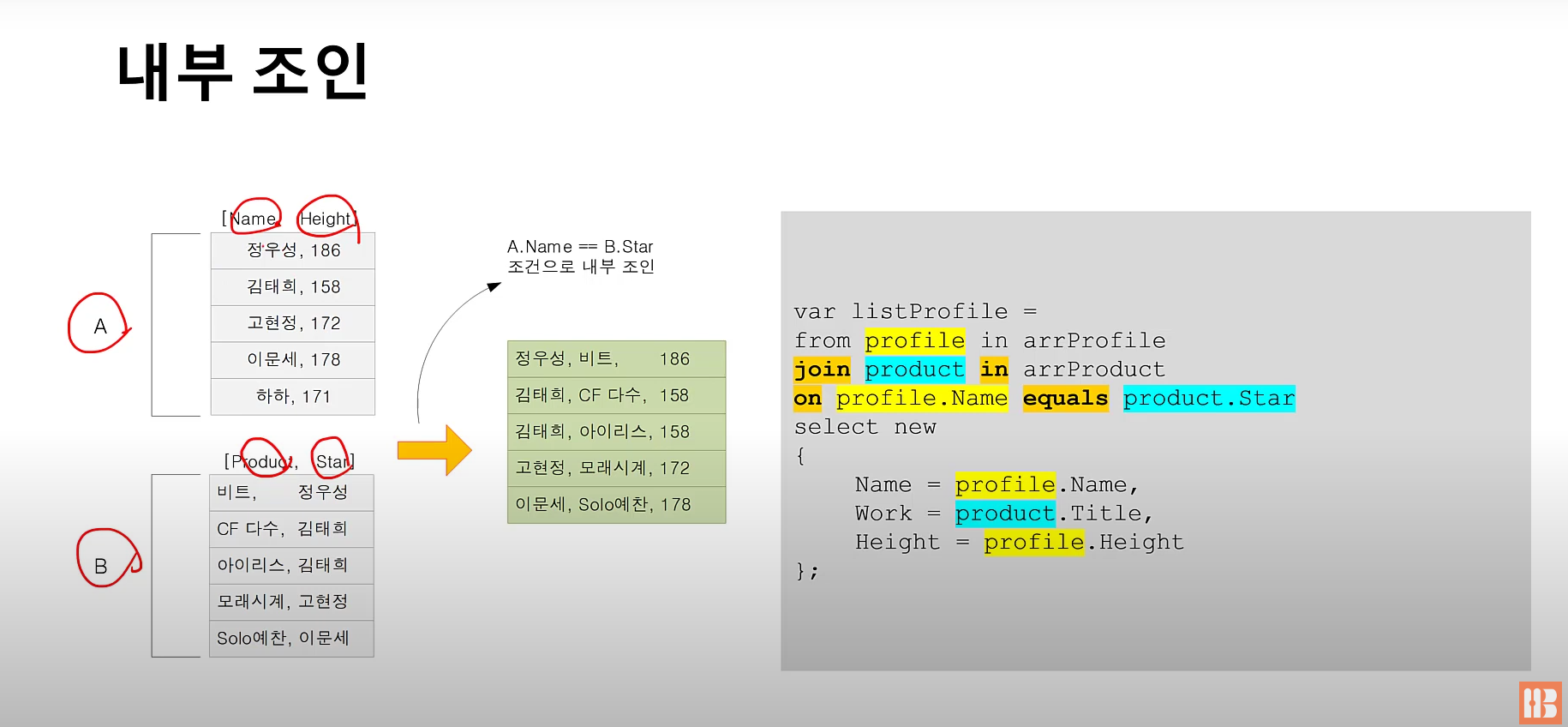
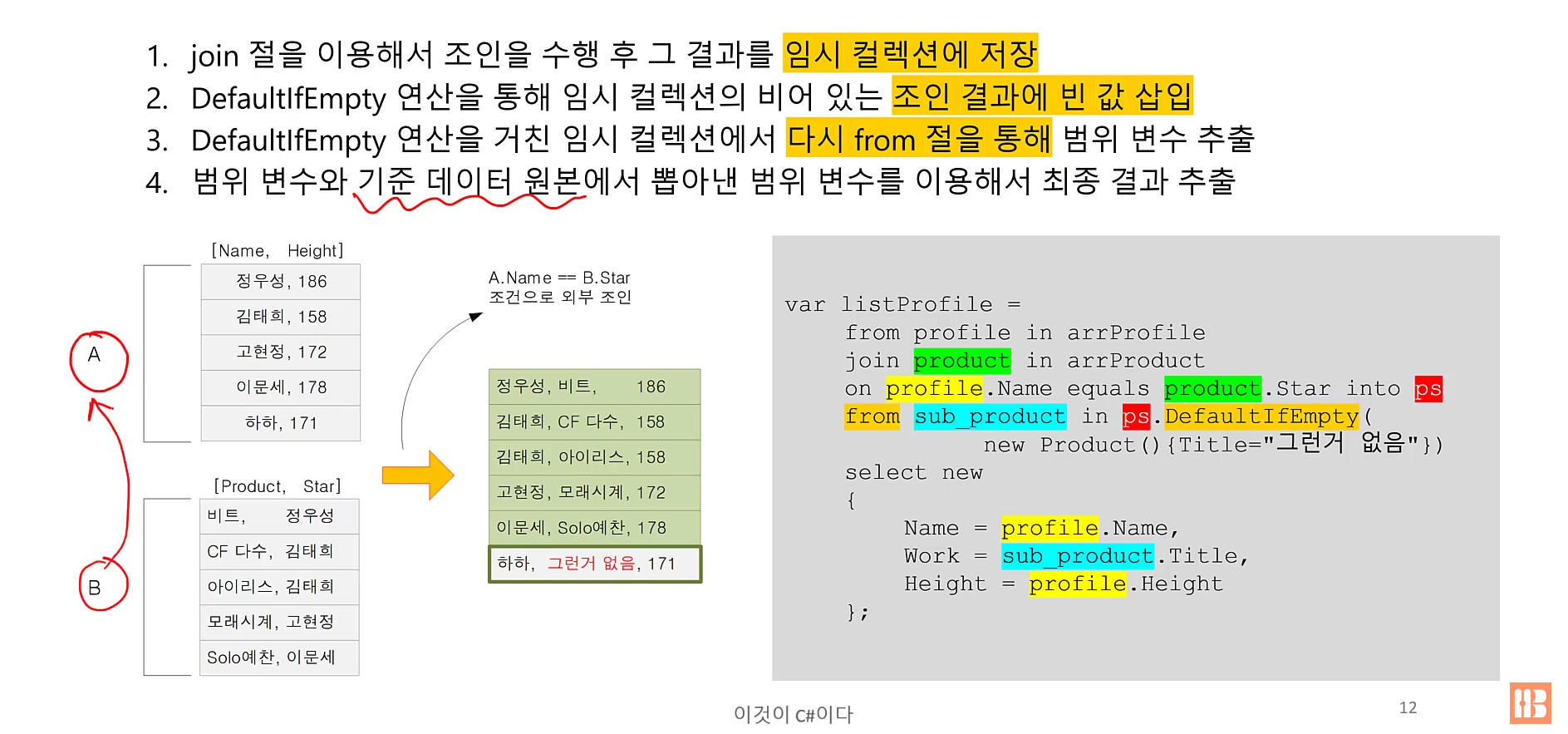
- 두 데이터 원본을 연결하는 연산
- 각 데이터 원본에서 특정 필드가 일치하는 데이터끼리 연결
- 내부 조인: 교집합
- 외부 조인: 한쪽 데이터 원본을 기준으로 삼은 상태에서 다른 데이터 원본과 결합하여 반환
내부 조인
외부 조인
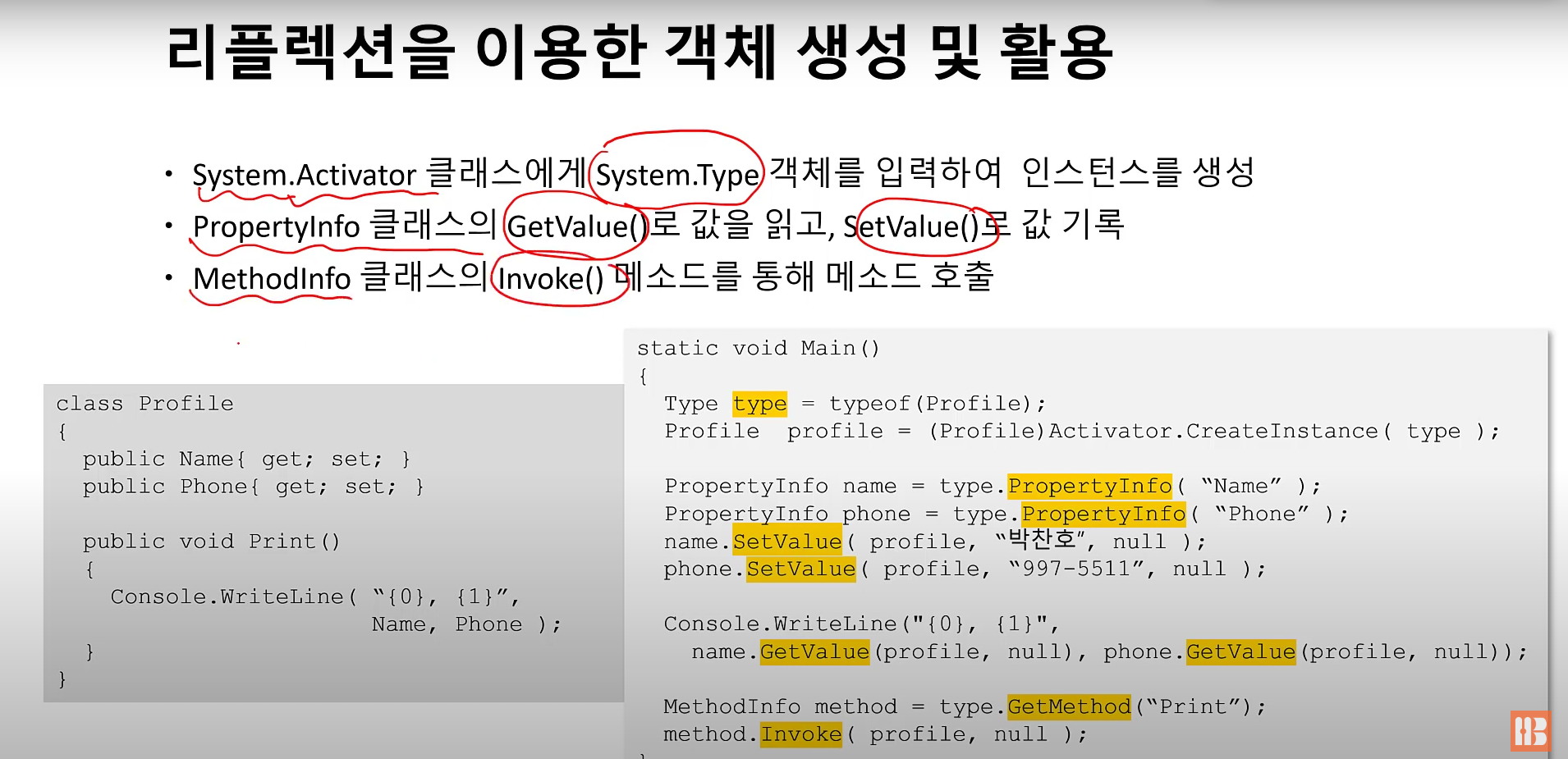
리플렉션
- 런타임에 객체의 형식(Type) 정보를 들여다보는 기능
- System.Object은 형식 정보를 반환하는 GetType() 메소드 보유
- 즉, 모든 데이터 형식은 System.Object 형식을 상속하므로 GetType() 메소드 또한 보유
Object.GetType()과 System.Type
- Object.GetType() 메소등는 System.Type 형식 결과를 반환
int a = 0;
Type type = a.GetType();
FiledInfo[] fileds = type.GetFields();
/////
에트리뷰트 (어노테이션?)
- 메타 데이터(코드에 대한 정보)를 담는 코드 요소
- 주석처럼 컴파일 시 사라지지 않음 (컴퓨터가 런타임에 읽을 수 있음)
class MyClass
{
	[Obsolete ("OldMethod는 폐기되었습니다.")]
    public void OldMethod()
    {
    	...
    }
}
사용자 정의 애트리뷰터
class History : System.Attribute
{
	private string programmer;
    public double Version {get; set;}
    public string changes {get; set;}
    public History(string programmer)
    {
    	this.programmer = programmer;
        Version = 1.0;
        Changes = "First release";
    }
    public string Programmer
    { get { return programmer; } }
}

[History("Sean", Version = 0.1, Changes = "2010-11-01")]
[History("Bob", Version = 0.2, Changes = "2010-12-03")]
class MyClaSS
{
	public void Func()
    {
    	Console.WriteLine("Func()");
    }
}
위처럼 애트리뷰틀 사용하면 실행파일로만 프로그램을 돌려도 콘솔에서 해당 코드에 대한 메모를 확인할 수 있다.
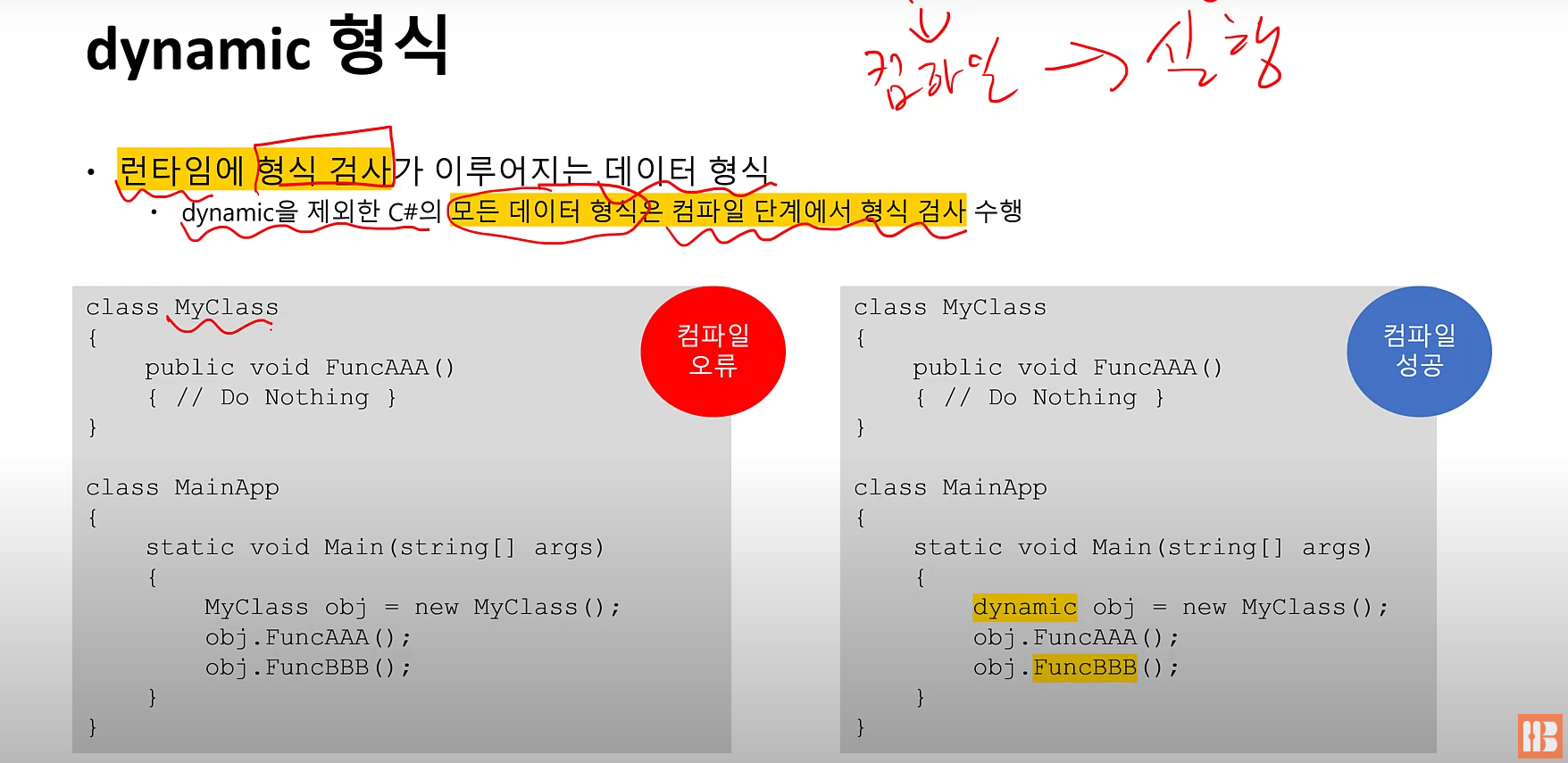
dynamic 형식
- 런타임에 형식 검사가 이루어지는 데이터 형식
- 원래 모든 데이터 형식은 컴파일 단계에서 형식 검사
오리 타이핑
- 상속 관련
- OOP에서는 오리로 인정받으려면 오리에서 파생되어야함
- dynamic 형식에서는 오리로 인정받으려면 오리처럼 해동하면 됨
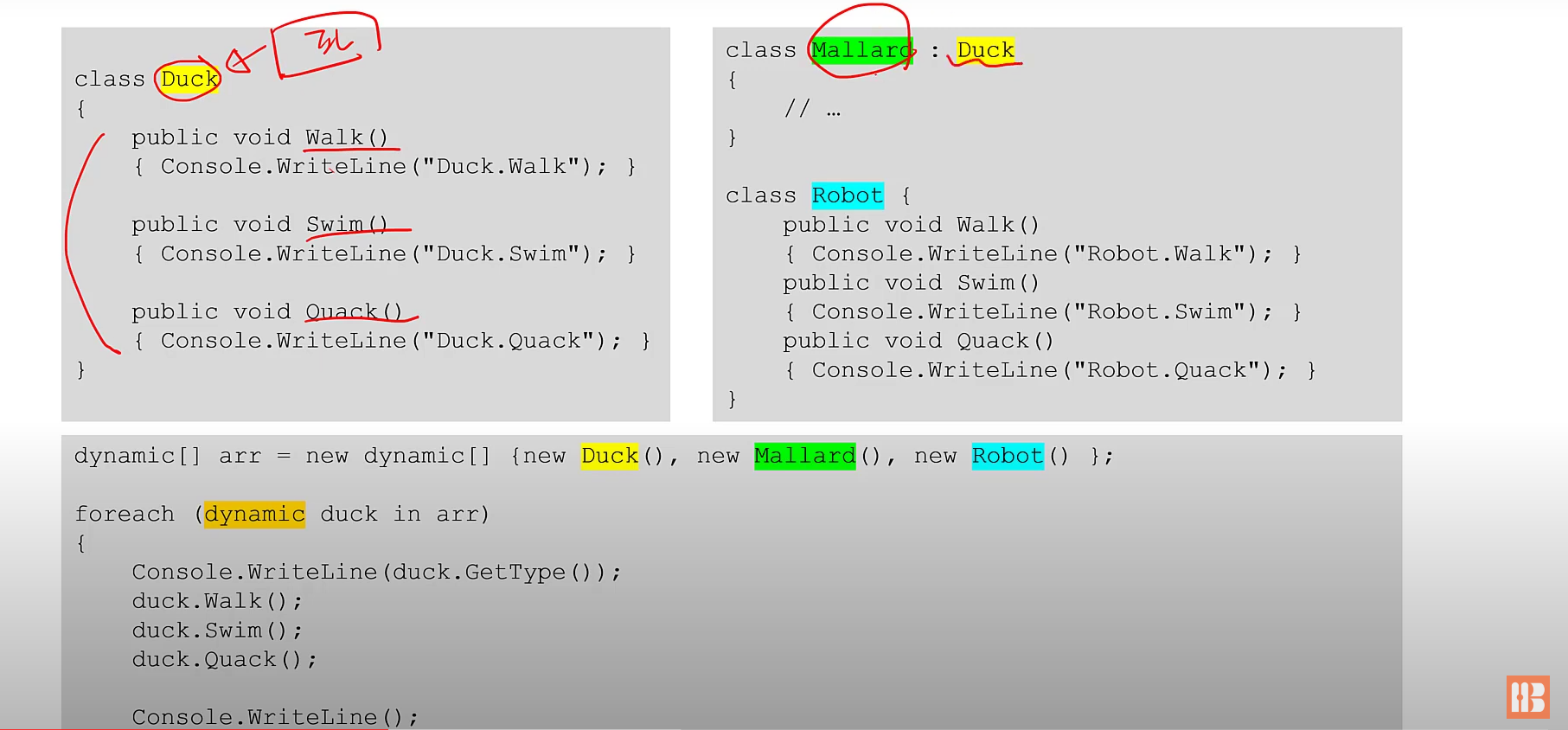
로봇은 관련이 없는데도 기능이 같아 문제 없이 실행이 된다.
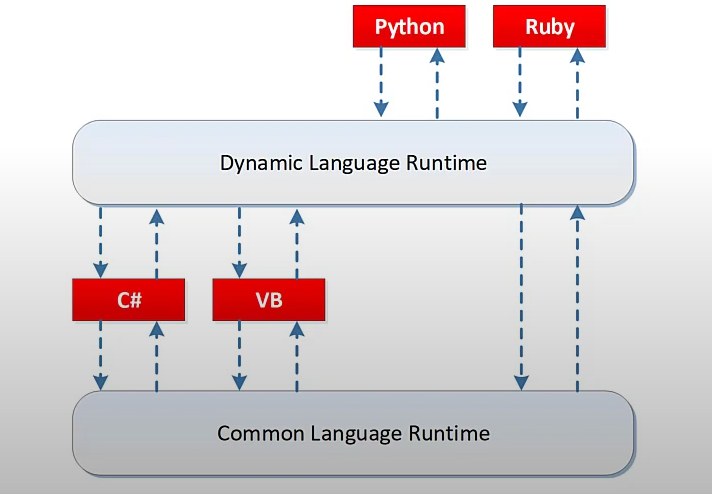
C#에서 파이썬 코드 사용하기
- DLR은 CLR위에서 동작하며, 파이썬이나 루비와 같은 동적 언어를 실행
- DLR은 C#같은 정적 언어 코드에서 파이썬같은 동적언어코드와의 상호동작 지원
- DLR과 CLR 사이의 상호동작은 dynamic 형식을 통해 이루어짐
namecard.py
class NameCard:
	def__init__(self, name, phone):
    	~~~~~

NameCard(n,p)
C#
ScriptRuntime runtime = Python.CreateRuntime();
dynamic result = runtime.ExecuteFile("namecard.py");

result.name = "박상현"
~~~
파일 다루기
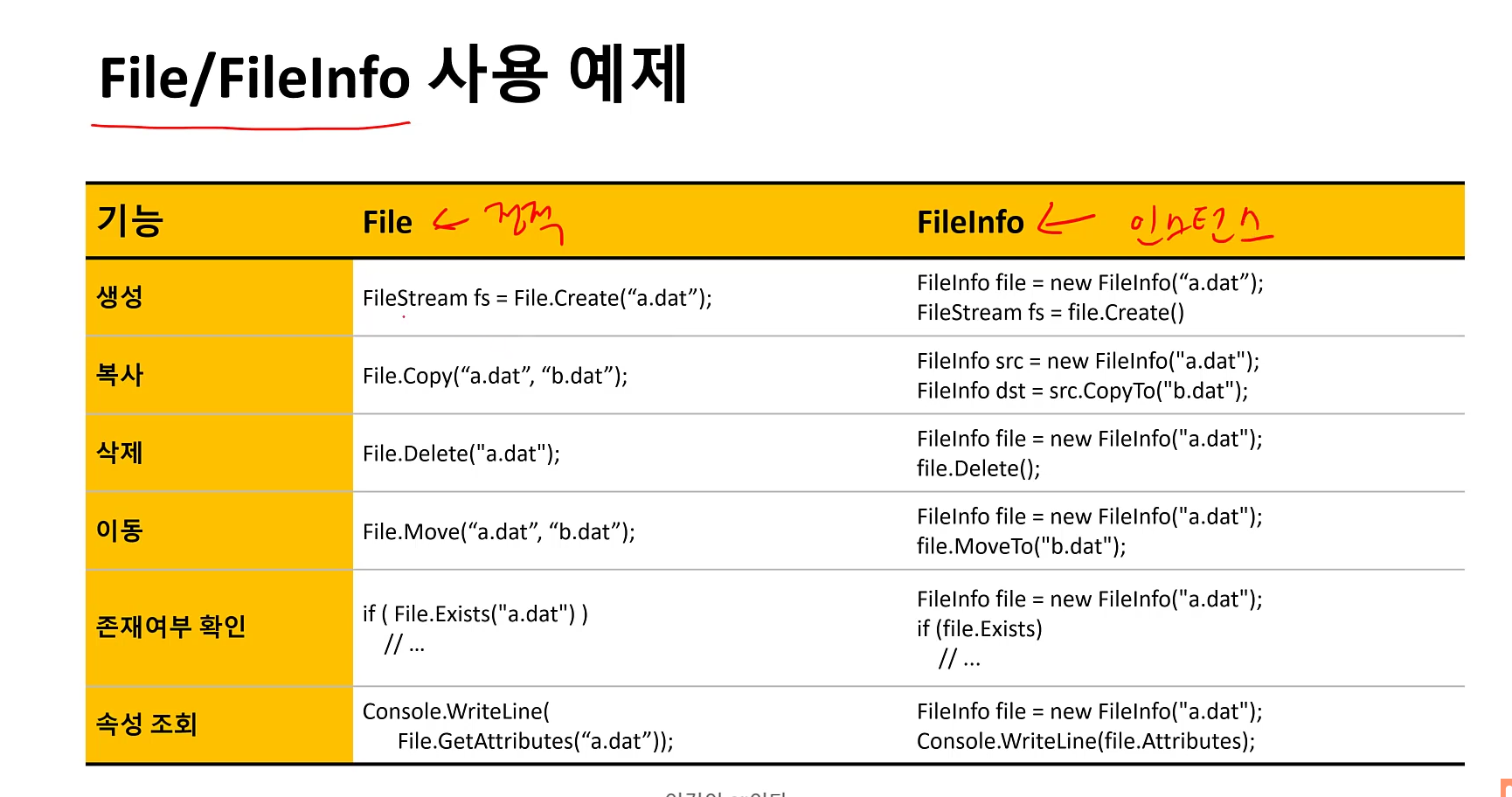
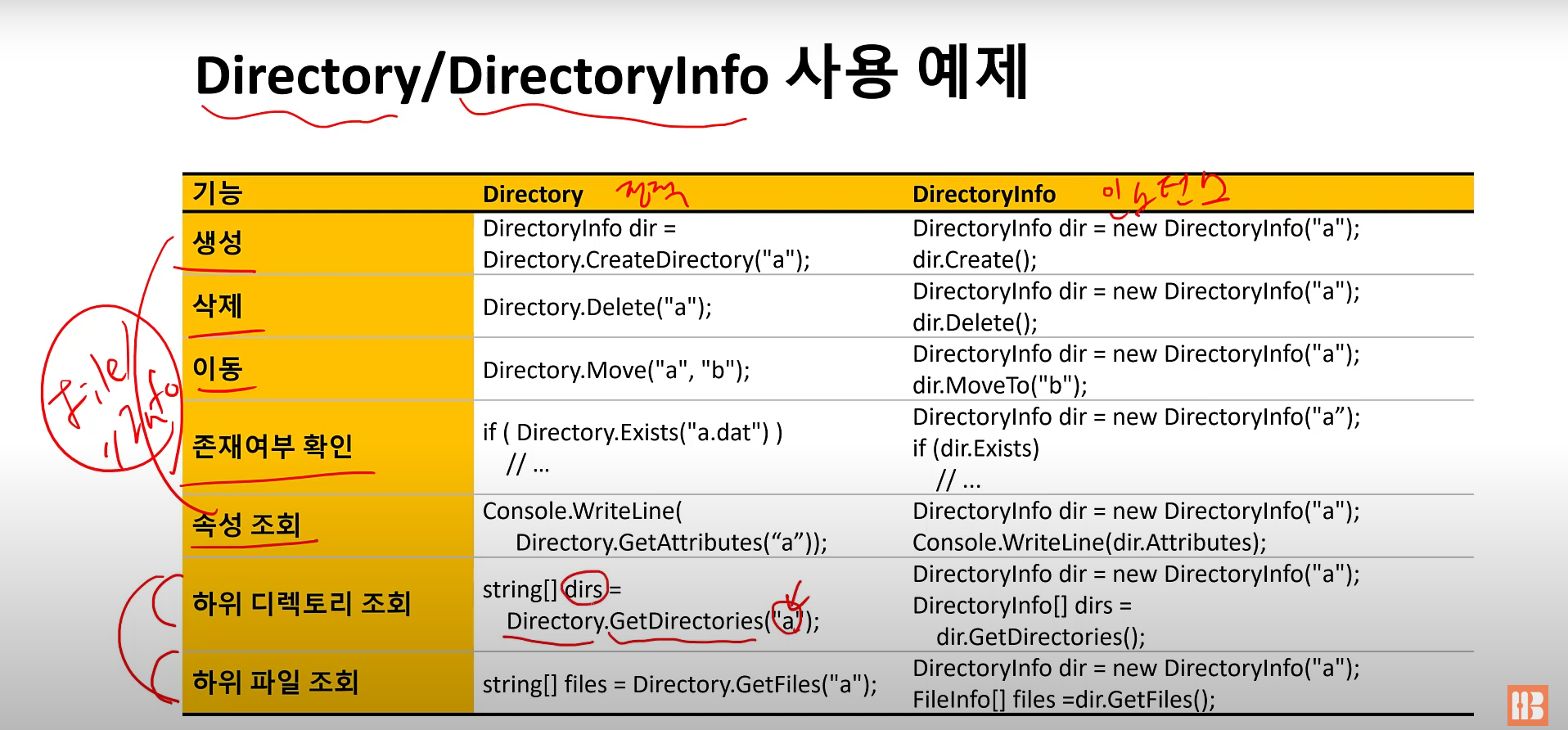
스트림(Stream I/O)
- Stream : 영어로 시내, 강, 또는 도로의 차선을 뜻함
- I/O에 있어 스트림은 "데이터가 흐르는 통로"를 뜻함
- 예) 메모리에서 하드디스크로 데이터 전송시 스트림으로 둘 사이를 연결 후,
데이터를 바이트 단위로 전송
파일에 대한 순차접근(Sequential Access)
- 처음부터 끝까지 순차로 읽는 방식
파일에 대한 임의접근(Random Access)
- 파일 내의 임의의 위치에 있는 데이터에 즉시 접근하는 방식
System.IO.Stream 클래스
- 입력, 출력 스트림 역할 수행
- 순차, 임의 접근 둘 다 지원
- 단, 추상 클래스이기 때문에 파생 클래스를 이용해야 함.
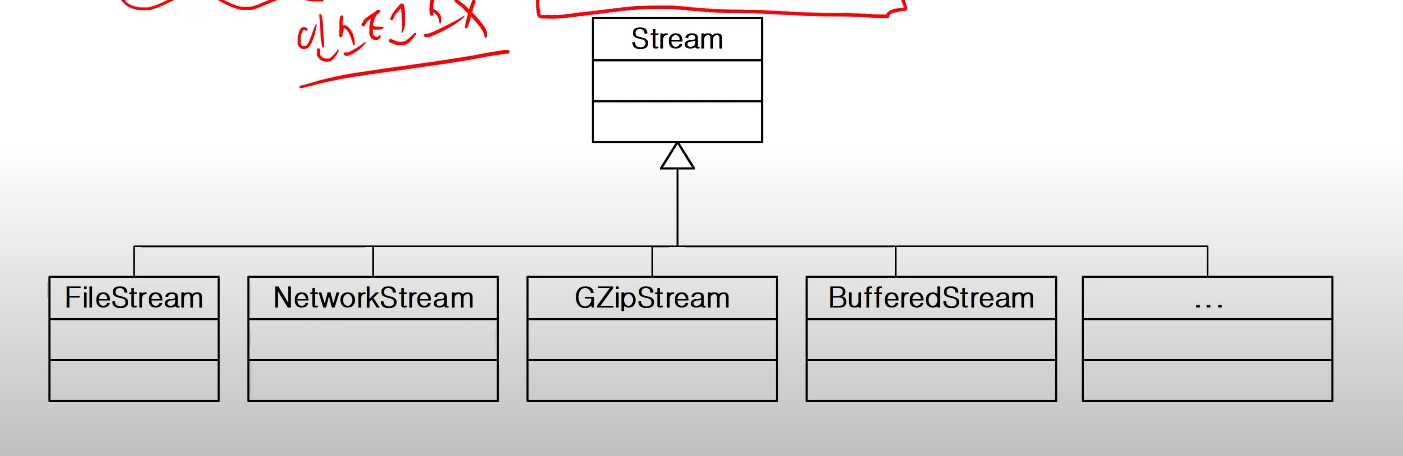
파일스트림 (System.IO.FileStream)
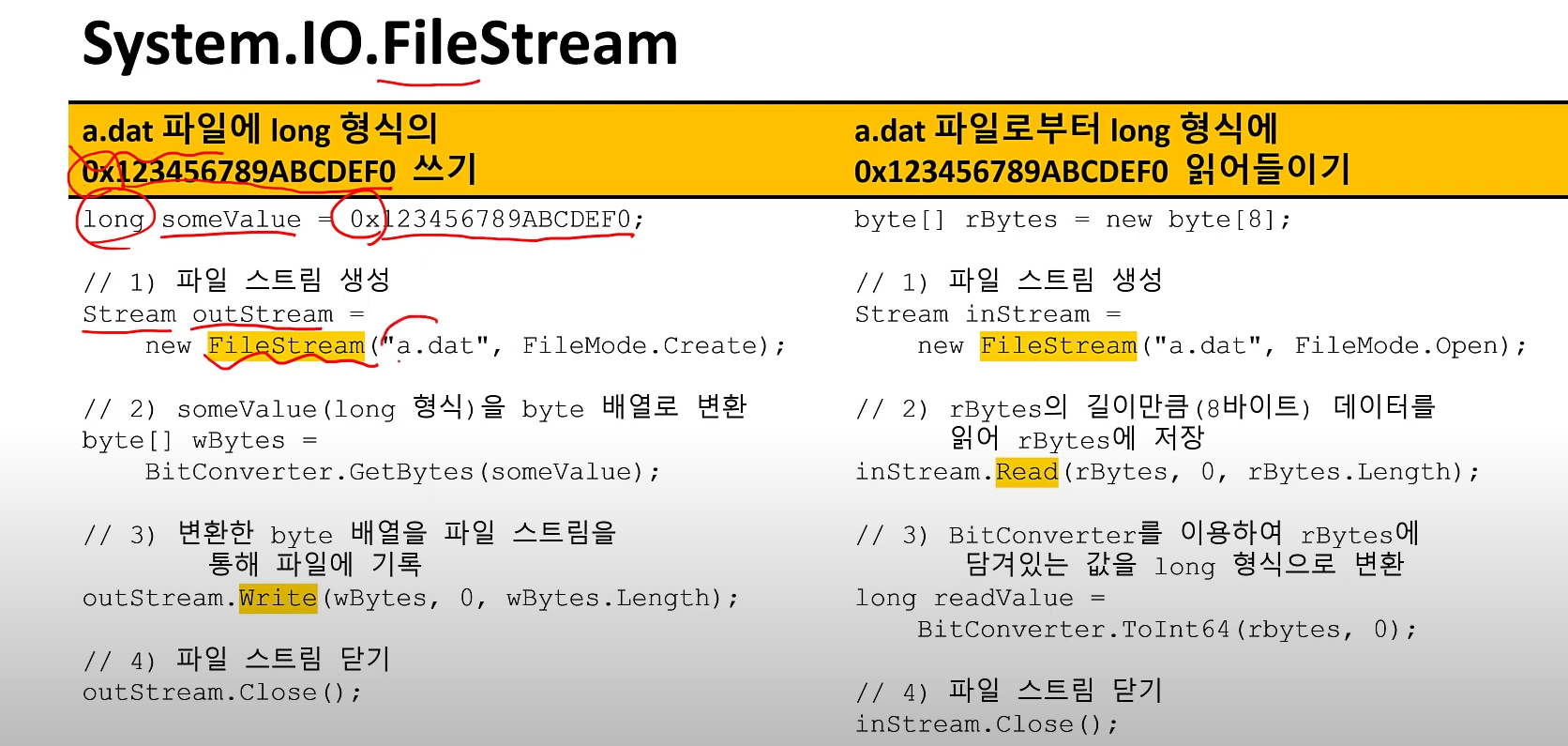
프로세스와 스레드
-
프로세스
- 실행파일의 데이터와 코드가 메모리에 적재되어 동작하는 것
- word.exe가 실행 파일이라면, 이 실행 파일을 실행한 것이 프로세스
-
스레드
- 스레드는 운영체제가 CPU 시간을 할당하는 기본 단위
- 프로세스가 밧줄이라면 스레드는 밧줄을 이루는 실
-
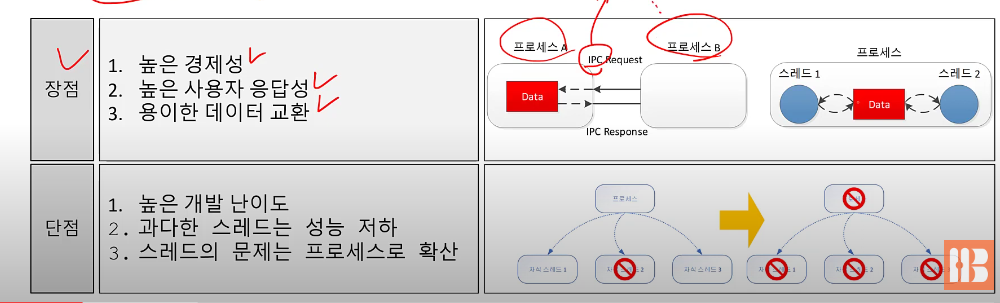
멀티 스레드
- 한 프로세스 안에 2개 이상의 스레드를 실행하는 기법
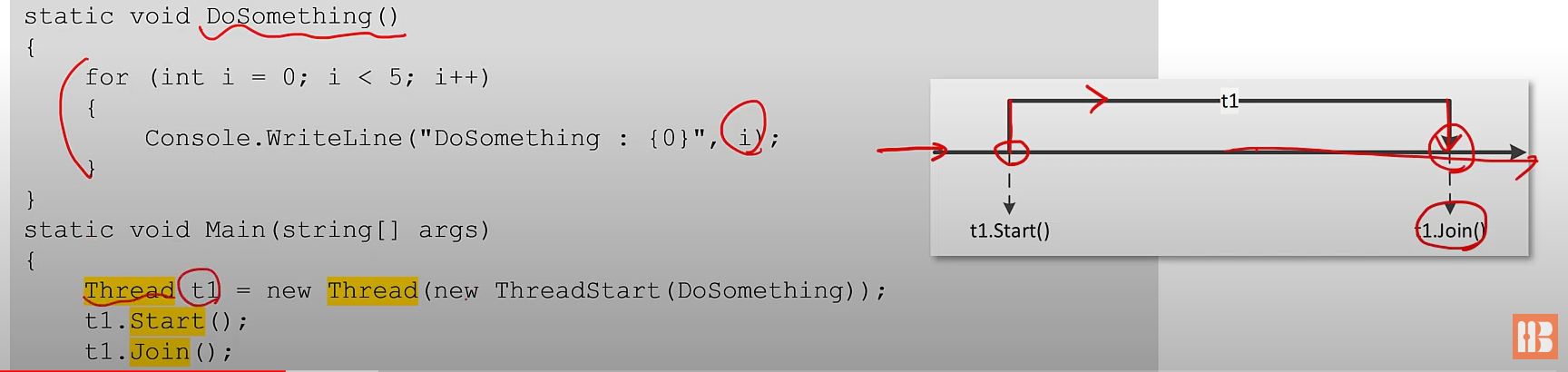
스레드 시작하기
- 절차
- Thread 인스턴스 생성
- Thread.Start()
- Thread.Join() (합류하기 위한 종료 대기)
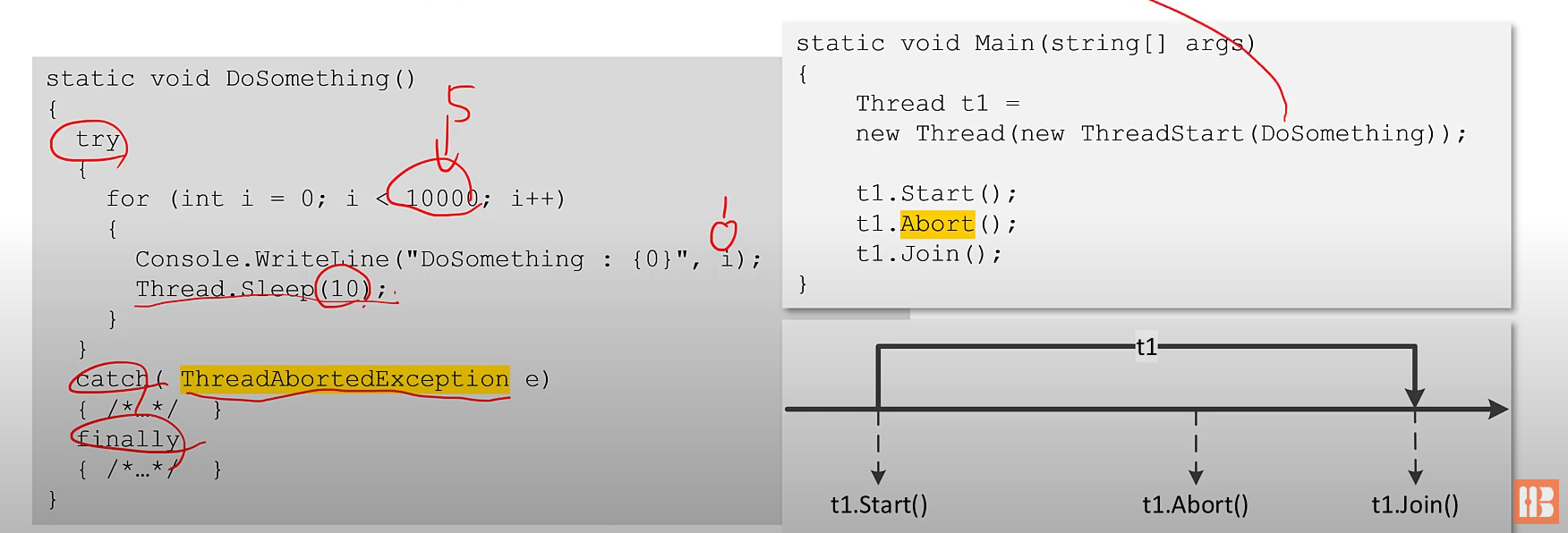
스레드 멈추기
- 스레드는 실행중인 메소드가 종료되면 함께 종료되지만, 필요한 경우 Abort()로 종료 가능
- Abort ㅎ출시 ThreadAbortedException 발생
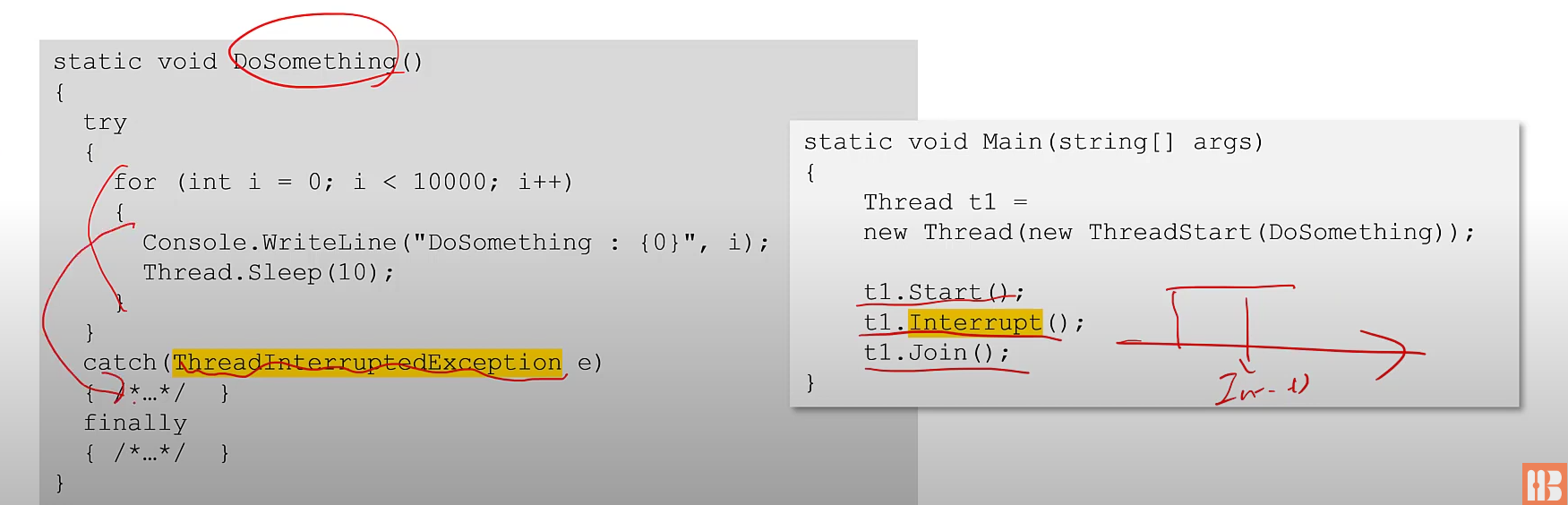
스레드 멈추기 - Interrupt
- Thread가 블로되어 있을 때만 스레드를 중단시키므로 부작용을 최소화 할 수 있음
스레드의 상태 변화
- Unstarted: 스레드 생성 직후
- Running: 실행중
- WaitSleepJoin: 블록
- Suspend: 일시 중단
- Aborted: 취소 상태
- Stopped: 정지 상태
스레드간의 동기화
- 동기화
- 자원을 한 번에 한 스레드가 사용하도록 순서를 맞추는 것
- .NET이 제공하는 대표적 동기화 도구
- lock 키워드
- Monitor 키워드
크리티컬 섹션
- 여러 스레드가 동시접근이 불가능하도록 보호된 코드 영역
- C#에서는 lock 키워드를 이용하여 생성 가능
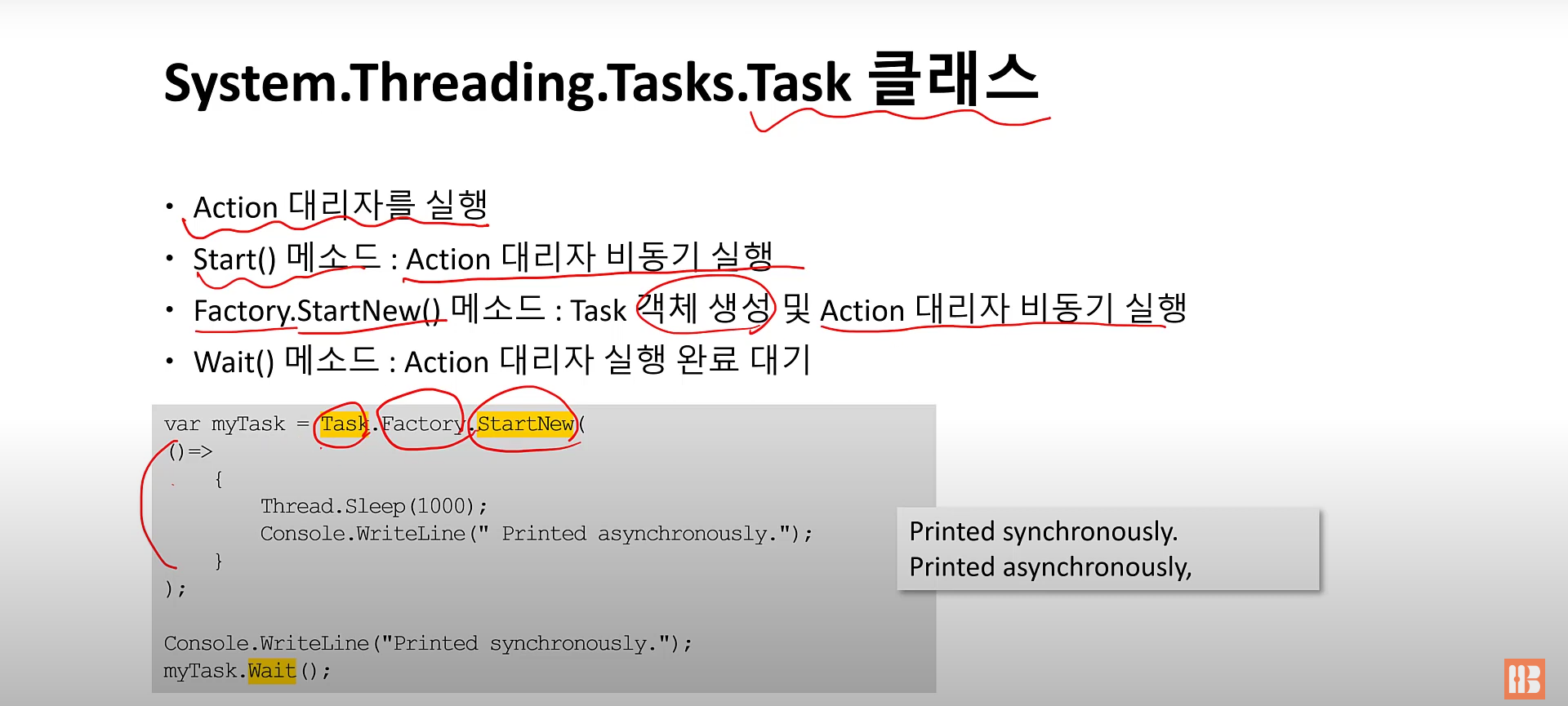
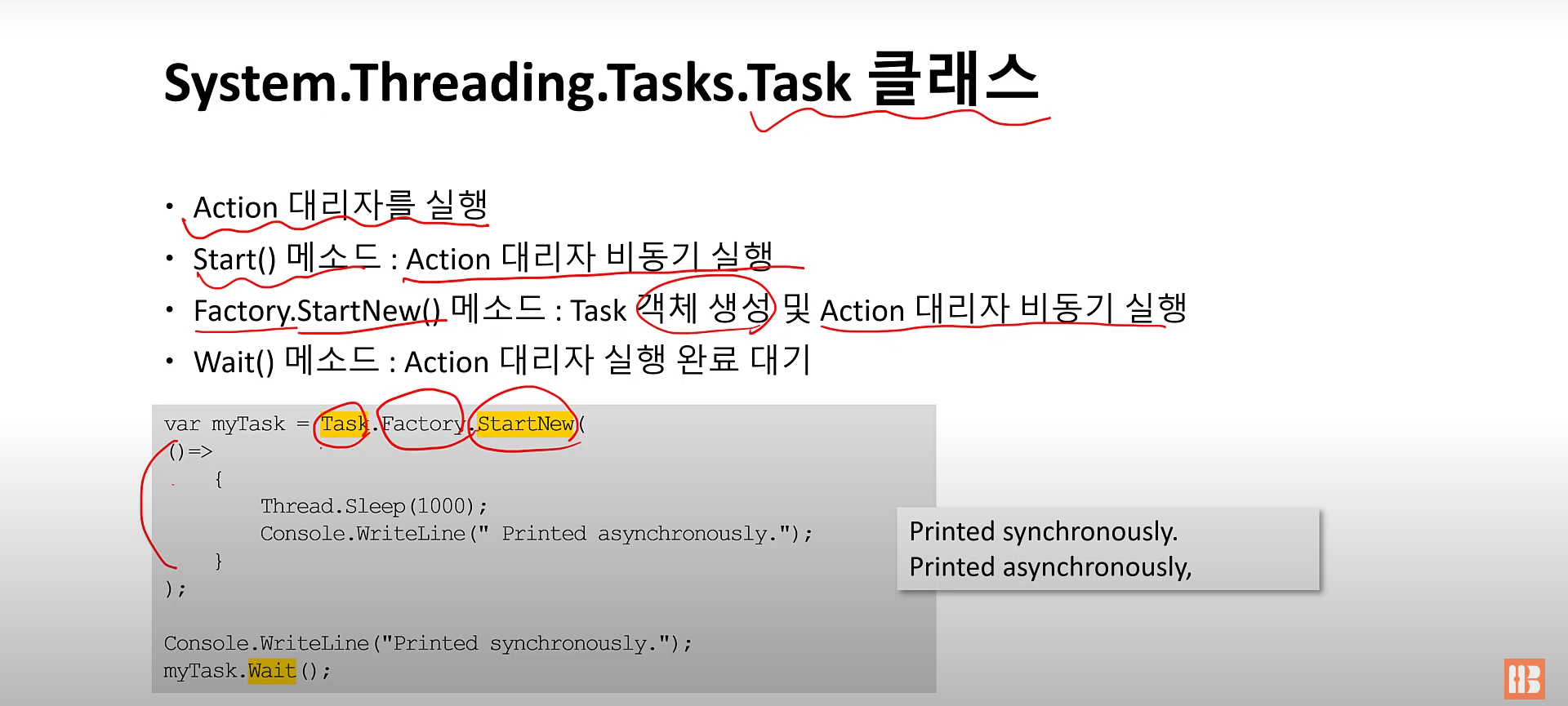
System.Threading.Tasks.Task 클래스
-
Action 대리자를 실행
-
Start() 메소드 : Action 대리자 비동기 실행
-
Factory.StartNew() 메소드 : Task 객체 생성 및 Action 대리자 비동기 실행
-
Wait() 메소드 : Action 대리자 실행 완료 대기
async, await
- async 한정자
- 메소드, 이벤트 처리기, 태스크, 람다식 등을 수식함
- C# 컴파일러가 async 한정자로 수식한 코드의 호출자를 만날 때 호출 결과를 기다리지 않고 바로 다음 코드로 이동하도록 실행 코드를 생성
- async로 한정하는 메소드는 반환 형식이 Task나 Task<TResult>, 또는 void여야 함
- 실행하고 잊어버릴 작업을 담고 있는 메소드라면 반환형식을 void로 선언
- 작업이 완료될 때까지 기다리는 메소드라면 Task, Task<TResult>로 선언
- await 연산자를 만나는 곳에서 호출자에게 제어 반환
- await 연산자가 없는 경우엔 동기로 실행
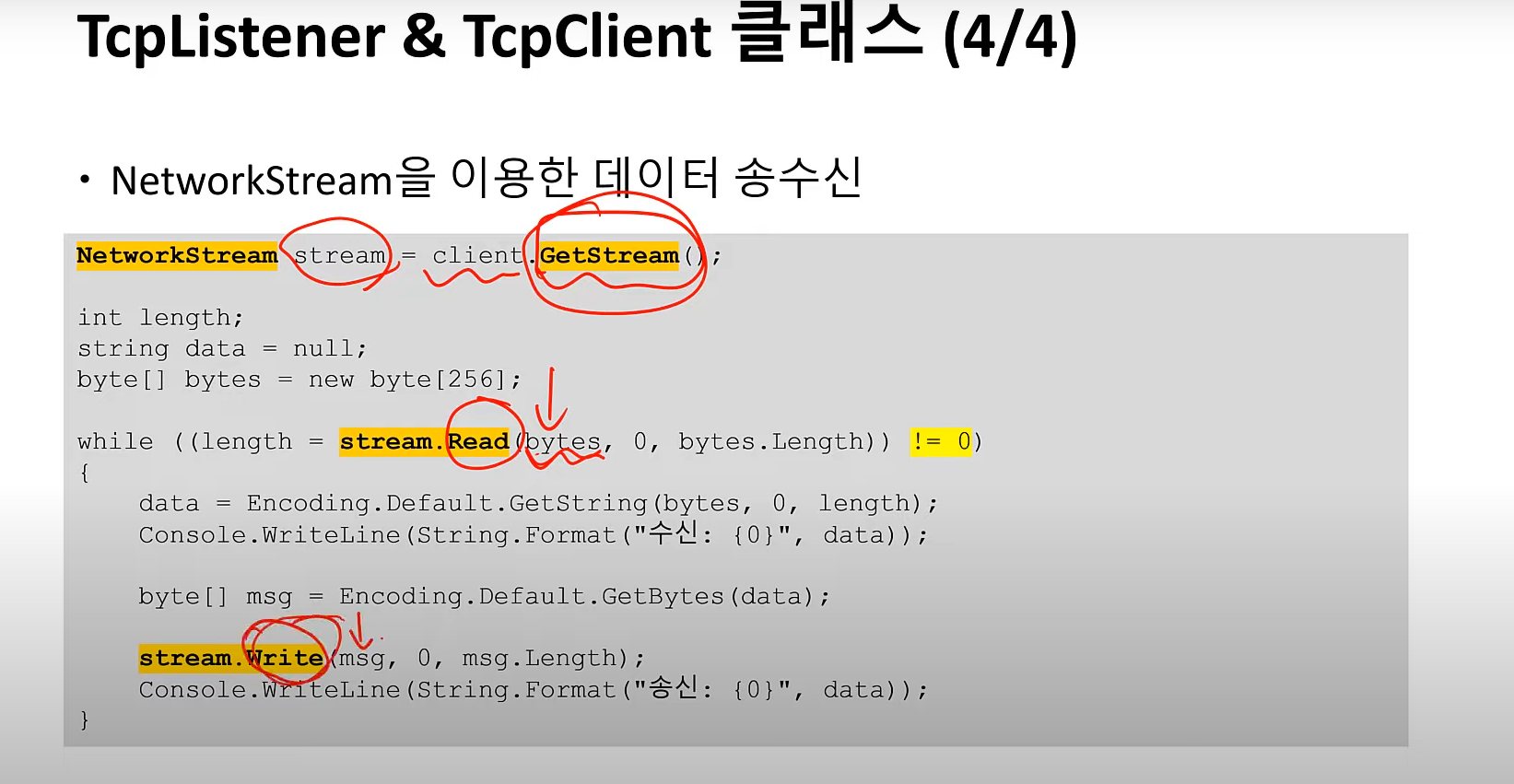
TcpListener & TcpClient 클래스