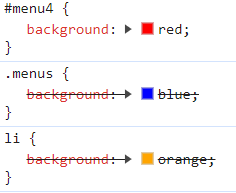
1. 전체 선택자
- 모든 태그 요소를 선택
- 모든 요소의 공통 스타일 적용
- 폰트(글꼴), 문서 여백
* {
	속성: 속성값;
	속성: 속성값;
	...
}
2. 태그 선택자
- 태그명으로 요소를 선택
<!DOCTYPE html>
<html>
    <head>
        <meta charset="UTF-8">
    </head>
    <body>
        <style>
            li{ //태그선택자
                background: orange;
            }
        </style>
        <ul>
            <li>메뉴1</li> //태그설정
            <li>메뉴2</li>
            <li>메뉴3</li>
            <li>메뉴4</li>
            <li>메뉴5</li>
        </ul>
    </body>
</html>
3. 클래스 선택자
- 복수개 선택시
.클래스명{

}
<!DOCTYPE html>
<html>
<head>
<meta charset="UTF-8">
</head>
<body>
<style>
li{
background: orange;
}
.menus{ //클래스선택자
background: blue;
}
</style>
<ul>
<li>메뉴1</li>
<li>메뉴2</li>
<li class="menus">메뉴3</li> //클래스설정
<li class="menus">메뉴4</li> //클래스설정
<li>메뉴5</li>
</ul>
</body>
</html>4. id 선택자
- 단수개 선택시
#id명{

}
<!DOCTYPE html>
<html>
<head>
<meta charset="UTF-8">
</head>
<body>
<style>
#menu4{ //아이디선택자
background: red;
}
</style>
<ul>
<li id="menu4">메뉴4</li> //아이디설정
</ul>
</body>
</html>5. 그룹 선택자
<style>
  h1, span,a { //다중으로 한번에 그룹을 묶어 설정
  	color :blue;
	}
</style>
6. 결합자
<!DOCTYPE html>
<html>
    <head>
        <meta charset="UTF-8">
    </head>
    <body>
        <style>
            li{ //결합자
                background: olivedrab;
            }
        </style>
        <ul>
            <li>메뉴1</li>
        </ul>
        <ol>
            <li>메뉴1</li>
        </ol>
    </body>
</html>
7. 속성명, 속성명=값으로 선택자
-
선택자[속성명]
input[type]: 태그에 type속성이 있는 모든 요소 -
선택자[속성명="값"]
input[type="text"]: input 태그에 type속성 값이 'text'인 요소 -
선택자[속성명^="키워드"]
input[type^="te"]: input 태그에 type속성 값이 'te' 키워드로 시작하는 요소 -
선택자[선택명~="키워드"]
input[type~="ex"]: input 태그에 type속성 값에 'ex'키워드가 포함된 요소 -
선택자[선택명$="키워드"]
input[type$="xt"]: input 태그에 type속성 값에 'ex'로 끝나는 요소
7. 조상 자손 선택자
조상선택자 ... 자손선택자
<!DOCTYPE html>
<html>
    <head>
        <meta charset="UTF-8">
    </head>
    <body>
        <style>
            ul li{ //조상 자손 선택자
                background: olivedrab;
            }
            ol li{ //조상 자손 선택자
                background: yellowgreen;
            }
        </style>
        <ul>
            <li>메뉴1</li>
        </ul>
        <ol>
            <li>메뉴1</li>
        </ol>
    </body>
</html>
<!DOCTYPE html>
<html>
<head>
<meta charset="UTF-8">
</head>
<body>
<style>
ol li{
background: blue;
}
ul li span{
color:red;
}
</style>
<ul>
<li class="menus">
<span>메뉴1</span> //빨강 적용
</li>
<ol>
<li>서브메뉴1</li> //블루 적용
<li>
<span>서브메뉴2</span> //블루, 빨강 적용
</li>
</ol>
</ul>
</body>
</html>8. 부모 자식 선택자
- 부모 : 바로 위 요소
- 자식 : 바로 아래 요소
부모선택자 > 자식선택자{

}
<!DOCTYPE html>
<html>
    <head>
        <meta charset="UTF-8">
    </head>
    <body>
        <style>
            ul > li > span{
                color:red;
            }
        </style>
        <ul>
            <li class="menus">
                <span>메뉴1</span> //빨강적용
            </li>
            <ol>
                <li>서브메뉴1</li>
                <li>
                    <span>서브메뉴2</span>
                </li>
            </ol>
        </ul>

    </body>
</html>
9. 형제 선택자
1) 형제 선택자
선택자 기준 오른쪽 형제 요소
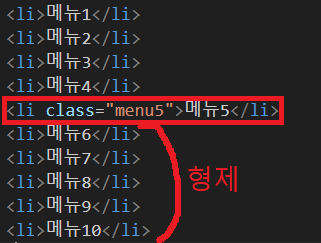
<!DOCTYPE html>
<html>
    <head>
        <meta charset="UTF-8">
    </head>
    <body>
        <style>
            .menu5 ~ li{
                background: orange;
            }
        </style>
        <ul>
            <li>메뉴1</li>
            <li>메뉴2</li>
            <li>메뉴3</li>
            <li>메뉴4</li>
            <li class="menu5">메뉴5</li>
            <li>메뉴6</li> //오렌지 적용
            <li>메뉴7</li> //오렌지 적용
            <li>메뉴8</li> //오렌지 적용
            <li>메뉴9</li> //오렌지 적용
            <li>메뉴10</li> //오렌지 적용
        </ul>
    </body>
</html>
2) 인접 형제 선택자
바로 오른쪽 옆 형제 요소
선택자 + 인접 형제 선택자 {

}
<!DOCTYPE html>
<html>
<head>
<meta charset="UTF-8">
</head>
<body>
<style>
.menu5 + li{
background: blue;
}
</style>
<ul>
<li>메뉴1</li>
<li>메뉴2</li>
<li>메뉴3</li>
<li>메뉴4</li>
<li class="menu5">메뉴5</li>
<li>메뉴6</li> //인접형제
<li>메뉴7</li>
<li>메뉴8</li>
<li>메뉴9</li>
<li>메뉴10</li>
</ul>
</body>
</html>10. 가상 클래스 선택자
1) 요소의 상태
선택자 : 상태 속성
:checked : 체크된 상태 선택
:slected : 선택된 상태 선택
:hover : 마우스 올린 상태 선택
:focus : 입력 대기 상태(커서 깜빡)
<!DOCTYPE html>
<html>
    <head>
        <meta charset="UTF-8">
    </head>
    <body>
        <style>
            input[type="checkbox"]:checked + label{
                background: gray; /*checked : 체크된 상태 일때*/
            }
            input[type="text"]:focus{
                background: yellow;/* focus : 입력대기 상태 일때*/
            }
            .box{
                width : 100px;
                height : 100px;
                background: orange;
                transition: all 10s;
            }
            .box:hover{ /*hover : 마우스 올린 상태 선택*/
                width : 200px;
                height : 200px;
                background: orange;
            }
        </style>
        <input type="checkbox" id="check">
        <label for="check">클릭!</label>
        <br>
        <input type="text" id="text">
        <br>
        <div class="box"></div>
    </body>
</html>
2) 요소의 순서
:first-child : 첫번째 자식 요소 선택
:last-child : 마지막 자식 요소 선택
:nth-child(숫자) : '숫자'번째 자식 선택(1부터시작)
:nth-child(수식) : 수식에 해당하는 요소 선택
:first-of-type :
:last-of-type :
:nth-of-type :
2n : 짝수
2n + 1 : 홀수
<!DOCTYPE html>
<html>
    <head>
        <meta charset="UTF-8">
    </head>
    <body>
        <style>
            ul li:first-child{ /*첫번째자식*/
                background: red;
            }
            ul li:last-child{ /*마지막자식*/
                background: blue;
            }
        </style>
        <ul>
            <li>메뉴1</li> /*첫번째 자식 - 레드적용*/
            <li>메뉴2</li>
            <li>메뉴3</li>
            <li>메뉴4</li>
            <li>메뉴5</li>
            <li>메뉴6</li>
            <li>메뉴7</li>
            <li>메뉴8</li>
            <li>메뉴9</li>
            <li>메뉴10</li> /*마지막 자식 - 블루적용*/
        </ul>
    </body>
</html>
:nth-child(숫자) : '숫자'번째 자식 선택(1부터시작)
<!DOCTYPE html>
<html>
    <head>
        <meta charset="UTF-8">
    </head>
    <body>
        <style>
            ul li:nth-child(1), /*1번째자식*/
            ul li:nth-child(3), /*3번째자식*/
            ul li:nth-child(5), /*5번째자식*/
            ul li:nth-child(7), /*7번째자식*/
            ul li:nth-child(9){ /*9번째자식*/
                background: orange;
            }

        </style>
        <ul>
            <li>메뉴1</li> //적용
            <li>메뉴2</li>
            <li>메뉴3</li> //적용
            <li>메뉴4</li>
            <li>메뉴5</li> //적용
            <li>메뉴6</li>
            <li>메뉴7</li> //적용
            <li>메뉴8</li>
            <li>메뉴9</li> //적용
            <li>메뉴10</li>
        </ul>
    </body>
</html>
:nth-child(수식) : 수식에 해당하는 요소 선택
ul li:nth-child(2n+1){
	background: orange;
}:nth-of-type타입 번째로 선택
ul li:nth-of-type(2n+1){
	background: orange;
}
3) 조건에 따라서 선택
:not(선택자) : 선택자를 제외한 모든 요소
 ul li:not(.menu5){
 	background: orange;
}
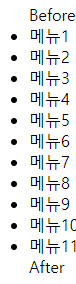
4) 가상의 요소를 추가, 선택
::before : 자식 요소위 첫 번째에 가상의 요소 추가, 선택
::after : 자식 요소의 마지막에 가상의 요소를 추가, 선택
필수속성 content
ul::before{
	content:'Before';
}
ul::after{
	content:'After';
}
11. 스타일적용 우선순위
- 범위가 넓을수록 적용 우선순위 높다.
- 같은 클래스, 태그 : 나중에 적용된 선택자가 우선순위가 높다.
태그 < 클래스 < 아이디 < style속성 < !important