⭐ Git & Github_협업
⭐ 팀 미니프로젝트 완성본 & 발표
⭐ 메인페이지
<!DOCTYPE html>
<html lang="en">

<head>
    <meta charset="UTF-8">
    <meta name="viewport" content="width=device-width, initial-scale=1.0">
    <title>우리 팀을 소개합니다</title>
    <script src="https://ajax.googleapis.com/ajax/libs/jquery/3.5.1/jquery.min.js"></script>
    <link href="https://cdn.jsdelivr.net/npm/bootstrap@5.0.2/dist/css/bootstrap.min.css" rel="stylesheet"
        integrity="sha384-EVSTQN3/azprG1Anm3QDgpJLIm9Nao0Yz1ztcQTwFspd3yD65VohhpuuCOmLASjC" crossorigin="anonymous">
    <link rel="stylesheet" href="css/index.css">


    <script type="module">
        // Firebase 모듈 불러오기
        import { initializeApp } from "https://www.gstatic.com/firebasejs/9.6.1/firebase-app.js";
        import { getFirestore, collection, onSnapshot, orderBy, query } from "https://www.gstatic.com/firebasejs/9.6.1/firebase-firestore.js";

        // Firebase 초기화
        const firebaseConfig = {
            apiKey: "AIzaSyCqPjlFsuIKZ3N4ZfO9mTKQs8Sya6aKCKs",
            authDomain: "introducing-fa5ae.firebaseapp.com",
            projectId: "introducing-fa5ae",
            storageBucket: "introducing-fa5ae",
            messagingSenderId: "190395607602",
            appId: "1:190395607602:web:5024130aaa95b9285f2a2b",
            measurementId: "G-YJFDJBS7SN"
        };

        const app = initializeApp(firebaseConfig);
        const db = getFirestore(app);

        // 방명록 데이터 가져오기 및 실시간 업데이트
        function fetchGuestbook() {
            const guestbookRef = collection(db, 'guestbook');
            const q = query(guestbookRef, orderBy('createdAt', 'desc'));
            onSnapshot(q, (snapshot) => {
                const guestbookData = snapshot.docs.map(doc => ({ id: doc.id, ...doc.data() }));

                const tableBody = document.getElementById('guestbookTableBody');
                tableBody.innerHTML = ''; // 기존 데이터 초기화
                guestbookData.forEach(entry => {
                    const row = document.createElement('tr');
                    row.innerHTML = `<td>${entry.name}</td><td>${entry.message}</td>`;
                    tableBody.appendChild(row);
                });
            });
        }

        // 페이지 로딩 시 방명록 데이터 가져오기
        document.addEventListener('DOMContentLoaded', fetchGuestbook);


        // 방명록 팝업페이지 열기
        document.getElementById('openGuestbook').onclick = function () {
            window.open(
                'guestbook.html',
                '방명록',
                'width=1000,height=600,' +
                'top=' + (window.screen.height / 2 - 350) + ',' +
                'left=' + (window.screen.width / 2 - 500)
            );
        }


        // 사원증 상세페이지 열기
        document.getElementById('clickimage').onclick = function () {
            window.open(
                'introduction4.html',
                'title 명',
                'width=1400,height=850,' +  //팝업크기
                'top=' + (window.screen.height / 2 - 450) + ',' +  //화면 중앙에 뜨게하기
                'left=' + (window.screen.width / 2 - 700)
            );
        }
        document.getElementById('clickimage2').onclick = function () {
            window.open(
                'introduction.html',
                'title 명',
                'width=1400,height=850,' +  //팝업크기
                'top=' + (window.screen.height / 2 - 450) + ',' +  //화면 중앙에 뜨게하기
                'left=' + (window.screen.width / 2 - 700)
            );
        }
        document.getElementById('clickimage3').onclick = function () {
            window.open(
                'introduction2.html',
                'title 명',
                'width=1400,height=850,' +  //팝업크기
                'top=' + (window.screen.height / 2 - 450) + ',' +  //화면 중앙에 뜨게하기
                'left=' + (window.screen.width / 2 - 700)
            );
        }
        document.getElementById('clickimage4').onclick = function () {
            window.open(
                'introduction3.html',
                'title 명',
                'width=1400,height=850,' +  //팝업크기
                'top=' + (window.screen.height / 2 - 450) + ',' +  //화면 중앙에 뜨게하기
                'left=' + (window.screen.width / 2 - 700)
            );
        }
    </script>
</head>

<body>
    <div class="main">
        <div class="p-5 mb-4 bg-body-tertiary rounded-3">
            <div class="container-fluid py-5" style="color: rgb(255, 249, 237); width: 700px; margin-left: 0;">
                <h1 class="display-5 fw-bold" style="font-size: 120px; text-shadow: 2px 2px 4px rgba(0, 0, 0, 0.5);">
                    상부3조
                </h1>
                <p class="col-md-8 fs-4"
                    style="font-size: 50px !important; font-weight: 700; text-shadow: 2px 2px 4px rgba(0, 0, 0, 0.5);">
                    상부상조(相扶相助)의
                    의미를 담아 각자의 강점을 살려 협력하여 최상의 결과를 만들어내는 팀입니다.</p>
            </div>
        </div>
    </div>
    <div class="text-box">

        <h2>⭐ 우리 팀 규칙</h2>
        <div class="box1">
            <p><img src="https://cdn-icons-png.flaticon.com/512/8068/8068016.png" alt="number 1 icon" width="30">
                말 예쁘게 하며 협력하겠습니다.</p>
            <p><img src="https://cdn-icons-png.flaticon.com/512/8068/8068072.png" alt="number 2 icon" width="30">
                자리 비움이나 문제가 생기면 빠르게 공유하겠습니다.</p>
            <p><img src="https://cdn-icons-png.flaticon.com/512/8068/8068126.png" alt="number 3 icon" width="30">
                실수나 문제가 있어도 살짝 놀리고 함께 문제해결 능력을 키워나가겠습니다. 오히려 좋아</p>
            <p><img src="https://cdn-icons-png.flaticon.com/512/8068/8068185.png" alt="number 4 icon" width="30">
                대화를 할 때는 마이크도 켜고 화면공유와 함께 잘 소통하겠습니다.</p>
            <p><img src="https://cdn-icons-png.flaticon.com/512/8068/8068239.png" alt="number 5 icon" width="30">
                상부상조하는 3조 하겠습니다. 🫶</p>
        </div>


        <h2>⭐ 우리 팀 목표</h2>
        <div class="box1">
            <p><img src="https://cdn-icons-png.flaticon.com/512/14865/14865963.png" alt="number one icon" width="30">
                데일리 스크럼 작성 및 실천하기</p>
            <p><img src="https://cdn-icons-png.flaticon.com/512/14866/14866025.png" alt="number two icon" width="30">
                부끄러워도 물어보기</p>
            <p><img src="https://cdn-icons-png.flaticon.com/512/14866/14866036.png" alt="number three icon" width="30">
                이번 프로젝트 포트폴리오로 사용하기</p>
            <p><img src="https://cdn-icons-png.flaticon.com/512/14866/14866047.png" alt="number four icon" width="30">
                1일 1TIL & 1알고리즘 📝</p>
            <p><img src="https://cdn-icons-png.flaticon.com/512/14866/14866058.png" alt="number five icon" width="30">
                끝까지 사이좋기</p>
        </div>

    </div>

    <h2>⭐ 팀원소개</h2>
    <div class="row row-cols-1 row-cols-md-2 g-2">
        <div class="q1">
            <div class="background">
                <div class="sub_box" id="clickimage">
                    <img src="https://teamsparta.notion.site/image/attachment%3A450155ed-0306-4f83-a8b5-a222564098ce%3AKakaoTalk_20250218_211025543.jpg?table=block&id=19e2dc3e-f514-803f-a1fb-c870df9929d5&spaceId=83c75a39-3aba-4ba4-a792-7aefe4b07895&width=1390&userId=&cache=v2"
                        alt="Foreground Image" class="foreground-image">
                    <div class="txt_box">
                        <span>자세히 보기</span>
                    </div>
                    <div class="sub_text">
                        <p class="title">팀장</p>
                        <p class="name">김지환</p>
                    </div>
                </div>
            </div>
        </div>
        <div class="q1">
            <div class="background">
                <div class="sub_box" id="clickimage2">
                    <img src="https://teamsparta.notion.site/image/https%3A%2F%2Fprod-files-secure.s3.us-west-2.amazonaws.com%2F83c75a39-3aba-4ba4-a792-7aefe4b07895%2F0d5174cf-b043-41d6-b407-06fc17a82257%2FKakaoTalk_Photo_2025-01-17-16-45-33.jpeg?table=block&id=546419e6-f3d6-493d-8ec1-b052af7aa58c&spaceId=83c75a39-3aba-4ba4-a792-7aefe4b07895&width=1390&userId=&cache=v2"
                        alt="Foreground Image" class="foreground-image">
                    <div class="txt_box">
                        <span>자세히 보기</span>
                    </div>
                    <div class="sub_text">
                        <p class="title">팀원</p>
                        <p class="name">김채원</p>
                    </div>
                </div>
            </div>
        </div>
        <div class="q2">
            <div class="background">
                <div class="sub_box" id="clickimage3">
                    <img src="https://teamsparta.notion.site/image/attachment%3A854e2e66-ed7f-4e19-a0c2-1c1cbbdaa968%3AKakaoTalk_20250218_194905462.jpg?table=block&id=19e2dc3e-f514-80ab-a1df-ea7811205e11&spaceId=83c75a39-3aba-4ba4-a792-7aefe4b07895&width=1390&userId=&cache=v2"
                        alt="Foreground Image" class="foreground-image">
                    <div class="txt_box">
                        <span>자세히 보기</span>
                    </div>
                    <div class="sub_text">
                        <p class="title">팀원</p>
                        <p class="name">김하정</p>
                    </div>
                </div>
            </div>
        </div>
        <div class="q2">
            <div class="background">
                <div class="sub_box" id="clickimage4">
                    <img src="https://teamsparta.notion.site/image/attachment%3A3d53d744-e179-440f-8007-6a298f3e1ec5%3AKakaoTalk_Photo_2025-02-18-20-41-31.jpeg?table=block&id=19e2dc3e-f514-8084-bc8e-dbbaa19cbb34&spaceId=83c75a39-3aba-4ba4-a792-7aefe4b07895&width=1390&userId=&cache=v2"
                        alt="Foreground Image" class="foreground-image">
                    <div class="txt_box">
                        <span>자세히 보기</span>
                    </div>
                    <div class="sub_text">
                        <p class="title">팀원</p>
                        <p class="name">강동연</p>
                    </div>
                </div>
            </div>
        </div>
    </div>
    <!-- 방명록 테이블-->
    <div class="bottom">
        <h2>방명록</h2>
        <div class="guest_box">
            <button type="button" class="btn btn-outline-info" style="float:right;" id="openGuestbook">글쓰기</button>
            <table>
                <thead>
                    <tr>
                        <th>이름</th>
                        <th>내용</th>
                    </tr>
                </thead>
                <tbody id="guestbookTableBody">
                </tbody>
            </table>
        </div>
    </div>
</body>

</body>

</html>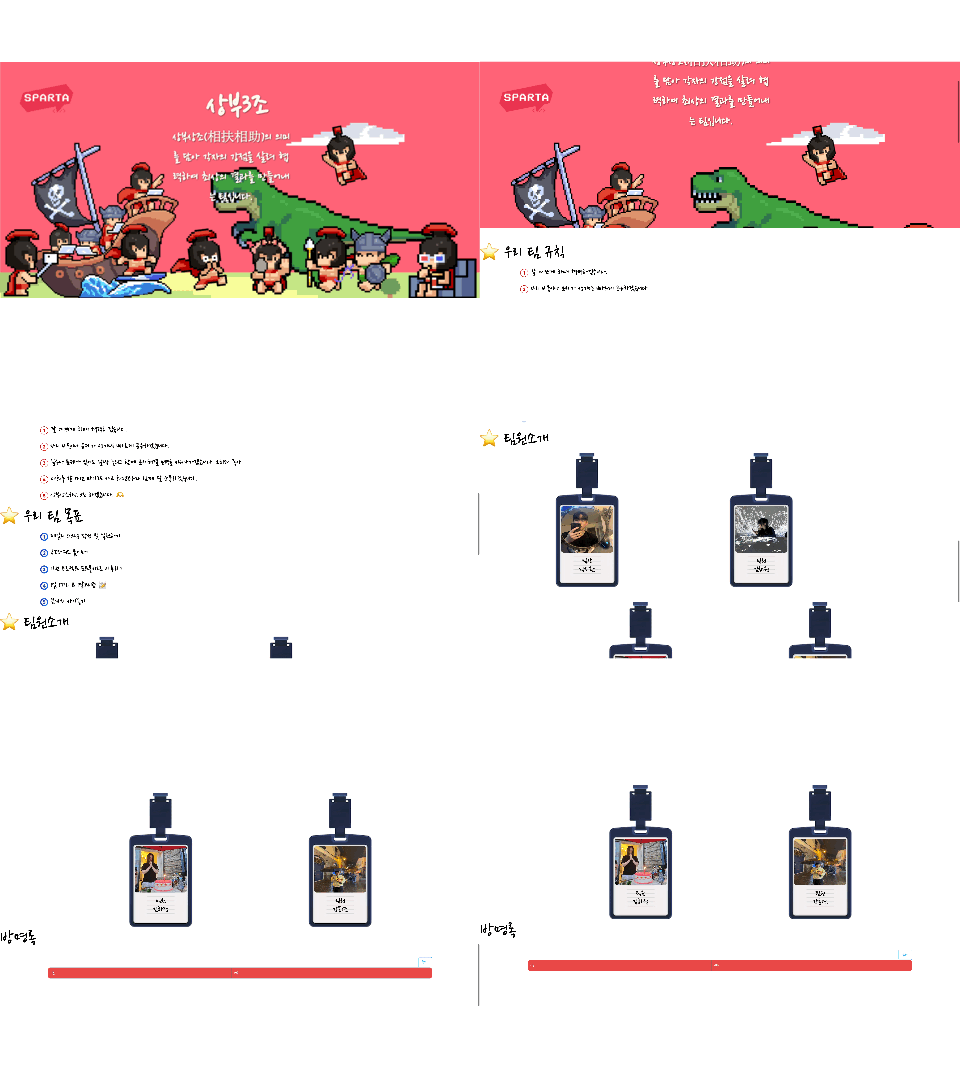
⭐ 방명록
<!DOCTYPE html>
<html lang="ko">

<head>
    <meta charset="UTF-8">
    <meta name="viewport" content="width=device-width, initial-scale=1.0">
    <link rel="stylesheet" href="css/guestbook.css">
    <title>방명록 작성</title>
    <script type="module">
        // Firebase 모듈
        import { initializeApp } from "https://www.gstatic.com/firebasejs/9.6.1/firebase-app.js";
        import { getFirestore, collection, addDoc } from "https://www.gstatic.com/firebasejs/9.6.1/firebase-firestore.js";

        // Firebase 초기화
        const firebaseConfig = {
            apiKey: "AIzaSyCqPjlFsuIKZ3N4ZfO9mTKQs8Sya6aKCKs",
            authDomain: "introducing-fa5ae.firebaseapp.com",
            projectId: "introducing-fa5ae",
            storageBucket: "introducing-fa5ae.appspot.com",
            messagingSenderId: "190395607602",
            appId: "1:190395607602:web:5024130aaa95b9285f2a2b",
            measurementId: "G-YJFDJBS7SN"
        };

        const app = initializeApp(firebaseConfig);
        const db = getFirestore(app);

        // 방명록 제출
        document.addEventListener('DOMContentLoaded', function () {
            document.getElementById('guestbookForm').onsubmit = async function (event) {
                event.preventDefault(); // none 입력 금지코드
                const name = document.getElementById('name').value;
                const message = document.getElementById('message').value;

                try {
                    // Firestore에 데이터 저장
                    await addDoc(collection(db, 'guestbook'), {
                        name: name,
                        message: message,
                        createdAt: new Date() // 글 순서대로 넣기위한
                    });

                    alert('완료되었습니다.');

                    // 입력 초기화
                    document.getElementById('name').value = '';
                    document.getElementById('message').value = '';

                    window.close();
                } catch (error) {
                    console.error("Error adding document: ", error);
                    alert('오류가 발생했습니다. 다시 시도해 주세요.');
                }
            }

            // 닫기 버튼 클릭 시 팝업 닫기
            document.getElementById('closePopup').onclick = function () {
                window.close(); // 현재 팝업 창 닫기
            }
        });
    </script>

</head>

<body>
    <h2>방명록 작성</h2>
    <form id="guestbookForm">
        <div class="form-floating">
            <label for="name">이름:</label>
            <input type="text" id="name" placeholder="이름을 입력하세요" required>
        </div>
        <div class="form-floating">
            <label for="message">내용:</label>
            <textarea id="message" placeholder="내용을 입력하세요" required></textarea>
        </div>
        <button type="submit">완료</button>
        <button type="button" id="closePopup">닫기</button>
    </form>
</body>

</html>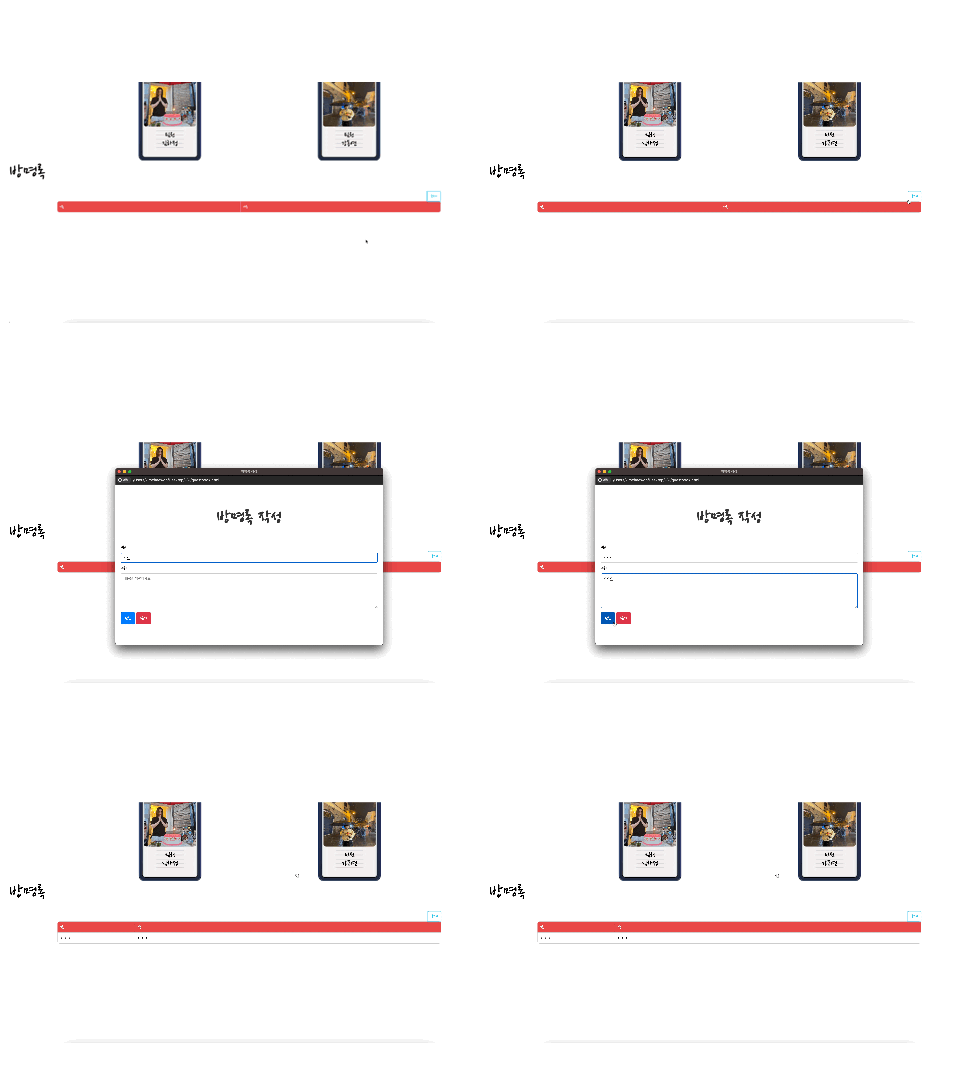
메인 페이지의 방명록 글쓰기 버튼을 클릭하면 방명록 작성 페이지가 팝업창으로 나타나도록 했다. 이름과 내용을 입력하고 등록 버튼을 누르면 등록이 완료되었다는 알림창이 뜨고, 기입한 내용은 메인페이지의 방명록 란에 나열된다.
⭐ 팀원소개 상세 페이지
<!DOCTYPE html>
<html lang="en">

<head>
    <meta charset="UTF-8">
    <meta name="viewport" content="width=device-width, initial-scale=1.0">
    <link rel="stylesheet" href="css/introduction.css">
    <title>김하정</title>
    <script type="module">
        import { initializeApp } from "https://www.gstatic.com/firebasejs/9.6.1/firebase-app.js";
        import { getFirestore, collection, addDoc, onSnapshot, orderBy, query, updateDoc, doc } from "https://www.gstatic.com/firebasejs/9.6.1/firebase-firestore.js";

        const firebaseConfig = {
            apiKey: "AIzaSyCqPjlFsuIKZ3N4ZfO9mTKQs8Sya6aKCKs",
            authDomain: "introducing-fa5ae.firebaseapp.com",
            projectId: "introducing-fa5ae",
            storageBucket: "introducing-fa5ae",
            messagingSenderId: "190395607602",
            appId: "1:190395607602:web:5024130aaa95b9285f2a2b",
            measurementId: "G-YJFDJBS7SN"
        };

        const app = initializeApp(firebaseConfig);
        const db = getFirestore(app);


        const collectionName = 'qna_2';

        function fetchComments() {
            const commentsRef = collection(db, collectionName);
            const q = query(commentsRef, orderBy('createdAt', 'desc'));
            onSnapshot(q, (snapshot) => {
                const commentsData = snapshot.docs.map(doc => ({ id: doc.id, ...doc.data() }));

                const commentsContainer = document.getElementById('commentsContainer');
                commentsContainer.innerHTML = '';
                commentsData.forEach(entry => {
                    const commentDiv = document.createElement('div');
                    commentDiv.className = 'comment';
                    commentDiv.innerHTML = `
                        <p>${entry.question}</p>
                        <button class="reply-button"token interpolation">${entry.id}')">답변하기</button>
                        <div class="reply-input" id="reply-input-${entry.id}">
                            <textarea placeholder="답변을 입력하세요" id="answer-${entry.id}"></textarea>
                            <buttontoken interpolation">${entry.id}')">확인</button>
                        </div>
                        ${entry.answer ? `<div class="answer" >답변: ${entry.answer}</div>` : ''}
                        <span class="timestamp">${entry.createdAt.toDate().toLocaleString()}</span>
                    `;
                    commentsContainer.appendChild(commentDiv);
                });
            });
        }

        document.addEventListener('DOMContentLoaded', function () {
            fetchComments();

            document.getElementById('qnaForm').onsubmit = async function (event) {
                event.preventDefault();
                const question = document.getElementById('question').value;

                try {
                    await addDoc(collection(db, collectionName), { // 변경된 부분
                        question: question,
                        createdAt: new Date()
                    });

                    alert('질문이 제출되었습니다.');
                    document.getElementById('question').value = '';
                } catch (error) {
                    console.error("Error adding document: ", error);
                    alert('오류가 발생했습니다. 다시 시도해 주세요.');
                }
            }
        });

        window.toggleReplyInput = function (commentId) {
            const replyInput = document.getElementById(`reply-input-${commentId}`);
            replyInput.style.display = replyInput.style.display === 'none' || replyInput.style.display === '' ? 'block' : 'none';
        }

        window.submitAnswer = async function (commentId) {
            const answer = document.getElementById(`answer-${commentId}`).value;

            if (!answer) {
                alert('답변을 입력하세요.');
                return;
            }

            const password = prompt('비밀번호를 입력하세요:');
            const correctPassword = '0000';

            if (password !== correctPassword) {
                alert('비밀번호가 틀렸습니다.');
                return;
            }

            try {
                const commentRef = doc(db, collectionName, commentId); // 변경된 부분
                await updateDoc(commentRef, {
                    answer: answer
                });

                alert('답변이 제출되었습니다.');
                document.getElementById(`answer-${commentId}`).value = '';

                const replyInput = document.getElementById(`reply-input-${commentId}`);
                replyInput.style.display = 'none';

                const commentDiv = document.querySelector(`#commentsContainer .comment:nth-child(${Array.from(document.querySelectorAll('.comment')).findIndex(el => el.innerHTML.includes(commentId)) + 1})`);
                const existingAnswerDiv = commentDiv.querySelector('.answer');
                if (!existingAnswerDiv) {
                    const answerDiv = document.createElement('div');
                    answerDiv.className = 'answer';
                    answerDiv.textContent = `답변: ${answer}`;
                    commentDiv.appendChild(answerDiv);
                }
            } catch (error) {
                console.error("Error updating document: ", error);
            }
        }
    </script>
</head>

<body>
    <div class="background">

        <div class="main">
            <div class="container">
                <img class="idCard"
                    src="https://postfiles.pstatic.net/MjAyNTAyMTlfODgg/MDAxNzM5OTI0NTQ2NTQ3.nLD3Pmiyds9bM0Vnvq9w6Swj6IGrceiPfcx6Ktj3FYcg.QWf1v1f_aLHtJ81Ra2z-F6pcbWtntdUQKd1gScExBuog.PNG/%EB%8B%A4%EC%9A%B4%EB%A1%9C%EB%93%9C.png?type=w580"
                    alt="Background">
                <img src="https://teamsparta.notion.site/image/attachment%3A854e2e66-ed7f-4e19-a0c2-1c1cbbdaa968%3AKakaoTalk_20250218_194905462.jpg?table=block&id=19e2dc3e-f514-80ab-a1df-ea7811205e11&spaceId=83c75a39-3aba-4ba4-a792-7aefe4b07895&width=1390&userId=&cache=v2"
                    class="picture" alt="Overlay">
                <div class="intro">
                    <p class="title">팀원</p>
                    <p class="name">김하정</p>
                </div>
            </div>
            <div class="introduce">
                <div class="aboutMe">
                    <span>⭐ ABOUT ME</span>
                </div>
                <div class="text">
                    <p><img src="https://cdn-icons-png.flaticon.com/512/8068/8068016.png" alt="number 1 icon"
                            width="30">
                        <span class="thick"> MBTI </span><span class="thin">INFP</span>
                </div>
                <div class="text">
                    <p><img src="https://cdn-icons-png.flaticon.com/512/8068/8068072.png" alt="number 2 icon"
                            width="30">
                        <span class="thick">생년월일 </span><span class="thin">1995.05.07</span>
                </div>
                <div class="text">
                    <p><img src="https://cdn-icons-png.flaticon.com/512/8068/8068126.png" alt="number 3 icon"
                            width="30">
                        <span class="thick">전공 유무 </span><span class="thin">비전공</span>
                </div>
                <div class="text">
                    <p><img src="https://cdn-icons-png.flaticon.com/512/8068/8068185.png" alt="number 4 icon"
                            width="30">
                        <span class="thick">블로그 </span><a href="https://velog.io/@jess_kim/series" class="blogLink"
                            target="_blank">https://velog.io/@jess_kim/series</a>
                </div>
                <div class="text">
                    <p><img src="https://cdn-icons-png.flaticon.com/512/8068/8068239.png" alt="number 5 icon"
                            width="30">
                        <span class="thick">목표 </span><span class="thin">풀스택 만능 프리랜서 개발자 되기</span>
                </div>
            </div>
        </div>
        <div class="bottom">
            <div>
                <h2 style="font-size: 40px; margin-bottom: 0;">⭐ QnA</h2>
                <div class="comments_box" id="commentsContainer">
                </div>
                <div class="form-container">
                    <h3 style="font-size: 30px; margin-top: 0; margin-bottom: 10px;">⭐ ASK ME</h3>
                    <form class="qnaForm" id="qnaForm">
                        <textarea style="font-size: 17px; width: 95%;" id="question" placeholder="질문을 입력하세요"
                            required></textarea>
                        <button type="submit" class="submit-button">완료</button>
                    </form>
                </div>
            </div>
        </div>
</body>

</html>
사원증에 마우스를 가져가면 hover 기능이 동작하도록 하고
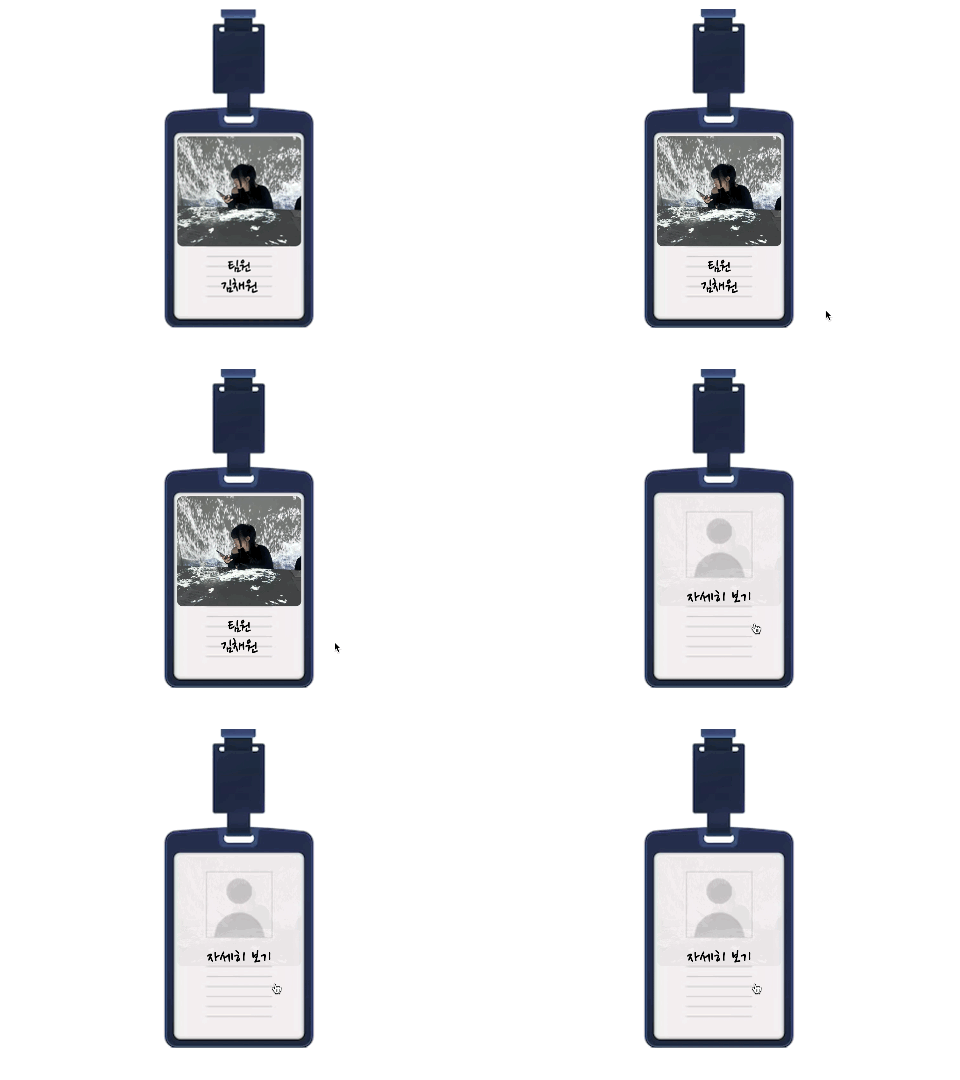
클릭하면 각 팀원의 상세페이지가 팝업 창으로 나오도록 했다
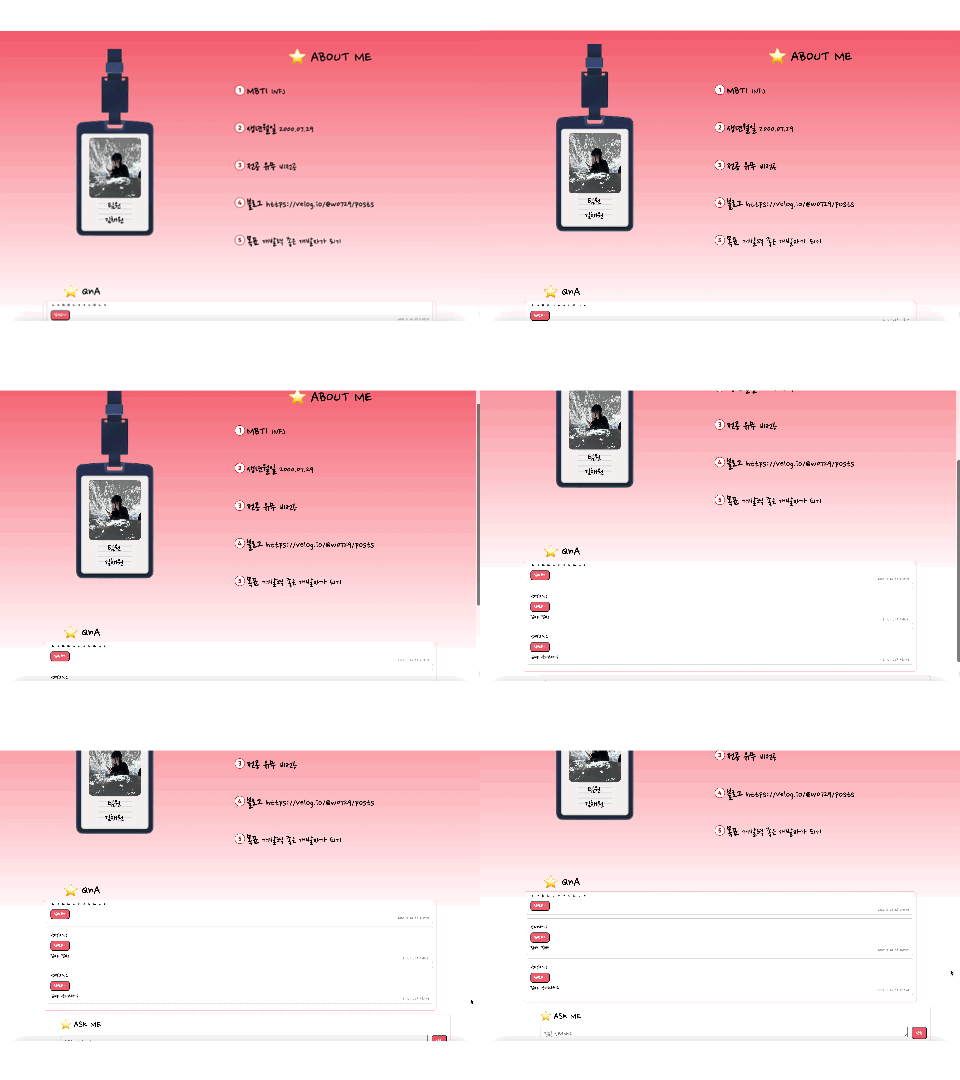
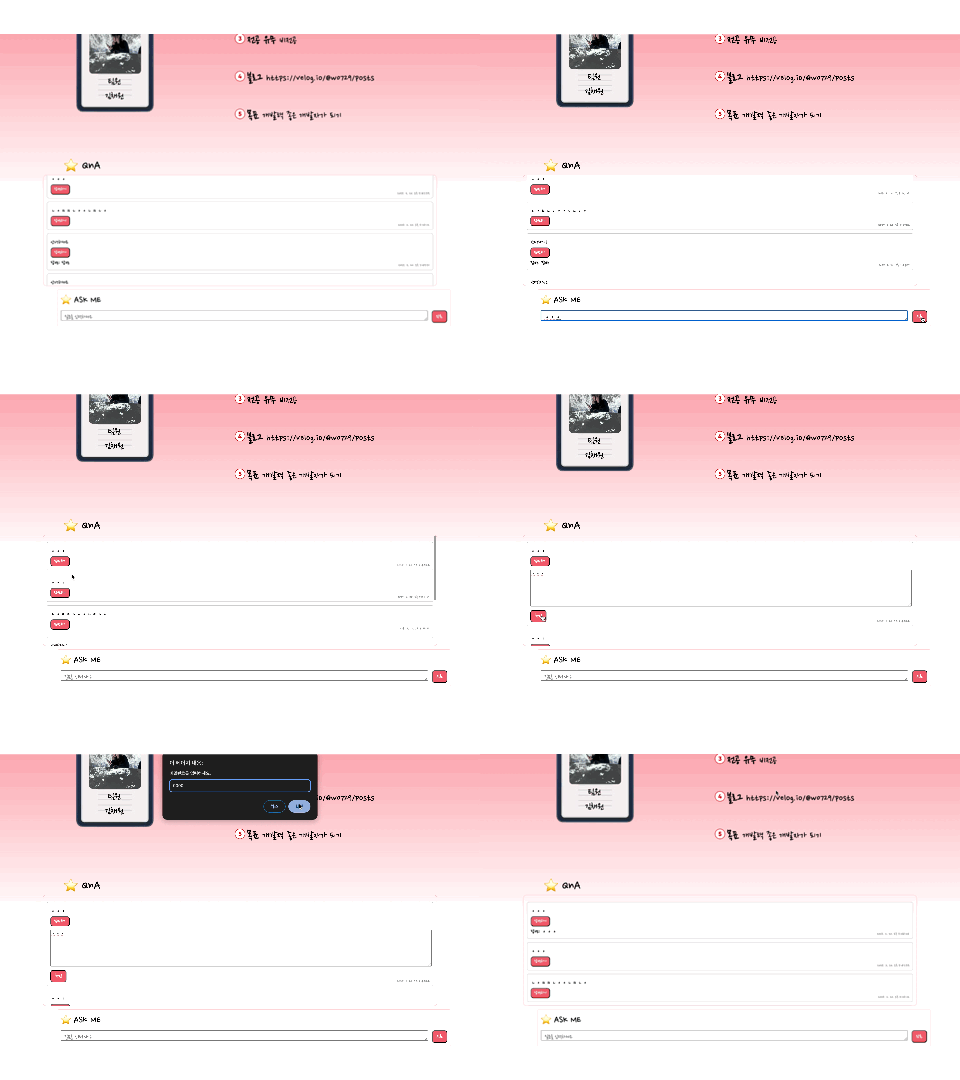
상세 페이지 하단에는 Q & A 입력란이 있고 작동 원리는 방명록과 비슷하다. 다만 답변하기 기능은 각 팀원만 할 수 있도록 비밀번호를 입력해야만 답변할 수 있도록 기능을 추가했다.
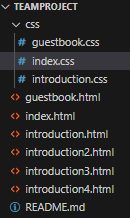
➡️ 마지막에는 갈수록 길어지는 코드의 가독성과 추후의 활용성을 위해 CSS 코드는 따로 폴더화 하여 정리해줬다


꾸준한 공부만이 답이다