⭐ Java 강의
Java 입문 과정에서 강의 들으며 빠른 학습 진도를 위해 추후에 집중해서 복습할 부분 메모하기
⭐ 컴퓨터의 기억 방식
-
일단 객체는 class 랑 같은 개념이라고 이해하고 넘어가기
-
- RAM : 주 기억장치 / 휘발성, 빠름 (휘발성 = 전원이 꺼지면 작업하던 내용이 사라짐) ➡️ 메모리라고 이해하기
- HDD / SSD : 보조 기억장치 / 영구저장, 느림 (보조기억 장치에 저장된 정보는 영구적으로 유지되지만 저장된 정보를 가져오기 위해 더 큰 비용이 소모됨. 주 기억장치보다 느리다는 것이 특징)
-
1 Byte = 8 Bit : 256개(0~255개)의 데이터 저장 가능
-
Bit는 메모리의 최소 저장 단위 : 1 Bit는 0 또는 1 중에서 한 개를 저장할 수 있는 공간
저장 단위가 1 비트 증가할 때마다 저장할 수 있는 공간은 2배로 늘어납니다.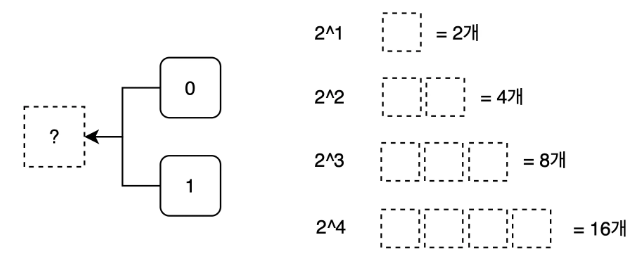
➡️ Chapter 1-2 복습 필요
⭐ 이름 규칙 종류
- 카멜케이스(camelCase) : 대문자가 혹처럼 튀어나옴
(ex :firstName, lastName, fullName) - 스네이크케이스(snake_case) : 언더스코어가 뱀처럼 이어짐
(ex :first_name, last_name, full_name)
⭐ 패키지 (폴더)
-
패키지(Package) : Java 프로젝트에서 파일들의 묶음을 패키지라고 한다. 관련된 자바 클래스들을 그룹으로 묶는 기능 ➡️ 폴더처럼 파일(클래스)을 정리해서 관리할 수 있도록 도와주는 역할
-
패키지 이름 규칙 : 일반적으로 소문자를 사용하며, 계층 구조를 표현하기 위해 .을 사용
(ex :com.example.myapp)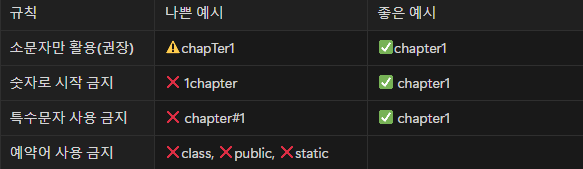
⭐ 클래스 (파일)
-
클래스(class) : Java 프로젝트에서는 클래스 이름이 파일명
-
import: 클래스를 프로그램 시작 지점(Main 클래스)에서 활용할 때 사용되는 클래스가 어느 패키지에 속한 클래스인지 명시해 준다. ➡️ 하나의 프로젝트 안에서 동일한 이름을 가진 클래스가 존재할 수 있기 때문
-
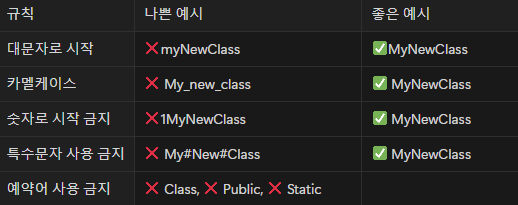
클래스 이름 규칙 : 클래스 이름을 작성할 때는 첫 글자 대문자 + 카멜케이스 조합으로 작성 ➡️ Pascal case (혹은 UpperCamelCase 스타일) 라고 한다
⭐ 변수
-
변수의 구조 : ex)
int a;➡️ <자료형> <변수이름><세미콜론> -
세미콜론(;) : Java에서 문장을 끝내는 마침표
-
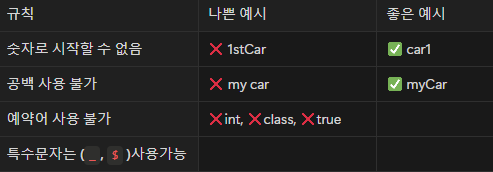
변수이름 규칙
-
변수 활용 : 문법
- 변수 선언 : 데이터 저장 공간을 만드는 것을 “변수를 선언한다” 라고 한다
   int a;
int b; 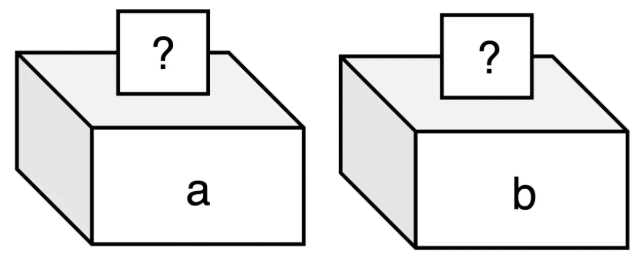
-
변수에 값 할당 : a 라는 변수는 이미 선언 되어 있으니 a 변수에 값을 할당해보자
- 할당(
Assign) : 변수에 값을 넣어주는 것을 “값을 할당한다” 라고 한다- 리터럴(
Literal) : 리터럴은 변수 안에 직접 “넣는 값” 을 의미
      // a 는 변수이름(Variable)
      // 1 은 리터럴(literal)
a = 1; 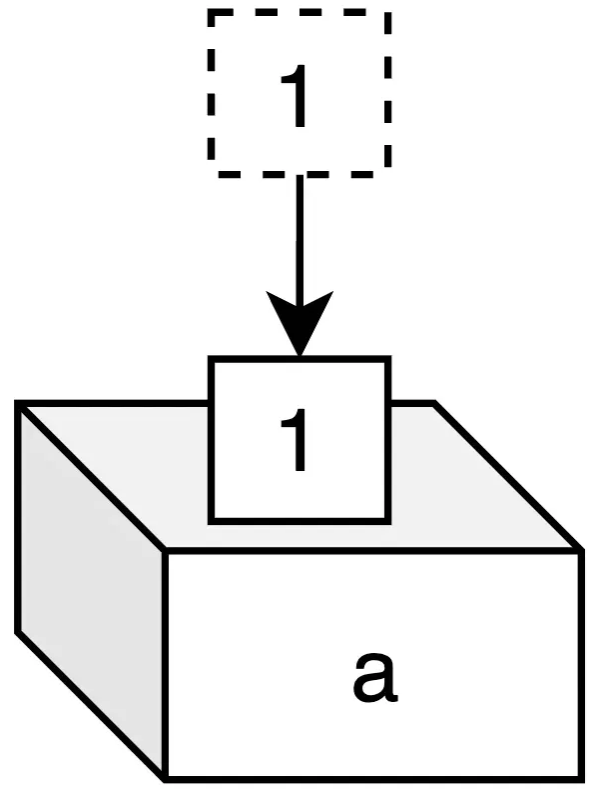
-
선언과 동시에 값 할당 : 변수를 선언하면서 동시에 값을 할당해 줄 수 있다
- 초기화(initialization) : 처음으로 데이터를 초기값을 설정 하는것을 초기화 라고 한다
int c = 3;- 기존 변수에 데이터 재할당(reassign) : 기존 변수에 값을 재할당하게 되면 값이 덮어씌워진다
   c = 4;
   c = 5;
c = 6;- 변수에 변수를 할당 : 변수에 직접 미리 선언된 변수를 할당할 수도 있다. 데이터가 복사되어 할당
   int d = 1;
   int e = d;
   d = 10;
   System.out.println("e = " + e); // 정답 1
⭐ 자료형 메모리를 사용하는 단위
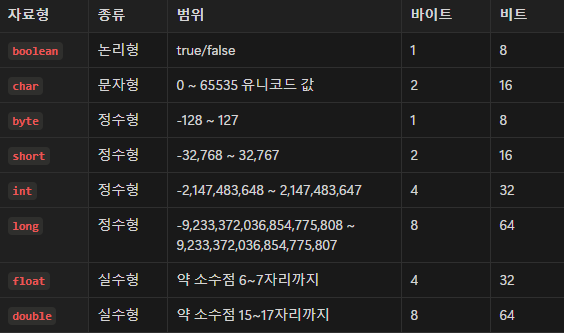
➡️ Chapter 1-4 복습 필요
⭐ 변수의 선언과 메모리 할당
➡️ Chapter 1-4 복습 필요
⭐ IntelliJ 활용하여 실습
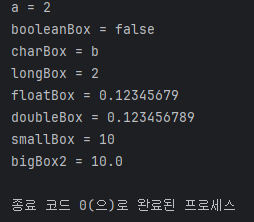
package chapter1.variable;

public class Main {
    public static void main(String[] args) {

        // [자료형] [변수이름];

        // 정수형
        int a;
        a = 1;
        a = 2;
        System.out.println("a = " + a);

        // 논리형
        boolean booleanBox = true;
        booleanBox = false;
        System.out.println("booleanBox = " + booleanBox);

        // 문자형
        char charBox = 'a';
        charBox = 'b';
        System.out.println("charBox = " + charBox);

        // 큰 정수형
        long longBox = 1;
        longBox = 2;
        System.out.println("longBox = " + longBox);

        // 실수형
        float floatBox = 0.12345678f;
        floatBox = 0.1234567890f;
        System.out.println("floatBox = " + floatBox);
        // f를 붙이면 자동으로 double 로 인식
        double doubleBox = 0.1234567890;
        System.out.println("doubleBox = " + doubleBox);

        // 캐스팅(Casting) : 형 변환
        // 다운캐스팅 : 큰 데이터를 -> 작은 상자에 넣는 것 -> 데이터 손실 발생
        double bigBox = 10.123;
        int smallBox = (int) bigBox;
        System.out.println("smallBox = " + smallBox);
        // 업캐스팅 : 작은 데이터 -> 큰 상자에 넣는 것
        int smallBox2 = 10;
        double bigBox2 = smallBox2;
        System.out.println("bigBox2 = " + bigBox2);

        // 믄자열 데이터
        char a1 = 'a';
        String str = "안녕하세요!";

        // 정수형
        int a2 = 1;
        long a3 = 1;

        // 논리형
        boolean b1 = true;
    }
}
⭐ 출력 & 입력 (io / Input & Output)
package chapter1.io;

import java.util.Scanner;

public class Main {

    public static void main(String[] args) {

        // 출력
        // println 사용
        System.out.println("Hello");
        System.out.println("Java");

        // print 사용
        System.out.print("안녕");
        System.out.print("자바");

        // 개행문자 포함 출력
        System.out.println("Hello\nWorld!");

        // 입력(Scanner)
        // 스캐너 객체를 스캐너형 박스(scanner)
        Scanner scanner = new Scanner(System.in);

        // 문자열 입력 받기
        System.out.println("좋아하는 문장을 입력하세요: ");
        String sentence = scanner.nextLine();
        System.out.println("sentence = " + sentence);

        // 정수형(int, long) 입력 받기
        System.out.println("정수(int)를 입력하세요");
        int intBox = scanner.nextInt();
        System.out.println("intBox = " + intBox);

        System.out.println("정수(long)를 입력하세요: ");
        long longBox = scanner.nextLong();
        System.out.println("longBox = " + longBox);

        // 소수점
        System.out.println("소수점(double)을 입력하세요: ");
        double doubleBox = scanner.nextDouble();
        System.out.println("doubleBox = " + doubleBox);

    }
}
- ⭐ 실습 과제
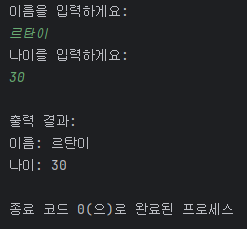
package chapter1.io;

import java.util.Scanner;

public class UserInfoPrinter {
    public static void main(String[] args) {

        Scanner scanner = new Scanner(System.in);

        // TODO: 사용자로부터 이름을 입력받기
        System.out.println("이름을 입력하게요: ");
        String name = scanner.nextLine();

        // TODO: 사용자로부터 나이를 입력받기
        System.out.println("나이를 입력하게요: ");
        int age = scanner.nextInt();

        // TODO: 입력받은 값 출력
        System.out.println("\n출력 결과: ");
        System.out.println("이름: " + name);
        System.out.println("나이: " + age);
    }
}
⭐ 연산자
package chapter1.operator;

public class Main {

    public static void main(String[] args) {

        int a = 10;
        int b = 3;

        // 기본적인 사칙연산
        int sum = a + b;
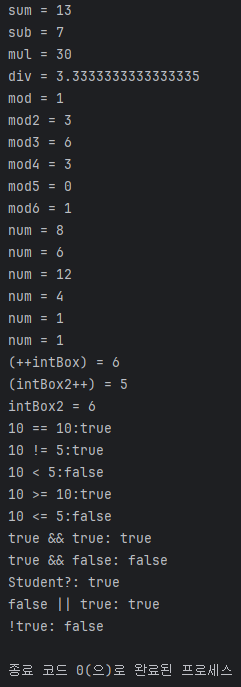
        System.out.println("sum = " + sum);

        int sub = a - b;
        System.out.println("sub = " + sub);

        int mul = a * b;
        System.out.println("mul = " + mul);

        // 나눗셈 소수점으로 나올 수 있도록
        double div = a / 3.0;
        System.out.println("div = " + div);

        // 모듈러 연산자(나머지 연산) - %
        int mod = 10 % 3;
        System.out.println("mod = " + mod);
        int mod2 = 15 % 4;
        System.out.println("mod2 = " + mod2);
        int mod3 = 20 % 7;
        System.out.println("mod3 = " + mod3);

        // 시간 연산
        int mod4 = (10 + 5) % 12;
        System.out.println("mod4 = " + mod4);

        // 짝수 홀수 연산
        int mod5 = 6 % 2;
        System.out.println("mod5 = " + mod5);

        int mod6 = 7 % 2;
        System.out.println("mod6 = " + mod6);

        // 대입 연산자
        int num = 5;
        // 복합 대입 연산자
        num += 3;
        // num = num + 3;
        // num + 3 먼저 보고, 그 다음에 num = 이렇게 볼 것
        System.out.println("num = " + num);

        num -= 2; // num = num - 2;
        System.out.println("num = " + num);
        // 8 - 2 = 6;

        num *= 2; // num = num * 2;
        System.out.println("num = " + num);
        // 6 * 2 = 12;

        num /= 3; // num = num / 3;
        System.out.println("num = " + num);
        // 12 / 3 = 4;

        num %= 3; // num = num % 3;
        System.out.println("num = " + num);
        // 4 % 3 = 1;

        // 증감 연산자
        num = 1;
        num++; // + 1;
        num++; // + 1;
        num--; // - 1;
        num--; // - 1;
        System.out.println("num = " + num);

        // 전위 연산(++i) - 연산 후 값이 활용된다
        int intBox = 5;
        System.out.println("(++intBox) = " + (++intBox));

        // 후위 연산
        int intBox2 = 5;
        System.out.println("(intBox2++) = " + (intBox2++));
        System.out.println("intBox2 = " + intBox2);

        // 비교 연산자
        // 같음 연산자(=) 같으면 true, 다르면 false
        System.out.println("10 == 10:" + (10 == 10));

        // 다름 연산자(!=) 다르면 true, 같으면 false
        System.out.println("10 != 5:" + (10 != 5));

        // 크기 비교 연산자
        System.out.println("10 < 5:"  + (10 < 5)); // false
        System.out.println("10 >= 10:" + (10 >= 10)); // true
        System.out.println("10 <= 5:" + (10 <= 5)); // false

        // 논리 연산자
        // AND 연산(&&) - 두 조건이 모두 참일 때 true 반환
        System.out.println("true && true: " + (true && true));
        System.out.println("true && false: " + (true && false));
        int age = 20;
        boolean isStudent = true;
        System.out.println("Student?: " + (age > 18 && isStudent));

        // OR 연산자(||) - 두 조건 중 하나라도 참이라면 true 반환
        System.out.println("false || true: " + (false || true));

        // NOT 연산자(!) - true -> false, false -> true
        System.out.println("!true: " + (!true));
    }
}