
Components, Props
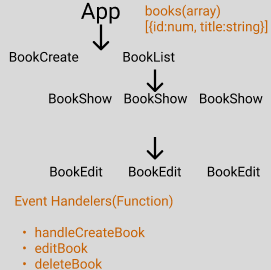
Get the Value From a Form
function BookCreate({ onCreate }) {
  const [title, setTitle] = useState("");

  const handleChange = (e) => {
    e.preventDefault();
    setTitle(e.target.value);
  };

  const handleSubmit = (e) => {
    e.preventDefault();
    onCreate(title);
    setTitle(" ");
  };
  return (
...
      <form onSubmit={handleSubmit}>
        <input
          className="input"
          value={title}
          onChange={handleChange}
          type="text"
        />
        <button className="button">submit</button>
      </form>
...
  );
}- input 에 property 로 value={title}
- handelChange로 input에 쓰여지는 값을title로 저장 => e.terget.value
- handleSubmit 로 App 에 props으로 넘김
Updating State
const [books, setBooks] = useState([]);-
Js sees you want to create an array =>
It finds an empty spot in memory and puts and array there -
React remembers this array for future use
(A case :Reference to current state)
Bad Code
    books.push({id:123, title:title})
    setBooks(books)
    //books.length => stays at '0'
3.push modifies the existing array => JS finds the existing array and adds an element
(B case :Reference to 'new' state)
-
setBooks(books) **should be rerenderd
=> React gets a reference to the 'new' state -
'A' 'B' cases are poiting at the same array/object
=> No render
How to fix it?
- Create a new array
const updateBooks = []- Copy all the elements from old array
const updatedBooks = [
      ...books,
      { id: Math.round(Math.random() * 9999), title },
];- Add new element to end
setBooks(updatedBooks);=> Referenes point at different array/ objects
=> React processes 'rerender'
Do not mutate /change/ modify / array or objects
Update arrays / objects
1. Inserting Elements
Adding in the middle => slice
const addColor = (new, index) =>{
 const updateColors = [
  ...colors.slice(0,index),
  new,
  ...colors(index)
 ]
 setColors[updateColors]
}
2. Removing Elements
Use filter
filter is added to new array
3. Modifying Elements
Use Map
4. Removing Elements
const {color, ...rest} =fruit
setFruit(rest)
rest => Make a new object
Generating Random ID
Math.roung(Math.random()*9999)

Web Developer