The path forward
- React has no tools, objects, functions for making HTTP requests.
- React only cares about showing content and handling user events.
- we can write an logic and data fetching without React.
HTTP
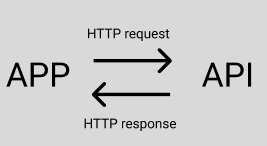
- HTTP request
- Request line
GET
HTTP 1.1 - Headers
Authorization : client....
=> Tell the server who we are - Body
- HTTP response
- Status line
HTTP/1.1 200 OK - Headers
content-Length:1000
content-type:application/json
3.Body
{ {id:"123"}....}
Method
indicates the general goal of the request
- GET , POST , PUT, PATCH, DEL
Status
Indicates whether or not the request is successful
==> 이런 방식들은 전달 받기까지 시간이 걸린다.
Making an API request
We use Axios or Fetch
Axios => npm install axios
How it works?
axios.get(url,{
  headers:{},
  params:{}
})
Async : Await
  const response = await axios.get("https://api.unsplash.com/search/photos", {
    headers: {
      Authorization: "Client-ID UihYZBnIemAxFhy4kPzyBcmtQTbKtGVeuyJmJQt3ipQ",
    },
    params: {
      query: term,
    },
  });
axios.get : JS starts the request
await : tell the JS to wait for a response
ONLY parents can communicate with child components to use 'props'
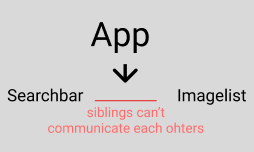
App
export default function App() {
  const [images, setImages] = useState([]);
  const handleSubmit = async (term) => {
    //getting the image frpm the searchImages takes time
    const result = await searchImages(term);
    setImages(result);
  };

  return (
    <div>
      <SearchBar onSubmit={handleSubmit}></SearchBar>
      <ImageList searchWord={images}></ImageList>
    </div>
  );
}
SearchBar
function SearchBar({ onSubmit }) {
  const [term, setTerm] = useState("");

  const handleChange = (e) => {
    e.preventDefault();
    setTerm(e.target.value);
  };

  const handleFormSubmit = (e) => {
    e.preventDefault();
    // onSubmit(document.querySelector('input).value);
    onSubmit(term);
  };
  return (
    <div className="search-bar">
      <form onSubmit={handleFormSubmit}>
        <label>Enter search term</label>
        <input onChange={handleChange} value={term} type="text" />
      </form>
    </div>
  );
}
ImageList
export default function ImageList({ searchWord }) {
  // const getImage = searchWord.map((item, index) => {
  //   return <ImageShow image={item.links.html} key={index} />;
  // });

  const renderedImages = searchWord.map((image) => {
    return <ImageShow className="image-list" image={image} key={image.id} />;
  });

  return <div>{renderedImages}</div>;
}
Handling Text Inputs
Never get a value out of na input using a query selector
document.querySelector('input').value
- Create a new piece of state
- Create an element handler to watch for the 'onChange' event
- When the 'onChange' fires, get the new state
- pass the state to the input as the value prop
** setTerm(e.target.value)

Web Developer