
Navigation Theory
Traditional
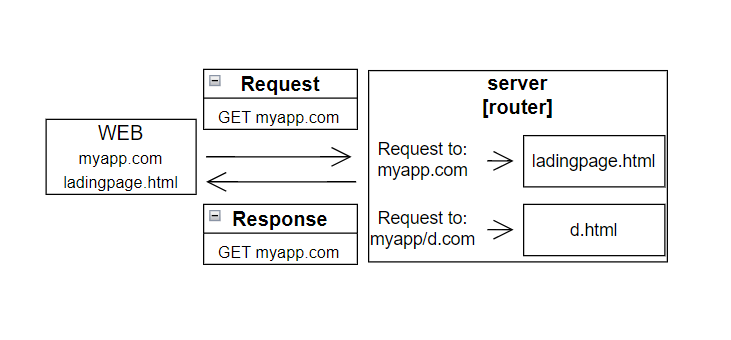
When the browser loads a new HTML document, all existing JS variables and code is dumped.
=> Doesn't really matter to JS(with onde request, user instantly sees content on the screen)
If our React app followed traditional navigation ideas, It'd take more requests to show basic content.(requeest html, js, components)
Theory of Navigation in React
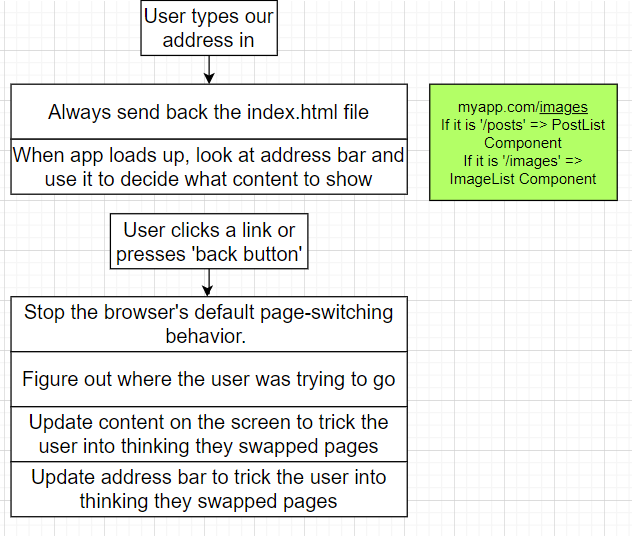
JS 환경에서는 Navigation 할경우 모든 값들이 리셋 된다.
React는 Navigation 할경우 주소 '/images'로 바꾸어서 모든 compoment를 리셋할 필요없이 해당 컴포넌트만 불러오는 방법을 사용한다.
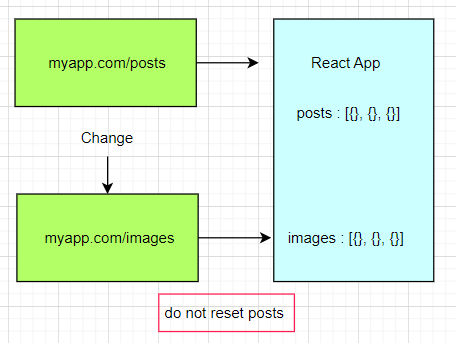
JS environment no longer being reset with navigation
This only works if the state is not defined in the component. It should be in the parent componet.
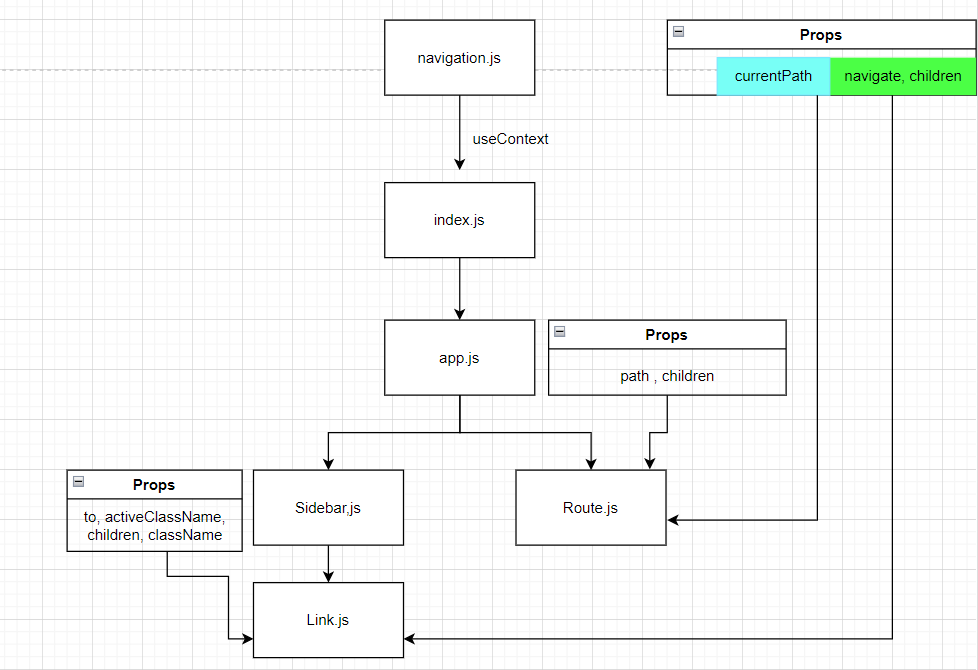
Make nagivation.js
createContext
const NavigationContext = createContext();
function NavigationProvider({children}){
  const [currentPath, setCurrentPath] = useState(window.location.pathname)
  //// we can search the pathname to use console.log

  useEffect(() =>{
    const handler = () =>{
      setCurrentPath(window.location.pathname);
     }
     window.addEventListener('popstate', handler);

     return () =>{
       window.removeEventListener('popstate', handler)
     }
  })

  const navigate = (to) =>{
    window.history.pushState({}, '', to);
    setCurrentPath(to)
  }

  return (
    <NavigationContext.Provider value={{currentPath, navigate}}>
    {children}
    </NavigationContext.Provider>
  )
}
popstate
사용자의 세션 기록 탐색으로 인해 현재 활성화된 기록 항목이 바뀔 때 발생합니다.
주소와 함께 데이터도 저장할 수 있기 때문에 매우 유용합니다. 이 데이터에 바뀔 페이지의 정보들을 담아두고 클라이언트에서 정보를 활용해 새로운 페이지를 렌더링하면 됩니다.
How do we look at the address bar?
What part of it do we care about?
We only care about pathname "/" , "/images"
EX) google.com => pathname => "/"
window.location.pathname
// we can search the pathname to use console.log
How do we update the address bar?
window.history.pushState({}, "" , "/dropdown")
// third argument is new path we want to visit
Updates the address bar but doesn't cause a refresh
Do not full page refresh
history.pushState()
history.pushState의 경우 새로운 주소목록을 추가 하기 때문에 이전 url의 주소가 남아있어 브라우저의 뒤로가기 버튼이 활성화 됩니다.
// 현재 url이 test라고 가정 했을 때
// 이전 url은 test, 현재 url은 test/pushpage로 변경된다.
history.pushState({ data: 'testData1' }, null, '/pushpage')
pushstate(state, title, url)
이는 브라우저가 세션 스태이트를 스택에 추가한다고 하는데, 쉽게 설명하자면 해당 url로 이동할 수 있게 해주는 역할을 한다.
How do we detect a user clicking a link? Clicking a back button?
function Link({to}){
// Prop 'to' describes the path that user will go to if they click this
  const handleClick = (e) =>{
    e.preventDefault();
    // Stops the standard navigation
    console.log("User navigate to : ", to)
  }

  return <a onClick={handleClick} href={to}>Click</a>
  //handleClick = Detect a click
}
User clicks forward or back?
=> Window emits a 'popstate' event if the user current url was added by'pushState'
=> Just type to url will refresh full page
window.history.pushState({}, "" , "/dropdown")
// do not full page refresh
//inside console
window.addEventListener("popstate", ()=> console.log(window.location.pathname))
// /aUrl when change to /aUrl
// /bUrl when change to /bUrlListening to Forward and Back Clicks
const [currentPath, setCurrentPath] = useState(window.location.pathname);

  // this is only for User clicks forward or back
  // make do not refresh all the variables
  useEffect(() => {
    const handler = () => {
      setCurrentPath(window.location.pathname);
    };
    window.addEventListener("popstate", handler);

    return () => {
      window.removeEventListener("popstate", handler);
    };
  }, []);
A route component
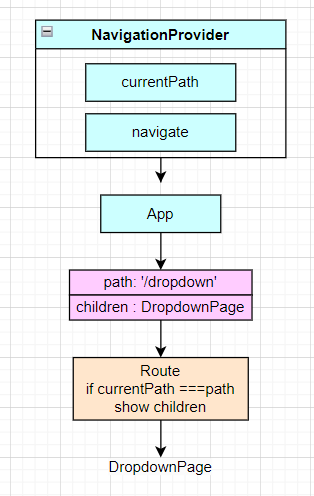
function Route({path, children}){
  const { currentPath} = useNavigation();

  if(path === currentPath){
    return children
  }
  return null
}

//App.js
       <Route path="/accordion">
          <AccordionPage />
        </Route>
        <Route path="/dropdown">
          <DropdownPage />
        </Route>
A Link Component
function Link({to, children, className, activeClassName}){
  const {navigate , currentPath} = useNavigation();
  const classes = className(
   'text-blue-500',
   className,
   currentPath === to && activeCCalssName
  )

  const handleClick =(e) =>{
    if(e.metakey || e.ctrlKey){
    //return 명령문은 함수 실행을 종료하고, 주어진 값을 함수 호출 지점으로 반환합니다.
      return
    }
    e.preventDefault()
    navigate(to)
  }

  return (
    <a className={classes} href={to} onClick={handleClick}>
      {children}
    </a>
  )
}
Adding sidebar component
 function Sidebar(){
   const links =[
     { label: "Dropdown", path: "/" },
     { label: "Accordion", path: "/accordion" },
    { label: "Buttons", path: "/buttons" },
   ];

   const renderedLinks = links.map((link)=>{
     return (
      <Link to={link.path}>{link.label}</Link>
     )
   })

   return (
     <div>{renderedLinks}</div>
   )
 }
Inside App.js
function App() {
  return (
    <div>
      <Sidebar />
      <div>