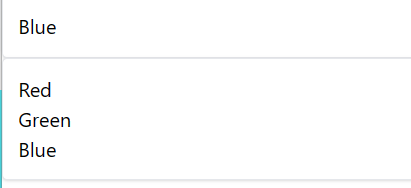
Demo
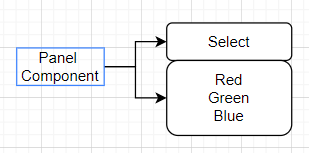
Component Design
DropdownPage ( Dropdown (Panel) )
DropDownPage
 export default function DropdownPage() {
   const [selection, setSelection] = useState(null);

   const options = [
    { label: "Red", value: "red" },
    { label: "Green", value: "green" },
    { label: "Blue", value: "blue" },
  ];

  const handleSelect = (option) =>{
    // console.log(option)
    // { label: "Red", value: "red" }
    setSelection(option)
  }

  return (
    <div>
      <Dropdown options={options} value={selection} onChange={hadleSelect}>
    </div>
  )
 }
Dropdown
Panel Component
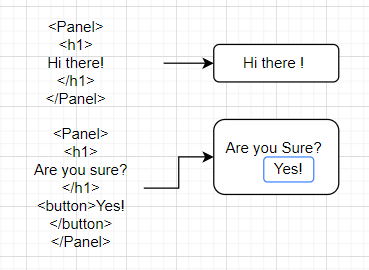
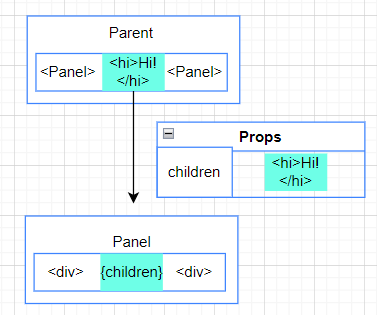
1. create a new component that shows a handful of JSX elements
2. Make sure the component accepts + uses the 'children' prop
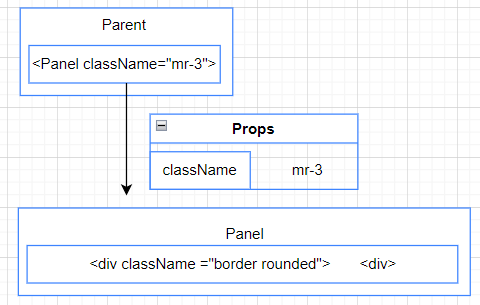
3. Allow extra className to be passed in + merge them
4. Take extra props, pass them through to root element
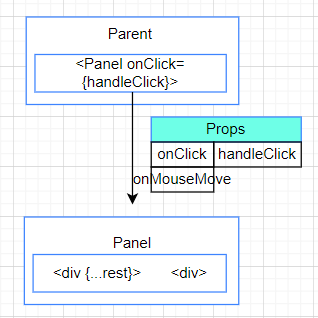
...rest = Take all these additional props and assign then to that div.
//Panel.js
  function Panel({children, className, ...rest}){
    const finalClassNames = classNames(
      "border rounded p-3 shadow bg-white w-full",
       className
    )
    return (
      <div {...rest} classsName={finalClassNames}>
        {children}
      </div>
    )
  }
Inside Dropdown
//Inside DropdownPage
// const [selection, setEelection] = useState(null)
// <Dropdown value={selection}>
//value is {label:'Red', value:'red'}
return (
<div>
  <Panel className="flex" onClick={handleClick}>
  // value is selected an option
    {value?.label || "Select..."}
  </Panel>
  {isOpen && <Panel>{renderedOptions}</Panel>}
 </div>
)
handleClick
Inside Dropdown.js
  const [isOpen, setIsOpen] = useState(false)

  const handleClick = () =>{
    setIsOpen(!isOpen)
    //Dropdown open button
  }

  const handleOptionClick = (option) =>{
    setIsOpen(false);
    onChange(option)
  }

  const renderedOptions = options.map((option)=>{
    return (
      <div
        onClick={()=> handleOptionClick(option)}
      >
        {option.label}
      </div>
    )
  })
Event capturing and bubbling
When an event occurs, browser wants to find event handlers to call
Order in which this search occurs is divided into three phases
- Capture Phase => 2. Target Phase => 3. Bubble Phase
<body>
  <div>
     <button>
      click me !
     </button>
  </div>
</body>
User clicks button => Browser needs to find click event handlers to call
body => div => button
Capture Phase
Go to most parent of clicked element, see if it has hadler.
And we go down to the button.(body => div => button)
Target Phase
Go to the clicked element, chech to see if it has event handler.(button)
If so, call it.
Bubble Phase
Go to parent of clicked element, see if it has hadler.
Then go to parent's parent.
(div => body)
Putting it all together
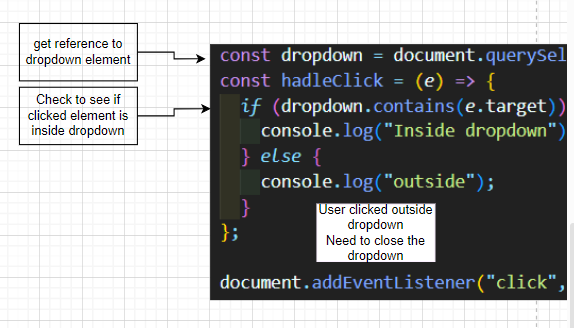
UseRef
- Allows a component to get a references to a DOM element that is creates .
- 95% of the time used with DOM elements, but can hold a reference to any value.
const divEl = useRef(); <div ref={divEl} className="w-48 relative"> useEffect(() => {
const handler = (e) => {
console.log(divEl.current);
};UseEffect on clean up
Baxic Logic
useEffect(()=>{
  // do something
  const cleanUp = () =>{
  // code for eventListener stops watching the clicks.
  // Because the button disappear on the screen.
  }

  return cleanUp;
}, [])
First component render
- useEffect function called
- We return a 'clean up' function(not executed, just call)
Component removed from screen
- React calls the clean up function
This is happens when second argument is an empty array.
Inside Dropdown.js
useEffect(()=>{
  const handler = (e) =>{
   if(!divEl.current){
   return;
   }

   if(!divEl.current.containes(e.target)){
     setIsOpen(false)
   }

   document.addEventListener('click', handler, true)
  }
  //capture	Optional (default = false).
 //true - The handler is executed in the capturing phase.
 //false - The handler is executed in the bubbling phase.

  return () =>{
    document.removeEventListener('click', handler)
  }
},[])