React 함수형 컴포넌트가 아닌 class형 컴포넌트에 대해 정리해봄
리액트 공식문서
React.Component
React 컴포넌트 class를 정의하려면 React.Component 를 상속받아야 한다
React.Component를 상속받았다면, 무조건render()함수를 정의해야한다- 나머지 메서드들은 선택 사항
class component extends React.Component {
  render() {
    return <h1>Hello, {this.props.name}</h1>;
  }
}
생명주기
모든 컴포넌트는 여러 종류의 생명주기 메서드를 가지며, 이 메서드들을 오버라이딩하여 특정 시점에 자신이 커스텀한 코드가 실행되도록 설정할 수 있다
덜 일반적인 라이프 사이클
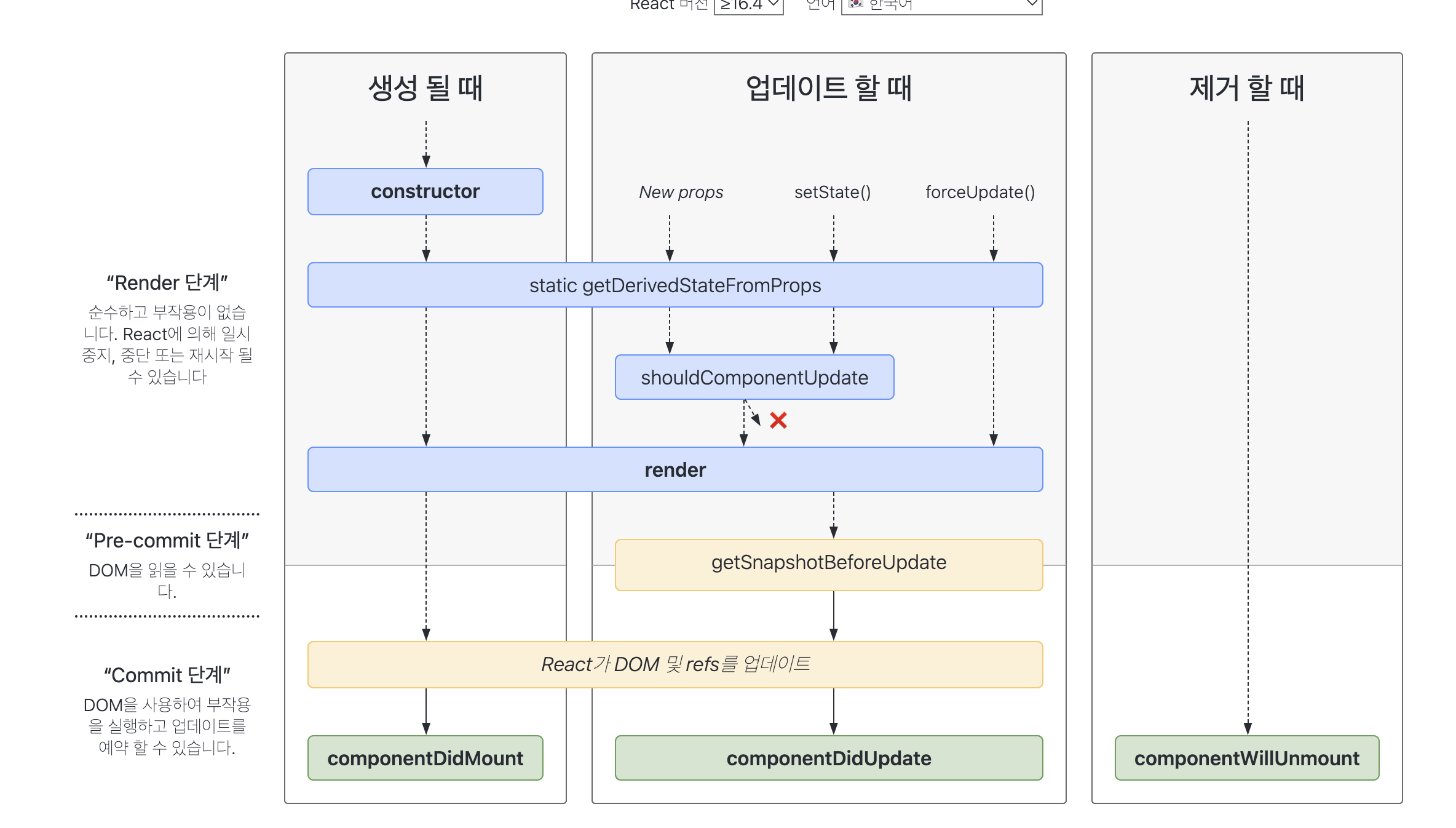
일반적인 라이프 사이클
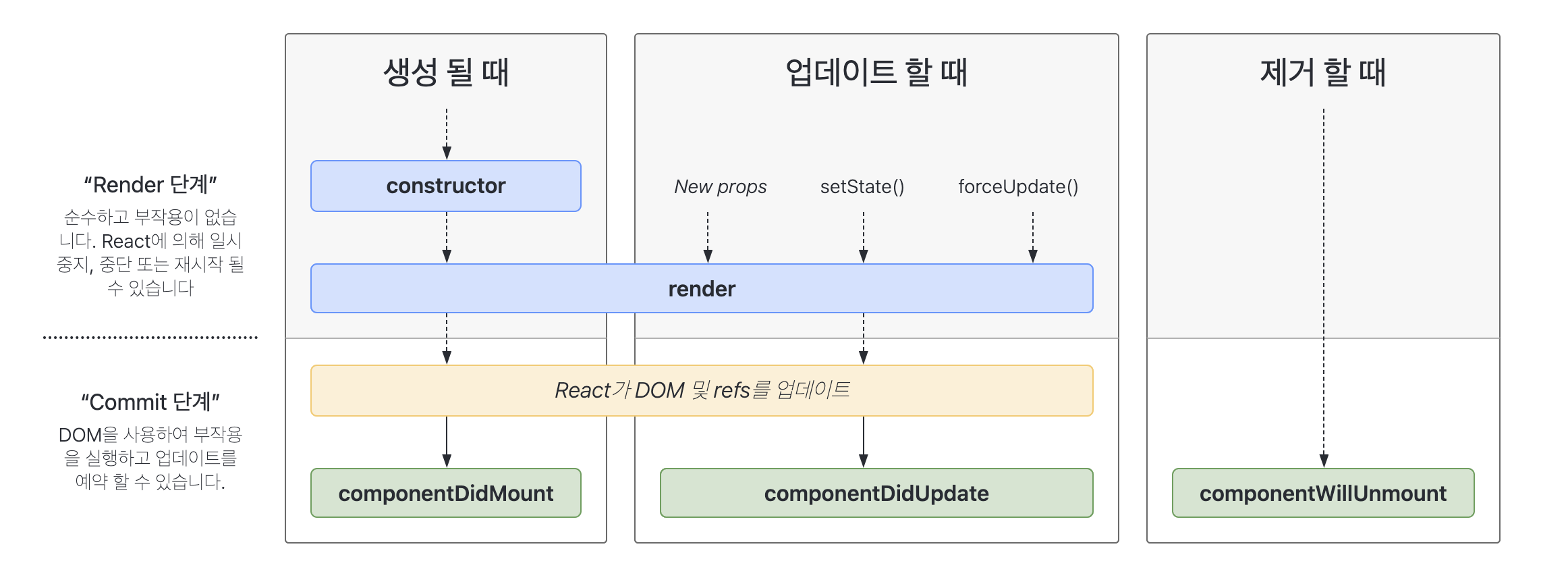
일반적인 라이프 사이클들의 메서드들이 일반적으로 자주 사용되는 메서드
Mount 메서드
constructor(props)
this.state에 객체를 할당하여 지역state를 초기화하거나, 인스턴스에 이벤트 처리 메서드를 바인딩 할 때 사용
- 해당 컴포넌트가 마운트되기 전에 호출
- 생성자는
this.state를 직접 할당할 수 있는 유일한 곳 - constructor를 사용했으면 , super 또한 사용해줘야 함 - JS 문법
- constructor를 사용하지 않아도, this.props에는 접근 가능
constructor(props) {
  super(props);
  // 여기서 this.setState()를 호출하면 안 됩니다!
  this.state = { counter: 0 };
  this.handleClick = this.handleClick.bind(this);
}
render()
클래스 컴포넌트에서 반드시 구현되어야아 하는 유일한 메서드
- render 함수는 순수함수여야 한다
순수함수란? - 동일한 인수를 전달하면 -> 동일한 결과를 반환하는 함수
- side effect를 일으키지 않음 - 함수형 컴포넌트에서 useEffect()라는 훅이 따로 존재하는 이유
- 동일한 결과를 반환하기 때문에 예측이 가능하고, 테스트하기 용이함
const pureFn = (n) => return n+1
- 동일한 인수를 가지고 함수를 수백번 호출한다고 해도, 리턴값은 같다
const nonPureFn = (n) => return fetch(n)
- 동일한 인수를 전달한다고 해도, 항상 동일한 값이 리턴됨이 보장되지 않음
가장 주의해야 될 점은
- fetch, async/await 사용 X -
componentDidMount()에서 사용하기 - state나 props 변경 X
render()의 반환값으로 올 수 있는 것은 함수 컴포넌트와 동일함
- 가장 많이 사용하고 있는 , JSX를 사용하여 생성된 React 엘리먼트
- Fragment(<>)
- Portal
- 문자열, 숫자
- Booleans or null or undefined
- return a ?<Component>:null이런식으로 사용하기
ComponentDidMount()
컴포넌트가 마운트된 직후(트리에 삽입된 직후)에 실행
- 당연하게도 DOM과 관련된 작업은 이 메서드에서 하면 안됨
- 해당 메서드에서 데이터 관련 작업 하기
- 함수형 컴포넌트의 useEffect와 비슷한 기능 아닌가? 할 수 있지만,
ComponentDidMount()는 마운트된 직후 한번만 실행됨
-setState()가 실행되어도 해당 메서드는 실행되지 않음
흔히 하는 실수
state에 props 복사 지양하기
constructor(props) {
 super(props);
 // 이렇게 하지 마세요!
 this.state = { color: props.color };
}- color props가 변경되어도 state에 반영되지 않음
- state를 초기화 하는것보다
this.props.color를 바로 사용하는 것이 더 편함
class App extends Component {
  constructor() {
    super();
    this.state = { count: 1 };
  }
  change = () => {
    this.setState(prev => {
      const newCount = ++prev.count;
      return { count : newCount };
    });
  };
  render() {
    return (
      <>
        <Try count={this.state.count}></Try>
        <button onClick={this.change}> </button>
      </>
    );
  }
}
//Try.js
class Try extends Component {
constructor(props) {
super(props);
this.state = { count: this.props.count };
}
componentDidUpdate(prevProps, prevState) {
console.log(prevProps, prevState);
}
render() {
return <div>{this.state.count}</div>;
}
}간단하게 App의 state에서 count 라는 값을 관리하고 있고, Try 컴포넌트에 props로 해당 값을 전달하며 버튼 클릭 시 count값이 1씩 증가하고 있음
-
state가 변경될 때
Try의render가 실행되면서 화면이 변경되어야 하지만 안되고 있음 -
버튼을 누를 때마다
componentDidUpdate의prevProps에는 변경된counter의 값이 정상적으로 출력되고 있지만this.state는 초기값인 `{count : 1} 에서 변하지 않기 때문에 화면에 변화가 없음
class Try extends Component {
  componentDidUpdate(prevProps, prevState) {
    console.log(prevProps, prevState);
  }
  render() {
    console.log('render');
    return <div>{this.props.count}</div>;
  }
}- 그냥
this.props.count로 쓰면 정상 작동
