MonoBehaviour Script
Assets - Scripts폴더 우클릭 후MonoBehaviour Script생성한다.
using UnityEngine;

public class BackgroundScroll : MonoBehaviour // MonoBehaviour 클래스 상속
{
    // ...existing code...
}Offset을 재구성하고 싶은 Object가 있을 때마다 MonoBehaivour 클래스를 상속 받으면 된다.
Add Component
1.Scene목록에서Object클릭 후 우측 하단의Add Component를 클릭하여Script를 추가한다.
1.Scene목록에서Object클릭 후Script를 드래그하여 우측 하단의Add Component영역에 드롭한다.
3.Script를 드래그하여Scene목록의Object에 드롭한다.
Public Property
public으로 변수를 정의하고 저장한 뒤Unity Hub로 돌아가보면 리로드 된 후Scroll Speed항목이 생긴다.
public class BackgroundScroll : MonoBehaviour
{
    public float scrollSpeed; // public property
    void Start()
    // ...existing code...
}
public class BackgroundScroll : MonoBehaviour
{
    [Header("Settings")] // Header
    [Tooltip("How fast should the texture scroll.")] // Tooltip
    public float scrollSpeed; // public property
    void Start()
    // ...existing code...
}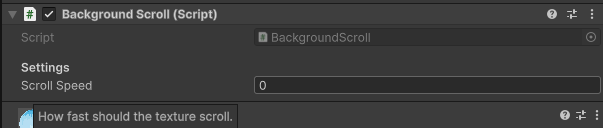
[Header("")], [Tooltip("")]를 추가할 수 있다.
Mesh Renderer
Texture와Material을 렌더링 하는Component이다.
Mesh Renderer를 체크 해제하면 Object가 화면에서 사라진다.
Script에 Mesh Renderer의 권한을 주어야 한다.
public class BackgroundScroll : MonoBehaviour
{
    [Header("Settings")]
    [Tooltip("How fast should the texture scroll.")]
    public float scrollSpeed;

    [Header("References")]
    public MeshRenderer meshRenderer; // add like Flutter
    void Start()
    // ...existing code...
}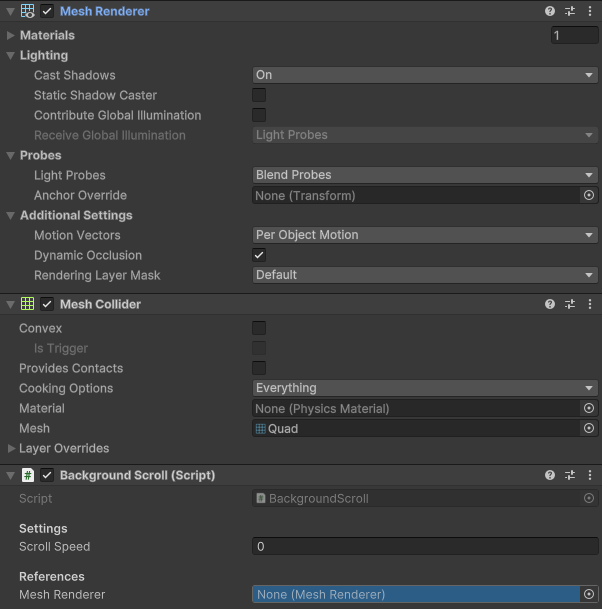
Mesh Renderer를 드래그하여 하단의 References - Mesh Renderer에 드롭하면 Mesh Renderer Component를 Script에 제공하게 된다.
Audio Clip을 이와 같이 적용하여 플레이어가 점프할 때 재생하는 등의 방식으로 활용할 수 있다.
void Update()
    {
        meshRenderer.material.mainTextureOffset += new Vector2(scrollSpeed, 0);
}meshRenderer에 접근하여 mainTextureOffset을 수정한다.
mainTextureOffset은 Vector2 타입이므로 Vector2를 더하는 코드를 작성한다.
x 값엔 scrollSpeed 만큼, y 값은 변하지 않기 때문에 0으로 둔다.
하지만 이렇게 할 경우 update() 메소드 특성 상 1프레임 당 한 번씩 실행되기 때문에 엄청나게 빠른 속도로 offset이 더해지게 된다.
그럼 눈으로 확인 할 수 없을 정도이다.
FPS(Frame Per Seconds)는 실시간으로 바뀌기 때문에 프레임에 의존하는 것은 좋지 않다.
프레임 단위가 아니라 초 단위로 움직이게 하기 위해서 Time.deltaTime 메소드를 사용한다.
Time.deltaTime
이전 프레임에서 지금 프레임까지의 초 단위 간격을 의미한다.
void Update()
    {
        meshRenderer.material.mainTextureOffset += new Vector2(scrollSpeed * Time.deltaTime, 0);
    }
이렇게 하면 mainTextureOffset이 speedScroll의 속도로 1초에 한 번만 이동하도록 설정할 수 있다.