원티드 프리온보딩 챌린지 - CSR / SSR with Next.js
i. CSR(Client-side Rendering)이란 무엇이며, 그것의 장단점에 대하여 설명해주세요.
i-1. CSR(Client-side Rendering) 이란?
- 클라이언트 측에서 렌더링을 진행한다는 것
- 보통 SPA(Single Page Application)에서 쓰이는 기법
-> SPA : 첫 요청시 딱 한 페이지만 불러오고, 페이지 이동 시 기존 페이지의 내부를 수정해서 보여준다.
특징
- 모든 코드들이 index.js파일에 들어있다.
- 코드를 받아와 화면을 그리지만, 데이터를 받아오지 않는다.
i-2. CSR의 장단점은?
장점
- 서버의 부하를 줄일 수 있다.
-> 서버에서는 데이터를 주고 받는 일만 하면되기 때문에 - 페이지를 이동할 때 화면이 깜빡하지 않아도 바로 렌더링이 된다. (사용성 측면)
단점
- 검색엔진최적화(SEO)가 좋지 않다.
** 초기에 html 데이터가 없다보니 검색 봇이 해당페이지를 빈페이지로 착각하여 SEO에 취약할 수 있다. - 사용자가 첫 화면을 보는데 시간이 많이 걸린다.
** 모든 코드들이 index.js파일에 들어있기 때문에, 처음에 번들된 이 파일을 다운받는데 시간이 꽤 걸릴 수 있다. - 애플리케이션이 커짐에 따라 필요한 JS의 양이 증가하는 경향이 있다.
-> 다운로드 속도가 느려질 수 있다.
ii. SPA(Single Page Application)로 구성된 웹 앱에서 SSR(Server-side Rendering)이 필요한 이유에 대하여 설명해주세요.
첫화면을 빠르게 띄워야하고, 화면 전체를 렌더링하여 새 화면으로 띄워야하는 경우, 또한 html데이터를 초기에 가져와 검색엔진최적화를 시킬 필요가 있을 때에 필요하다.
iii. Next.js 프로젝트에서 yarn start(or npm run start) 스크립트를 실행했을 때 실행되는 코드를 Next.js Github 레포지토리에서 찾은 뒤, 해당 파일에 대한 간단한 설명을 첨부해주세요.
#!/usr/bin/env node

import arg from 'next/dist/compiled/arg/index.js'
import { startServer } from '../server/lib/start-server'
import { getPort, printAndExit } from '../server/lib/utils'
import isError from '../lib/is-error'
import { getProjectDir } from '../lib/get-project-dir'
import { CliCommand } from '../lib/commands'
import { resolve } from 'path'
import { PHASE_PRODUCTION_SERVER } from '../shared/lib/constants'
import loadConfig from '../server/config'

const nextStart: CliCommand = async (argv) => {
  const validArgs: arg.Spec = {
    // Types
    '--help': Boolean,
    '--port': Number,
    '--hostname': String,
    '--keepAliveTimeout': Number,

    // Aliases
    '-h': '--help',
    '-p': '--port',
    '-H': '--hostname',
  }
  let args: arg.Result<arg.Spec>
  try {
    args = arg(validArgs, { argv })
  } catch (error) {
    if (isError(error) && error.code === 'ARG_UNKNOWN_OPTION') {
      return printAndExit(error.message, 1)
    }
    throw error
  }
  if (args['--help']) {
    console.log(`
      Description
        Starts the application in production mode.
        The application should be compiled with \`next build\` first.

      Usage
        $ next start <dir> -p <port>

      <dir> represents the directory of the Next.js application.
      If no directory is provided, the current directory will be used.

      Options
        --port, -p          A port number on which to start the application
        --hostname, -H      Hostname on which to start the application (default: 0.0.0.0)
        --keepAliveTimeout  Max milliseconds to wait before closing inactive connections
        --help, -h          Displays this message
    `)
    process.exit(0)
  }

  const dir = getProjectDir(args._[0])
  const host = args['--hostname']
  const port = getPort(args)

  const keepAliveTimeoutArg: number | undefined = args['--keepAliveTimeout']
  if (
    typeof keepAliveTimeoutArg !== 'undefined' &&
    (Number.isNaN(keepAliveTimeoutArg) ||
      !Number.isFinite(keepAliveTimeoutArg) ||
      keepAliveTimeoutArg < 0)
  ) {
    printAndExit(
      `Invalid --keepAliveTimeout, expected a non negative number but received "${keepAliveTimeoutArg}"`,
      1
    )
  }

  const keepAliveTimeout = keepAliveTimeoutArg
    ? Math.ceil(keepAliveTimeoutArg)
    : undefined

  const config = await loadConfig(
    PHASE_PRODUCTION_SERVER,
    resolve(dir || '.'),
    undefined,
    undefined,
    true
  )

  await startServer({
    dir,
    isDev: false,
    hostname: host,
    port,
    keepAliveTimeout,
    useWorkers: !!config.experimental.appDir,
  })
}

export { nextStart }
파일 경로
https://github.com/vercel/next.js/blob/canary/packages/next/src/cli/next-start.ts
-> cli로 입력하는 옵션들에 대한 실행 내용이 정의되어 있다.
npm install
-> npx create-react-app
-> 간단한 cli로 웹앱 프로젝트를 시작할 수 있다.
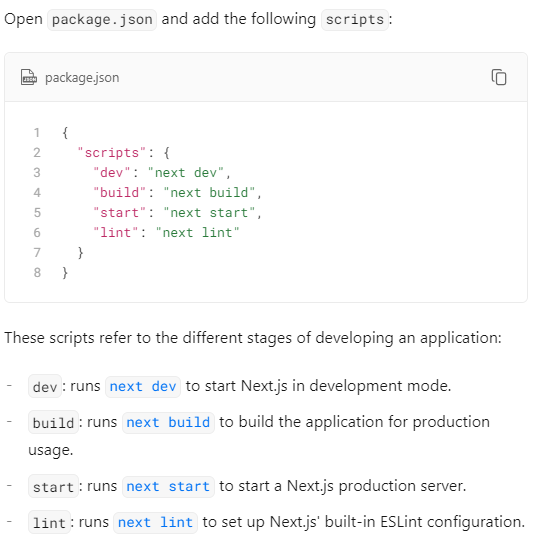
참고
https://junghyeonsu.tistory.com/258
https://www.sarah-note.com/%ED%81%B4%EB%A1%A0%EC%BD%94%EB%94%A9/posting2/

긍정 성장 꾸준