크롤링이란 ?
웹 페이지를 방문해서 필요한 데이터를 가져오는 것
주로 Python 사용
Node.js에서 해보자 (공모전 만들려면)
필요 라이브러리
- Axios : 사이트의 HTML을 가져올 때 필요함
- Cheerio : Node.js 환경에서 Jquery처럼 Domselector 기능 제공
Axios로 데이터를 받아서 필요한 데이터를 추출하기 위해 필요


라이브러리를 설치해주자.
만들기
가져올 웹사이트 확인
데이터를 가져올 웹 사이트로 가서 HTML 태그 요소와 클래스 정보 등을 알아서 가져올 수 있게 준비해야한다
가져오기
const axios = require("axios");
const cheerio = require("cheerio");
const log = console.log;

const getHtml = async () => {
  try {
    return await axios.get("https://www.yna.co.kr/sports/all");
  } catch (error) {
    console.error(error);
  }
};

getHtml()
  .then(html => {
    let ulList = [];
    const $ = cheerio.load(html.data);
    const $bodyList = $("div.headline-list ul").children("li.section02");

    $bodyList.each(function(i, elem) {
      ulList[i] = {
          title: $(this).find('strong.news-tl a').text(),
          url: $(this).find('strong.news-tl a').attr('href'),
          image_url: $(this).find('p.poto a img').attr('src'),
          image_alt: $(this).find('p.poto a img').attr('alt'),
          summary: $(this).find('p.lead').text().slice(0, -11),
          date: $(this).find('span.p-time').text()
      };
    });

    const data = ulList.filter(n => n.title);
    return data;
  })
  .then(res => log(res));
위의 참고한 블로그에서 가져왔다.
블로그 설명을 참고해서 간단하게 설명을 써보면
const getHtml = async () => {
  try {
    return await axios.get("https://www.yna.co.kr/sports/all");
  } catch (error) {
    console.error(error);
  }
};
getHtml 함수는 axios.get 함수로 인자로 전달된 링크의 html 파일을 가져와서 반환한다. 비동기로 처리함 (비동기는 함수에서 반환값을 기다리고 다음 동작을 하는게 아니라 동시에 다른 동작도 함)
cheerio 함수들의 기능들 (출처 : 참고 블로그)
- load : 인자로 html 문자열을 받아 cheerio 객체를 반환합니다.
- children : 인자로 html selector를 문자열로 받아 cheerio 객체에서 선택된 html 문자열에서 해당하는 모든 태그들의 배열을 반환합니다.
- each : 인자로 콜백 함수를 받아 태그들의 배열을 순회 하면서 콜백함수를 실행합니다.
- find : 인자로 html selector 를 문자열로 받아 해당하는 태그를 반환합니다.
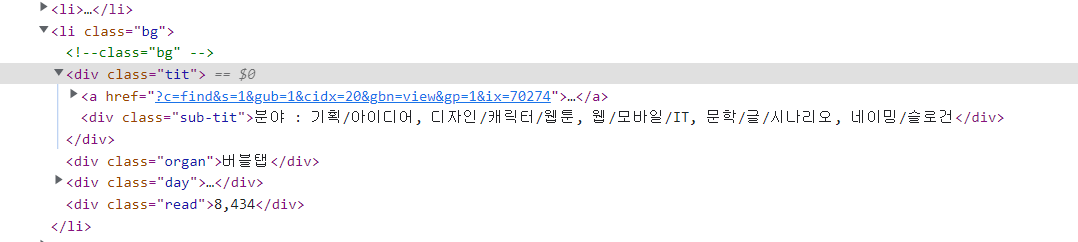
위 사이트에서 개발자 도구로 html 구조를 확인함
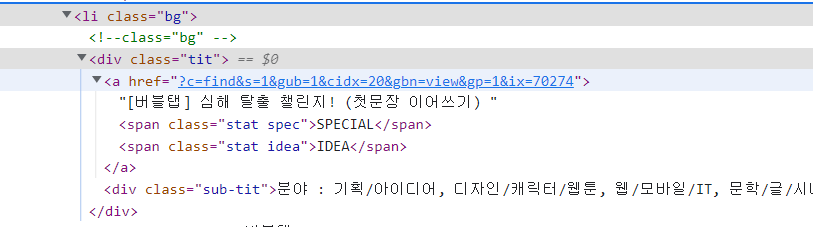
class명이 tit인 div 태그 밑에
a 태그의 href 속성에 공모전 링크가 걸려있고 그 공모전 링크는 상대경로임 앞에 저 사이트의 주소인 https://www.wevity.com/ 을 붙여줘야함
그리고 a태그의 내용으로 공모전 이름이 들어가 있음
내가 작성한 코드
const axios = require("axios");
const cheerio = require("cheerio");
const log = console.log;


//getHtml 함수는 axios.get의 인자로 전달받은 페이지에서 html 파일을 가져옴

// https://www.wevity.com/?c=find&s=1&gub=1&cidx=20 공모전 목록 제공하는 사이트
const getHtml = async () => {
  try {
    return await axios.get("https://www.wevity.com/?c=find&s=1&gub=1&cidx=20");
  } catch (error) {
    console.error(error);
  }
};

//


var crawl = getHtml()
  .then(html => {
    let ulList = [];
    //사이트에서 html을 가져와서 cheerio 객체로 반환
    const $ = cheerio.load(html.data);
    //cheerio 객채에서 클래스가 bg인 li의 자손중 클래스가 tit인 div 반환
    const $bodyList = $('li.bg').children('div.tit');

    //each로 bodyList의 각 요소에 대해 콜백함수를 실행함
    $bodyList.each(function(i, elem) {

        // 그 내용을 지금 ulList에 json 형태로 저장하는거임
      ulList[i] = {
        //find의 인자로 html selector를 받아서 해당 태그를 반환함
          title: $(this).find('a').text(),
          url: `https://www.wevity.com/`+$(this).find('a').attr('href'),
      };
    });
    //console.log(ulList);

    const data = ulList.filter(n => n.title);
    console.log(data);
    return data;
  });
  // .then(res => log(res));

  module.exports=crawl;
crawling.js의 코드다.
//크롤링 함수 import
const crawl = require(`../crawling`);
//크롤링한 공모전 목록으로 이동
router.get(`/crawling`,function(req,res){
    console.log(`크롤링한 공모전 리스트로 이동`);
    //crawl은 crawling.js의 함수를 실행하고 Promise 객체를 반환함
    //Promise 객체는 비동기 처리를 위한 객체로 객채에 then으로 받고 나서 처리를 해줘야함
    //then(콜백함수(비동기처리완료된객체){..실행내옹})
    //즉 나는 비동기로 크롤링하는데 크롤링 완료된 데이터를 data 변수에 받아서 competitions라는 이름으로 crawl.ejs로 넘긴것임
    crawl.then(function(data){
        res.render(`competitions/crawl`,{competitions:data})
    });

    //res.render(`competitions/crawl`,{competitions:crawledCompData});
});
competitionRouter.js에서 공모전 정보를 크롤링해와서 보여주는 코드다.
여기서 어려웠던 부분이 Promise 객체에 관한 것이다.
Promise 객체는 비동기 처리의 결과를 받아오기 위한 객체다
비동기로 처리하면 결과를 반환할 때까지 기다리지 않는다.
그래서 Promise 객체 대상으로 .then(콜백함수(매개변수){..});
와 같이 작성하면 Promise 객체가 데이터를 다 받아오면 그 데이터를 매개변수에 넣어서 처리할 수 있다.
위 코드에서도 Promise가 데이터를 받아오고 나서 처리할 수 있게 then을 사용해서 처리된 데이터를 response에 넣어줬다.
이렇게 해야 데이터를 ejs 파일에서 사용할 수 있다!
<html lang="en">
<head>
    <meta charset="UTF-8">
    <meta http-equiv="X-UA-Compatible" content="IE=edge">
    <meta name="viewport" content="width=device-width, initial-scale=1.0">
    <title>Document</title>
</head>
<body>
    <h1>크롤링해온 공모전 목록</h1> <a href="/competitions">뒤로가기</a><hr>
    <% competitions.forEach(function(competition){ %>
        제목 : <%= competition.title %> <br>
        url : <a href="<%= competition.url %>">이동하기</a> <br>
        <hr>
        <% }); %>

</body>
</html>
crawl.ejs에서는 위와 같이 받은 데이터를 표시해줬다.