[ Swift ] Floating Button
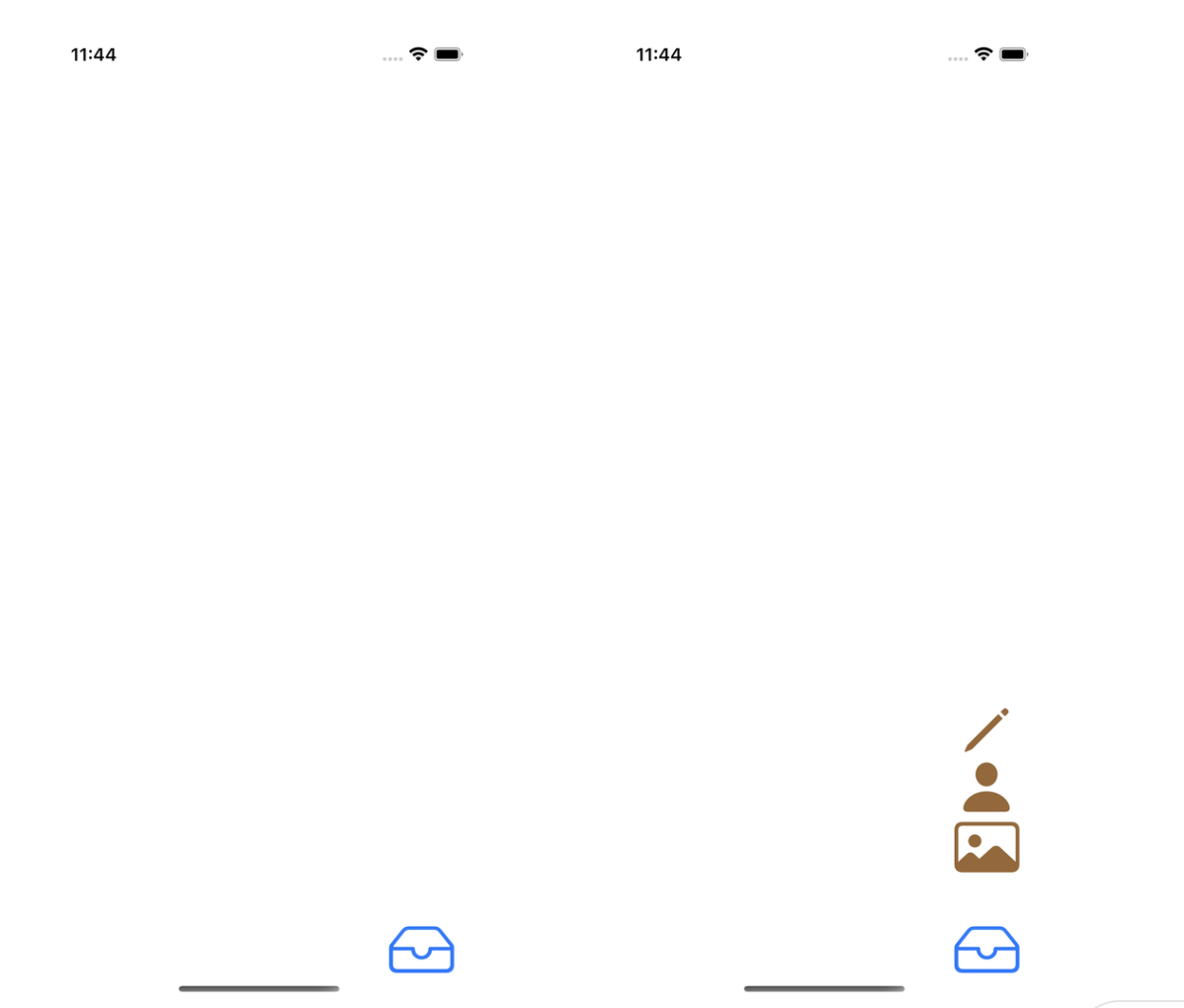
전체적인 코드
//
//  Menu.swift
//  FloatingButton
//
//  Created by 지해 on 1/23/24.
//

import UIKit

class Menu: UIView {

    private var menuBtn: UIButton!
    private var menuStack: UIStackView!

    override init(frame: CGRect) {
        super.init(frame: frame)
        addMenuBtn()
        addMenuStack()
    }

    required init?(coder: NSCoder) {
        fatalError("init(coder:) has not been implemented")
    }


}

extension Menu {

    private func addMenuBtn() {
        let button = UIButton(type: .system)
        let image = UIImage(systemName: "tray",
                            withConfiguration: UIImage.SymbolConfiguration(textStyle: .largeTitle))

        button.setImage(image, for: .normal)
        button.tintColor = .systemBlue
        button.translatesAutoresizingMaskIntoConstraints = false

        addSubview(button)

        let btnTopCons = button.topAnchor.constraint(equalTo: topAnchor)
        btnTopCons.priority = .defaultLow

        NSLayoutConstraint.activate([
            btnTopCons,
            button.leadingAnchor.constraint(equalTo: leadingAnchor),
            button.trailingAnchor.constraint(equalTo: trailingAnchor),
            button.bottomAnchor.constraint(equalTo: bottomAnchor)
        ])

        button.addTarget(self, action: #selector(menuBtnTapped), for: .touchUpInside)

        menuBtn = button
    }

    @objc private func menuBtnTapped() {

        UIView.animate(withDuration: 0.3,
                       delay: 0,
                       usingSpringWithDamping: 0.5,
                       initialSpringVelocity: 0.5) {
            self.menuStack.arrangedSubviews.forEach { button in
                button.isHidden = !button.isHidden
            }

            self.menuStack.layoutIfNeeded()
        }

    }

    private func addMenuStack() {
        let stack = UIStackView()
        stack.axis = .vertical
        stack.translatesAutoresizingMaskIntoConstraints = false

        let buttonImageNames = ["pencil", "person.fill", "photo", "bubble.left.and.button.right" ]
        buttonImageNames.forEach{ imageName in
            let button = UIButton(type: .system)
            let image = UIImage(systemName: imageName,
                                withConfiguration: UIImage.SymbolConfiguration(textStyle: .largeTitle))
            button.setImage(image, for: .normal)
            stack.addArrangedSubview(button)
            button.isHidden = true
            button.tintColor = .brown
        }

        addSubview(stack)

        NSLayoutConstraint.activate([
            stack.centerXAnchor.constraint(equalTo: centerXAnchor),
            stack.bottomAnchor.constraint(equalTo: menuBtn.topAnchor, constant: -8)
        ])
        let stackTopConstraint = stack.topAnchor.constraint(equalTo: topAnchor)
        stackTopConstraint.priority = .defaultHigh
        stackTopConstraint.isActive = true

        menuStack = stack
    }

}
//
// ViewController.swift
// FloatingButton
//
// Created by 지해 on 1/23/24.
//
import UIKit
class ViewController: UIViewController {
override func viewDidLoad() {
super.viewDidLoad()
let menuBtn = Menu()
menuBtn.translatesAutoresizingMaskIntoConstraints = false
view.addSubview(menuBtn)
NSLayoutConstraint.activate([
menuBtn.trailingAnchor.constraint(equalTo: view.trailingAnchor, constant: -20),
menuBtn.bottomAnchor.constraint(equalTo: view.bottomAnchor, constant: -20)
])
}
}FlaotingButton 생성
menu Button 생성하기
import UIKit

class Menu: UIView {

    private var menubutton = UIButton()

    // 새로운 view의 생성자
    override init(frame: CGRect) {
        super.init(frame: frame)
        menuButton()
    }

    // 필수 생성자
    required init?(coder: NSCoder) {
        fatalError("init(coder:) has not been implemented")
    }

}

extension Menu {

    // menuButton 생성하기
    private func menuButton() {

        let button = UIButton(type: .system)
        let menuButtonImage = UIImage(systemName: "tray",
                                      withConfiguration: UIImage.SymbolConfiguration(textStyle: .largeTitle))

        button.setImage(menuButtonImage, for: .normal)
        button.tintColor = .blue

        button.translatesAutoresizingMaskIntoConstraints = false

        addSubview(button)

        let buttonTopConstraint = button.topAnchor.constraint(equalTo: topAnchor)
        buttonTopConstraint.priority = .defaultLow
        buttonTopConstraint.isActive = true

        button.bottomAnchor.constraint(equalTo: bottomAnchor).isActive = true
        button.leadingAnchor.constraint(equalTo: leadingAnchor).isActive = true
        button.trailingAnchor.constraint(equalTo: trailingAnchor).isActive = true

        menubutton = button
    }
}- UIButton에 이미지 넣기
// 시스템 이미지 이름으로 이미지 설정
let menuButtonImage = UIImage(systemName: "tray",
                              withConfiguration: UIImage.SymbolConfiguration(textStyle: .largeTitle))

// 버튼에 적용
button.setImage(menuButtonImage, for: .normal)- Button의 Constraint에 priority 변경하기
// 변수에 특정 constraint값 담기
let buttonTopConstraint = button.topAnchor.constraint(equalTo: topAnchor)
// priority 변경 (.defaultLow / .defaultHigh)
buttonTopConstraint.priority = .defaultLow
buttonTopConstraint.isActive = true
menu Button안에 StackView 생성하기
// menuStack 생성하기
private func menuStack() {

    let stack = UIStackView()

		// stack 정렬 선택
    stack.axis = .vertical
    stack.translatesAutoresizingMaskIntoConstraints = false

		// stackView에 들어갈 버튼들의 이미지 배열
    let buttonImageNames = [ "pencil", "person.fill", "photo", "bubble.left.and.button.right" ]

		// button 만들어 stack에 추가하기
    buttonImageNames.forEach{ buttonImage in

        let button = UIButton(type: .system)
        let buttonImage = UIImage(systemName: buttonImage,
                                      withConfiguration: UIImage.SymbolConfiguration(textStyle: .largeTitle))

        button.setImage(buttonImage, for: .normal)
				button.isHidden = true
        button.tintColor = .brown

        stack.addArrangedSubview(button)
    }

		// stackView view위에 올리기
    addSubview(stack)

    let stackTopConstraint = stack.topAnchor.constraint(equalTo: topAnchor)
    stackTopConstraint.priority = .defaultHigh
    stackTopConstraint.isActive = true

    stack.bottomAnchor.constraint(equalTo: menubutton.topAnchor).isActive = true
    stack.centerXAnchor.constraint(equalTo: centerXAnchor).isActive = true

    menustack = stack
}- StackView에 Button 올리기
// button 만들어 stack에 추가하기
buttonImageNames.forEach{ buttonImage in

    let button = UIButton(type: .system)
    let buttonImage = UIImage(systemName: buttonImage,
                              withConfiguration: UIImage.SymbolConfiguration(textStyle: .largeTitle))

    button.setImage(buttonImage, for: .normal)
    // ⭐️⭐️⭐️
		button.isHidden = true
    button.tintColor = .brown

    stack.addArrangedSubview(button)
}
→ stackView의 사라짐을 위해서 button을 숨겨놓아야함.
- Button의 Constraint에 priority 변경하기
let stackTopConstraint = stack.topAnchor.constraint(equalTo: topAnchor)
stackTopConstraint.priority = .defaultHigh
stackTopConstraint.isActive = true
→ StackView가 menubutton의 top에 따라서 움직이기 때문에 button의 top의 priority를 낮추고, stack의 top의 priority를 높여서, button을 클릭함으로써 stackView안에 button들이 보이게 되면, stackView에 맞는 높이에 맞춘다.
menu Button을 클릭할 시 StackView 나타나기 ( with. animation )
// stackView 나타나기
@objc private func menuButtonTapped() {
		// 애니매이션 효과
    UIView.animate(withDuration: 0.3,
                   delay: 0,
                   usingSpringWithDamping: 0.5,
                   initialSpringVelocity: 0.5) {
				// stackView에 있는 button의 각각의 요소의 숨겨짐 해제
        self.menustack.arrangedSubviews.forEach { button in
            button.isHidden = !button.isHidden
        }

				// updateCycle 호출 -> 즉시 애니매이션 변경하기
        self.menustack.layoutIfNeeded()
    }
}
I'm Junior iOS developer 배지해.