API Gateway
📌 API Gateway란?
역할
- 사용자가 설정한 라우팅 설정에 따라 각각의 엔드포인트(End-Point)로 클라이언트 대신 요청
- 응답을 받으면 다시 클라이언트에게 전달
- 프록시 역할
장점
- 시스템 내부 구조는 숨기고, 외부 요청에 대해 적절한 형태로 가공하여 응답 가능
기능
- 인증 및 권한 부여
- 서비스 검색 통합
- 응답 캐싱
- 정책, 회로 차단기
- 부하 분산
- 속도 제한
- 헤더, 쿼리 문자열 청구 반환
- IP 허용 목록에 추가
📌 API Gateway 종류
Ribbon / Netflix Zuul
- 비동기를 지원하지 않음
- SpringBoot 2.4.x 에서 Maintenance 상태
Spring Cloud Gateway
- 가장 많이 사용하고 있음
📌 소스코드
1. First-service
- FirstServiceController.java
@RestController
@RequestMapping("/") //Root로 설정하여, 모든 요청에 응답함.
public class firstServiceController {

    @GetMapping("/welcome")
    public String welcome(){
    	return "Weclome to First service";
    }

}
@RestController
RequsetBody와 ResponseBody를 구현하지 않고 제공되는 것을 사용.
@RequestMapping
사용자로부터 요청되는 URL 값을 지정
- application.yml
spring:
	application:
    	name: first-service

server:
	port: 8081

eureka:
	client:
    	fetch-registry: false
        register-with-eureka: false
fetch-registry
Eureka에 등록되는 서비스들의 정보를 갱신하기 위한 용도
register-with-eureka
레지스트리에 자신을 등록할 지에 대한 여부
2. Second-service
- SecondServiceController.java
@RestController
@RequestMapping("/") //Root로 설정하여, 모든 요청에 응답함.
public class secondServiceController {

    @GetMapping("/welcome")
    public String welcome(){
    	return "Weclome to Second service";
    }

}
@RestController
RequsetBody와 ResponseBody를 구현하지 않고 제공되는 것을 사용.
@RequestMapping
사용자로부터 요청되는 URL 값을 지정
- application.yml
spring:
	application:
    	name: second-service

server:
	port: 8082

eureka:
	client:
    	fetch-registry: false
        register-with-eureka: false
3. 실행결과

localhost는 컴퓨터에서 사용하는 loopback.
IPv4 체계에서 127.0.0.1 이라는 일반 인터넷 상에서는 사용할 수 없도록 만들어진 특수한 & 예약된 주소를 가리키도록 설정된 것
🔗출처: [네트워크] localhost - 127.0.0.1, IP, 그리고 통신
📌 API Gateway 추가
Spring Cloud Gateway 사용하기
✅ IntelliJ IDEA (2024.2.4)
✅ SpringBoot 3.3.5
- 의존성 추가하여 프로젝트 생성
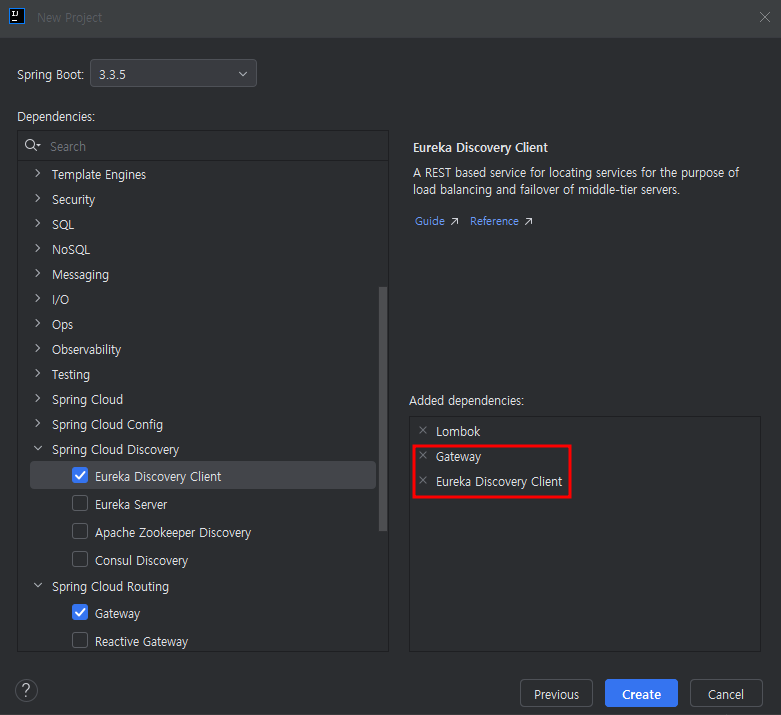
✅ 참고
pom.xml<dependency> <groupId>org.springframework.cloud</groupId> <artifactId>spring-cloud-starter-gateway-mvc</artifactId> </dependency>
- 기존 서비스들의 컨트롤러 수정
- FirstServiceController.java
@RestController
@RequestMapping("/first-service") //first-service로 시작하는 요청일 때만 허용
public class firstServiceController {
@GetMapping("/welcome")
public String welcome(){
return "Welcome to Frist service";
}
}- SecondServiceController.java
@RestController
@RequestMapping("/second-service") //second-service로 시작하는 요청일 때만 허용
public class secondServiceController {
@GetMapping("/welcome")
public String welcome(){
return "Welcome to Second service";
}
}- API Gateway 서비스의 application.yml 설정
spring:
application:
name: gateway-service
cloud:
mvc:
routes:
- id: first-service
uri: http://localhost:8081/
predicates:
- Path=/first-service/**
#/first-service로 시작하는 모든 경로(/**)에 대한 요청
- id: second-service
uri: http://localhost:8082/
predicates:
- Path=/second-service/**
#/second-service로 시작하는 모든 경로(/**)에 대한 요청
server:
port: 8000
eureka:
client:
fetch-registry: false
register-with-eureka: false
service-url:
defaultZone: http://localhost:8761/eureka위와 같은 설정들을 완료한 후, 다음의 주소를 들어가보면 브라우저에 해당 주소의 return 값들이 출력됨.
✅ localhost:8000/first-service/welcome
✅ localhost:8000/second-service/welcome
- Filter 적용
- 종류
1) Pre Filter (사전필터)
2) Post Filter(사후필터) - 설정 방법
1) JAVA Code 수정
2) property 수정
📌 Filter 테스트
방법1) JAVA Code
1) pom.xml 수정
<dependency>
<groupId>org.springframework.cloud</groupId>
<artifactId>spring-cloud-starter-gateway</artifactId>
</dependency>2) FilterConfig.java 생성
-
위치
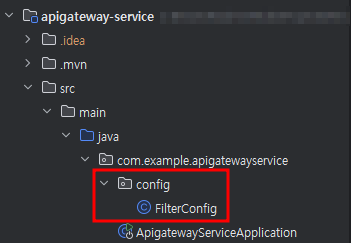
⭐ ApigatewayServiceApplication과 동일한 폴더 구조 안에 존재해야 함. -
소스코드
@Configuration
public class FilterConfig {
@Bean
public RouteLocator gatewayRoutes(RouteLocatorBuilder builder){
return builder.routes()
.route(r -> r.path("/first-service/**")
.filters(f -> f.addRequestHeader("first-request", "first-request-header")
.addResponseHeader("first-response", "first-response-header"))
.uri("http://localhost:8081")
)
.route(r -> r.path("/second-service/**")
.filters(f -> f.addRequestHeader("second-request", "second-request-header")
.addResponseHeader("second-response", "second-response-header"))
.uri("http://localhost:8082")
)
.build();
}
- 메소드 체이닝
메소드를 고리처럼 메소드를 계속해서 이어서 사용할 수 있게끔 하는 방법
- filter()
요청(Request) 및 응답(Response) 수정, 로깅, 인증 및 권한 부여, 리디렉션(Redirection)의 역할- Header 추가
addResponseHeader, addResponseHeader를 통해 요청 및 응답 헤더 추가
(cf. Header란? HTTP 요청이나 응답의 메타 데이터를 가지고 있는 부분)
3) 각 서비스에 엔드 포인트(/message) 추가
- FirstServiceController.java
@RestController
@RequestMapping("/first-service")
public class firstServiceController {
@GetMapping("/welcome")
public String welcome(){
return "Welcome to Frist service";
}
@GetMapping("/message")
public String message(@RequestHeader("first-request") String header) {
log.info(header);
return "Hello World in First Service";
}
}- SecondServiceController.java
@RestController
@RequestMapping("/second-service")
public class secondServiceController {
@GetMapping("/welcome")
public String welcome(){
return "Welcome to Second service";
}
@GetMapping("/message")
public String message(@RequestHeader("first-request") String header) {
log.info(header);
return "Hello World in Second Service";
}
}4) 실행결과

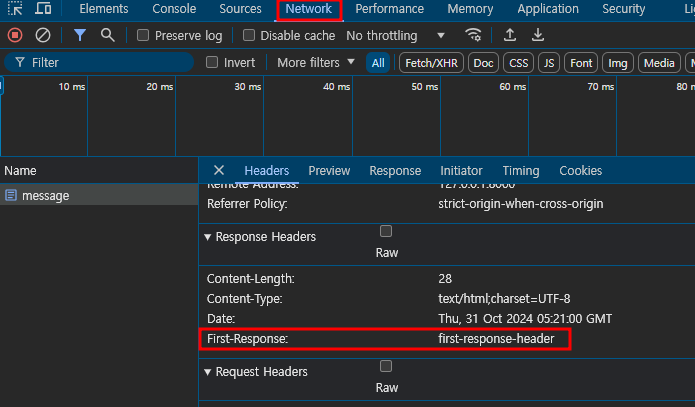
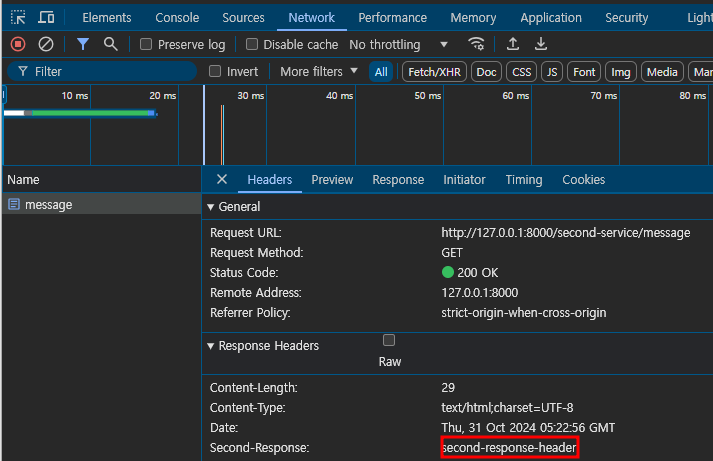
방법2) Property
⭐ 방법1과 전혀 다른 방법이므로 FilterConfig.java는 모두 주석 처리 필요
1) pom.xml 수정
<dependency>
            <groupId>org.springframework.cloud</groupId>
            <artifactId>spring-cloud-starter-gateway-mvc</artifactId>
</dependency>2) application.yml 수정
spring:
  application:
    name: apigateway-service
  cloud:
    gateway:
      mvc:
        routes:
          - id: first-service
            uri: http://localhost:8081/
            predicates:
              - Path=/first-service/**
            filters:
              - AddRequestHeader=first-request,first-request-header2
              - AddResponseHeader=first-response,first-response-header2
          - id: second-service
            uri: http://localhost:8082/
            predicates:
              - Path=/second-service/**
            filters:
              - AddRequestHeader=second-request,second-request-header2
              - AddResponseHeader=second-response,second-response-header2

server:
  port: 8000

eureka:
  client:
    register-with-eureka: false
    fetch-registry: false
    service-url:
      defaultZone: http://localhost:8761/eureka
spring.cloud.gateway.mvc.routes에 설정한 방식대로 라우팅 진행됨
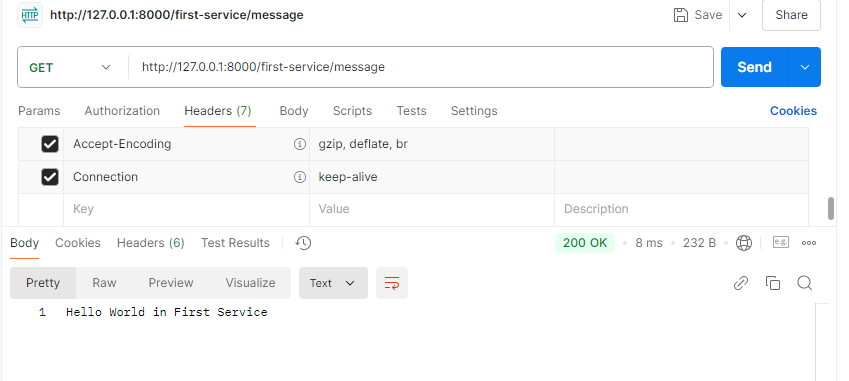
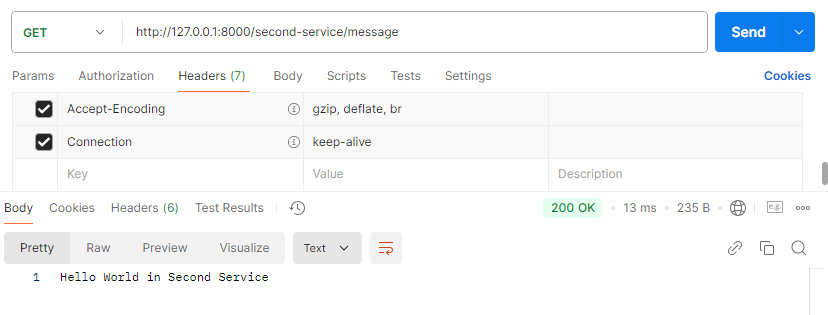
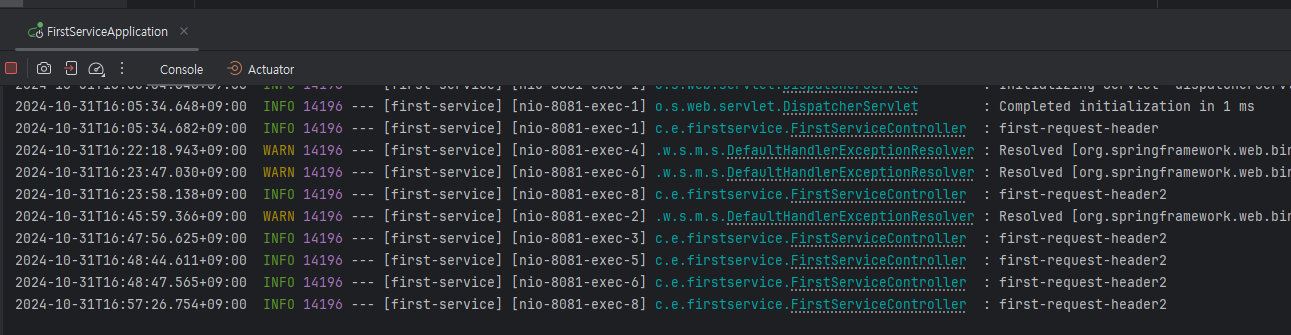
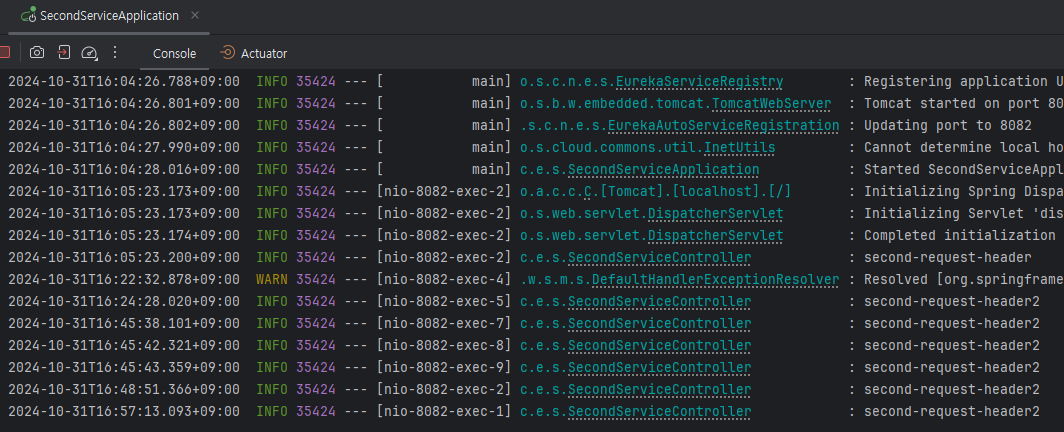
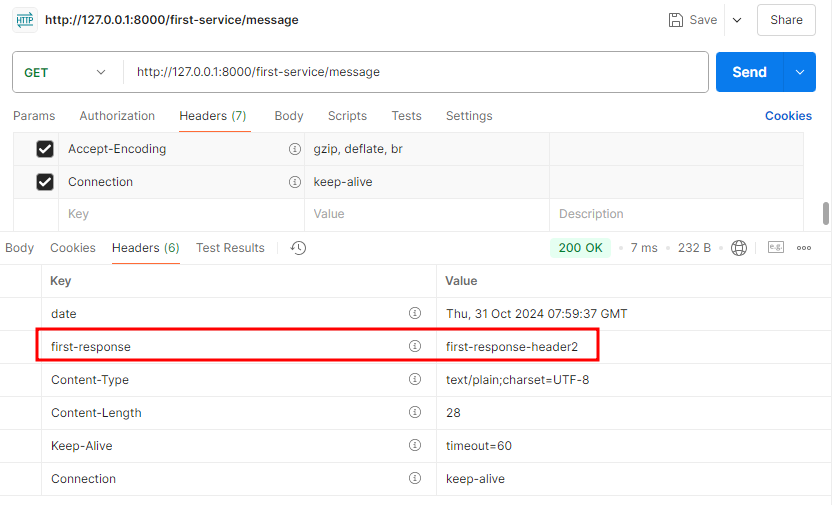
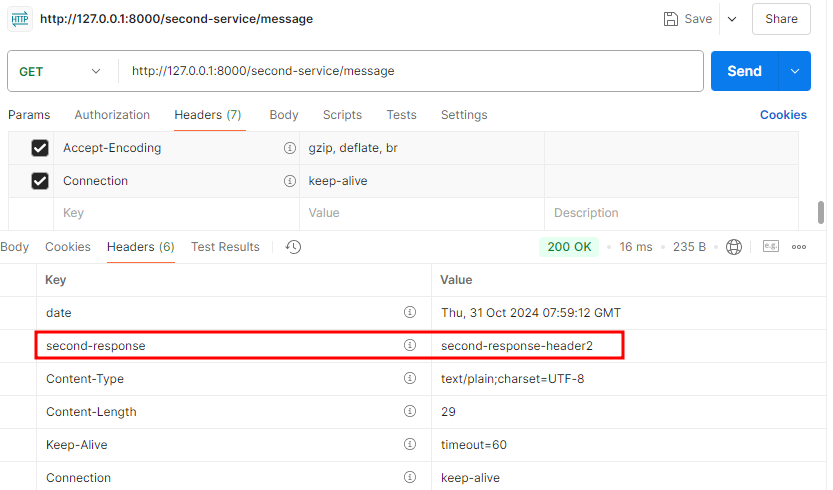
3) 실행결과
✅ 방법1과 다르게 POSTMAN을 사용하여 테스트
💡 참고
- spring-cloud-starter-gateway-mvc
Tomcat 서버 가동
Spring MVC의 Blocking 방식으로 서비스 처리 - spring-cloud-starter-gateway
Netty 서버 가동 (비동기)
Reactive 방식 사용 - 샘플 코드
🔗 Github 바로가기 (OpenJDK 21, SpringBoot 3.2.2)
