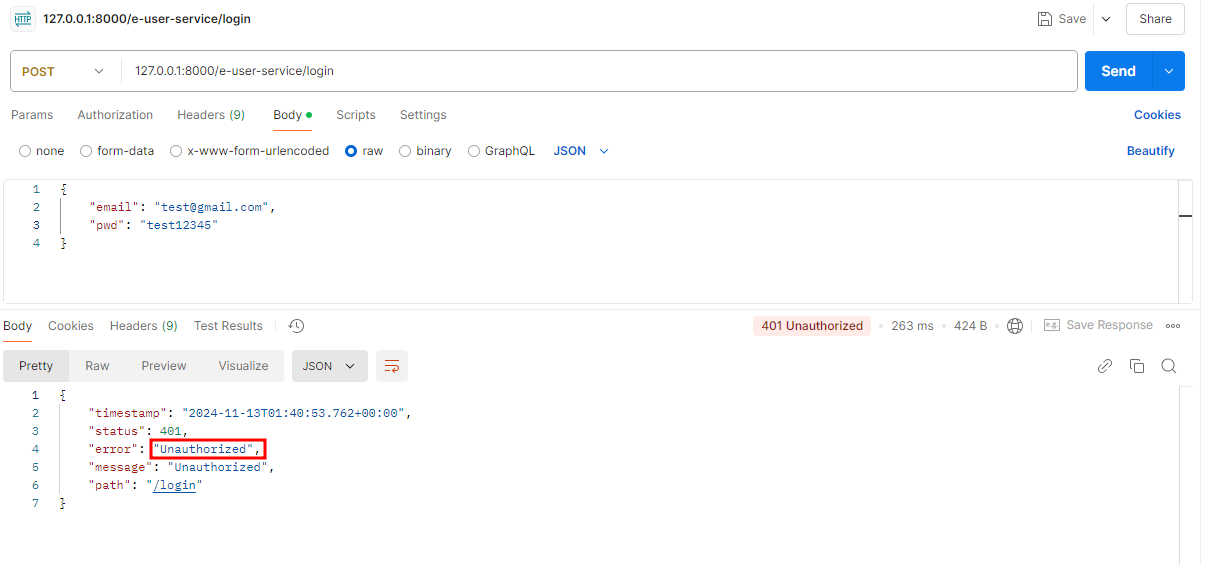
login 기능 구현
✅ 유의해야 할 부분들
- AuthenticationFilter
- UsernamePasswordAuthenticationFilter
- WebSecurity
- UserDetailsService
📌 소스코드 작성
1. user-service
- RequestLogin.java 생성
package com.example.euserservice.vo;

import jakarta.validation.constraints.Email;
import jakarta.validation.constraints.NotNull;
import jakarta.validation.constraints.Size;
import lombok.Data;

@Data
public class RequestLogin {
    @NotNull(message = "Email cannot be null")
    @Size(min = 2, message = "Email not be less than two characters")
    @Email
    private String email;

    @NotNull(message = "password cannot be null")
    @Size(min = 8, message = "password must be equals or  grater than 8 characters")
    private String pwd;
}
RequestLogin
사용자의 로그인 정보를 담고 있음
- AuthenticationFilter.java 수정
package com.example.euserservice.security;

import com.example.euserservice.service.UserService;
import com.example.euserservice.vo.RequestLogin;
import com.fasterxml.jackson.databind.ObjectMapper;
import jakarta.servlet.FilterChain;
import jakarta.servlet.ServletException;
import jakarta.servlet.http.HttpServletRequest;
import jakarta.servlet.http.HttpServletResponse;
import lombok.extern.slf4j.Slf4j;
import org.springframework.core.env.Environment;
import org.springframework.security.authentication.AuthenticationManager;
import org.springframework.security.authentication.UsernamePasswordAuthenticationToken;
import org.springframework.security.core.Authentication;
import org.springframework.security.core.AuthenticationException;
import org.springframework.security.web.authentication.UsernamePasswordAuthenticationFilter;

import java.io.IOException;
import java.util.ArrayList;

@Slf4j
public class AuthenticationFilter extends UsernamePasswordAuthenticationFilter {
    private UserService userService;
    private Environment environment;

    public AuthenticationFilter(AuthenticationManager authenticationManager,
                                   UserService userService, Environment environment) {
        super(authenticationManager);
        this.userService = userService;
        this.environment = environment;
    }

    @Override
    public Authentication attemptAuthentication(HttpServletRequest req, HttpServletResponse res)
            throws AuthenticationException {
        try {
            RequestLogin creds = new ObjectMapper().readValue(req.getInputStream(), RequestLogin.class);

            return getAuthenticationManager().authenticate(
                    new UsernamePasswordAuthenticationToken(creds.getEmail(), creds.getPwd(), new ArrayList<>()));

        } catch (IOException e) {
            throw new RuntimeException(e);
        }
    }


    @Override
    protected void successfulAuthentication(HttpServletRequest req, HttpServletResponse res, FilterChain chain,
                                            Authentication auth) throws IOException, ServletException {
				//내용없음
    }
}
💡 Spring Security 동작 과정
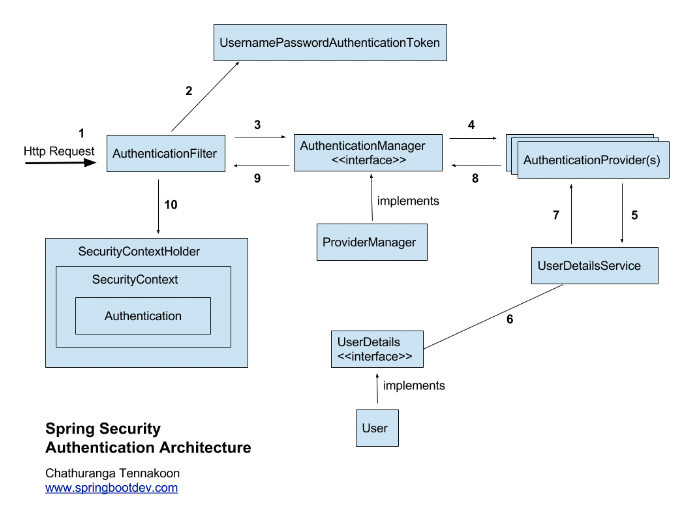
🔗 출처: [Spring Security] 내부 구조 살펴보기 (2) - Authentication의 Filter, Manager, Provider
🔗 출처: [Spring Security] 인증 흐름 및 절차
🔗 출처: [Spring Security] Authentication Provider (인증 제공자) 설명 및 구현
AuthenticationFilter
- 인증되지 않은
AuthenticationToken을 만들고 내부에 저장된AuthenticationManager에게 토큰과 함께 이 요청이 인증된 사용자인지 판단을 요청하고 그 응답을 받음Authentication객체가 넘어온다면 인증에 성공 / null이 넘어온다면 인증에 실패attemptAuthentication()에 핵심 로직이 포함되어 있음- 인증 처리 기능을 하는
AbstractAuthenticationProcessingFilter의doFilter()메서드에서 실행됨
AuthenticationManager
- 실제 인증 역할을 하는
AuthenticationProvider를 관리하는 역할AuthenticationManager는 Filter로부터 요청을 받아 내부의AuthenticationProvider에게 인증 처리를 위임하고 그 결과를 다시 Filter에게 반환하는 역할
authenticate()
Authentication을 인자로 받음- 내부 인증 로직을 처리한 뒤
Authentication객체를 반환- 인증이 성공하면 인증이 되었는지를 판단하는
isAuthenticated()의 값이 true가 되고 반환값에 인증된Authentication을 담아서 반환함- 반환값이
null이라면 인증에 실패한 것으로 간주
AuthenticationProvider
- 인증 방법을 제공하기 위한 인터페이스
- 데이터베이스에서 사용자 정보를 가져오고, 암호를 구성한 뒤, 비밀번호를 비교하며, 계정의 만료 여부나 신임장 만료 여부를 확인하는 등 다양한 기능을 제공
UsernamePasswordAuthenticationFilter
Form based Authentication방식으로 인증을 진행할 때 아이디, 패스워드 데이터를 파싱하여 인증 요청을 위임하는 필터
소스코드 설명
ObjectMapper().readValue()
전달되어진InputStream에 어떠한 값이 들어가 있을 때 그 값을 우리가 원하는 자바 클래스 타입으로 변환
- UserRepository.java 수정
package com.example.euserservice.jpa;

import org.springframework.data.repository.CrudRepository;

public interface UserRepository extends CrudRepository<UserEntity, Long> {

    UserEntity findByUserId(String userId);

    UserEntity findByEmail(String username); //추가
}
추가 설명
find:SELECT와 같은 의미ByAbc: 연동되어 있는 테이블의 Abc 칼럼을 사용하여 실행하겠다는 의미
- eUserService.java 수정
package com.example.euserservice.service;

import com.example.euserservice.dto.UserDto;
import com.example.euserservice.jpa.UserEntity;
import org.springframework.security.core.userdetails.UserDetailsService;

public interface UserService extends UserDetailsService { //UserDetailsService 상속
    UserDto createUser(UserDto userDto);
    UserDto getUserByUserId(String userId);
    Iterable<UserEntity> getUserByAll();
}
UserDetailsService
Spring Security에서 유저의 정보를 가져오는 인터페이스
- eUserServiceImpl.java 수정
//loadUserByUsername() 메서드 추가
@Override
    public UserDetails loadUserByUsername(String username) throws UsernameNotFoundException {
        UserEntity userEntity = userRepository.findByEmail(username);

        if (userEntity == null)
            throw new UsernameNotFoundException(username + ": not found");

        return new User(userEntity.getEmail(), userEntity.getEncryptedPwd(),
                true, true, true, true,
                new ArrayList<>());
    }
메서드 추가 이유
UserDetailsService을 상속 받음- Spring Security에서 유저의 정보를 불러오기 위해서 구현해야하는 인터페이스로 기본 오버라이드 메서드이기 때문
🔗 출처: Spring Security UserDetails, UserDetailsService 란?
소스코드 설명
- new User(email, pwd,true, true, true, true, new ArrayList<>())
1.org.springframework.security.core.userdetails.User클래스의 생성자에 전달되는 값들로,UserDetails객체를 생성하는 데 사용
- 인자1 :
userEntity.getEmail()
사용자 인증(로그인 시)에 사용되는 아이디로,username에 해당
이 값을 이용하여 사용자를 식별함- 인자2 :
userEntity.getEncryptedpwd()
Spring Security에서는 사용자의 비밀번호를EncryptedPwd와 같은 암호화된 형태로 저장하고 비교해야 하므로, 이를UserDetails객체에 설정함- 인자3: true
accountNonExpired (계정 만료 여부)를 나타내는 플래그
true로 설정 시 계정이 만료되지 않았음을 의미하고,false로 설정 시 계정이 만료된 것으로 간주하여 로그인을 할 수 없게 됨- 인자4: true
credentialsNonExpired (비밀번호 만료 여부)를 나타내는 플래그
true는 비밀번호가 만료되지 않았음을 의미하고,false로 설정 시 비밀번호가 만료된 것으로 간주하여 로그인을 할 수 없게 됨- 인자5: true
accountNonLocked (계정 잠금 여부)를 나타내는 플래그
true는 계정이 잠겨 있지 않음을 의미하고,false로 설정 시 계정이 잠긴 것으로 간주하여 로그인을 할 수 없게 됨- 인자6: true
enabled (계정 활성화 여부)를 나타내는 플래그
true는 계정이 활성화 되어 있고 사용할 수 있음을 의미하고,false로 설정시 계정이 비활성화된 것으로 간주하여 로그인을 할 수 없게 됨- 인자7:
new ArrayList<>()
authorities (사용자가 가진 권한) 목록
new ArrayList<>()로 설정 시, 권한 목록이 비어있음을 의미
이 리스트에 권한을 추가할 수 있음
👇 권한 추가 예시:
new ArrayList<>(Collections.singletonList(new SimpleGrantedAuthority("ROLE_USER")))- new ArrayList<>()
로그인 후 권한 추가하는 작업 진행 시 사용
- WebSecurity.java 수정
package com.example.euserservice.security;

import com.example.euserservice.service.UserService;
import org.springframework.context.annotation.Bean;
import org.springframework.context.annotation.Configuration;
import org.springframework.core.env.Environment;
import org.springframework.security.authentication.AuthenticationManager;
import org.springframework.security.authorization.AuthorizationDecision;
import org.springframework.security.config.annotation.authentication.builders.AuthenticationManagerBuilder;
import org.springframework.security.config.annotation.web.builders.HttpSecurity;
import org.springframework.security.config.annotation.web.configuration.EnableWebSecurity;
import org.springframework.security.config.http.SessionCreationPolicy;
import org.springframework.security.core.Authentication;
import org.springframework.security.crypto.bcrypt.BCryptPasswordEncoder;
import org.springframework.security.web.SecurityFilterChain;
import org.springframework.security.web.access.expression.WebExpressionAuthorizationManager;
import org.springframework.security.web.access.intercept.RequestAuthorizationContext;
import org.springframework.security.web.util.matcher.AntPathRequestMatcher;
import org.springframework.security.web.util.matcher.IpAddressMatcher;

import java.util.function.Supplier;


@Configuration
@EnableWebSecurity
public class WebSecurity {
    private UserService userService;
    private BCryptPasswordEncoder bCryptPasswordEncoder;
    private Environment env;

    public static final String ALLOWED_IP_ADDRESS = "127.0.0.1";
    public static final String SUBNET = "/32";
    public static final IpAddressMatcher ALLOWED_IP_ADDRESS_MATCHER = new IpAddressMatcher(ALLOWED_IP_ADDRESS + SUBNET);

    public WebSecurity(Environment env, UserService userService, BCryptPasswordEncoder bCryptPasswordEncoder) {
        this.env = env;
        this.userService = userService;
        this.bCryptPasswordEncoder = bCryptPasswordEncoder;
    }

    @Bean
    protected SecurityFilterChain configure(HttpSecurity http) throws Exception {
        // Configure AuthenticationManagerBuilder
        AuthenticationManagerBuilder authenticationManagerBuilder =
                http.getSharedObject(AuthenticationManagerBuilder.class);
        authenticationManagerBuilder.userDetailsService(userService).passwordEncoder(bCryptPasswordEncoder);

        AuthenticationManager authenticationManager = authenticationManagerBuilder.build();

        http.csrf( (csrf) -> csrf.disable());
//        http.csrf(AbstractHttpConfigurer::disable);

        http.authorizeHttpRequests((authz) -> authz
                                .requestMatchers(new AntPathRequestMatcher("/actuator/**")).permitAll()
                                .requestMatchers(new AntPathRequestMatcher("/h2-console/**")).permitAll()
                                .requestMatchers(new AntPathRequestMatcher("/users", "POST")).permitAll()
                                .requestMatchers(new AntPathRequestMatcher("/welcome")).permitAll()
                                .requestMatchers(new AntPathRequestMatcher("/health-check")).permitAll()
                                .requestMatchers(new AntPathRequestMatcher("/swagger-ui/**")).permitAll()
                                .requestMatchers(new AntPathRequestMatcher("/swagger-resources/**")).permitAll()
                                .requestMatchers(new AntPathRequestMatcher("/v3/api-docs/**")).permitAll()
//                        .requestMatchers("/**").access(this::hasIpAddress)
                                .requestMatchers("/**").access(
                                        new WebExpressionAuthorizationManager(//"hasIpAddress('localhost') or " +
                                                "hasIpAddress('127.0.0.1') or hasIpAddress('172.30.96.94')")) // host pc ip address
                                .anyRequest().authenticated()
                )
                .authenticationManager(authenticationManager)
                .sessionManagement((session) -> session
                        .sessionCreationPolicy(SessionCreationPolicy.STATELESS));

        http.addFilter(getAuthenticationFilter(authenticationManager));
        http.headers((headers) -> headers.frameOptions((frameOptions) -> frameOptions.sameOrigin()));

        return http.build();
    }

    private AuthorizationDecision hasIpAddress(Supplier<Authentication> authentication, RequestAuthorizationContext object) {
        return new AuthorizationDecision(ALLOWED_IP_ADDRESS_MATCHER.matches(object.getRequest()));
    }

    private AuthenticationFilter getAuthenticationFilter(AuthenticationManager authenticationManager) throws Exception {
        return new AuthenticationFilter(authenticationManager, userService, env);
    }

}
기본 개념 설명
스프링부트 3.0부터 스프링 시큐리티 6.0.0 이상의 버전이 적용
➡@Bean으로 등록하고,SecurityFilterChain을 반환해야 함
🔗 출처: Spring Security- SecurityFilterChain사용
소스코드 설명
BCryptPasswordEncoder
비밀번호 암호화를 위한BCrypt인코더ALLOWED_IP_ADDRESS
인증을 허용할 IP 주소를 정의ALLOWED_IP_ADDRESS_MATCHER
허용된 IP 주소를 매칭하는데 사용되는IpAddressMatcher
configure(HttpSecurity http) 메소드 (1)
- AuthenticationManagerBuilder
➡UserService와BCryptPasswordEncoder를 설정하여 사용자 인증 처리- authenticationManager.build()
➡AuthenticationManager객체를 생성- http.csrf((csrf) -> csrf.disable());
➡ CSRF 보호 비활성화
configure(HttpSecurity http) 메소드 (2)
- authorizeHttpRequests()
➡ HTTP 요청에 대한 인가 설정 구성- requestMatchers()
➡ 특정 URL 패턴에 대한 접근을 허용하거나 제한
➡permitAll()을 사용하여 해당 URL에 대한 모두 접근 허용requestMatchers("/**").access()
➡ 모든 URL("/**")에 대해서, 접근 권한 설정WebExpressionAuthorizationManager("hasIpAddress('127.0.0.1') or hasIpAddress('172.30.96.94')")
➡ 요청에 대한 역할 지정 (여기서는 특정 IP 주소에서만 접근 허용)
➡ IP 주소 체크는hasIpAddress표현식으로 설정anyRequest()
➡ 접근허용 리소스 및 인증 후 특정 레벨의 권한을 가진 사용자만 접근가능한 리소스를 설정하고 그 외 나머지 리소스들을 의미authenticated()
➡ 나머지 리소스들은 무조건 인증을 완료해야한다는 의미
configure(HttpSecurity http) 메소드 (3)
- authenticationManager(authenticationManager)
➡AuthenticationManager를 설정하여 인증 처리를 수행- SessionCreationPolicy.STATELESS
➡ 세션을 사용하지 않겠다는 설정
➡ RestFul API에서 상태를 유지하지 않는 방식의 인증을 사용할 때 유용- addFilter(getAuthenticationFilter(authenticationManager))
➡ 인증 필터 추가- frameOptions.sameOrigin()
➡ 클릭재킹 공격을 방지하기 위해 헤더에X-Frame-Options: SAMEORIGIN설정
getAuthenticationFilter(AuthenticationManager authenticationManager) 메소드
- 사용자 인증을 처리하는 커스텀 필터
AuthenticationManager,UserService,Environment를 주입AuthenticationFilter객체를 생성하여 반환
hasIpAddress 메소드
- 요청자의 IP 주소가 허용된 IP 주소인지 확인하는 메소드
IpAddressMatcher를 사용하여 요청의 IP 주소가ALLOWED_IP_ADDRESS에 맞는지 검사- 이에 따라
AuthorizationDecision객체를 반환
2. API Gateway
- Application.yml 수정
spring:
  cloud:
    gateway:
      routes:
		#기존 routes 설정 방식(사용X)
#        - id: e-user-service
#          uri: lb://E-USER-SERVICE
#          predicates:
#            - Path=/e-user-service/**
		#추가 작성한 설정 방식
        - id: e-user-service
          uri: lb://E-USER-SERVICE
          predicates:
            - Path=/e-user-service/login
            - Method=POST
          filters:
            - RemoveRequestHeader=Cookie
            - RewritePath=/e-user-service/(?<segment>.*), /$\{segment}
        - id: e-user-service
          uri: lb://E-USER-SERVICE
          predicates:
            - Path=/e-user-service/users
            - Method=POST
          filters:
            - RemoveRequestHeader=Cookie
            - RewritePath=/e-user-service/(?<segment>.*), /$\{segment}
        - id: e-user-service
          uri: lb://E-USER-SERVICE
          predicates:
            - Path=/e-user-service/**
            - Method=GET
          filters:
            - RemoveRequestHeader=Cookie
            - RewritePath=/e-user-service/(?<segment>.*), /$\{segment}
소스코드 설명
RemoveRequestHeader=Cookie
➡ 요청 헤더 중에서 Cookie 헤더를 제거하는 규칙
➡ 보안상의 이유로 Cookie 정보가 외부로 노출되지 않게 하거나,
필요하지 않은 쿠키 정보를 서버로 전달하지 않도록 할 때 사용RewritePath
➡ 요청 URL의 경로를 재작성하는 규칙
✅ 예시:/e-user-service/users/123
➡ segment 값: user/123
➡ 재작성된 경로: /user/123
- UserController.java 수정
//기존
@RestController
@RequestMapping("/e-user-service/")
public class UserController {
	...
}

//변경
@RestController
@RequestMapping("/")
public class UserController {
	...
}
📌 실행결과
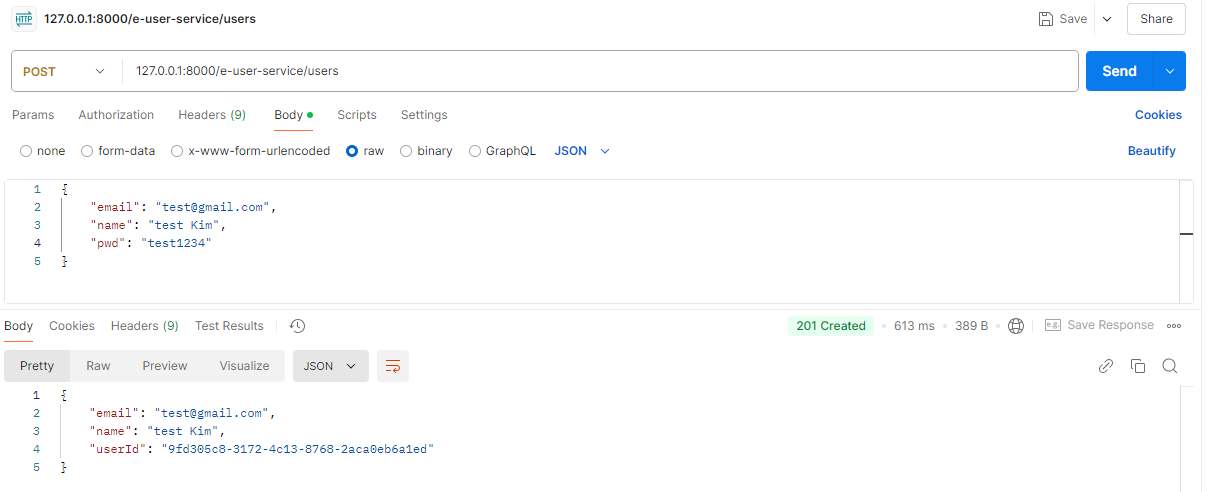
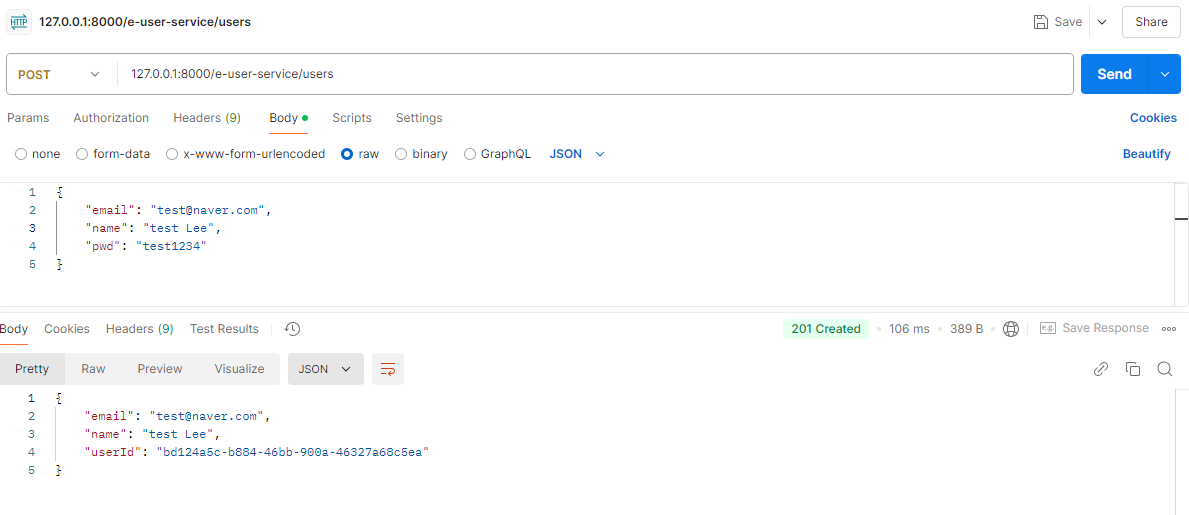
1. 회원가입
2. 가입 확인
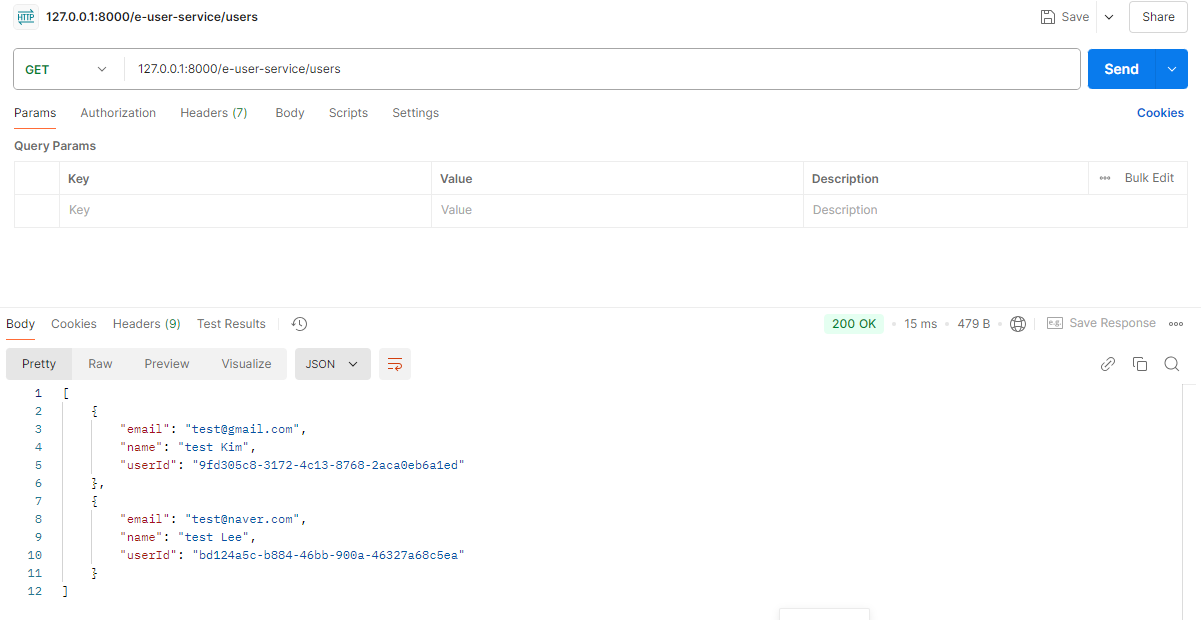
3. 로그인 성공 테스트
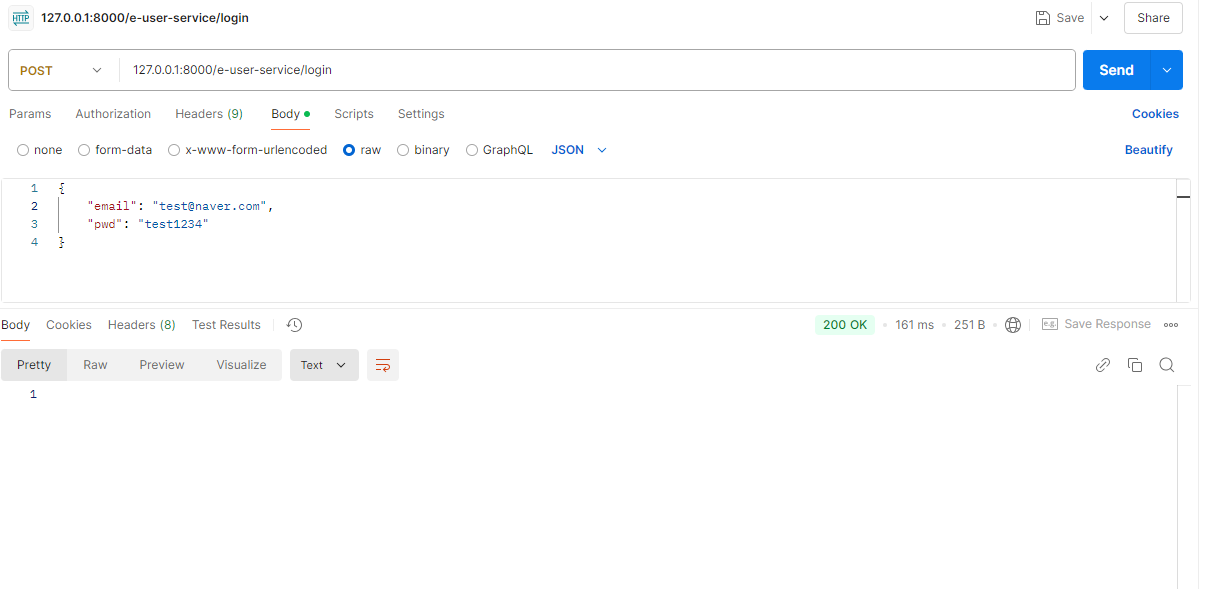
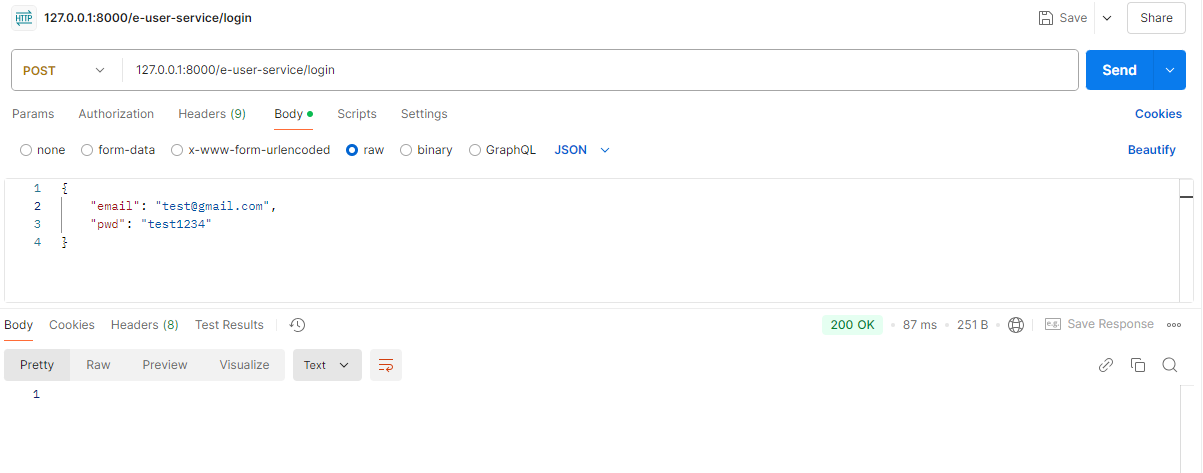
4. 로그인 실패 테스트