선언과 표현, 호이스팅
// 함수(Function)
// 함수 선언문(Declaration)
function hello() {
    console.log('Hello!')
}

hello()

// 함수 표현식(Expression) // 호출하고 함수 선언은 X
const hello = function() {}

// 호이스팅(Hoisting) : 함수 선언부가 유효범위 최상단으로 끌어올려지는 현상을 말한다.
반환 및 종료
// 반환 및 종료

function hello() {
    if(typeof num === 'number'){  // num 매개변수 타입이 'number'라는 문자가 아니면.
        console.log('숫자를 입력해주세요!')
        return 0
    }
    return 'Hello~'
    console.log('Wow!') // return 만나면 실행되지 않음.
}

console.log(hello()) //'Hello~'

//return 뒤에 아무것도 작성하지 않으면 암시적으로~ undefined

function plus(num) {
    return num +1
}

console.log(plus(2))
console.log(plus(7))
console.log(plus()) // undefined가 num으로 들어가게 되고, num +1은 숫자데이터이나, 숫자로 표현할 수가 없어서 NaN이 나온다.
매개변수 패턴(Parameter pattern)
// 매개변수 패턴(Parameter pattern)
//// 기본값(Default value)

function sum(a, b)  {
    return a +b
}

console.log(sum(1, 2)) //3
console.log(sum(7)) // 7 +undefined = NaN
function sum(a, b = 1) {
return a +b
}
console.log(sum(1, 2)) //3
console.log(sum(7)) // 8//// 구조 분해 할당 (Destructuring assignment)
const user = {
name : 'HEROPY',
age : 85,
email : "wjdwlswn2#@nanre"
}
function getName( { name }) {
return name
}
function getEmail({email = '이메일이 없습니다'}) {
return email
}
console.log(getName(user)) // HEROPY
console.log(getEmail(user))배열 구조 분해 할당
const fruits = ['Apple', 'Banana' , 'Cherry']

function getSecondItem([, b]) {
    return b
}

console.log(getSecondItem(fruits))
const number= [1,2,3.4,5,6,7]
function getSecondItem([, b]) {
return b
}
console.log(getSecondItem(fruits))
console.log(getSecondItem(numbers)) //2//// 나머지 배개변수(Rest parameter)
// ...rest : 들어오는 인수들을 전부 순서대로 받아서 배열로 저장한다.
function sum(...rest) {
console.log(rest)
}
console.log(sum(1,2)) //3
console.log(sum(1,2,3,4)) //10
console.log(1,2,3,4,5,6,7,8,9,10) //55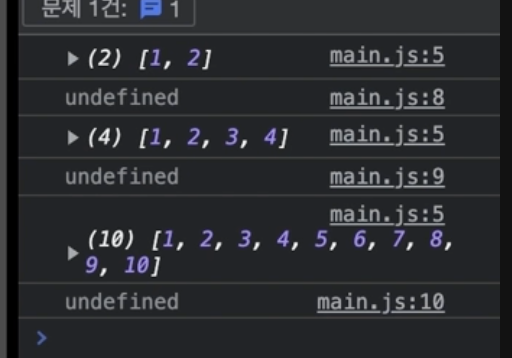
//// 나머지 배개변수(Rest parameter)
// ...rest : 들어오는 인수들을 전부 순서대로 받아서 배열로 저장한다.
function sum(a, b, ...rest) {
    console.log(rest)
    return rest.reduce(function (acc, cur) {
        return acc + cur
    }, 0)

// reduce는, 배열데이터의 아이템 개수만큼 콜백함수를 실행하는데, 만약 rest라는 변수가 숫자 1과 2를 가지고 있는
// 배열 데이터이면, reduce의 콜백함수는 총 2번 실행된다.
// acc : 값이 누적된다. 라는 의미이고 최초값은 뒤에 적은 0
// cur 에는 현재값으로 반복되는 첫번째 아이템 값이다


}
console.log(sum(1,2)) //3
console.log(sum(1,2,3,4)) //10
console.log(1,2,3,4,5,6,7,8,9,10) //55
function sum(a, b, ...rest) {
console.log(rest)
console.log(arguments) // 배열 데이터는 아니고 배열데이터처럼 생긴 객체(=유사배열,Array-Like)
// auguments 는 배열데이터가 아니기 때문에 reduce를 사용할 수 없다. (일종 객체)화살표 함수
// 화살표 함수(Arrow function)

// function sum() {}
// const sum = function () {}
// const sum = () => {}

function sum (a, b) {
    return a + b
}

const sum = (a, b) => a + b

console.log(sum(1,2)) //3
console.log(sum(10,20)) //30

// 소괄호, 화살표기호, 중괄호  -> 어떤 변수에 할당하는 (함수 표현식)
const a = () => {}
const b = x => {}  // 매개변수가 하나일 때는 소괄호()생략 가능
const c = (x,y) => {}
const d = x => {return x * x}
const e = x => x * x
const f = x => {
    console.log(x * x)
    return x * x
}
const g = () => {return {a: 1}}
const h = () => ({a: 1}) // 화살표 함수에서 코드 범위로 사용되는 {} 와,
//객체 데이터에서 사용하는 리터럴 방식 {} 기호가 같기 때문에 h 함수 입장에서는 js로 이해할 수 없기 때문에
// ( )로 묶어서 객체데이터라는 것을 알려준다.

const i = () => {return [1,2,3]}
const j = () => [1,2,3]
즉시실행함수(IIFE)
// 즉시 실행함수( Immediately-Invoked Function Expression)

const a = 7

const double = () => {
    console.log(a * 2)
}

double()

;(() => {
    console.log(a * 2)
})()

;(() => {console.log(a * 2)})()        //(F)()
;(function () {console.log(a * 2)}) () // (F)()
;(function () {console.log(a * 2)} ()) // (F())
;!function () {console.log(a * 2)}()   // !F()
;+function () {console.log(a * 2)}()   // +F()


// 즉시 실행함수는 두번째 소괄호로 들어오는 각각의 데이터들을 즉시실행하는 함수의 매개변수로 받아서 쓸 수 있다,
// 당장 유용하지 않을 수도 있지만, 외부의 변수를 다른 이름으로 내부에서 사용할 수 있다(코드의 난독화가 있다.)
;((a, b) => {
    console.log(a.innerWidth)
    console.log(b.body)
})(window, document)
콜백
// 콜백(Callback) : 함수가 실행될 때 인수로 들어가는 또 하나의 함수.

const { values } = require("lodash")

const a = (callback) => {
    console.log('A')
    callback()
}

const b =() => {
    console.log('B')
}
// 함수는 하나의 데이터로서 소괄호를 열고 닫지않으면, 하나의 함수데이터이고 ()해야, 함수라는 데이터를 실행한다.
a(b)

const sum = (a , b, c) => {
    setTimeout(()=> {
        c(a + b)

    },1000)
}

sum(1,2, value => {
    console.log(value)
})
sum(3,7, value => {
    console.log(value)
})
// 콜백(Callback) : 함수가 실행될 때 인수로 들어가는 또 하나의 함수.
const loadImage = (url, cb) => {
const imgEl = document.createElement('img')
imgEl.src = url
imgEl.addEventListener('load', () => {
setTimeout(() => {
cb(imgEl)
}, 1000)
})
}
const containerEl = document.querySelector('.container')
loadImage('https://fhukhfklw', imgEl => {
containerEl.innerHTML = ''
containerEl.append(imgEl)
})재귀
// 재귀(Recursive)

const { get } = require("lodash")

// 재귀는 무한반복실행이 되기 때문에 멈출 수 있는 조건을 주어야 한다
let i =0
const a = () => {
    console.log('A')
    i +=1
    if(i < 4) {
        a()
    }
}

a()

const userA = {name :'A', parent: null}
const userB = {name: 'B', parent: userA}
const userC = {name:'C', parent : userB}
const userD = {name:'D', parent: userC}

const getRootUser = user => {
    if(user.parent){
        return getRootUser(user.parent)
    }

    return user
}
console.log(getRootUser(userC))
호출 스케줄링
// 호출 스케줄링 (Scheduling a fuction call)
// 호출 스케줄링 (Scheduling a fuction call)

const hello = () => {
    console.log('Hello~')

}
// 몇 초 뒤에 함수를 실행할지.
const timeout = setTimeout(hello, 2000)
const h1El = document.querySelector('h1')
h1El.addEventListener('click', () => {
    console.log('Clear!')
    clearTimeout(timeout) // Timeout을 종료하는,
})
// clearTimeout(timeout) //타이머를 해제

const timeout_2 = setInterval(hello, 2000) // 2초마다 계속 함수 실행
const h1El_2 = document.querySelector('h1')
h1El_2.addEventListener('click', () => {
    console.log('Clear!')
    clearTimeout(timeout)
})
this⭐️
- js로 코딩할 때 많이 만나기 때문에 ,일반함수, 화살표 함수와 다른 방식으로 해석이 되기 때문에 명확히 이해하고 넘어가야 한다.
일반 함수에서의 this 호출
// this
//// 일반 함수의 this는 호출 위치에서 정의
//// 화살표 함수의 this는 자신이 선언된 함수(렉시컬) 범위에서 정의

const user = {
    firstName:'HEROPY',
    lastName: 'Park',
    age:85,
    getFullName : function () {
        return '${this.firstName} ${this.lastName}'
    }
}

console.log(user.getFullName())
화살표 함수의 this 호출
function user() {
    this.firstName = 'Neo'
    this.lastName = 'Anderson'

    return {
        firstName:'HEROPY',
        lastName: 'Park',
        age:85,
        getFullName : function () { // :, function은 생략가능
            return '${this.firstName} ${this.lastName}'
        }
    }
}

const lewis = {
    firstName: 'Lewis',
    lastName: 'Yang'
}

const u = user()
console.log(u.getFullName())
console.log(u.getFullName.call(lewis))
특정한 함수 내부에서 this라는 키워드를 반복적으로 사용할 때 만약 함수 내부에 또 다른 함수가 들어있는 구조라면 일반함수보단, 화살표함수를 사용하는 것이 일반적이다.
// 렉시컬(Lexical)이란, 함수가 동작할 수 있는 유효한 범위를 의미

const timer = {
    title:'TIMER',
    timeout:function() {
        console.log(this.title)
        setTimeout(() => {
            console.log(this.title)
        },1000)
    }
}

timer.timeout()
위 코드에서 timeout함수가 가지고 있는 this 키워드는 결과적으로 timer라는 객체 데이터이고 여기서의 this와 callback의 this 함수와 동일하다.

개인 개발 공부, 정리용 🔗

이 글은 저에게 많은 도움이 되었습니다.