개발일지 쓰기
학습한 내용
진도와 학습한 내용작성
오늘은 레이아웃중 박스모델, 마진병합, display, vertical-align, position 에 대하여 공부하였습니다. 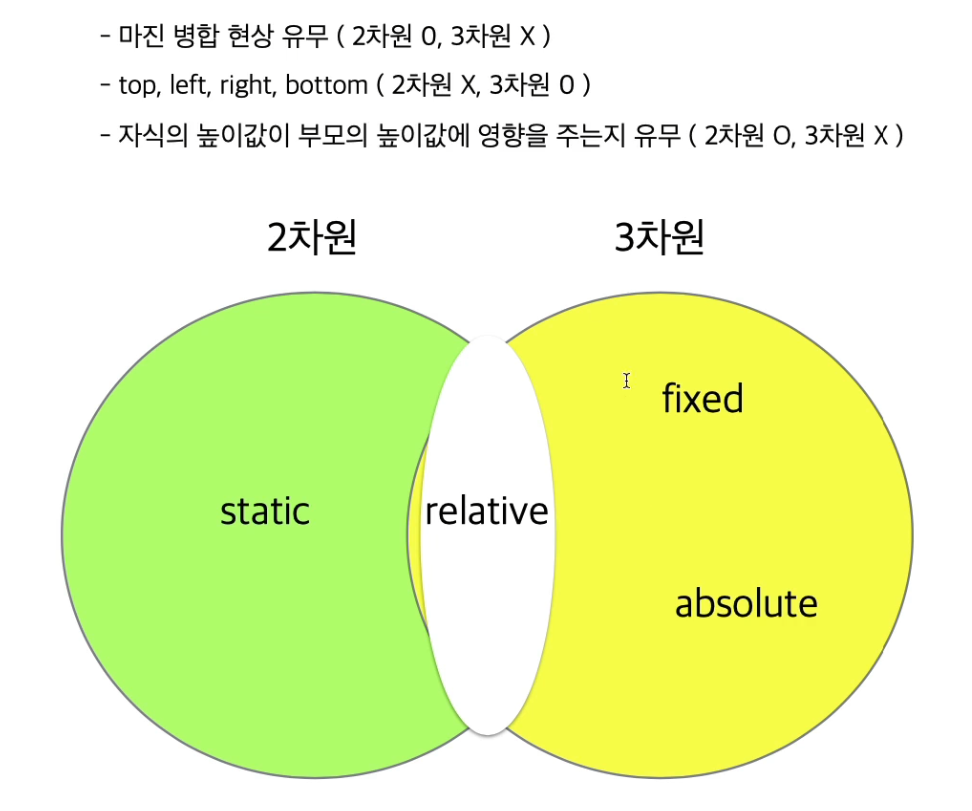
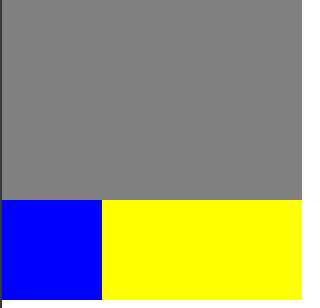
결과물은 해당 영상강의 마지막에 찍어둔것입니다. 다음에는 중간중간 찍겠습니다.
css 코딩한 내용입니다.
html, body {
margin: 0;
padding: 0;
}
.box-model {
box-sizing: border-box;
width: 200px;
height: 200px;
background-color: yellow;
border: solid 10px red;
/ margin: 100px 0 0 100px;/
padding: 100px 0 0 100px;
/*
margin-left: 100px;
margin-top: 100px;
margin-right: ;
margin-bottom: ;

padding-left: 100px;
padding-top: 100px;
padding-right: ;
padding-bottom: ;
*/
}
.margin-one {
width: 100%;
height: 100px;
background-color: yellow;
margin-bottom: 100px;}
.margin-two {
width: 100%;
height: 100px;
background-color: blue;
margin-top: 150px;}
.margin-parent {
width: 300%;
height: 300px;
background-color: yellow;
}
.margin-child {
position: absolute;
width: 150%;
height: 150px;
background-color: blue;
margin-top: 100px;}
/*
h1 {
display: inline;
width: 100px;
height: 100px;
background-color: yellow;
margin-top: 100px;}
span {
display: block;
width: 100px;
height: 100px;
background-color: pink;
margin-top: 100px;}
*/
.inline-block {
display: inline-block;
width: 100px;
height: 100px;
background-color: yellow;}
.inline, .inline-block, img, h1 {
vertical-align: top;
}
.static-parent {
width: 300px;
/ height: 300px;/
background-color: yellow;
}
.static-child {
width: 150px;
height: 150px;
background-color: blue;
margin-top: 100px;/ top: 100px;/
}
.box1 {
width: 300px;
height: 200px;
background-color: gray;
}
.fixed-parent {
width: 300px;
/ height: 300px;/
background-color: yellow;
}
.fixed-child {
width: 100px;
height: 100px;
background-color: blue;
/ margin-top: 100px;/
/ top: 100px;/
}
.box2 {
width: 300px;
height: 2000px;
background-color: green;
}
.box1 {
width: 300px;
height: 200px;
background-color: gray;
}
.absolute-parent {
width: 300px;
/ height: 300px;/
background-color: yellow;
}
.absolute-child {
position: relative;
width: 100px;
height: 100px;
background-color: blue;/ margin-top: 100px;/
/ top: 100px;/
}
.box1 {
width: 300px;
height: 200px;
background-color: gray;
}
.absolute-parent {
width: 300px;
height: 300px;
background-color: yellow;
}
.absolute-child {
width: 100px;
height: 100px;
background-color: blue;
/ margin-top: 100px;/
top: 100px;
}
학습한 내용 중 어려웠떤 점 또는 해결못한 것들
position 속성에 대하여 배운것이 어려웠습니다. 부모 자식간의 2차원은 영향을 주고 3차원은 영향을 안주고 이런식으로 속성에 따라 결과물자체에 내용이 바뀔수있기때문에 실제로 코딩시에 많은 오류가 발견되었습니다. 또한 코딩중에 영상에서보면 css 값은 왠만하면 주석처리안하고 그냥 진행하시는데 저는 다음배울것을 하는도중에 앞에 css코딩한것에 영향을 받는게 아닐까 싶을정도로 결과물이 이상하게 나올때가 있습니다. 이부분은 시간을 들여서 다시 해보도록 하겠습니다.
해결방법
일단 position 속성에 대해서는 3번~4번정도 계속 반복적으로 듣고 해보고 하였습니다. 그리하여 대략적인 이해는 되나 아직 정확하게 이해했다는 생각은 안드는 상태입니다. 주변인을 통하여 해당 부분에 대해 좀더쉽게 이해할수 있는 방법이 있다고 하여, 다시 정확히 이해되도록 조언을 구해보려고 합니다.
학습 소감
확실히 실제 강의 보다는 영상물이어서 이해안되는 부분을 다시 반복해서 볼수있어 너무 좋습니다. 물론 모르는 부분에 대해 즉각 질문이 최고이긴하지만 처음배우는 부분이라 제가 해볼수있는만큼 해본후에 질문을 하는게 더 이해가 잘될것 같습니다. 아직은 제가 배운부분으로 프로그래밍을 할수있을지 미지수이긴 하지만 그래도 많이 도움이 되고 있습니다. 감사합니다.