1. 프렌드 함수
프렌드 함수는 클래스 외부에서 정의된 함수로, 해당 클래스의 private 및 protected 멤버에 접근할 수 있습니다. 프렌드 함수는 friend 키워드를 사용하여 선언합니다.
프렌드로 초대하는 3가지 유형
-
전역 함수 : 객체를 사용하지 않고 호출
class Rect { friend bool equals(Rect r, Rect s); }; -
특정 클래스 멤버 함수 : 해당 클래스의 객체를 생성하여 호출
class Rect { friend bool RectManager::equals(Rect r, Rect s); }; -
다른 클래스 전체 : 해당 클래스의 객체를 생성하여 호출
class Rect {
    friend class RectManager;
};
예시 코드 - 프렌드 함수 만들기 (7-1,2,3)
#include <iostream>
using namespace std;

// Rect 클래스의 전방 선언. Rect클래스가 선언되기 전에 먼저 참조되는 컴파일 오류를 막기 위한 선언문
class Rect;

bool externalEquals(Rect r, Rect s);    // 외부(전역) 함수 선언

class RectManager {
public:
    bool memberEquals(Rect r, Rect s);  // 멤버 함수: 도형 크기 비교
    void copy(Rect& dest, Rect& src);   // 멤버 함수: 도형 복사
};

class Rect {
    int width, height;
public:
    Rect(int width, int height) : width(width), height(height) {}   // 생성자

    // 1. 외부 함수를 프렌드로 선언
    friend bool externalEquals(Rect r, Rect s);

    // 2. 특정 클래스 멤버 함수를 프렌드로 선언
    friend bool RectManager::memberEquals(Rect r, Rect s);

    // 3. 다른 클래스 전체를 프렌드로 선언
    friend class RectManager;
};

// 1. 외부 함수 정의
bool externalEquals(Rect r, Rect s) {
    return r.width == s.width && r.height == s.height;  // private 멤버에 접근 가능
}

// 2. RectManager의 멤버 함수 정의
bool RectManager::memberEquals(Rect r, Rect s) {
    return r.width == s.width && r.height == s.height;
}

// 3. RectManager의 멤버 함수 정의
void RectManager::copy(Rect& dest, Rect& src) {
    dest.width = src.width;
    dest.height = src.height;
}

int main() {
    Rect a(3, 4), b(4, 5);
    RectManager man;

    // 외부 함수 호출
    if (externalEquals(a, b))
        cout << "externalEquals: equal" << endl;
    else
        cout << "externalEquals: not equal" << endl;

    // RectManager 멤버 함수 호출
    if (man.memberEquals(a, b))
        cout << "memberEquals: equal" << endl;
    else
        cout << "memberEquals: not equal" << endl;

    // RectManager 멤버 함수 호출 (copy)
    man.copy(b, a);
    if (man.memberEquals(a, b))
        cout << "after copy: equal" << endl;
    else
        cout << "after copy: not equal" << endl;

    return 0;
}
2. 연산자 중복
연산자 중복은 C++에서 기존 연산자에 새로운 의미를 부여하여 사용자 정의 타입에 대해 사용할 수 있도록 합니다. 이를 통해 코드의 가독성과 사용성을 높일 수 있습니다.
- C++에 본래 있는 연산자만 중복 가능
- 피연산자 타입이 다른 새로운 연산 정의
- 연산자는 함수 형태로 구현
- 반드시 클래스와 관계를 가짐
- 피연산자의 개수를 바꿀 수 없음
- 연산의 우선 순위 변경 불가
- 모든 연산자가 중복 가능하지 않음
1) 연산자 함수 형식
-
클래스의 멤버 함수로 구현
-
외부 함수로 구현하고 클래스에 프렌드 함수로 선언
리턴타입 operator연산자(매개변수리스트);
2) 이항 연산자 중복: +와 == 연산자의 작성 사례
클래스의 멤버 함수로 작성:
class Color {
public:
    Color operator+(Color op2);
    bool operator==(Color op2);
};
외부 함수로 작성하고 클래스에 프렌드로 선언:
class Color {
public:
    friend Color operator+(Color op1, Color op2);
    friend bool operator==(Color op1, Color op2);
};
3) 이항 연산자 중복: + 연산자 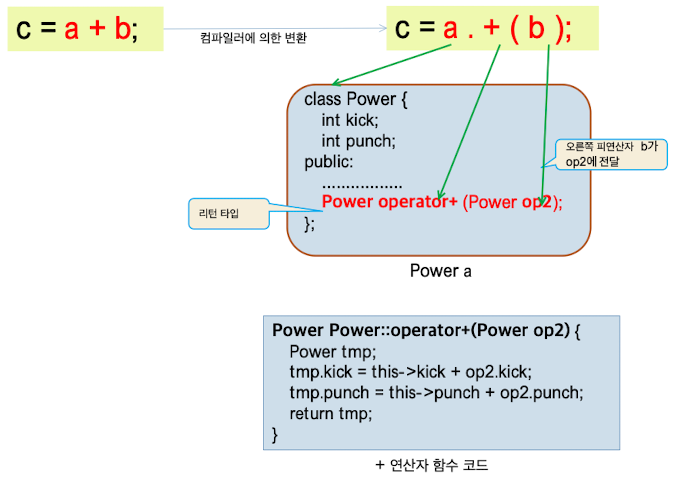
주요 코드 구조
class Power {
    int kick;
    int punch;
public:
    Power(int kick=0, int punch=0) : kick(kick), punch(punch) {}
    Power operator+(Power op2);  // + 연산자 함수 선언
};

//새로운 객체 'tmp'를 생성하여 두 객체의 값을 더해준다. 원래 객체는 수정되지 않고, 새로운 객체를 반환한다.
Power Power::operator+(Power op2) {
    Power tmp;
    tmp.kick = this->kick + op2.kick;  // kick 값 더하기
    tmp.punch = this->punch + op2.punch;  // punch 값 더하기
    return tmp;
}
4) 단항 연산자 중복: 전위와 후위 ++ 연산자
단항 연산자는 피연산자가 하나뿐인 연산자로, 연산자 중복 방식은 이항 연산자의 경우와 거의 유사합니다.
단항 연산자 종류
- 전위 연산자 (prefix operator) :
++op,--op,!op,~op - 후위 연산자 (postfix operator) :
op++,op--
전위 ++ 연산자 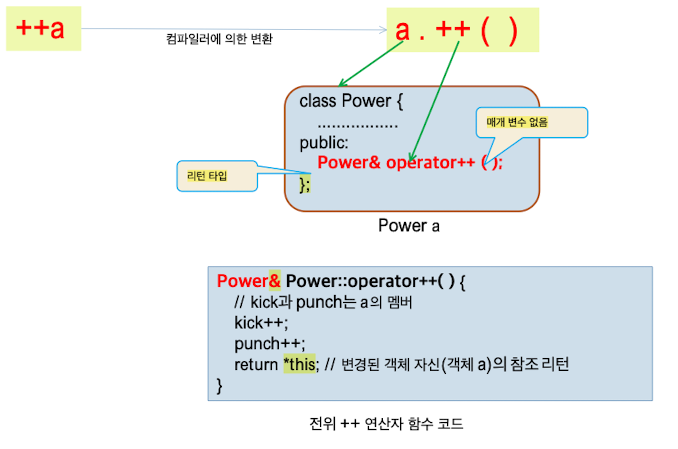
class Power {
    int kick;
    int punch;
public:
    Power(int kick=0, int punch=0) : kick(kick), punch(punch) {}
    Power& operator++();  // 전위 ++ 연산자 함수 선언.
};

// 리턴타입 : 레퍼런스
Power& Power::operator++() {
    kick++;
    punch++;
    return *this;  // 변경된 객체 자신을 반환
}

int main() {
	Power a(3,5), b;	//a=(3,5), b=(0,0)
    b=++a;				//a=(4,6), b=(4,6)
}
후위 ++ 연산자 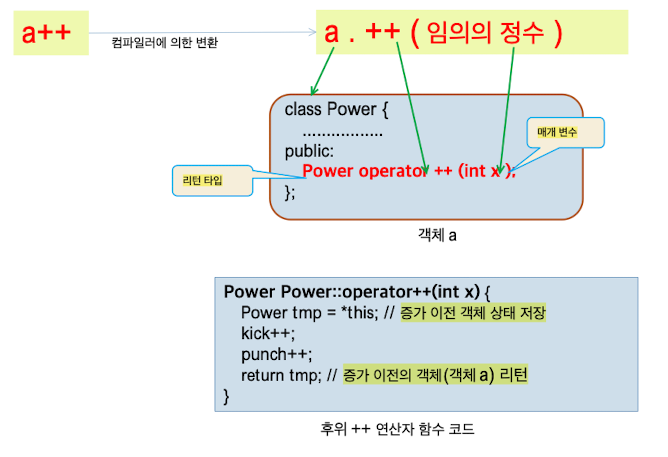
class Power {
    int kick;
    int punch;
public:
    Power(int kick=0, int punch=0) : kick(kick), punch(punch) {}
    Power operator++(int);  // 후위 ++ 연산자 함수 선언
};

Power Power::operator++(int) {
    Power tmp = *this;  // 증가 이전 객체 상태 저장
    kick++;
    punch++;
    return tmp;  // 증가 이전의 객체 반환
}

int main() {
	Power a(3,5), b;	//a=(3,5), b=(0,0)
    b = a++;			//a=(4,6), b=(3,5)
}
5) 2 + a 덧셈을 위한 + 연산자 함수 작성
Power operator+(int op1, Power op2) {
    Power tmp;
    tmp.kick = op1 + op2.kick;  // kick 값 더하기
    tmp.punch = op1 + op2.punch;  // punch 값 더하기
    return tmp;
}
+ 연산자를 외부 프렌드 함수로 구현
Power operator+(Power op1, Power op2) {
    Power tmp;
    tmp.kick = op1.kick + op2.kick;  // kick 값 더하기
    tmp.punch = op1.punch + op2.punch;  // punch 값 더하기
    return tmp;
}
참조를 리턴하는 << 연산자 작성
#include <iostream>
using namespace std;

class Power {
    int kick;
    int punch;
public:
    Power(int kick = 0, int punch = 0) : kick(kick), punch(punch) {}
    void show() {
        cout << "kick=" << kick << ", punch=" << punch << endl;
    }
    Power& operator<<(int n);  // << 연산자 함수 선언
};

Power& Power::operator<<(int n) {
    kick += n;  // kick 값에 n 더하기
    punch += n;  // punch 값에 n 더하기
    return *this;  // 변경된 객체 자신을 반환
}

int main() {
    Power a(1, 2);
    a << 3 << 5 << 6;  // << 연산자 사용
    a.show();  // 결과 출력
}
주니어 개발자