🚨 이슈 사항
- 이슈 내용: supabase의 auth 스키마와 public의 users 테이블을 연동하기 위한 trigger function 적용 시 500 에러가 발생하며 회원 정보가 등록되지 않는 이슈
1. 이슈 로직
: signup 페이지에서 유저가 입력하는 정보는 다음과 같다.
1. email
2. password
3. 닉네임
이 세 가지 정보를 각각 받아 submit 해주었다.
// signUp.jsx
const onSubmit = (data) => {
  const { email, password, userName } = data;
  console.log('email =====>', email);
  console.log('password =====>', password);
  handleUserSignUp(email, password, userName);
};
// userAuthService.js
import { supabase } from './client';
export const handleUserSignUp = async (email, password, userName) => {
try {
const { data, error } = await supabase.auth.signUp({
email,
password,
options: {
data: {
name: userName,
profile_img: '/profile_default.png',
},
},
});
} catch (err) {
console.log('err =====>', err);
}
};: handleUserSignUp 함수는 이메일, 비밀번호, 닉네임과 기본 프로필 이미지 이 4개의 항목을 DB로 전송한다.
🧨 트리거 함수
begin
  insert into public.users (user_id, email, name, profile_img)
  values (
    new.id,
    new.email,
    new.raw_user_meta_data->>'name',
    new.raw_user_meta_data->>'profile_img'
  );
  return new;
end;
: auth 스키마의 users의 새로운 정보 new가 등록되면 public에 있는 users 테이블에 DB로 넘겨준 정보가 들어가도록 트리거 함수를 작성했다.
public의 users 테이블 columns는 아래와 같다.

1. id
2. created_at
3. user_id
4. email
5. name
6. profile_img
전체적으로 문제가 없을 것으로 생각하고 회원가입 버튼을 누르자마자 500 에러를 마주했다☠
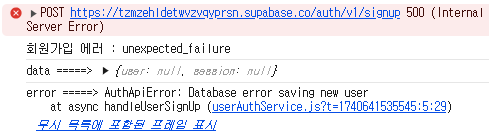
원인도 제대로 말 안해주고 unexpected_failure라고만 말하면 어떡하니..
해당 에러 메시지에 대해 다방면으로 검색을 해보았지만 데이터가 그렇게 많지도 않았다.. 그나마 도움이 됐.. 다고 했던 내용은 하나였다.
"트리거 함수에 문제가 있을 때 발생하는 에러다."
뭐가 잘못된건지도 알려주면 좋으련만.. ^^~
2. 트리거를 테스트하자
// 🐞 문제의 트리거 함수
begin
  insert into public.users (user_id, email, name, profile_img)
  values (
    new.id,
    new.email,
    new.raw_user_meta_data->>'name',
    new.raw_user_meta_data->>'profile_img'
  );
  return new;
end;
: 하나하나 천천히 사용법을 확인했다.
insert into뒤에는 auth 스키마와 연결할 테이블명을 작성한다.insert into 테이블명뒤에는 소괄호와 함께 해당 테이블의 columns를 작성한다.values안에는 columns에 삽입할 내용들을 작성한다.- 위 columns 를 적는 란과 동일한 순서로 values를 삽입해야 한다.
- auth 스키마에 있는 내용은
new.value로, 없는 추가적인 내용은new.raw_user_meta_data->>''로 작성한다.
그리고 난 모든 사용법을 지켰는데도. 💢 why
테스트를 위해 추가적인 데이터를 우선 빼고 회원가입을 시도해봤다.
// 1️⃣ 기본적인 정보인 id와 email만 추가
begin
  insert into public.users (user_id, email)
  values (
    new.id,
    new.email
  );
  return new;
end;- 결과 : 실패
// 2️⃣ 진짜진짜진짜 기본적인 정보인 id만 추가
begin
  insert into public.users (user_id)
  values (
    new.id
  );
  return new;
end;- 결과 : 실패
// 3️⃣ 이미지만 제외하고 추가
begin
  insert into public.users (user_id, email, name)
  values (
    new.id,
    new.email,
    new.raw_user_meta_data->>'name'
  );
  return new;
end;- 결과 : 실패

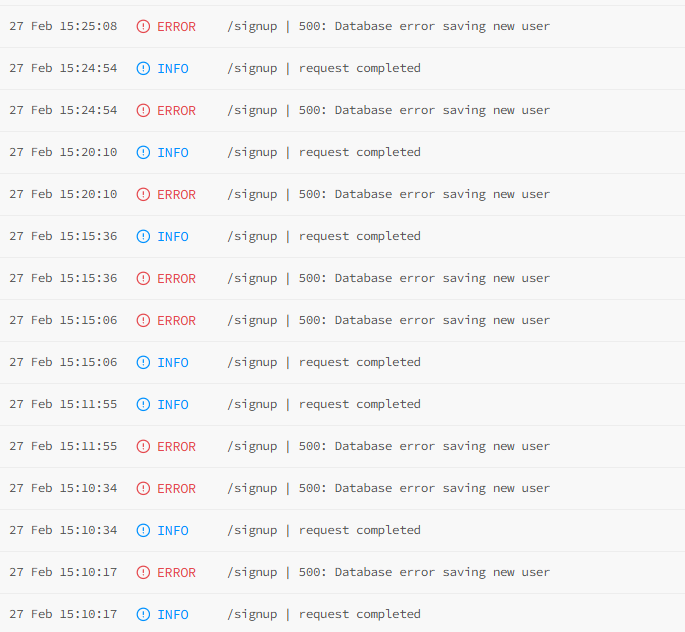
괴로움의 에러 로그 .. 에러 Raw를 봐도 별 다른 내용은 없는 것 같았는데..
{
  "event_message": "{\"component\":\"api\",\"error\":\"failed to close prepared statement: ERROR: current transaction is aborted, commands ignored until end of transaction block (SQLSTATE 25P02): ERROR: null value in column \\\"created_at\\\" of relation \\\"users\\\" violates not-null constraint (SQLSTATE 23502)\",\"level\":\"error\",\"method\":\"POST\",\"msg\":\"500: Database error saving new user\",\"path\":\"/signup\",\"referer\":\"http://localhost:5173/\",\"remote_addr\":\"49.166.97.221\",\"request_id\":\"918656b02671d1d9-ICN\",\"time\":\"2025-02-27T07:07:33Z\"}",
  "id": "9261749b-a5cf-4cbc-8920-f33e3e0460a4",
  "metadata": [
    {
      "host": "db-tzmzehldetwvzvqvprsn",
      "component": "api",
      "_SYSTEMD_CGROUP": null,
      "request_id": "918656b02671d1d9-ICN",
      "mail_from": null,
      "message": null,
      "_SOURCE_REALTIME_TIMESTAMP": null,
      "PRIORITY": null,
      "_AUDIT_LOGINUID": null,
      "panic": null,
      "metering": null,
      "UNIT": null,
      "event": null,
      "SYSLOG_FACILITY": null,
      "msg": "500: Database error saving new user",
      "mail_type": null,
      "EXECUTABLE": null,
      "user_id": null,
      "_CMDLINE": null,
      "action": null,
      "auth_event": [],
      "level": "error",
      "_PID": null,
      "path": "/signup",
      "duration": null,
      "_COMM": null,
      "header": null,
      "_MACHINE_ID": null,
      "login_method": null,
      "_STREAM_ID": null,
      "source_type": null,
      "_LINE_BREAK": null,
      "_EXE": null,
      "_AUDIT_SESSION": null,
      "_TRANSPORT": null,
      "x_forwarded_proto": null,
      "time": null,
      "mail_to": null,
      "_GID": null,
      "stack": null,
      "x_forwarded_host": null,
      "status": null,
      "_UID": null,
      "method": "POST",
      "CODE_FILE": null,
      "remote_addr": "49.166.97.221",
      "provider": null,
      "_SYSTEMD_UNIT": null,
      "issuer": null,
      "error": "failed to close prepared statement: ERROR: current transaction is aborted, commands ignored until end of transaction block (SQLSTATE 25P02): ERROR: null value in column \"created_at\" of relation \"users\" violates not-null constraint (SQLSTATE 23502)",
      "client_id": null,
      "MESSAGE_ID": null,
      "referer": "http://localhost:5173/",
      "_SYSTEMD_INVOCATION_ID": null,
      "CODE_FUNC": null,
      "_BOOT_ID": null,
      "INVOCATION_ID": null,
      "__MONOTONIC_TIMESTAMP": null,
      "timestamp": null,
      "__REALTIME_TIMESTAMP": null,
      "CODE_LINE": null,
      "_SYSTEMD_SLICE": null,
      "instance_id": null,
      "args": [],
      "SYSLOG_IDENTIFIER": null,
      "metadata": [],
      "_CAP_EFFECTIVE": null,
      "factor_id": null,
      "_SELINUX_CONTEXT": null,
      "project": null
    }
  ],
  "timestamp": 1740640053000000
}
그리고 찾았다!
"error": "failed to close prepared statement: ERROR: current transaction is aborted, commands ignored until end of transaction block (SQLSTATE 25P02): ERROR: null value in column \"created_at\" of relation \"users\" violates not-null constraint (SQLSTATE 23502)",
created_at 이라는 column이 nullable 하지 않은 데도 값이 할당되지 않았다는 거다.
역시 어디가 맛탱이가 가면 에러 로그를 봐야한다는 것을 또 또 뼈저리게 느끼기 ..
그리고 다시 public의 users 테이블로 돌아가보면
1. id
2. created_at
3. user_id
4. email
5. name
6. profile_img
6가지의 정보가 있고 create_at column은 nullable 하지 않았다 .. . .
// 🐞 문제의 트리거 함수
begin
  insert into public.users (user_id, email, name, profile_img)
  values (
    new.id,
    new.email,
    new.raw_user_meta_data->>'name',
    new.raw_user_meta_data->>'profile_img'
  );
  return new;
end;
잘 보면 created_at 을 할당해주지 않았다 .. ^^ 그치만 여기에는 어느 정도 나만의 이유가 있었는데 .. created_at은 row가 생성될 때 자동으로 값이 할당되는 줄 알았기 때문이다 ~~ 😭 내힘들다 .. 하지만 이번 테이블에서는 default 값이 설정되어 있지 않았다는 것을 간과했다 😭
✅ 해결
begin
  insert into public.users (user_id, email, name, profile_img, created_at)
  values (
    new.id,
    new.email,
    new.raw_user_meta_data->>'name',
    new.raw_user_meta_data->>'profile_img',
    now()
  );
  return new;
end;now()로created_atcolumn에 자동으로 데이터가 등록된 시간이 반영되게끔 추가해주었다.
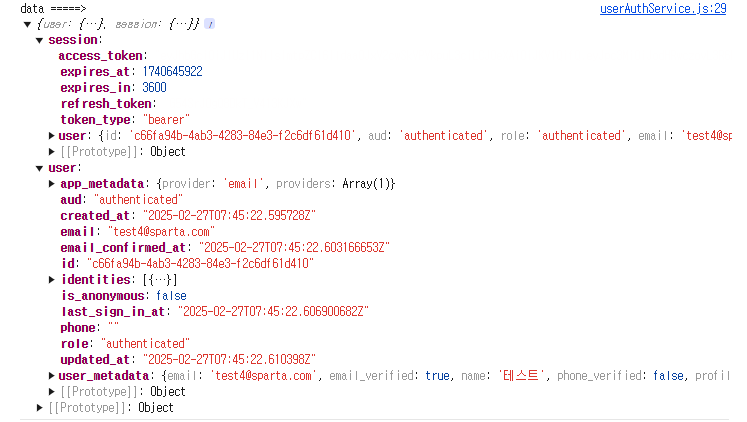
그리고 행복한 결말 … 🥴
💌 요약
: Supabase에서 trigger를 사용해 테이블에 INSERT를 수행할 때, values()에 모든 컬럼에 대한 값이 명시될 필요는 없으나 아래 조건을 확인해야 한다.
-
NOT NULL 제한이 있는 컬럼
NOT NULL로 설정된 컬럼은 반드시 값을 제공해야 한다.
-
DEFAULT 값이 설정된 컬럼
DEFAULT값이 설정된 컬럼은 생략할 수 있으며, 자동으로 기본값이 적용된다.
-
SERIAL 또는 IDENTITY 컬럼
SERIAL(자동 증가) 또는IDENTITY컬럼은 명시적으로 값을 넣지 않아도 자동으로 증가된 값이 저장된다.