API 연결 방식
1. Fetch API
2. Axios
3. React Query (TanStack Query)
4. GraphQL (Apollo Client / Relay)
5. Redux Middleware (Thunk, Saga 등)
그리고,, REST API
1. Fetch API
- HTTP request 전송 기능을 제공하는 클라이언트 사이드 Web API
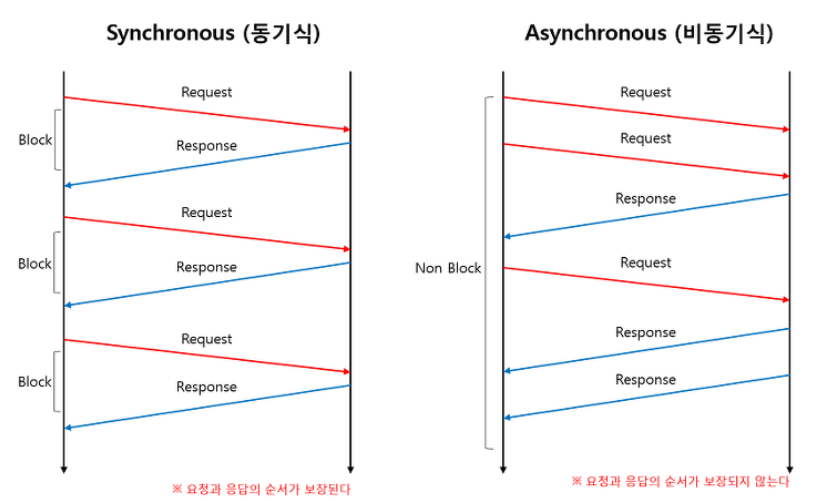
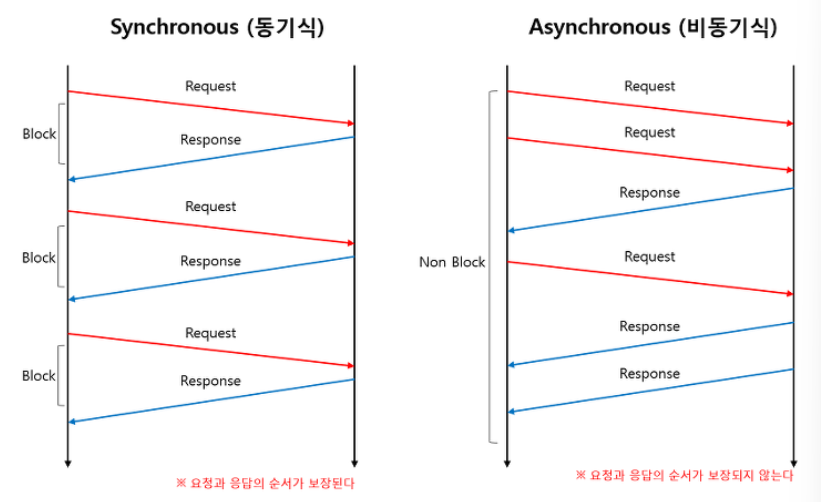
클라이언트 → 서버 : request
서버 → 클라이언트: response - 라이브러리인 axios와 달리 브라우저에 내장된 함수
=>서버와의 통신을 통해 CRUD를 구현할 수 있게 하는 프로미스 지원 내장 함수
<사용법>
const promise = fetch(url [, options])- params
*1번째 인자: HTTP 요청을 전달할 url- 2번째 인자: 옵션 객체 (HTTP 요청 메서드, HTTP 요청 헤더, payload 등)
- return=>HTTP 응답을 나타내는 Response 객체를 래핑한 Promise 객체 반환
* Response 객체 : HTTP 응답 상태(status), HTTP 응답 헤더(headers), HTTP 응답 전문(body) 등
- 단점 : 에러 처리와 복잡한 요청 시 코드가 장황해질 수 있음
- 참고 링크텍스트
2. Axios
- 브라우저, Node.js를 위해서 만들어진 Promise API를 활요하는 HTTP 비동기 통신 라이브러리
- Axios는 운영환경에 따라서 브라우저간 XMLHttpRequest 객체 또는 Node.js의 HTTP API를 사용한다.
- Promise(ES6) API를 사용한다.
- 요청(Request) 응답 (reply)을 JSON 형태로 자동 변경
<사용법>
- Axios 다운로드
npm i axios- HTTP Methods (GET,POST,DELETE,PUT)
=>클아이언트가 웹서버에게 사용자 요청의 목적/종류를 알려주는 수단
import axios from 'axios';

useEffect(() => {
  axios.get('https://api.example.com/data')
    .then(response => setData(response.data))
    .catch(error => console.error('Error:', error));
}, []);
번외 Fetch API VS Axios
Fetch API
- body안에 정보
- url은 ()안에 인자로
- body는 stringify()
const url = '요청할 주소'
const options = {
  method: 'POST',
  header: {
     'Accept' : 'application/json',
     'Content-Type':'application/json';charset=UTP-8'
  },
  body:JSON.stringify({
     name: 'test'
  })

  fetch(url.options)
     .then(response => console.log(response))
}
AXIOS
- data안에 정보
- url은 option 객체 안에 값으로
- const option = {
   url = '요청할 주소'
   method:'POST',
   header: {
     'Accept':'application/json',
     'Content-Type': 'application/json';charset=UTP-8'
   },
   data: {
      name: 'test'
   }

   axios(options)
      .then(response => console.log(response))
}
3. React Query (TanStack Query)
<React Query라는 이름으로 시작했지만, v4부터 Vue나 Svelte 등의 다른 프레임워크에서도 활용할 수 있도록 기능이 확장되며 TanStack Query라는 이름으로 변경되었다.>
- 서버 상태 관리를 위한 라이브러리로, 캐싱 및 자동 재요청 기능 제공.
데이터 가져오기 및 캐싱
동일 요청의 중복 제거
신선한 데이터 유지
무한 스크롤, 페이지네이션 등의 성능 최적화
* 네트워크 재연결, 요청 실패 등의 자동 갱신
<데이터 캐싱>
- TanStack Query를 활용해서 데이터를 가져올 때는 항상 쿼리 키(queryKey)를 지정하게 된다.
- 쿼리 키는 캐시된 데이터와 비교해 새로운 데이터를 가져올지, 캐시된 데이터를 사용할지 결정하는 기준이 된다.
어.. 더 쓰려고 했는데 생각보다 길어져서 따로 TanStack Query에 대한 포스팅을 해볼게요
import { useQuery } from '@tanstack/react-query'

export default function DelayedData() {
  const { data } = useQuery({
    queryKey: ['delay'],
    queryFn: async () => (await fetch('https://api.heropy.dev/v0/delay?t=1000')).json()
  })
  return <div>{JSON.stringify(data)}</div>
}- 참고 링크텍스트
4번은 진짜 처음 봤는데
-
GraphQL (Apollo Client / Relay)는 GraphQL API를 사용하는 프로젝트에 적합한 클라이언트 라이브러리로 데이터 요청을 효율적으로 구성,프런트엔드에서 필요한 데이터만 요청 가능하며 데이터 요청에 최적화 되어있으나 GraphQL API 환경 필요하다.
-
Redux Middleware (Thunk, Saga 등)는 Redux 상태 관리와 API 통합한다. 비동기 작업 처리를 위해 Thunk 또는 Saga 사용하고 상태와 API 요청 로직을 통합 관리하며 전역 상태와 API 요청 통합하지만 설정 및 코드 복잡도 증가한다..
REST API
to be continue..