Dilation, linear-interpolation 그리고 Bilinear upsampling

현재 작성중인 PSPN(Pyramid Scene Parsing Network)논문 리뷰에 앞서, 함께 설명할 dilation, linear-interpolation 그리고 Bilinear upsampling에 대해서 간략하게 설명하고자 한다.
먼저 dilation에 대해서 설명하겠다.
Dilation (Dilated / Astrous Convolution)
PSPN을 구현하다 보면,
def get_backbone(layers):
    if layers == 50:
        weights = models.ResNet50_Weights.DEFAULT
        backbone = models.resnet50(
            weights=weights,
            replace_stride_with_dilation=[False, True, True]
        )
    elif layers == 101:
        weights = models.ResNet101_Weights.DEFAULT
        backbone = models.resnet101(
            weights=weights,
            replace_stride_with_dilation=[False, True, True]
        )

    backbone_layers = list(backbone.children())[:-2]
    backbone = nn.Sequential(*backbone_layers)

    return backbone
위와 같이 replace_stride_with_dilation=[False, True, True] 를 사용하게 된다.(위 코드는 PSPN에서 backbone으로 ResNet50을 불러오는 과정이다.)
이는 backbone모델로 줄어든 Feature Map이 위치 정보 손실을 야기하게 되어 사용하는 기법이다.
Dilation이란, feature map의 spatial 해상도를 줄이지 않고 Receptive Field만 키우기 위한 Convolution 기법이다.
Semantic Segmentation에서 사실상 필수적인 개념이다.
PSPN에서는 backbone 모델로 pre-trained된 ResNet50 혹은 ResNet101 모델을 사용한다.
일반적인 분류문제에서 ResNet을 거칠 때 Output Feature Map의 크기는 원본 이미지의 1/32 크기로 줄어든다.(*output stride=32)
PSPN에서 사용하는 입력 이미지 473x473의 크기는 이 된다. (*output stride=8)
[이 때 output stride는 누적 stride를 말한다.]
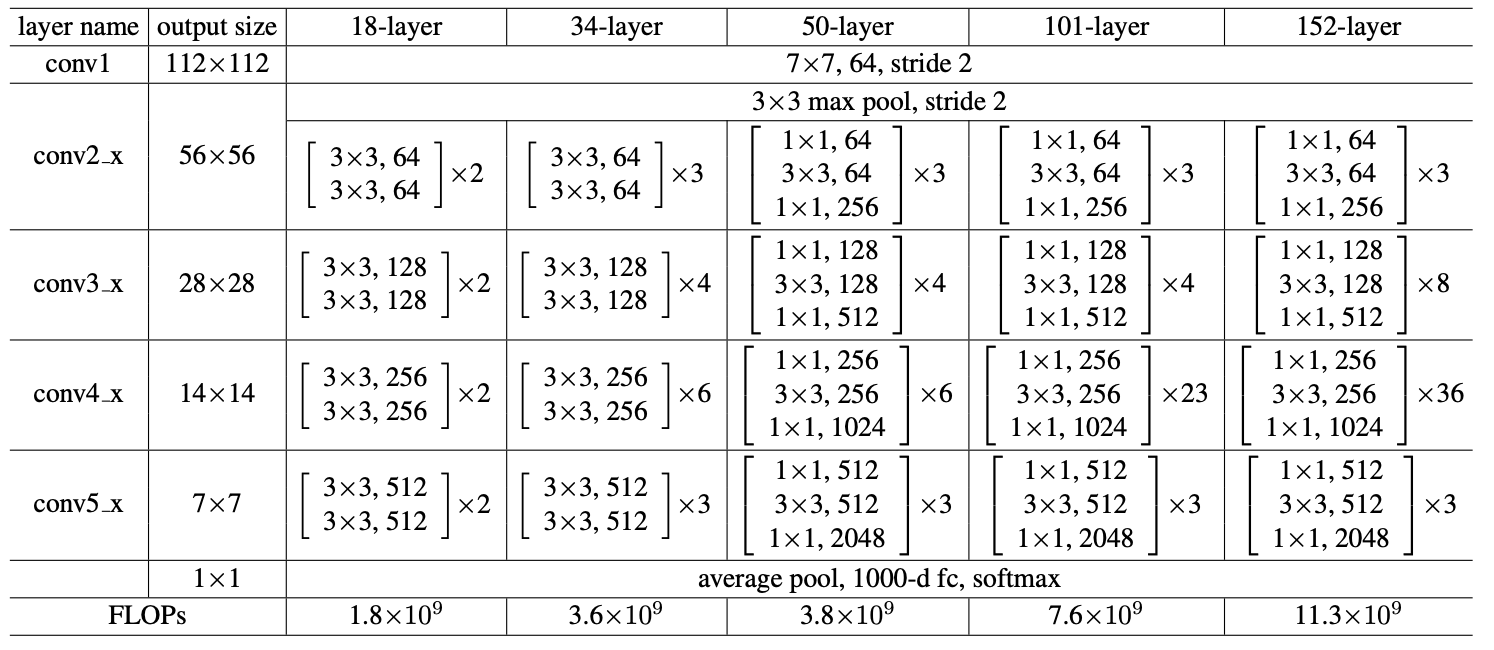
위 표는 ResNet 논문에서 가져온 Architecture 표이다.
잠시 구현한 ResNet의 코드 일부를 가져와서 살펴보자.
class ResNet18(nn.Module):
    def __init__(self, num_classes=1000):
        super().__init__()

        # in_channel 3 -> 64 변환 과정 (STEM) [conv1]
        self.conv1 = nn.Conv2d(3, 64, kernel_size=7, stride=2, padding=3, padding_mode='zeros')
        # 여기서 왜 bias를 왜 제거 해야할까?
        # BN이 Conv의 bias를 무력화하기 때문이다. -> BN의 Beta가 대신 역할 수행


        # 몇줄을 0padding으로 추가할지 output feature map 크기 구하는 공식 사용해서 직접 구하기
        self.bn = nn.BatchNorm2d(64)
        self.ReLU = nn.ReLU(inplace=True)
        self.maxPool = nn.MaxPool2d(kernel_size=3, stride=2, padding=1)

        self.layer1 = nn.Sequential(
            BasicBlock(64, 64, 1),
            BasicBlock(64, 64, 1)
        )
        self.layer2 = nn.Sequential(
            BasicBlock(64, 128, 2),
            BasicBlock(128, 128, 1)
        )
        self.layer3 = nn.Sequential(
            BasicBlock(128, 256, 2),
            BasicBlock(256, 256, 1)
        )
        self.layer4 = nn.Sequential(
            BasicBlock(256, 512, 2),
            BasicBlock(512, 512, 1)
        )

        # Head Designing..
        # GAP -> Flatten -> FC
        self.avgpool = nn.AdaptiveAvgPool2d((1, 1)) # 어떤 크기든 1x1로 압축
        self.fc = nn.Linear(512, num_classes)
위 코드와 ResNet논문의 표를 비교해서 살펴보자.
| 예제 코드 | ResNet논문 표 | 크기(누적 stride) | dilation적용 |
|---|---|---|---|
| INPUT | INPUT | 473x473 | 원본 |
| STEM (conv1+bn+ReLU +MaxPool2d) | conv1 | 119 x 119 (1/4) | 초반엔 어쩔 수 없이 줄임 |
| layer 1 | conv2_ | 119 x 119 (1/4) | 원래 Stride가 1 |
| layer 2 | conv3_ | 60 x 60 (1/8) | False |
| layer 3 | conv4_ | 60 x 60 (1/8) | True-여기서 False하면, 60보다 더 줄게됨. (Dilation:2) |
| layer 4 | conv5_ | 60 x 60 (1/8) | True (Dilation:4) |
replace_stride_with_dilation 을 PSPN에서 사용한 코드를 보면(맨 처음), 실제 resnet50 클래스 안에
# 실제 라이브러리 내부 코드 (약간 단순화)
class ResNet(nn.Module):
    def __init__(self, block, layers, replace_stride_with_dilation, ...):

        # ... (중략) ...

        # ★ Layer 1: 얘는 리스트를 아예 안 봅니다. (항상 Stride=1이라 바꿀 게 없어서)
        self.layer1 = self._make_layer(block, 64, layers[0])

        # ★ Layer 2: 리스트의 첫 번째([0]) 값을 가져다 씀 -> False
        self.layer2 = self._make_layer(block, 128, layers[1], stride=2,
                                       dilate=replace_stride_with_dilation[0])

        # ★ Layer 3: 리스트의 두 번째([1]) 값을 가져다 씀 -> True
        self.layer3 = self._make_layer(block, 256, layers[2], stride=2,
                                       dilate=replace_stride_with_dilation[1])

        # ★ Layer 4: 리스트의 세 번째([2]) 값을 가져다 씀 -> True
        self.layer4 = self._make_layer(block, 512, layers[3], stride=2,
                                       dilate=replace_stride_with_dilation[2])
으로 하드코딩 되어있다.
때문에 replace_stride_with_dilation이 지정한 인덱스에 stride를 사용할지, dilation을 사용할지 결정할 수 있다.
이로써 Feature map의 크기를 60x60으로 유지할 수 있고, 위치정보 손실을 방지할 수 있게 된다.
Linear-Interpolation
Linear Interpolation (선형 보간)이란, 알려진 두 점 사이의 값을 그 직선 거리에 따라 선형적으로 추정하는 1차원 보간 방식이다.
두 점이 과 같이 주어졌을 때, 중간 지점 x에서의 값을
으로 구할 수 있다.
두 점을 잇는 직선 위에서 값을 읽는 것이 핵심이다.
이것을 2D로 확장하면 Bilinear Interpolation이다.
Bilinear-Interpolation
Bilinear Interpolation은 가로(X)방향과 세로(Y)방향으로 Linear-Interpolation(선형 보간)을 두 번 적용한 것이다.
2차원 grid에서 주어지지 않은 좌표의 값을 추정할 때 사용한다.
어떠한 점 를 구하고자 할 때, 그 점을 둘러싼 4개의 가장 가까운 픽셀값을 사용하여 가중 평균을 구한다.
1. X축 방향으로 보간 : 위쪽 두 점 사이에서 한 번, 아래쪽 두 점 사이에서 한 번
2. Y축 방향으로 보간 : 위에서 구한 두 값을 사용하여 최종적으로 Y축 방향으로 보간하여 P를 찾는다.
위 1, 2번은 순서 상관없이 수행하면 된다.
PSPN을 구현할 때에는 입력이 (Batch, Channel, H, W)이기 때문에 mode='bilinear'를 사용하도록 한다.
| 구분 | Linear Interpolation | Bilinear Interpolation |
|---|---|---|
| 차원 | 1D (선 위에서의 보간) | 2D (평면/이미지의 보간) |
| 입력 텐서 형태 | 3D Tensor (N, C, L) | 4D Tensor (N,C,H,W) |
| PyTorch | mode='linear' | mode='bilinear' |
| 주요 용도 | 오디오 샘플링 속도 변환, 1D시계열 데이터 길이 변환 | 이미지 Resizing, Segmentation모델의 Upsampling |
코드 비교
import torch
import torch.nn.functional as F

#===== Linear Interpolation (1D 데이터용)======
input_1d = torch.tensor([[[10., 20.]]])
output_linear = F.interpolate(input_1d, scale_factor=2, mode='linear', align_corners=False)

print("Linear Interpolation")
print(f"\nInput : {input_1d.shape} -> {input_1d.tolist()}")
print(f"\nOutput : {output_linear.shape} -> {output_linear.tolist()}")


#===== Bilinear Interpolation (2D 이미지용) =======
input_2d = torch.tensor([[[[1., 2.],
	    					[3., 4.]]]])
ouptut_bilinear = F.interpolate(input_2d, scale_factor=2, mode='bilinear', align_corners=False)

print("\n\nBilinear Interpolation")
print(f"Input : {input_2d.shape}")
print(f"Output : {output_bilinear.shape}")