Stack
Stack은 Positioned 위젯을 사용해 위젯들을 겹치게 할 수 있는 위젯이다. left, right, top, bottom속성을 이용해 위젯을 배치한다.
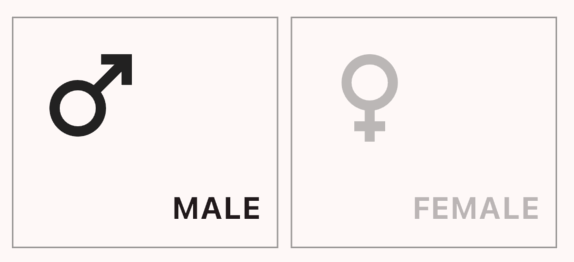
이런식으로 위젯을 꼭 겹치게하지 않더라도 자유롭게 위젯을 배치 할 수도 있다.
- 예제 코드
child: Stack(
            children: [
              Positioned(
                top: 10,
                left: 10,
                child: Opacity(
                  opacity: selected ? 1 : 0.3,
                  child: Icon(icon, size: 80),
                ),
              ),
              Positioned(
                bottom: 10,
                right: 10,
                child: Opacity(
                  opacity: selected ? 1 : 0.3,
                  child: Text(
                    text,
                    style: TextStyle(
                      fontSize: 20,
                      fontWeight: FontWeight.bold,
                    ),
                  ),
                ),
              ),
            ],
          ),
CircularProgressIndicator의 재발견
우리가 흔히 알고 있는 CircularProgressIndicator는 로딩 중일 때 보이는 아래와 같은 UI일 것이다.

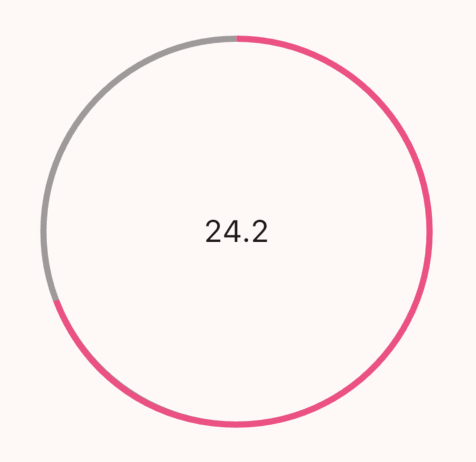
하지만 Stack Widget과 CircularProgressIndicator의 value속성을 이용하면 이런 멋진 GaugeBar를 구현할 수 있다.
value는 0 - 1사이의 숫자로 Min - Max를 나타낸다.
- 예제 코드
import 'dart:math';
import 'package:flutter/material.dart';
class ResultGauge extends StatelessWidget {
ResultGauge(this.bmi);
double bmi;
Widget build(BuildContext context) {
return Stack(
alignment: Alignment.center,
children: [
SizedBox.square(
dimension: 250,
child: CircularProgressIndicator(
value: 1,
color: Theme.of(context).dividerColor,
),
),
SizedBox.square(
dimension: 250,
child: CircularProgressIndicator(
value: min(bmi / 35, 1),
color: Theme.of(context).highlightColor,
),
),
Text(
bmi.toStringAsFixed(1),
style: TextStyle(fontSize: 20),
),
],
);
}
}

우주를 항해하는 여행자