ThemeData를 통해서 MaterialApp 내에 다크테마, 라이트테마를 정의할 수 있다.
- ThemeData 정의
ThemeData(
    useMaterial3: true, // Material3 디자인 사용여부 2와의 차이는 아래 그림 참조
     // ColorScheme 클래스의 fromSeed 생성자를 사용하면
     // seedColor 를 기준으로 각각 요소들의 색상을 정해줍니다.
    colorScheme: ColorScheme.fromSeed(
      seedColor: Colors.purple,
      // dark, light 에 따라 디자인이 배경 색상 등이 다크모드, 라이트모드로 달라집니다
      brightness: Brightness.dark,
    ),
    // 앱 내에서 사용할 TextTheme 를 정할수도 있는데
    // displayLarge, titleLarge 등의 속성별로 정의할 수 있습니다.
    textTheme: TextTheme(
      displayLarge: const TextStyle(
        fontSize: 72,
        fontWeight: FontWeight.bold,
      ),
      // ···
      titleLarge: GoogleFonts.oswald(
        fontSize: 30,
        fontStyle: FontStyle.italic,
      ),
      bodyMedium: GoogleFonts.merriweather(),
      displaySmall: GoogleFonts.pacifico(),
    ),
  ),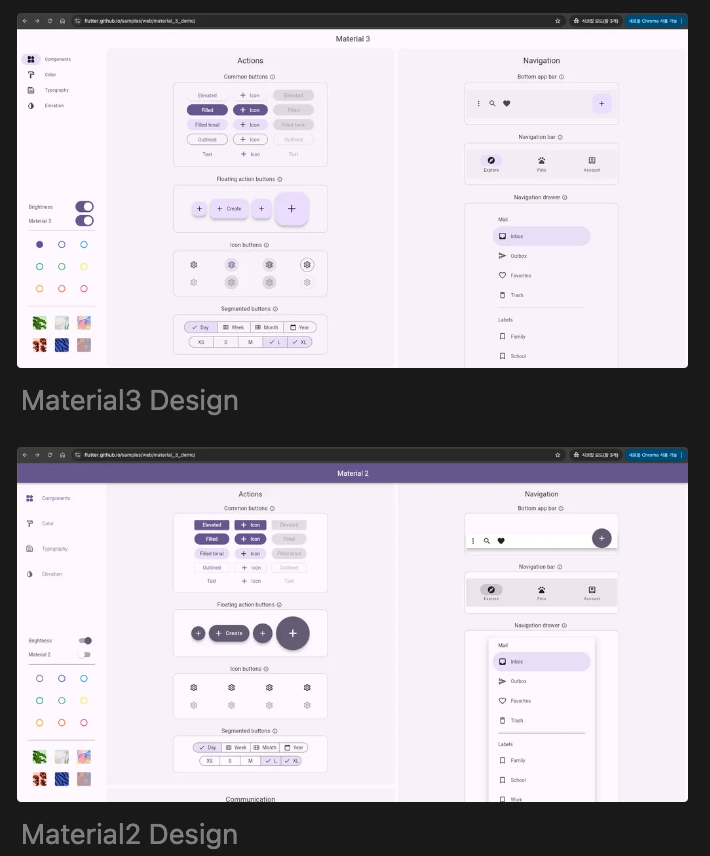
Material2에서 3으로 넘어오면서 전반적으로 각진 디자인에서 둥글둥글한 디자인으로 변했다.
- 앱에 적용
import 'package:flutter/material.dart';
import 'package:flutter_bmi_app/pages/home/home_page.dart';
void main() {
runApp(const MyApp());
}
class MyApp extends StatelessWidget {
const MyApp({super.key});
// This widget is the root of your application.
Widget build(BuildContext context) {
return MaterialApp(
theme: ThemeData(
useMaterial3: true,
colorScheme: ColorScheme.fromSeed(
seedColor: Colors.pinkAccent,
brightness: Brightness.light,
),
),
darkTheme: ThemeData(
useMaterial3: true,
colorScheme: ColorScheme.fromSeed(
seedColor: Colors.pinkAccent,
brightness: Brightness.dark,
),
),
home: HomePage(),
);
}
}- 임의로 다크, 라이트모드 변경
themeMode: ThemeMode.dart,		// 다크 모드
themeMode: ThemeMode.light,		// 라이트 모드
themeMode: ThemeMode.system,	// 사용자의 기기 설정에 따라 변경
우주를 항해하는 여행자