Unity webrequest
시도 1: www가 만료됐다는 걸 못 보고 그대로 코드를 복붙했다.
// Get the Unity logo as a texture from the Unity website
using UnityEngine;
using System.Collections;

public class ExampleClass : MonoBehaviour
{
    public string url = "https://unity3d.com/files/images/ogimg.jpg";
    IEnumerator Start()
    {
        using (WWW www = new WWW(url))
        {
            yield return www;
            Renderer renderer = GetComponent<Renderer>();
            renderer.material.mainTexture = www.texture;
        }
    }
}
출처: https://docs.unity3d.com/ScriptReference/WWW.html
결과: www 에서 에러가 난다.
시도2: Unity WebRequest로 다시 고쳤다
using UnityEngine;
using UnityEngine.Networking;
using System.Collections;

public class MyBehaviour : MonoBehaviour
{
    void Start()
    {
        StartCoroutine(GetText());
    }

    IEnumerator GetText()
    {
        using (UnityWebRequest uwr = UnityWebRequestTexture.GetTexture("https://www.my-server.com/myimage.png"))
        {
            yield return uwr.SendWebRequest();

            if (uwr.result != UnityWebRequest.Result.Success)
            {
                Debug.Log(uwr.error);
            }
            else
            {
                // Get downloaded asset bundle
                var texture = DownloadHandlerTexture.GetContent(uwr);
            }
        }
    }
}
출처: https://docs.unity3d.com/ScriptReference/Networking.UnityWebRequestTexture.GetTexture.html
결과: 'UnityWebRequest' does not contain a definition for 'result'
시도3: 검색해보니 result 의 새로운 버전이 나왔다는 것 같다.
    void Start()
    {
        StartCoroutine(GetText());
    }

    IEnumerator GetText()
    {
        using (UnityWebRequest uwr = UnityWebRequestTexture.GetTexture("https://www.my-server.com/myimage.png"))
        {
            yield return uwr.SendWebRequest();

            if(!string.IsNullOrWhiteSpace(uwr.error))
			{
                Debug.LogError($"Error {uwr.responseCode} - {uwr.error}");
                yield break;
            }

            else
            {
                // Get downloaded asset bundle
                var texture = DownloadHandlerTexture.GetContent(uwr);
                renderer.material.mainTexture = texture;
            }
        }
    }
참고 출처: https://stackoverflow.com/questions/74906471/unitywebrequest-does-not-contain-a-definition-for-result
결과: 잘 나온다

Particles/Alpha Blended 못 찾음
인터넷에서 프로젝트를 몇개 받아서 버전을 변경하면서 열다보니 에러가 났다. 코드는 대충 이런 식이었다.
const string DefaultLineShader = "Particles/Alpha Blended";
const string DefaultLineShaderColor = "_TintColor";

LineMaterial = new Material(Shader.Find(DefaultLineShader));
LineMaterial.SetColor(DefaultLineShaderColor, Color.white);
LineMaterial = new Material(Shader.Find(DefaultLineShader));여기의 Find 함수에서 null을 리턴해서(못 찾아서) 에러가 났다.
2017.3??(정확히 기억 안 남) 버전에서는 찾아졌는데 2018.4 정도의 버전으로 변경해서 열었더니 못 찾는 것 같다.
이 클래스에서 쓰는 것 같은 메테리얼을 찾아서 속성을 확인해본다
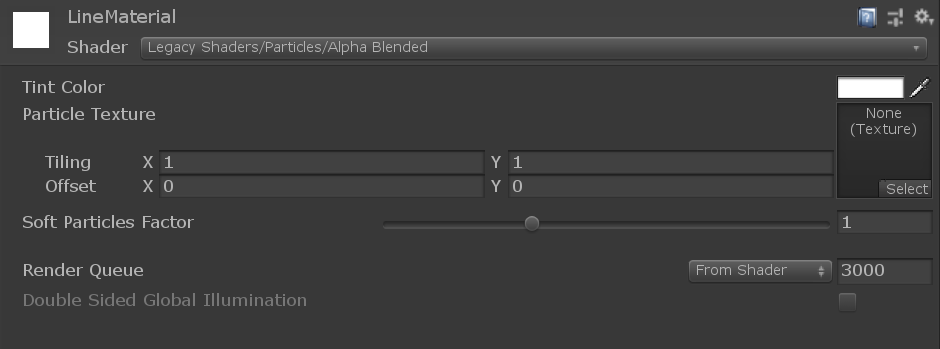
혹시나 싶어 Particles 앞에 Lagacy Shader 경로를 추가해주었더니 잘 찾는다.
수정 후:
const string DefaultLineShader = "Legacy Shaders/Particles/Alpha Blended";
const string DefaultLineShaderColor = "_TintColor";
텍스트 파일에서 읽어온 path 사용시 오류
그냥 path를 하드 코딩으로 써주면 돌아가는데 파일에서 읽어온 문자열을 가져다 쓰니 파일을 찾지 못했다는 에러가 자꾸 떴다
string path = GetPathFromTextFile();
string pathHard = "C:\somewhere\over\the\rainbow\way up high\dream.exe";
Process.Start(path); //에러
Process.Start(pathHard); //실행됨
두 path를 출력해서 확인해봐도 다른 점이 없었는데 디버그하며 확인 해보니 텍스트 파일에서 읽어온 문자열은 뒤에 \r 이 붙어있었다.
\r을 제거해주면 잘 된다.
string path = GetPathFromTextFile();
Process.Start("\"" + path.Replace("\r", "") + "\"");