Now you have all 9 squares' states memorized in the Board component, there is still a problem that we cannot show Os on a board. Which means, you cannot take turns.
1. Taking Turns
We are going to create an another state that tells us if it's O or X's turn.
const [XIsNext, setXIsNext] = useState(true);This code states can tell us that the first move is X.
Then,
function handleClick(i) {
    if (squares[i]) {
          return;
        }
    const nextSquares = squares.slice();
    if (XIsNext) {
      nextSquares[i] = "X";
    }
    else {
      nextSquares[i] = "O";
    }
    setSquares(nextSquares);
    setXIsNext(!XIsNext);
  }
We change its state in the
handleClickfunction so that everytime we click a square, turn is to be swapped.
if (squares[i]) {
          return;
        }
The if statement above is to block clicking and changing states on preoccupied squares with either X or O.
Therefore, if there is an X shown already on a square, even though you click the square again, it will not change to O.
2. Declaring a Winner
To delcare a winner, we need another function to decide who is the winner of the game.
Therefore, we create a calculateWinner function that receives squares from the board as its props.
function calculateWinner (squares) {
  const lines = [
    [0, 1, 2],
    [3, 4, 5],
    [6, 7, 8],
    [0, 3, 6],
    [1, 4, 7],
    [2, 5, 8],
    [0, 4 ,8],
    [2, 4, 6]
  ];
  for (let i = 0; i < lines.length; i++) {
    const [a, b, c] = lines[i];
    if (squares[a] === squares[b] && squares[a] === squares[c] && squares[a])
      return squares[a];
  }
  return null;
}
Then you will call this function in the Board's component handleClick to check if a player has won.
function handleClick(i) {
    if (squares[i] || calculateWinner(squares)) {
      return;
    }
    ...
}
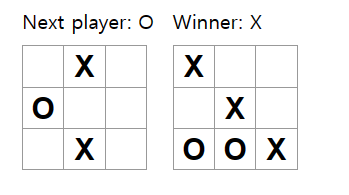
Now, we want to display texts saying the winner when the game is finished or which player's turn if the game is ongoing.
In the Board component, we'll add a status section that calls calculateWinner function.
Overall, you code will look like this,
import React from 'react';
import { useState } from 'react';

function Square( {value, onSquareClick} ) {
  return (
    <button className = "square" onClick = {onSquareClick}>
      {value}
    </button>
  );
}


const Board = () => {
  const [XIsNext, setXIsNext] = useState(true);
  const [squares, setSquares] = useState(Array(9).fill(null));

  const winner = calculateWinner(squares);
  let status;
  if (winner) {
    status = "Winner: " + winner;
  } else {
    status = "Next player: " + (XIsNext ? "X" : "O");
  }

  function handleClick(i) {
    if (squares[i] || calculateWinner(squares)) {
      return;
    }
    const nextSquares = squares.slice();
    if (XIsNext) {
      nextSquares[i] = "X";
    }
    else {
      nextSquares[i] = "O";
    }

    console.log(nextSquares);
    setSquares(nextSquares);
    setXIsNext(!XIsNext);
  }

  return (
    <React.Fragment>
      <div className = "status">{status}</div>
      <div className="board-row">
        <Square value={squares[0]} onSquareClick={() => handleClick(0)}/>
        <Square value={squares[1]} onSquareClick={() => handleClick(1)}/>
        <Square value={squares[2]} onSquareClick={() => handleClick(2)}/>
      </div>
      <div className="board-row">
        <Square value={squares[3]} onSquareClick={() => handleClick(3)}/>
        <Square value={squares[4]} onSquareClick={() => handleClick(4)}/>
        <Square value={squares[5]} onSquareClick={() => handleClick(5)}/>
      </div>
      <div className="board-row">
        <Square value={squares[6]} onSquareClick={() => handleClick(6)}/>
        <Square value={squares[7]} onSquareClick={() => handleClick(7)}/>
        <Square value={squares[8]} onSquareClick={() => handleClick(8)}/>
      </div>
    </React.Fragment>
  )
}

export default Board;


function calculateWinner (squares) {
  const lines = [
    [0, 1, 2],
    [3, 4, 5],
    [6, 7, 8],
    [0, 3, 6],
    [1, 4, 7],
    [2, 5, 8],
    [0, 4 ,8],
    [2, 4, 6]
  ];
  for (let i = 0; i < lines.length; i++) {
    const [a, b, c] = lines[i];
    if (squares[a] === squares[b] && squares[a] === squares[c] && squares[a])
      return squares[a];
  }
  return null;
}
3. Adding Time Travel
Now that we completed the Tic-Tac-Toe game, we want to go back to our past moves.
To create that time travel, we need to have history of past moves which is controlled in upper state of Board component.
Therefore, we create Game component and lift state up. We will now controll Board's states in the Game component, and uses it as Board component's props.
First of all, we will move squares and XIsNext states up to Game component.
export default function Game() {
  const [XIsNext, setXIsNext] = useState(true);

  const [history, setHistory] = useState([Array(9).fill(null)]);

  const currentSquares = history[history.length - 1];

  function handlePlay(nextSquares) {
    setHistory([...history, nextSquares]);
    setXIsNext(!XIsNext);
  }
history and setHistory is to save all states of Board for each moves in the game.
currentSquares is a props to send to the Board component to display current Board's state, which will be place at the last of history array.
Function handlePlay will be passed as a props to Board component, and receive states of the Board to re-render and update XIsNext and history.
So the result will be,
import React from 'react';
import { useState } from 'react';

function Square( {value, onSquareClick} ) {
  return (
    <button className = "square" onClick = {onSquareClick}>
      {value}
    </button>
  );
}


const Board = ({ XIsNext, squares, onPlay }) => {
  const winner = calculateWinner(squares);
  let status;
  if (winner) {
    status = "Winner: " + winner;
  } else {
    status = "Next player: " + (XIsNext ? "X" : "O");
  }


function handleClick(i) {
    if (squares[i] || calculateWinner(squares)) {
      return;
    }
    const nextSquares = squares.slice();
    if (XIsNext) {
      nextSquares[i] = "X";
    }
    else {
      nextSquares[i] = "O";
    }
    onPlay(nextSquares);
  }

  return (
    <React.Fragment>
      <div className = "status">{status}</div>
      <div className="board-row">
        <Square value={squares[0]} onSquareClick={() => handleClick(0)}/>
        <Square value={squares[1]} onSquareClick={() => handleClick(1)}/>
        <Square value={squares[2]} onSquareClick={() => handleClick(2)}/>
      </div>
      <div className="board-row">
        <Square value={squares[3]} onSquareClick={() => handleClick(3)}/>
        <Square value={squares[4]} onSquareClick={() => handleClick(4)}/>
        <Square value={squares[5]} onSquareClick={() => handleClick(5)}/>
      </div>
      <div className="board-row">
        <Square value={squares[6]} onSquareClick={() => handleClick(6)}/>
        <Square value={squares[7]} onSquareClick={() => handleClick(7)}/>
        <Square value={squares[8]} onSquareClick={() => handleClick(8)}/>
      </div>
    </React.Fragment>
  )
}


export default function Game() {
  const [XIsNext, setXIsNext] = useState(true);
  const [history, setHistory] = useState([Array(9).fill(null)]);
  const currentSquares = history[history.length - 1];
  function handlePlay(nextSquares) {
    setHistory([...history, nextSquares]);
    setXIsNext(!XIsNext);
  }
  return (
    <div className="game">
      <div className="game-board">
        <Board XIsNext={XIsNext} squares={currentSquares} onPlay={handlePlay}/>
      </div>
      <div className="game-info">

      </div>
    </div>
  )
}


function calculateWinner (squares) {
  const lines = [
    [0, 1, 2],
    [3, 4, 5],
    [6, 7, 8],
    [0, 3, 6],
    [1, 4, 7],
    [2, 5, 8],
    [0, 4 ,8],
    [2, 4, 6]
  ];
  for (let i = 0; i < lines.length; i++) {
    const [a, b, c] = lines[i];
    if (squares[a] === squares[b] && squares[a] === squares[c] && squares[a])
      return squares[a];
  }
  return null;
}
Displaying Time Travel
We will use history moves in state to display past moves.
By using array map method, we will be able to transform history array into another.
To do so, we will add function jumpto and moves inside the Game component.
  function jumpTo(nextMove) {
    // TODO
  }

  const moves = history.map((squares, move) => {
    let description;
    if (move > 0) {
      description = 'Go to move #' + move;
    } else {
      description = 'Go to game start';
    }
    return (
      <li key={move}>
        <button onClick={() => jumpTo(move)}>{description}</button>
      </li>
    );
  });
As we iterate through
historyarray inside the function we passed tomap, thesquaresargument goes through each element ofhistory, and themoveargument goes through each array index (1, 2, ...).
Also, we can see that in moves, it returns buttons list with a key for each.
Key property of lists in React is really important for re-rendering.
When React re-renders a list, React looks at the key property to differentiate each list items.
If no key is specified, React will report an error and use the array index as a key by default. Using the array index as a key is problematic when trying to re-order a list’s items or inserting/removing list items. Explicitly passing key={i} silences the error but has the same problems as array indices and is not recommended in most cases.
To Complete jumpTo function, we need to keep track of which step the user is currently viewing.
Therefore, define a new state variable called currentMove, defaulting to 0.
export default function Game() {
  const [xIsNext, setXIsNext] = useState(true);
  const [history, setHistory] = useState([Array(9).fill(null)]);
  const [currentMove, setCurrentMove] = useState(0);
  const currentSquares = history[history.length - 1];
  //...
}
Then, inside the jumpTo function,
export default function Game() {
  // ...
  function jumpTo(nextMove) {
    setCurrentMove(nextMove);
    setXIsNext(nextMove % 2 === 0);
  }
  //...
}
We update set the currentMove to desiring nextMove and set XIsNext either if the nextMove is odd or even number.
Finally, we make two more changes to the Game component's handlePlay function.
- When we "Go back in Time" and then make a new move from that point, we only want to keep the history up to that point. Therefore, instead of adding
nextSquaresafter all items inhistory, we will add it after all itmes inhistory.slice(0, currentMove + 1)so that we are only keeping that portion of the old history.
function handlePlay(nextSquares) {
    const nextHistory = [...history.slice(0, currentMove + 1), nextSquares];
    setHistory(nextHistory);
    setCurrentMove(nextHistory.length-1);
    setXIsNext(!XIsNext);
}- Each time a move is made, we need to upate
currentMoveto point to the latest history entry.
So, instead ofconst currentSquares = history[history.length - 1];,
we doconst currentSquares = history[currentMove];.
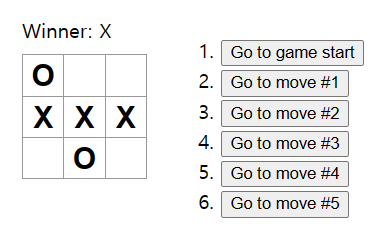
Now, the final result including Time Travel will be,
import React from 'react';
import { useState } from 'react';

function Square( {value, onSquareClick} ) {
  return (
    <button className = "square" onClick = {onSquareClick}>
      {value}
    </button>
  );
}


const Board = ({ XIsNext, squares, onPlay }) => {
  const winner = calculateWinner(squares);
  let status;
  if (winner) {
    status = "Winner: " + winner;
  } else {
    status = "Next player: " + (XIsNext ? "X" : "O");
  }

function handleClick(i) {
    if (squares[i] || calculateWinner(squares)) {
      return;
    }
    const nextSquares = squares.slice();
    if (XIsNext) {
      nextSquares[i] = "X";
    }
    else {
      nextSquares[i] = "O";
    }
    onPlay(nextSquares);
  }

  return (
    <React.Fragment>
      <div className = "status">{status}</div>
      <div className="board-row">
        <Square value={squares[0]} onSquareClick={() => handleClick(0)}/>
        <Square value={squares[1]} onSquareClick={() => handleClick(1)}/>
        <Square value={squares[2]} onSquareClick={() => handleClick(2)}/>
      </div>
      <div className="board-row">
        <Square value={squares[3]} onSquareClick={() => handleClick(3)}/>
        <Square value={squares[4]} onSquareClick={() => handleClick(4)}/>
        <Square value={squares[5]} onSquareClick={() => handleClick(5)}/>
      </div>
      <div className="board-row">
        <Square value={squares[6]} onSquareClick={() => handleClick(6)}/>
        <Square value={squares[7]} onSquareClick={() => handleClick(7)}/>
        <Square value={squares[8]} onSquareClick={() => handleClick(8)}/>
      </div>
    </React.Fragment>
  )
}

export default function Game() {
  const [XIsNext, setXIsNext] = useState(true);

  const [history, setHistory] = useState([Array(9).fill(null)]);

  const [currentMove, setCurrentMove] = useState(0);

  const currentSquares = history[currentMove];

  function handlePlay(nextSquares) {
    const nextHistory = [...history.slice(0, currentMove + 1), nextSquares];
    setHistory(nextHistory);
    setCurrentMove(nextHistory.length-1);
    setXIsNext(!XIsNext);
  }

  function jumpTo(nextMove){
    setCurrentMove(nextMove);
    setXIsNext(nextMove % 2 === 0);
  }

  const moves = history.map((squares, move) => {
    let description;
    if (move > 0) {
      description = 'Go to move #' + move;
    } else {
      description = 'Go to game start';
    }
    return (
      <li key={move}>
        <button onClick = {()=> jumpTo(move)}>{description}</button>
      </li>
    )
  })

  return (
    <div className="game">
      <div className="game-board">
        <Board XIsNext={XIsNext} squares={currentSquares} onPlay={handlePlay}/>
      </div>
      <div className="game-info">
        <ol>{moves}</ol>
      </div>
    </div>
  )
}

function calculateWinner (squares) {
  const lines = [
    [0, 1, 2],
    [3, 4, 5],
    [6, 7, 8],
    [0, 3, 6],
    [1, 4, 7],
    [2, 5, 8],
    [0, 4 ,8],
    [2, 4, 6]
  ];
  for (let i = 0; i < lines.length; i++) {
    const [a, b, c] = lines[i];
    if (squares[a] === squares[b] && squares[a] === squares[c] && squares[a])
      return squares[a];
  }
  return null;
}