This post is cited from https://react.dev/learn/tutorial-tic-tac-toe.
While Creating a simple
Tic-Tac-Toe game, we will be able to learn the most common techniques in React Development.
Link Above is the final result of what we are building today.
You can either practice at the following website, or
press the menu at the top left corner then click file, export to zip to your local folder and start
I created my own project on my local environment and I had to make one edit to the code I downloaded. Which was,
import React from 'react'; on my App.js file.
Even though you are not using any JSX or React Component, it is necessary to import react to do any tasks related to the React.
Then, you are ready to start!
1. Starter Code
App.js
First thing you will see in the App.js file is
import React from 'react';

export default function Square() {
  return <button className="square">X</button>;
}

This is what the square will look like when you click on to a square among 9 in your Tic-Tac-Toe game.
The code above in App.js creates a component which is Square.
A component is a piece of reusable code that represents a part of a user interface, and used to render, manage, and update the UI elements in your application.
style.css
In this file, it defines the styles for our React App.
*andbodydefine the style of large parts.=.squaredefines the style of any component where the className property is set tosquare.
index.js
-
import { StrictMode } from 'react';
- brings react -
import { createRoot } from 'react-dom/client';
- brings React's library to connect to web browsers (React Dom)
-
import './styles.css';
- brings the styles for your components
-
import App from './App';
- brings the component you created in App.js
2. Building the board
To show 9 squares for your Tic-Tac-Toe, your code in App.js should be like
import React from 'react';

export default function Square() {
  return (
    <React.Fragment>
      <div className="board-row">
        <button className="square">1</button>
        <button className="square">2</button>
        <button className="square">3</button>
      </div>
      <div className="board-row">
        <button className="square">4</button>
        <button className="square">5</button>
        <button className="square">6</button>
      </div>
      <div className="board-row">
        <button className="square">7</button>
        <button className="square">8</button>
        <button className="square">9</button>
      </div>
    </React.Fragment>
  );
}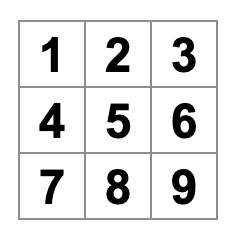
It does show 9 squares in a shape of
Tic-Tac-Toe, but Too Much Typing!
So, we will try Passing Data Through Props
3. Passing Data Through Props
The code above is no more a square, but a board. So we will seperate square and board.
React's component architecture allows you to create a reusable component to avoid messy, duplicated code.
import React from 'react';

function Square( {value} ) {
  return <button className="square">{value}</button>
}
function Square( {value} ) indicates the Square component can be passed a prop called value.
Therefore, instead of typing duplicates of button tags, we can simply pass a prop with a proper value on to the children component.
By covering value with curly braces {}, it "escape into JavaScript" from JSX and pass assgined values.
So, the result will be,
import React from 'react';

function Square( {value} ) {
  return <button className="square">{value}</button>
}
const Board = () => {
  return (
    <React.Fragment>
      <div className="board-row">
        <Square value="1"/>
        <Square value="2"/>
        <Square value="3"/>
      </div>
      <div className="board-row">
        <Square value="4"/>
        <Square value="5"/>
        <Square value="6"/>
      </div>
      <div className="board-row">
        <Square value="7"/>
        <Square value="8"/>
        <Square value="9"/>
      </div>
    </React.Fragment>
  )
}

export default Board;
4. Making an Interactive Component
For Tic-Tac-Toe game, you need the Square component to "remember" that it is clicked and fill it with an X mark.
To remember, components use state.
function Square() {
  const [value, setValue] = useState(null);

  function handleClick() {
    setValue('X');
  }

  return (
    <button
      className = "square"
      onClick = {handleClick}
    >
      {value}
    </button>
  );
}valuestores the valuesetValueis a function to change the valueuseState(null)passes null to be the initial value for this state variable
Then, Square component no longer accpets props anymore, therefore remove the value prop from all nine of the Square components in Board Component
The result code is,
import React from 'react';
import { useState } from 'react';

function Square() {
  const [value, setValue] = useState(null);

  function handleClick() {
    setValue('X');
  }

  return (
    <button
      className = "square"
      onClick = {handleClick}
    >
      {value}
    </button>
  );
}

const Board = () => {
  return (
    <React.Fragment>
      <div className="board-row">
        <Square />
        <Square />
        <Square />
      </div>
      <div className="board-row">
        <Square />
        <Square />
        <Square />
      </div>
      <div className="board-row">
        <Square />
        <Square />
        <Square />
      </div>
    </React.Fragment>
  )
}

export default Board;
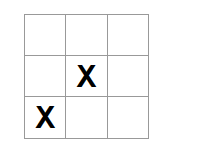
Now, when you click on a square X shows up.
By calling the
setfunction from anonClick Handler, React re-rendersSquarewhenever its button is clicked.
5. Completing the Game
Now that you have all the basic building blocks for the tic-tac-toe game, completing the game requires us to do advanced jobs.
Such as placing X and O alternatively and determining the Winner.
To determine the winner of the game, the board component needs to remember all 9 squares' states. Therefore, we declare a shared state in the Board component instead of the Square component and pass state back to Square
via props.
First, we declare a state that remember all 9 states of squares.
const [squares, setSquares] = useState(Array(9).fill(null));we created a size 9 array consisted of null value in each.
Then, we create a function handleClick reacting to a click on each squares.
function handleClick(i) {
    const nextSquares = squares.slice();
    nextSquares[i] = "X";
    setSquares(nextSquares);
  }
The handleClick function will receive an index to change the state of each squares, and we save the changed states by setSquares.
Finally, pass those states by props to each Squares.
return (
    <React.Fragment>
      <div className="board-row">
        <Square value={squares[0]} onSquareClick={() => handleClick(0)}/>
        <Square value={squares[1]} onSquareClick={() => handleClick(1)}/>
        <Square value={squares[2]} onSquareClick={() => handleClick(2)}/>
      </div>
      <div className="board-row">
        <Square value={squares[3]} onSquareClick={() => handleClick(3)}/>
        <Square value={squares[4]} onSquareClick={() => handleClick(4)}/>
        <Square value={squares[5]} onSquareClick={() => handleClick(5)}/>
      </div>
      <div className="board-row">
        <Square value={squares[6]} onSquareClick={() => handleClick(6)}/>
        <Square value={squares[7]} onSquareClick={() => handleClick(7)}/>
        <Square value={squares[8]} onSquareClick={() => handleClick(8)}/>
      </div>
    </React.Fragment>
  )
The reason why onSquareClick looks different than before is because if we don't, the function gets called and is rendered with the board component.
Which means, the board component gets re-rendered everytime handleClick function is called and error occurs.

By using () => syntax we can solve that complicating problem.
()=> handleClick(0)is an arrow function, a shorter way to define functions, and it makes sure that after the square is clicked, the code after=>will run.
The result will be,
import React from 'react';
import { useState } from 'react';

function Square( {value, onSquareClick} ) {
  return (
    <button className = "square" onClick = {onSquareClick}>
      {value}
    </button>
  );
}

const Board = () => {
  const [squares, setSquares] = useState(Array(9).fill(null));
  function handleClick(i) {
    const nextSquares = squares.slice();
    nextSquares[i] = "X";
    console.log(nextSquares);
    setSquares(nextSquares);
  }
  return (
    <React.Fragment>
      <div className="board-row">
        <Square value={squares[0]} onSquareClick={handleClick(0)}/>
        <Square value={squares[1]} onSquareClick={() => handleClick(1)}/>
        <Square value={squares[2]} onSquareClick={() => handleClick(2)}/>
      </div>
      <div className="board-row">
        <Square value={squares[3]} onSquareClick={() => handleClick(3)}/>
        <Square value={squares[4]} onSquareClick={() => handleClick(4)}/>
        <Square value={squares[5]} onSquareClick={() => handleClick(5)}/>
      </div>
      <div className="board-row">
        <Square value={squares[6]} onSquareClick={() => handleClick(6)}/>
        <Square value={squares[7]} onSquareClick={() => handleClick(7)}/>
        <Square value={squares[8]} onSquareClick={() => handleClick(8)}/>
      </div>
    </React.Fragment>
  )
}

export default Board;
States of 9 squares shown below
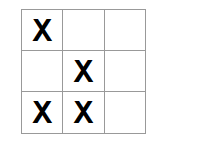

Process
- Clicking on a Square is received as its
onClickprop from the Square component. - Sqaure component received that function as its
onSquareClickprop from the Board component - Board component defined that function directly in the JSX and calls
handleClickwith an argument handleClickuses the argument to update the first element of thesquaresarray from null toX.- As the
squaresstate of the Board component was updated, the Board and all of its children re-render. As a result, thevalueprop of the Square component changes toX.